Community
- Forums Home
- >
- Subscription, Installation and Licensing Community
- >
- Installation & Licensing forum
- >
- Re: Network License Error [1.5.-15] and IPv6
Installation & Licensing
Welcome to Autodesk’s Installation and Licensing Forums. Share your knowledge, ask questions, and explore popular Download, Installation, and Licensing topics.
Turn on suggestions
Auto-suggest helps you quickly narrow down your search results by suggesting possible matches as you type.
 This page has been translated for your convenience with an automatic translation service. This is not an official translation and may contain errors and inaccurate translations. Autodesk does not warrant, either expressly or implied, the accuracy, reliability or completeness of the information translated by the machine translation service and will not be liable for damages or losses caused by the trust placed in the translation service.
Translate
This page has been translated for your convenience with an automatic translation service. This is not an official translation and may contain errors and inaccurate translations. Autodesk does not warrant, either expressly or implied, the accuracy, reliability or completeness of the information translated by the machine translation service and will not be liable for damages or losses caused by the trust placed in the translation service.
Translate
Network License Error [1.5.-15] and IPv6
68 REPLIES 68
SOLVED
Reply
Topic Options
- Subscribe to RSS Feed
- Mark Topic as New
- Mark Topic as Read
- Float this Topic for Current User
- Bookmark
- Subscribe
- Printer Friendly Page
Message 1 of 69


04-07-2011
12:28 PM
- Mark as New
- Bookmark
- Subscribe
- Mute
- Subscribe to RSS Feed
- Permalink
- Report
04-07-2011
12:28 PM
PROBLEM: You launch your Autodesk product and receive a the FlexLM License Finder box and after specifying the License Server System, you are presented with the following error:

The network license manager was not able to get a valid license. If this problem continues, please contact your system administrator. Error [1.5.-15]
CAUSE: Your Autodesk Network License Manager is installed on a Windows Server 2008 or Windows Vista/7 machine and/or your NLM and Autodesk product exist on the same workstation with IPv6 enabled.
RESOLUTION: If your NLM and your Autodesk product are installed on the same workstation, verify that the connection made to the NLM is not via IPv6. If so, disable IPv6 or redirect the protocol to use IPv4 instead.
Method #1: Verify connectivity with your NLM server by opening a command prompt (Start > Run > CMD) and PING your server hostname:
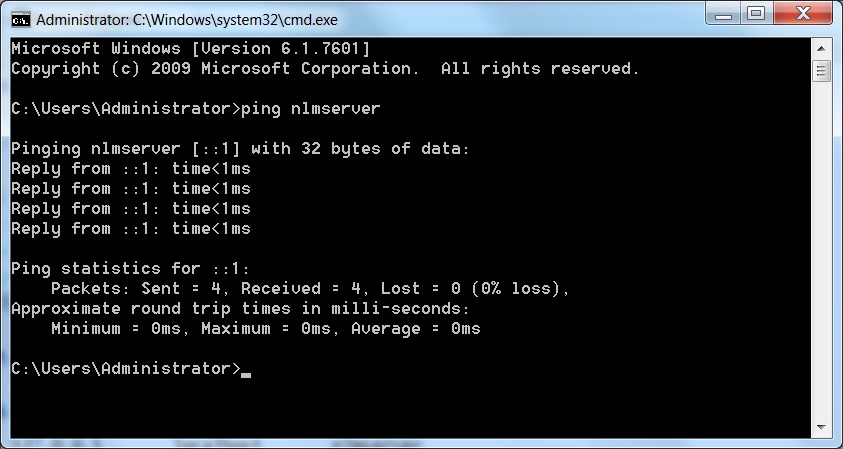
A typical IPv6 response for localhost loopback when the NLM is on the same machine may be ::1 or it may be a full IPv6 address such as 3ffe:1900:4545:3:200:f8ff:fe21:67cf. Your results may look different. If the response is an IPv6 as in the picture above, then you need to disable IPv6 on your Network LAN settings and verify PING again to ensure it has an IPv4 address in the format of xxx.xxx.xxx.xxx. For more configuration changes, continue on to Method #2.
For more information on how to disable IPv6 in Microsoft Windows Vista and 7, please see the following Microsoft KB support article:
http://support.microsoft.com/kb/929852/en-us
Method #2: If you are unable to disable IPv6 or have a need for IPv6 on your network, then you can make a change to your system HOSTS file to redirect the protocol to use an IPv4 address instead.
Verify that connectivity to the NLM server is using IPv6 as described in Method #1. If your response in an IPv6, then you need to edit your HOSTS file to point the server hostname to an IPv4 address instead. You will need Administrative rights for this process.
First ensure that the User Account Control (UAC) in Windows is disabled. Open the Control Panel and choose System and Security:

Then choose Change User Account Control settings:

Finally, disable the UAC option by setting it to Never notify:
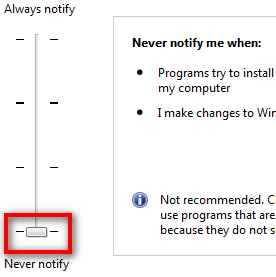
Now you should be able to open and edit the Windows HOSTS file to make the necessary changes. Find the file in the following location:
C:\Windows\system32\drivers\etc
Open the hosts file with Notepad.exe. You should have Administrator privileges when performing this task. If the file is Read-only, you may need to make the file writable from within the file properties dialog box.
Your HOSTS file should appear similar to the image below.
If your NLM and Autodesk product are on the same machine:
First, comment out the IPv6 localhost address of ::1 by adding a # sign. Then add your hostname behind the IPv4 localhost 127.0.0.1 address as shown. Save the file and close Notepad.

If your NLM is on a different server than your client installed software:
Create a new entry for your NLM server with the correct IPv4 xxx.xxx.xxx.xxx formatted address followed by your server hostname and save the file then close Notepad.
Verify IPv4 connectivity by opening the Command prompt and PING the server hostname. It should now read the appropriate IPv4 response. If your NLM is local, it should read 127.0.0.1. If the NLM is on a server, it should read the IP address of your server.

Launch your Autodesk product. It should now launch and obtain a license as appropriate.
For more information about Autodesk compatibility with IPv6, please see the following Autodesk Support KB article here:
http://usa.autodesk.com/adsk/servlet/ps/dl/item?siteID=123112&id=13107015&linkID=9261340
Travis Nave
 Need help in your post? Mention me with @TravisNave
HOT: Named User FAQ | 2025 Download Links | Invalid Serial Number | LiteHTML.DLL error | Reset Autodesk 2020-24 Licensing
My Expert Contributions to the
FLEXnet License Admin | MSI Cleanup Utility | .NET Framework Cleanup Tool | IPv6 NLM Fix | adskflex.opt Options File | Combine .LIC Files
Disk Space | Quickstart Guide for LMTOOLS | Edit setup.ini for 1603 Installation Failure | 1603 Error installing /w Updates | Disable Optimus
Understanding Failures in the Installation .log File | Server Status from Client | Autodesk 2024 System Requirements Fix | Reuse USB Stick
⤽ If my post was helpful, please give Likes and/or mark the Accept as Solution button(s) below. Thank you! ⤵
Solved! Go to Solution.
Solved by scottmoyse. Go to Solution.
Solved by TravisNave. Go to Solution.
Solved by TravisNave. Go to Solution.
Solved by TravisNave. Go to Solution.
Solved by TravisNave. Go to Solution.
Solved by TravisNave. Go to Solution.
68 REPLIES 68
Message 2 of 69
04-07-2011
12:35 PM
- Mark as New
- Bookmark
- Subscribe
- Mute
- Subscribe to RSS Feed
- Permalink
- Report
04-07-2011
12:35 PM
Help Improve the Autodesk Discussion Groups
--------------------------------------------------------
If I was able to resolve your issue, please select the "Accept as Solution" option so that you can help fellow members quickly find solutions to their problems.
Travis Nave
Need help in your post? Mention me with @TravisNave HOT: Named User FAQ | 2025 Download Links | Invalid Serial Number | LiteHTML.DLL error | Reset Autodesk 2020-24 Licensing
My Expert Contributions to the
FLEXnet License Admin | MSI Cleanup Utility | .NET Framework Cleanup Tool | IPv6 NLM Fix | adskflex.opt Options File | Combine .LIC Files
Disk Space | Quickstart Guide for LMTOOLS | Edit setup.ini for 1603 Installation Failure | 1603 Error installing /w Updates | Disable Optimus
Understanding Failures in the Installation .log File | Server Status from Client | Autodesk 2024 System Requirements Fix | Reuse USB Stick
⤽ If my post was helpful, please give Likes and/or mark the Accept as Solution button(s) below. Thank you! ⤵
Message 3 of 69


04-07-2011
01:44 PM
- Mark as New
- Bookmark
- Subscribe
- Mute
- Subscribe to RSS Feed
- Permalink
- Report
04-07-2011
01:44 PM
@Travis,
I appreciate your help but even after following your instructions, my issue persisted. I am going to start from scratch in the hopes that I just goofed somewhere on the install. I'm sure the problem was in my set up and not your help. I will comment back later if I get up and running or if the issue continues for some reason.
Thanks again.
Message 4 of 69


07-06-2011
09:20 AM
- Mark as New
- Bookmark
- Subscribe
- Mute
- Subscribe to RSS Feed
- Permalink
- Report
07-06-2011
09:20 AM
Travis, thanks for this solution, it worked perfectly for me 
Cheers,
John
Message 5 of 69
09-14-2011
10:27 AM
- Mark as New
- Bookmark
- Subscribe
- Mute
- Subscribe to RSS Feed
- Permalink
- Report
09-14-2011
10:27 AM
I wanted to provide another update to this issue that can sometimes be addressed with the LICPATH.LIC file located in the root folder of your Autodesk application. Modifying this file in a text editor such as Notepad can result in similar behavior as provided above. Simply replace the NetBIOS hostname with the IPv4 address of the NLM server to resolve connectivity.

For more information about this file and more, please see the following link:
http://usa.autodesk.com/adsk/servlet/ps/dl/item?siteID=123112&id=14374530&linkID=9240617
Travis Nave
Need help in your post? Mention me with @TravisNave HOT: Named User FAQ | 2025 Download Links | Invalid Serial Number | LiteHTML.DLL error | Reset Autodesk 2020-24 Licensing
My Expert Contributions to the
FLEXnet License Admin | MSI Cleanup Utility | .NET Framework Cleanup Tool | IPv6 NLM Fix | adskflex.opt Options File | Combine .LIC Files
Disk Space | Quickstart Guide for LMTOOLS | Edit setup.ini for 1603 Installation Failure | 1603 Error installing /w Updates | Disable Optimus
Understanding Failures in the Installation .log File | Server Status from Client | Autodesk 2024 System Requirements Fix | Reuse USB Stick
⤽ If my post was helpful, please give Likes and/or mark the Accept as Solution button(s) below. Thank you! ⤵
Message 6 of 69

09-22-2011
12:11 AM
- Mark as New
- Bookmark
- Subscribe
- Mute
- Subscribe to RSS Feed
- Permalink
- Report
09-22-2011
12:11 AM
Dear Travis,
I am also facing the same prob. I did edited the host file on server as you showed in this post. And it did worked for only server not the client PC's. Previously revit was not working on server also.
Do i have to edit the host file on client Pc also. Please see attached screenshot of my edited server file. Please explain how to make run revit on client PC's it still gives the same error [-15.570.0].
Thanks,
mohans
Message 7 of 69
09-22-2011
06:46 AM
- Mark as New
- Bookmark
- Subscribe
- Mute
- Subscribe to RSS Feed
- Permalink
- Report
09-22-2011
06:46 AM
Yes. If your clients are Win Vista/7 then they will also connect via IPv6. You will need to modify the hosts file to point to the correct IP address of your NLM server. Then verify with ping.
Additionally in the license finder box, you can put the IP address of the server also.
Just remember that 127.0.0.1 is the localhost so you will be using a different address on your clients' hosts that match the server's real IPv4 address.
Travis Nave Need help in your post? Mention me with @TravisNave
My Expert Contributions to theAutodesk Forums:
FLEXnet License Admin | MSI Cleanup Utility | .NET Framework Cleanup Tool | IPv6 NLM Fix | adskflex.opt Options File | Combine .LIC Files
Additionally in the license finder box, you can put the IP address of the server also.
Just remember that 127.0.0.1 is the localhost so you will be using a different address on your clients' hosts that match the server's real IPv4 address.
Travis Nave
Need help in your post? Mention me with @TravisNave HOT: Named User FAQ | 2025 Download Links | Invalid Serial Number | LiteHTML.DLL error | Reset Autodesk 2020-24 Licensing
My Expert Contributions to the
FLEXnet License Admin | MSI Cleanup Utility | .NET Framework Cleanup Tool | IPv6 NLM Fix | adskflex.opt Options File | Combine .LIC Files
Disk Space | Quickstart Guide for LMTOOLS | Edit setup.ini for 1603 Installation Failure | 1603 Error installing /w Updates | Disable Optimus
Understanding Failures in the Installation .log File | Server Status from Client | Autodesk 2024 System Requirements Fix | Reuse USB Stick
⤽ If my post was helpful, please give Likes and/or mark the Accept as Solution button(s) below. Thank you! ⤵
Message 8 of 69
09-30-2011
12:48 AM
- Mark as New
- Bookmark
- Subscribe
- Mute
- Subscribe to RSS Feed
- Permalink
- Report
09-30-2011
12:48 AM
Thanks a lot Mr. Travis. It worked for me i edited the host file's from both server & client PC's. Can you please elaborate on the license box, from where i will get this box also whicch IP address (server's or Client's) i have to add and where. Thanks again for your support.
Best Regards,
Mohan Suryawanshi-AE
Message 9 of 69
09-30-2011
01:49 PM
- Mark as New
- Bookmark
- Subscribe
- Mute
- Subscribe to RSS Feed
- Permalink
- Report
09-30-2011
01:49 PM
If the client can't find the NLM, it should prompt the license finder box similar to the graphic listed at the top of this thread. Glad you are up and running.
Travis Nave
Need help in your post? Mention me with @TravisNave HOT: Named User FAQ | 2025 Download Links | Invalid Serial Number | LiteHTML.DLL error | Reset Autodesk 2020-24 Licensing
My Expert Contributions to the
FLEXnet License Admin | MSI Cleanup Utility | .NET Framework Cleanup Tool | IPv6 NLM Fix | adskflex.opt Options File | Combine .LIC Files
Disk Space | Quickstart Guide for LMTOOLS | Edit setup.ini for 1603 Installation Failure | 1603 Error installing /w Updates | Disable Optimus
Understanding Failures in the Installation .log File | Server Status from Client | Autodesk 2024 System Requirements Fix | Reuse USB Stick
⤽ If my post was helpful, please give Likes and/or mark the Accept as Solution button(s) below. Thank you! ⤵
Message 10 of 69

01-23-2012
09:42 AM
- Mark as New
- Bookmark
- Subscribe
- Mute
- Subscribe to RSS Feed
- Permalink
- Report
01-23-2012
09:42 AM
Took a while to get my head wrapped around the entire idea, but in the end it worked perfecty and now program is running.
Thanks alot.
Message 11 of 69

04-09-2012
05:31 AM
- Mark as New
- Bookmark
- Subscribe
- Mute
- Subscribe to RSS Feed
- Permalink
- Report
04-09-2012
05:31 AM
Followed all of these steps and for some reason I still cannot get the client-server connection to fuction correctly.
Could have the computers on a Microsoft Domain affect the license sever at all?
Thanks
Message 12 of 69
04-09-2012
07:01 AM
- Mark as New
- Bookmark
- Subscribe
- Mute
- Subscribe to RSS Feed
- Permalink
- Report
04-09-2012
07:01 AM
No, that won't cause a problem. What issue are you having?
On a side note, I have found that many times adskflex 11.9 from the 2012 media does not work well with Server 2008 R2. Using a different version helps. You can try the 2013 version of 11.10:
Check to make sure that adskflex.exe is running in the processes tab once you have started the NLM. You can also check for port connectivity with Internet Explorer (no 3rd party browsers) by going to the following links:
Simply replace servername with the hostname of the NLM server you are trying to connect to. You should get a response on each of them that looks like this:
Wê-60Wê-60Wê-60Wê-60Wê-60Wê-60
If you get a 'Page cannot be displayed' error, then you might have a firewall issue.
Let me know what remaining issue you have.
Travis Nave
Need help in your post? Mention me with @TravisNave HOT: Named User FAQ | 2025 Download Links | Invalid Serial Number | LiteHTML.DLL error | Reset Autodesk 2020-24 Licensing
My Expert Contributions to the
FLEXnet License Admin | MSI Cleanup Utility | .NET Framework Cleanup Tool | IPv6 NLM Fix | adskflex.opt Options File | Combine .LIC Files
Disk Space | Quickstart Guide for LMTOOLS | Edit setup.ini for 1603 Installation Failure | 1603 Error installing /w Updates | Disable Optimus
Understanding Failures in the Installation .log File | Server Status from Client | Autodesk 2024 System Requirements Fix | Reuse USB Stick
⤽ If my post was helpful, please give Likes and/or mark the Accept as Solution button(s) below. Thank you! ⤵
Message 13 of 69
04-09-2012
08:06 AM
- Mark as New
- Bookmark
- Subscribe
- Mute
- Subscribe to RSS Feed
- Permalink
- Report
04-09-2012
08:06 AM
Thank you travis!
Turned out to be a Firewall issue in the Domain settings.
All functional now
Message 14 of 69
06-29-2012
08:19 AM
- Mark as New
- Bookmark
- Subscribe
- Mute
- Subscribe to RSS Feed
- Permalink
- Report
06-29-2012
08:19 AM
Travis, is it possible to use a network license without using FlexLM management software at all? I've managed to go through the troubleshooting items in this thread to discover that the firewall was causing the dialog box to pop up during program launch; however, my IT advisor would rather not open up any more holes in the firewall. I'm wondering if the license file could simply be located on a 'public' portion of the server that is only accessible to the local network and direct the programs to search only for this rather than going through the manager?
Message 15 of 69

06-29-2012
08:28 AM
- Mark as New
- Bookmark
- Subscribe
- Mute
- Subscribe to RSS Feed
- Permalink
- Report
06-29-2012
08:28 AM
i don't believe you can do that
flex lm is the only way autodesk network licensing works
DarrenP
Did you find this post helpful? Feel free to Like this post.
Did your question get successfully answered? Then click on the ACCEPT SOLUTION button.

Message 16 of 69
06-29-2012
08:42 AM
- Mark as New
- Bookmark
- Subscribe
- Mute
- Subscribe to RSS Feed
- Permalink
- Report
06-29-2012
08:42 AM
Darren is right. The NLM is designed to work the way it is. It runs as a server service listening on ports 2080 and 27000. The port 2080 is registered only to Autodesk, so opening this port should not cause any issues. Port 27000 was known to have a security vulnerability in older versions of the lmgrd.exe, but this has since been corrected. Even so, for added security, you are welcomed to change this to use ports other than default. Anything between 27000~27009 should work just fine. As long as your NLM server is not open to the public, then this shouldn't be a problem at all. Your hardware firewall on the WAN should take care of any security of that sort. Software firewall on the server really doesn't serve much of a purpose on your LAN except for causing unnecessary connectivity issues. I don't run it on my servers. There's no need. Your IT guy could probably learn a few lessons about his job, in my opinion.
Travis Nave
Need help in your post? Mention me with @TravisNave HOT: Named User FAQ | 2025 Download Links | Invalid Serial Number | LiteHTML.DLL error | Reset Autodesk 2020-24 Licensing
My Expert Contributions to the
FLEXnet License Admin | MSI Cleanup Utility | .NET Framework Cleanup Tool | IPv6 NLM Fix | adskflex.opt Options File | Combine .LIC Files
Disk Space | Quickstart Guide for LMTOOLS | Edit setup.ini for 1603 Installation Failure | 1603 Error installing /w Updates | Disable Optimus
Understanding Failures in the Installation .log File | Server Status from Client | Autodesk 2024 System Requirements Fix | Reuse USB Stick
⤽ If my post was helpful, please give Likes and/or mark the Accept as Solution button(s) below. Thank you! ⤵
Message 17 of 69

07-02-2012
04:27 AM
- Mark as New
- Bookmark
- Subscribe
- Mute
- Subscribe to RSS Feed
- Permalink
- Report
07-02-2012
04:27 AM
I tried the conventional solutions shown, these didn't seem to work.
Now I found this supposed solution:
Method 2
Use the IPv4 IP address of the FLEXnet server in theLICPATH.LIC file:
- Open Windows Explorer on the computer where you have installed the Autodesk Vault Server.
- Navigate to the <install path>\Autodesk\ADMS edition 2010\directory.
- Using Microsoft Notepad, open the licpath.lic file.
- On the first line, replace the server name with the IPv4 address of the FLEXnet server.
- Save the file and close it.
How do I know the IPv4 address of the FLEXnet server? And what exactly would I have to fill?
Thanks in advance
(For the record I've already disabled my IPv6 and took also took the steps in method in this thread)
Message 18 of 69
07-02-2012
08:11 AM
- Mark as New
- Bookmark
- Subscribe
- Mute
- Subscribe to RSS Feed
- Permalink
- Report
07-02-2012
08:11 AM
PING your NLM server to find its IPv4 address (assuming your DNS registration is correct.)
Rather than use the licpath.lic, you might consider creating an ADSKFLEX_LICENSE_FILE system environment variable with a value of @servername (or @IPv4) instead.
Travis Nave
Need help in your post? Mention me with @TravisNave HOT: Named User FAQ | 2025 Download Links | Invalid Serial Number | LiteHTML.DLL error | Reset Autodesk 2020-24 Licensing
My Expert Contributions to the
FLEXnet License Admin | MSI Cleanup Utility | .NET Framework Cleanup Tool | IPv6 NLM Fix | adskflex.opt Options File | Combine .LIC Files
Disk Space | Quickstart Guide for LMTOOLS | Edit setup.ini for 1603 Installation Failure | 1603 Error installing /w Updates | Disable Optimus
Understanding Failures in the Installation .log File | Server Status from Client | Autodesk 2024 System Requirements Fix | Reuse USB Stick
⤽ If my post was helpful, please give Likes and/or mark the Accept as Solution button(s) below. Thank you! ⤵
Message 19 of 69

07-10-2012
07:37 AM
- Mark as New
- Bookmark
- Subscribe
- Mute
- Subscribe to RSS Feed
- Permalink
- Report
07-10-2012
07:37 AM
I try to install Autodesk Revit 2013 NLM on a machine. I tried all the different solutions who are discribed on this website and the discussion groups.
When I start Revit 2013, I get the message: Your application was not able to optain a license because the FLEXnet license server manager could not determine where to find the licensing data it needs. Please choose one of the following: 1. Specify the License Server System or 2. Specify the License File.
I choose Next, and type the hostname.
Then I choose Next, and get the message: The FLEXnet license finder has completed. Press Finish to return to the application.
When I choose Finish, I get exactly the same message again: Your application was not able to optain a license because the FLEXnet license server manager could not determine where to find the licensing data it needs. Please choose one of the following: 1. Specify the License Server System or 2. Specify the License File.
After trying this 4 times, i get a Licensing Error: Error [0.0.0]
- I tried to use the IP-address, the hostname, the mac-address
- I disabled the firewall
- I did add the environment variables ADSKFLEX_LICENSE_FILE and FLEXLM_TIMEOUT
- I connected the server http://servername:2080 and got the response Wê-60Wê-60Wê-60Wê-60Wê-60Wê-60Wê-60
- I get IPv4 PING statistics, so the problem is not IPv6
- The licensing server status: license server UP (MASTER) v11.9
So I think I tried all. But maybe anybody can help me?
Check the attachment for the messages I got.
Message 20 of 69
07-10-2012
07:43 AM
- Mark as New
- Bookmark
- Subscribe
- Mute
- Subscribe to RSS Feed
- Permalink
- Report
07-10-2012
07:43 AM
what does flex lm say when you run a status inquiry?
DarrenP
Did you find this post helpful? Feel free to Like this post.
Did your question get successfully answered? Then click on the ACCEPT SOLUTION button.

Reply
Topic Options
- Subscribe to RSS Feed
- Mark Topic as New
- Mark Topic as Read
- Float this Topic for Current User
- Bookmark
- Subscribe
- Printer Friendly Page



.jpg)