Community
- Forums Home
- >
- Subscription, Installation and Licensing Community
- >
- Installation & Licensing forum
- >
- Installing Maya 2011/2012/2013 with a Network license (Mac)
Installation & Licensing
Welcome to Autodesk’s Installation and Licensing Forums. Share your knowledge, ask questions, and explore popular Download, Installation, and Licensing topics.
Turn on suggestions
Auto-suggest helps you quickly narrow down your search results by suggesting possible matches as you type.
 This page has been translated for your convenience with an automatic translation service. This is not an official translation and may contain errors and inaccurate translations. Autodesk does not warrant, either expressly or implied, the accuracy, reliability or completeness of the information translated by the machine translation service and will not be liable for damages or losses caused by the trust placed in the translation service.
Translate
This page has been translated for your convenience with an automatic translation service. This is not an official translation and may contain errors and inaccurate translations. Autodesk does not warrant, either expressly or implied, the accuracy, reliability or completeness of the information translated by the machine translation service and will not be liable for damages or losses caused by the trust placed in the translation service.
Translate
Installing Maya 2011/2012/2013 with a Network license (Mac)
21 REPLIES 21
SOLVED
Reply
Topic Options
- Subscribe to RSS Feed
- Mark Topic as New
- Mark Topic as Read
- Float this Topic for Current User
- Bookmark
- Subscribe
- Printer Friendly Page
Message 1 of 22


09-09-2010
10:40 AM
- Mark as New
- Bookmark
- Subscribe
- Mute
- Subscribe to RSS Feed
- Permalink
- Report
09-09-2010
10:40 AM
I've been trying to install a floating license on a Network with Maya and still can't get it to work (on a Mac). I feel like the documentation on this is very vague.
I have installed the Network License Manager on the the server I want to manage the license and have obtained a license file in which I have put on the server's var/flexlm folder and a different folder that my other computers can network to.
That all seems fine. The Install guide says
"Use the Console to verify that lmgrd and adskflex start up successfully."
So using Terminal, not Console I think I verified they started up but I am not entirely sure. This is where I wish there was a bit more clarification and direction in the install guide. Also when you install Maya on a separate machine and tell it to be a network version you are told to give the "Server Name". No where in the install guide does it clarify what the Server Name would be or how it should be written. This is the documentation for it:
"If you will use a network license to run Maya, contact your network
administrator to find your license server name before you start the installation.
You can enter your license server name in the installer to configure your
network license."
and
"Where do I find my server name?
When installing a network licensed product, you must specify the name of
the server that will run the Network License Manager. If you don’t know the
server name, you can quickly find it by opening a Windows command prompt
on the system that will be the Network License Manager. At the prompt, enter
ipconfig /all and note the Host Name entry."
Which is great. If you are running Windows, which I am not.
With some searching on forums I found that you can use the server's IP Address which makes things much easier but it wasn't in the install guide or any other Maya documentation.
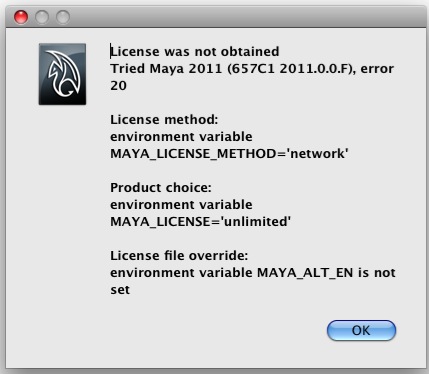
Now I am trying to run Maya on one of the machines I have installed it on and directed it to use a network license file with the correct server name in the maya.lic file but I am getting this error (screenshot attached).
I know I am missing some things but there really isn't very much good documentation that helps me out.
Please help.
Solved! Go to Solution.
Solved by david.lau. Go to Solution.
21 REPLIES 21
Message 2 of 22
09-09-2010
10:48 AM
- Mark as New
- Bookmark
- Subscribe
- Mute
- Subscribe to RSS Feed
- Permalink
- Report
09-09-2010
10:48 AM
Sorry, correction to one thing, I realize now that when the install guide says "Use the Console to verify that lmgrd and adskflex start up successfully."
It does mean use the console.
Message 3 of 22


09-09-2010
01:37 PM
- Mark as New
- Bookmark
- Subscribe
- Mute
- Subscribe to RSS Feed
- Permalink
- Report
09-09-2010
01:37 PM
Setting up a licensing server on Mac OS X.
1. Get your license.
- You will need to know your ethernet address (Ethernet 1) if you have a Mac Pro as these systems have 2 network cards.
- You cannot license it on the Airport Card unless it is a Mac Mini.
- To get the hostname of the computer, you will need to open a Terminal (Applications > Utilities > Terminal) and type:
hostname <enter>
2. Contact the Autodesk Business Center/Authcodes team and get a license. You will need to provide to them, your serial number for your product, hostname, and ethernet address. You can also get the license online by checking out this post:
3. Install the licensing tools for the MAC. It will be on the DVD, otherwise, you will need to download it here:
Optional downloads:
4. Your license may be sent as an attachment. You will need to rename it to: adsk_server.lic. You may need to make sure that you can see file extension on Mac OS X as adsk_server.lic.txt is not a valid file extension. You can use Textedit to view a .lic file. You can save the license on the desktop and rename it as noted. If they make a mistake with the SERVERNAME, you can edit it afterwards. In some cases, you may need to use an IP address of your Mac OS X license server in place of the servername.
5. Move this file into /var/flexlm directory. In the Finder > Go > Go to Folder... and type
/var/flexlm
If the flexlm folder does not exist, you will need to create it using this command:
sudo mkdir /var/flexlm
Drag file into this hidden folder.
6. To start the license server, you will need to go into a Terminal again and type the following commands:
cd /usr/local/flexnetserver
<enter>
=You are going to that directory.
ls
<enter>
=You are listing directory contents.
OPTION 1 TO START THE LICENSE SERVER
sudo ./lmgrd -c /var/flexlm/adsk_server.lic
<enter>
=You are starting the license server. At this time, you will be prompted to enter your Administrator password. NOTE: You will not be able to see your password being type. i.e. there is no feedback for data entry.
OPTION 2 TO START THE LICENSE SERVER
sudo /sbin/SystemStarter start adsknlm
CHECKING THE STATUS OF THE LICENSE SERVER
sudo ./lmutil lmstat -a -c /var/flexlm/adsk_server.lic
<enter>
NOTE: If there is a failure, you must use the Activity Monitor and use Quit Process the stray lmgrd process and only then can you restart the license server properly. If the server has started correctly, there will be an adskflex and lmgrd process in your Activity Monitor.
7. It is best to not make the Mac (Hard Drive) go to Sleep. This is a process that can't be restarted when 'sleeping'. You can make the monitor go to sleep. This is done via System Preferences > Energy Saver.
8. If you have installed Maya on the same computer as the license server, there may also be a /var/flexlm/maya.lic file. To easily edit the file in the /var/flexlm folder, you will need to run this command:
sudo chmod -R 777 /var/flexlm
<enter>
=Full permissions on this folder. You can then edit the license file using Textedit and saving in the same folder without any permissions issues.
The maya.lic file should contain:
SERVER your-server-name-or-ip-address 0
USE_SERVER
NOTE: There should be a the number 0 after your-server-name-or-ip-address.

David Lau
Message 4 of 22
10-05-2010
10:43 AM
- Mark as New
- Bookmark
- Subscribe
- Mute
- Subscribe to RSS Feed
- Permalink
- Report
10-05-2010
10:43 AM
One final note, the server tools is certified to run only on Mac OS X and not on Mac OS X Server.
David Lau
Message 5 of 22
10-05-2010
10:52 AM
- Mark as New
- Bookmark
- Subscribe
- Mute
- Subscribe to RSS Feed
- Permalink
- Report
10-05-2010
10:52 AM
Thanks for your help David. I just noticed we are running Mac OS X Server but the licensing seems to be working OK. Do you know of any bugs with it or problems? Or is it just "certified" to run on Mac OS X.
Thanks again.
Message 6 of 22
10-05-2010
11:45 AM
- Mark as New
- Bookmark
- Subscribe
- Mute
- Subscribe to RSS Feed
- Permalink
- Report
10-05-2010
11:45 AM
Autodesk officially only supports Mac OS X. In theory, it could work on Mac OS X server but the server operating system is currently untested. Typically, I would use the same instructions on either operating system and if it doesn't work on Mac OS X Server, we would not troubleshoot it any further.
http://usa.autodesk.com/adsk/servlet/index?siteID=123112&id=14959955&linkID=9242259
David Lau
Message 7 of 22
04-13-2011
02:35 AM
- Mark as New
- Bookmark
- Subscribe
- Mute
- Subscribe to RSS Feed
- Permalink
- Report
04-13-2011
02:35 AM
Hi all,
I've found this post very useful so far and I believe I have almost got my license server working. However when I run "sudo /sbin/SystemStarter start adsknlm" it doesn't seem to complete the start-up due to "Invalid License Key (inconsistent authentication code).
I have had the license file issued to me multiple times and I have even taken the license file to a Mac OS 10.6 Client which is freshly installed, adjusted the license file to use the correct hostname and MAC address of that computer but get the same result. Below is the output from Terminal when starting the licence server (without the license key info).
1. Can anyone help me out here or let me know what might be going wrong?
2. Is there a terminal command I can run to get lmgrd to check that what my MAC address is to ensure this isn't the issue?
19:02:45 (lmgrd) The license server manager (lmgrd) running as root:
19:02:45 (lmgrd) 	This is a potential security problem
19:02:45 (lmgrd) 	and is not recommended.
Apples-MacBook-Pro:flexnetserver apple$ 19:02:45 (lmgrd) FLEXnet Licensing (v11.7.0.0 build 73797 x64_mac10) started on 192.168.0.7 (Mac) (4/13/2011)
19:02:45 (lmgrd) Copyright (c) 1988-2009 Acresso Software Inc. All Rights Reserved.
19:02:45 (lmgrd) US Patents 5,390,297 and 5,671,412.
19:02:45 (lmgrd) World Wide Web:  http://www.acresso.com
19:02:45 (lmgrd) License file(s): /var/flexlm/adsk_server.lic
19:02:45 (lmgrd) lmgrd tcp-port 27000
19:02:45 (lmgrd) Starting vendor daemons ...
19:02:45 (lmgrd) Using vendor daemon port 2080 specified in license file
19:02:45 (lmgrd) Started adskflex (internet tcp_port 2080 pid 562)
19:02:45 (adskflex) Unable to initialize access to trusted storage: 1
19:02:45 (adskflex) FLEXnet Licensing version v11.7.0.1 build 79971 x64_mac10
19:02:45 (adskflex) Invalid license key (inconsistent authentication code)

LICENCE FILE INFO HERE BUT REMOVED ....


19:02:45 (lmgrd) The license server manager (lmgrd) running as root:
19:02:45 (lmgrd) 	This is a potential security problem
19:02:45 (lmgrd) 	and is not recommended.
Apples-MacBook-Pro:flexnetserver apple$ 19:02:45 (lmgrd) FLEXnet Licensing (v11.7.0.0 build 73797 x64_mac10) started on 192.168.0.7 (Mac) (4/13/2011)
19:02:45 (lmgrd) Copyright (c) 1988-2009 Acresso Software Inc. All Rights Reserved.
19:02:45 (lmgrd) US Patents 5,390,297 and 5,671,412.
19:02:45 (lmgrd) World Wide Web:  http://www.acresso.com
19:02:45 (lmgrd) License file(s): /var/flexlm/adsk_server.lic
19:02:45 (lmgrd) lmgrd tcp-port 27000
19:02:45 (lmgrd) Starting vendor daemons ...
19:02:45 (lmgrd) Using vendor daemon port 2080 specified in license file
19:02:45 (lmgrd) Started adskflex (internet tcp_port 2080 pid 562)
19:02:45 (adskflex) Unable to initialize access to trusted storage: 1
19:02:45 (adskflex) FLEXnet Licensing version v11.7.0.1 build 79971 x64_mac10
19:02:45 (adskflex) Invalid license key (inconsistent authentication code)
Message 8 of 22
04-13-2011
06:18 AM
- Mark as New
- Bookmark
- Subscribe
- Mute
- Subscribe to RSS Feed
- Permalink
- Report
04-13-2011
06:18 AM
This maybe a bad license file. In some cases, you need to use Textedit in 'plain' text mode instead of 'rich' text mode. The default is rich text mode. If there are those special characters in rich text mode, it may cause this problem.
David Lau
Message 9 of 22
04-13-2011
05:02 PM
- Mark as New
- Bookmark
- Subscribe
- Mute
- Subscribe to RSS Feed
- Permalink
- Report
04-13-2011
05:02 PM
Hi David,
Many thanks for the reply. Yes I thought this could be the case. So in the scenario where I got another machine and installed from scratch what I did was move the lic file into /var/flexlm - set ownership to 777 on the flexlm folder, edited the file in Terminal to change the hostname and MAC address on the file and ran into the same report as per my above post.
Any other ideas on this one? Any chance you are able to check the license file? How would I send to you?
Message 10 of 22
04-26-2011
01:32 AM
- Mark as New
- Bookmark
- Subscribe
- Mute
- Subscribe to RSS Feed
- Permalink
- Report
04-26-2011
01:32 AM
I'm not sure if this helps but it does say in between all the licenses "20:30:40 (adskflex) Invalid license key (inconsistent authentication code)"
Any ideas?
Message 11 of 22
06-07-2011
01:17 PM
- Mark as New
- Bookmark
- Subscribe
- Mute
- Subscribe to RSS Feed
- Permalink
- Report
06-07-2011
01:17 PM
For customers, trying to use Mac OS X Server, check out this post:
David Lau
Message 12 of 22
06-08-2011
09:55 AM
- Mark as New
- Bookmark
- Subscribe
- Mute
- Subscribe to RSS Feed
- Permalink
- Report
06-08-2011
09:55 AM
The 11.9 license tools can be found here:
www.autodesk.com/nlm-ipv4-windows
www.autodesk.com/nlm-ipv4-linux
www.autodesk.com/nlm-ipv6-windows
www.autodesk.com/nlm-ipv6-linux
David Lau
Message 13 of 22
08-23-2011
11:30 AM
- Mark as New
- Bookmark
- Subscribe
- Mute
- Subscribe to RSS Feed
- Permalink
- Report
08-23-2011
11:30 AM
To resolve this error:
Please correct problem and restart daemons.
EXITING DUE TO ERROR TO SIGNAL 37 Exit reason 5
adskflex exited with status 37 (Communications error)
Check out this post:
David Lau
Message 14 of 22

Anonymous
in reply to:
Anonymous
10-12-2011
04:20 AM
- Mark as New
- Bookmark
- Subscribe
- Mute
- Subscribe to RSS Feed
- Permalink
- Report
10-12-2011
04:20 AM
Meanwhile,i'm stucked too. I'm on Mac OS X Server 10.6.8.
I've done these steps:
1) Install NLM which created the folder of /var/flexlm
2) Put in the adsk_license.lic into /var/flexlm after providing my Mac OS X Server HOST Name and Ethernet 2 MAC Address.
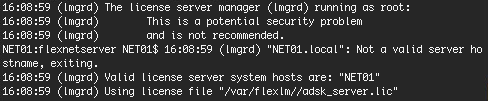
3) On Terminal, i did this "sudo /sbin/SystemStarter start adsknlm" and this is what i get (see attachment)
4) Checked for the server status and i get this (see attachment)
Message 15 of 22
Anonymous
in reply to:
Anonymous
10-12-2011
05:01 AM
- Mark as New
- Bookmark
- Subscribe
- Mute
- Subscribe to RSS Feed
- Permalink
- Report
10-12-2011
05:01 AM
On another note, i don't have /Library/StartupItems/adsknlm directory created but from what i read from Licensing Guide,it says it will be created.Did i miss out anything?
Message 16 of 22
Anonymous
in reply to:
Anonymous
10-12-2011
05:28 AM
- Mark as New
- Bookmark
- Subscribe
- Mute
- Subscribe to RSS Feed
- Permalink
- Report
10-12-2011
05:28 AM
What are the difference between the license file in /etc/flexlm (server) and /var/flexlm/aw_client.dat (client)? Apparently i don't have these 2 directories.
Message 17 of 22
10-12-2011
11:59 AM
- Mark as New
- Bookmark
- Subscribe
- Mute
- Subscribe to RSS Feed
- Permalink
- Report
10-12-2011
11:59 AM
You can do the following in a terminal:
sudo mkdir /var/flexlm/
sudo chmod 777 /var/flexlm
open /var/flexlm
Then create a license file using Textedit and then drag and drop it into the /var/flexlm folder.
David Lau
Message 18 of 22
10-12-2011
12:03 PM
- Mark as New
- Bookmark
- Subscribe
- Mute
- Subscribe to RSS Feed
- Permalink
- Report
10-12-2011
12:03 PM
Can you download the license tools from here:
There have been reports that the NLM from www.autodesk.com/nlm-ipv4-mac doesn't have the startup scripts in the system.
Can you also cast a vote/comment here:
David Lau
Message 20 of 22
10-12-2011
11:52 PM
- Mark as New
- Bookmark
- Subscribe
- Mute
- Subscribe to RSS Feed
- Permalink
- Report
10-12-2011
11:52 PM
Hi,
I managed to get the license server up and running under Mac OS X Server 10.6.8. I changed the adsk_server.lic Servername to IP Address on both file in /var/flexlm and /usr/local/flexnetserver and it works!
Reply
Topic Options
- Subscribe to RSS Feed
- Mark Topic as New
- Mark Topic as Read
- Float this Topic for Current User
- Bookmark
- Subscribe
- Printer Friendly Page