Community
- Forums Home
- >
- Subscription, Installation and Licensing Community
- >
- Installation & Licensing forum
- >
- Re: Home Use user - transferring licenses
Installation & Licensing
Welcome to Autodesk’s Installation and Licensing Forums. Share your knowledge, ask questions, and explore popular Download, Installation, and Licensing topics.
Turn on suggestions
Auto-suggest helps you quickly narrow down your search results by suggesting possible matches as you type.
 This page has been translated for your convenience with an automatic translation service. This is not an official translation and may contain errors and inaccurate translations. Autodesk does not warrant, either expressly or implied, the accuracy, reliability or completeness of the information translated by the machine translation service and will not be liable for damages or losses caused by the trust placed in the translation service.
Translate
This page has been translated for your convenience with an automatic translation service. This is not an official translation and may contain errors and inaccurate translations. Autodesk does not warrant, either expressly or implied, the accuracy, reliability or completeness of the information translated by the machine translation service and will not be liable for damages or losses caused by the trust placed in the translation service.
Translate
Home Use user - transferring licenses
14 REPLIES 14
SOLVED
Reply
Topic Options
- Subscribe to RSS Feed
- Mark Topic as New
- Mark Topic as Read
- Float this Topic for Current User
- Bookmark
- Subscribe
- Printer Friendly Page
Message 1 of 15


11-09-2012
10:30 AM
- Mark as New
- Bookmark
- Subscribe
- Mute
- Subscribe to RSS Feed
- Permalink
- Report
11-09-2012
10:30 AM
I have a home use user that wants to transfer his home use from his home desktop to his home laptop. If he uninstalls it and reinstalls and tries to reactivate it on his laptop, will he run into any trouble? Would it be more prudent to use the license transfer utility?
Solved! Go to Solution.
Solved by philip.s. Go to Solution.
Solved by philip.s. Go to Solution.
14 REPLIES 14
Message 2 of 15

11-09-2012
11:09 AM
- Mark as New
- Bookmark
- Subscribe
- Mute
- Subscribe to RSS Feed
- Permalink
- Report
11-09-2012
11:09 AM
Jroper,
Hello. There is no way to tell if your user will run into trouble on the home machine. There are simply too many variables to predict accurately- the OS, the settings, the internet, any of the programs that may be installed… etc. I would suggest trying the transfer utility first and if it does not work, uninstall and reinstall and activate.
I have a post for general license troubleshooting here:
http://usa.autodesk.com/adsk/servlet/ps/dl/item?siteID=123112&id=19100954&linkID=9240697
When activating, there are some things to look at:
Turn off Windows UAC
Check your security Settings and make sure the system has access to these web sites:
o *.autodesk.com
o *.google-analytics.com
o *.cloudfront.com
If you cannot activate online, it can always be activated manually.
Thank you for taking part in our community!
David Dembkoski
Product Support Specialist
Autodesk Product Support
David Dembkoski
Message 3 of 15


11-09-2012
11:09 AM
- Mark as New
- Bookmark
- Subscribe
- Mute
- Subscribe to RSS Feed
- Permalink
- Report
11-09-2012
11:09 AM
Hi Jason,
You're actually allowed to have a single-seat standalone license installed and activated on 2 machines as long as they're being used by the same user and aren't being used concurrently.
Autodesk Product Activation FAQ
This shouldn't be an issue, but just incase your customer does run into any activation errors (typically caused by too many attempts or invalid / expired licenses), they can reach out to our Registration and Activation team for the proper assistance.

Philip Schmelzer
Program Manager
Using the Autodesk Community | Community Feedback | Expert Elite Program
Message 5 of 15
11-09-2012
12:52 PM
- Mark as New
- Bookmark
- Subscribe
- Mute
- Subscribe to RSS Feed
- Permalink
- Report
11-09-2012
12:52 PM
Actually, let me back up on that and clarify something. The user has a home use serial number. He wants to put the serial number on his own personal desktop and personal laptop. At work he uses a network license. Can he activate the home use serial number on both ot his home machines?
Message 6 of 15
11-09-2012
01:12 PM
- Mark as New
- Bookmark
- Subscribe
- Mute
- Subscribe to RSS Feed
- Permalink
- Report
11-09-2012
01:12 PM
Yes, the user can install and activate the home use license on both of his personal computers assuming that the afore mentioned guidelines (only user / licenses aren't being used at the same time) are met.
Philip Schmelzer
Program Manager
Using the Autodesk Community | Community Feedback | Expert Elite Program
Message 8 of 15
02-08-2018
11:24 AM
- Mark as New
- Bookmark
- Subscribe
- Mute
- Subscribe to RSS Feed
- Permalink
- Report
02-08-2018
11:24 AM
Hi Philip,
I read your post and think I finally found the right source for my necessary Information.
I'm working with Inventor since Release 4 in 2000 - and after all These years I still like it...
Actual Im working on 3 different Computers:
1. Company Computer
2. Home Use at Home
3. Notebook for the time I am out of the Office to be able to work on my Desing when I'm at some customers place. Or even during Vacation.
- Last October I hat Trouble transfering the License back from the Notebook (afterwards I found out in the Forum the Autodesk License Server had Problems)
- Yesterday I transfered the License to my Notebook. This trggered an eMail which is reading like: ".. Kongratulations to your new Software..." But it is no new Software! Went something wrong again with the Transfer?
My question is the following:
Ist it allowed for me to have these 3 Computers activated the same time each separately. I know I have to make sure I only have 1 Inventor on 1 Computer active the same time. This is the same Rule for me like I'm following for the last years.
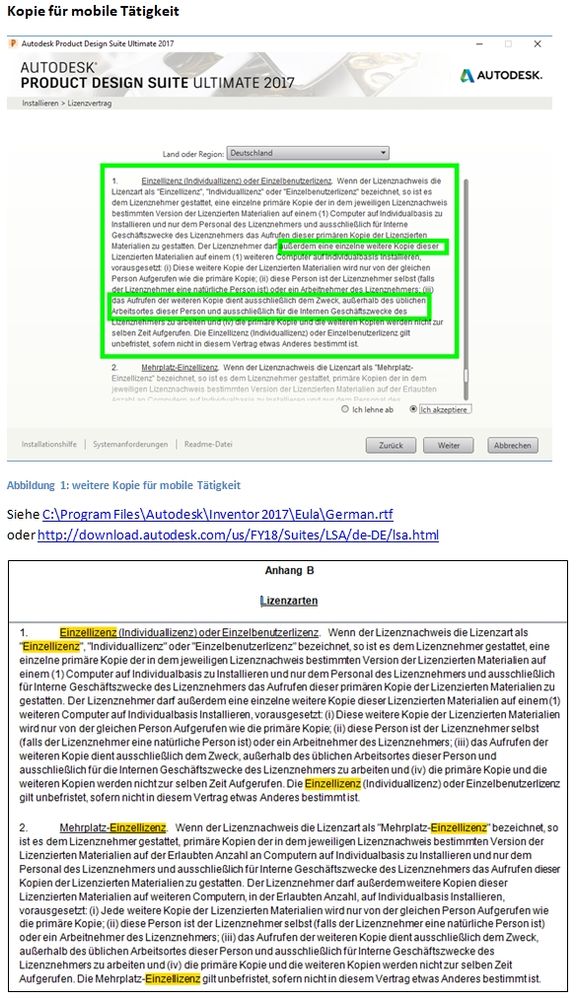
I checked the License Agreement carefully but I don't want to get trouble when activating too many Licenses:
See Picture below the German License Agreement
- 2nd License on a Notebook for work out of Office (Chapter 1)
- Home Use as long as the Subscription (new Maintennance??) is active (Appendix B)
Thank you for your answer in advance.
Best Regards
Roland Dietze
Message 9 of 15


02-08-2018
12:01 PM
- Mark as New
- Bookmark
- Subscribe
- Mute
- Subscribe to RSS Feed
- Permalink
- Report
02-08-2018
12:01 PM
Is this license perpetual or single user subscription?
I assume you have a perpetual license because you can't use the license transfer on a subscription type license. Anyhow you can't have the software installed on 3 machines for a single license.. One machine only.. IF you have active maintenance plan then you can install it on a 2nd machine for home use, meaning you can't be using the license on both machines at the same time. In addition you can't leave the software running at the office and launch it again on the home machine.
However each license comes with a magic number of activation. If you run into an activation limit you have to contact Autodesk and explain what's going on.
Also I'm confused at what an old legacy version has to do with this..
Mark Lancaster
& Autodesk Services MarketPlace Provider
Autodesk Inventor Certified Professional & not an Autodesk Employee
Likes is much appreciated if the information I have shared is helpful to you and/or others
Did this resolve your issue? Please accept it "As a Solution" so others may benefit from it.
Message 10 of 15
02-09-2018
01:57 AM
- Mark as New
- Bookmark
- Subscribe
- Mute
- Subscribe to RSS Feed
- Permalink
- Report
02-09-2018
01:57 AM
Hi Marc,
thank you for your response.
Now I see I have not been clear enough in my post:
1. I'm working with Inventor 2017 on a perpetual license and active Maintenance Plan .
Since Autodesk changed the Name of this so often (from Subscription to Maintennance to Desktop subscription ...) I'm confused with the Translation of the actual Designation from German to English.
A Perpetual license and the Company pays the annual fee - I guess you call it an active Maintenance Plan.
As you see in my Picture in the upper chapter, Autodesk allowes a 2nd Installation like describet in my Post.
As you can see in the lower chapter, with active Maintenance Plan I'm allowed to use the Home Use Installation.
With the main activation in the Company this Counts to 3 activations.
Don't worry about using more than 1 Computer the same time. If you re-read my post you will see I'm fully Aware of this part of the Licence Agreement.
The most important message for my question in this thread is from Philip Schmelzer (Autodesk Program Manager):
11-09-2012 01:12 PM in reply to: Jroper
Yes, the user can install and activate the home use license on both of his personal computers assuming that the afore mentioned guidelines (only user / licenses aren't being used at the same time) are met.
So I hoped to get an official Autodesk answer from him.
An Answer in the Kind of: "Some say so and others different" does not help me in this case.
Message 11 of 15

02-09-2018
03:34 AM
- Mark as New
- Bookmark
- Subscribe
- Mute
- Subscribe to RSS Feed
- Permalink
- Report
02-09-2018
03:34 AM
Hi @raith-mb,
I understand you're using a Standalone Perpetual License. In that case, I confirm you're entitled to install and activate software on 2 computers, though the 2 copies should not be accessed at the same time. This is explained in the following online solution:
Maximum number of computers permitted for single-user perpetual licenses
The official statement is to be found in the License & Services Agreement, under Point 1 of Exhibit B. Here's the link to the German version of the License & Services Agreement for 2017 releases:
LIZENZ- UND DIENSTLEISTUNGSVERTRAG (see Anhang B)
Regards,
Simona Golisciano
Message 12 of 15
02-09-2018
05:14 AM
- Mark as New
- Bookmark
- Subscribe
- Mute
- Subscribe to RSS Feed
- Permalink
- Report
02-09-2018
05:14 AM
Hi Simona,
thank you for your Response.
You are right: Standalone Perpetual License. And I know I can activate 2 Computers (Office and Notebook) according to the License Agreement.
BUT: what is the Home Use License included in the active Maintenance Plan (Deutsch: Wartungsvertrag)
Our local Autodesk dealer is telling uns the Advantage of the Maitenance Plan is the Home Use License.
"..Home Use Rights is a benefit available to Autodesk subscriptions with multi-user access and maintenance plan customers. The benefit provides licenses for home use and allows employees to install and activate the software program at a home location away from the office for work related to business, personal education, or for training Needs..."
Is this Home Use installation and activation No. 3?
Given all times the copies should not be accessed at the same time. Each time only one of them.
In this case I would not have to Transfer the license to the Notebook and back to the Desktop Computer when out of office and not at home.
Best Regards Roland Dietze
Message 13 of 15
02-09-2018
05:56 AM
- Mark as New
- Bookmark
- Subscribe
- Mute
- Subscribe to RSS Feed
- Permalink
- Report
02-09-2018
05:56 AM
Hello @raith-mb,
Thanks for your response.
I understand this is confusing. Let me try and clarify.
The Home Use Right described here is for customers with Networked (= Multi-user) Perpetual Licenses with active Maintenance Plan. This benefit will allow them to request a Standalone companion Serial Number, so that they can activate the software on their home computer (or on their laptop), if that computer is not connected to their company's server.
On the other hand, customers with Standalone Perpetual Licenses don't need the Home Use right, because they are already entitled to a second activation with their original license.
So, to answer your question, this does not correspond to activation # 3.
Hope this helps.
Regards,
Simona Golisciano
Message 14 of 15
02-09-2018
06:20 AM
- Mark as New
- Bookmark
- Subscribe
- Mute
- Subscribe to RSS Feed
- Permalink
- Report
02-09-2018
06:20 AM
Hi Simona,
Thank you. Your answer explains it completely.
I learned: For customers with Standalone Perpetual Licenses the Advantage of Home Use License as an additional activation does not exist. This is a false information from our Autodesk dealer.
On the other Hand: If someone quits the active Maintenance Plan and does not move to the new rental System (Deutsch: Abonnement ), it will still keep the 2 activations (Company Desktop and Notebook). He stays on Inventor 2018 which is activated on 2 Computers for ever. Only one Computer to be used at any time.
Best Regards Roland Dietze
Message 15 of 15
02-09-2018
07:06 AM
- Mark as New
- Bookmark
- Subscribe
- Mute
- Subscribe to RSS Feed
- Permalink
- Report
02-09-2018
07:06 AM
Hello again @raith-mb,
I'm glad my response was helpful 😉
Yes, that's right: even when the Standalone Perpetual License is no longer covered by the Maintenance Plan, the user can still access the software on 2 computers (though not simultaneously). This because this right is not granted by the Maintenance Plan, but rather by the License itself.
Regards,
Simona Golisciano

Reply
Topic Options
- Subscribe to RSS Feed
- Mark Topic as New
- Mark Topic as Read
- Float this Topic for Current User
- Bookmark
- Subscribe
- Printer Friendly Page

