Community
- Forums Home
- >
- Subscription, Installation and Licensing Community
- >
- Installation & Licensing forum
- >
- Re: Error 1606.Could not access network location bin maya 2011 64bit Uninstall
Installation & Licensing
Welcome to Autodesk’s Installation and Licensing Forums. Share your knowledge, ask questions, and explore popular Download, Installation, and Licensing topics.
Turn on suggestions
Auto-suggest helps you quickly narrow down your search results by suggesting possible matches as you type.
 This page has been translated for your convenience with an automatic translation service. This is not an official translation and may contain errors and inaccurate translations. Autodesk does not warrant, either expressly or implied, the accuracy, reliability or completeness of the information translated by the machine translation service and will not be liable for damages or losses caused by the trust placed in the translation service.
Translate
This page has been translated for your convenience with an automatic translation service. This is not an official translation and may contain errors and inaccurate translations. Autodesk does not warrant, either expressly or implied, the accuracy, reliability or completeness of the information translated by the machine translation service and will not be liable for damages or losses caused by the trust placed in the translation service.
Translate
Error 1606.Could not access network location bin maya 2011 64bit Uninstall
9 REPLIES 9
Reply
Topic Options
- Subscribe to RSS Feed
- Mark Topic as New
- Mark Topic as Read
- Float this Topic for Current User
- Bookmark
- Subscribe
- Printer Friendly Page
Message 1 of 10


10-07-2010
12:36 AM
- Mark as New
- Bookmark
- Subscribe
- Mute
- Subscribe to RSS Feed
- Permalink
- Report
10-07-2010
12:36 AM
Error 1606.Could not access network location bin maya 2011 64bit Uninstall
Recently we had reported issues regarding uninstalling Maya 2011 on 64 bit OS.
Following Error was shown during the Uninstall Process.
Error 1606.Could not access network location bin
One Work around is to use the following msiexec command
msiexec /qb /X {887CB4A1-5DB4-4924-A2C6-CDCB72376CC7} INSTALLDIR=”xxxxxxxxx”
(replace the xxxxxxxxx with the path where Maya 2011 is installed)
Important parameter for the work around is INSTALLDIR=”xxxxxxxxx”
---------------------------------------------------------------------------------------
If my post answers your question, please mark it as an Accepted Solution, so that others can find answers quickly!
For more tips & tricks: http://upandready.typepad.com

Hashim Mundol
Autodesk Product Support
Autodesk, Inc.
If my post answers your question, please mark it as an Accepted Solution, so that others can find answers quickly!
For more tips & tricks: http://upandready.typepad.com
Hashim Mundol
Autodesk Product Support
Autodesk, Inc.
9 REPLIES 9
Message 2 of 10
11-08-2010
07:54 AM
- Mark as New
- Bookmark
- Subscribe
- Mute
- Subscribe to RSS Feed
- Permalink
- Report
11-08-2010
07:54 AM
That workaround doesn't work for me.
In ran
msiexec /qb /X{02C4BEE3-863A-41CD-8EDB-D90B04795509} INSTALLDIR="C:\Program Files\Autodesk\Maya2011"
and got the same error.
The GUID is for x64 SP1 Subscription Advantage Pack which was installed from a deployment created by the installer.
I first noticed this bug with Hotfix 2, the initial release worked fine. I didn't try Hotfix 1. So it's a regression that came with Hotfix 1 or 2. I already filed a bug report about it about 3 month ago. Please fix it. Being unable to uninstall Maya would hinder deploying the next update, so I haven't deployed any Hotfixes/SP1 yet, but totally would like to.
Message 3 of 10
11-10-2010
05:20 AM
- Mark as New
- Bookmark
- Subscribe
- Mute
- Subscribe to RSS Feed
- Permalink
- Report
11-10-2010
05:20 AM
Please try INSTALLDIR="C:\Program Files\Autodesk\Maya2011\"
note:the trailing \
---------------------------------------------------------------------------------------
If my post answers your question, please mark it as an Accepted Solution, so that others can find answers quickly!
For more tips & tricks: http://upandready.typepad.com
Hashim Mundol
Autodesk Product Support
Autodesk, Inc.
If my post answers your question, please mark it as an Accepted Solution, so that others can find answers quickly!
For more tips & tricks: http://upandready.typepad.com
Hashim Mundol
Autodesk Product Support
Autodesk, Inc.
Message 4 of 10
11-10-2010
05:35 AM
- Mark as New
- Bookmark
- Subscribe
- Mute
- Subscribe to RSS Feed
- Permalink
- Report
11-10-2010
05:35 AM
I tried ...\Maya2011 and ...\Maya2011\bin with and without trailing backslash. Did not work.
Message 5 of 10
11-10-2010
06:37 AM
- Mark as New
- Bookmark
- Subscribe
- Mute
- Subscribe to RSS Feed
- Permalink
- Report
11-10-2010
06:37 AM
Try to run the Maya2011.msi from the deployment image folder.
---------------------------------------------------------------------------------------
If my post answers your question, please mark it as an Accepted Solution, so that others can find answers quickly!
For more tips & tricks: http://upandready.typepad.com
Hashim Mundol
Autodesk Product Support
Autodesk, Inc.
If my post answers your question, please mark it as an Accepted Solution, so that others can find answers quickly!
For more tips & tricks: http://upandready.typepad.com
Hashim Mundol
Autodesk Product Support
Autodesk, Inc.
Message 6 of 10
11-12-2010
05:37 AM
- Mark as New
- Bookmark
- Subscribe
- Mute
- Subscribe to RSS Feed
- Permalink
- Report
11-12-2010
05:37 AM
Running msiexec /x \\path\to\Maya2011.msi produces the same error, also with INSTALLDIR parameter.
Just running the MSI interactively and choosing remove works. However, I'm not so keen on doing that with 80 workstations, so that doesn't solve my problem.
I've had log files created of the uninstallation attempts and will take a look at them when I find some time. Maybe I can find an important property that isn't set in unattended mode.
Message 7 of 10
11-12-2010
10:48 PM
- Mark as New
- Bookmark
- Subscribe
- Mute
- Subscribe to RSS Feed
- Permalink
- Report
11-12-2010
10:48 PM
Try the following instead:-
msiexec /qb /X {887CB4A1-5DB4-4924-A2C6-CDCB72376CC7} ARPINSTALLLOCATION=”xxxxxxxxx”
A custom action that runs only during uninstall sets INSTALLDIR to the value of ARPINSTALLLOCATION, which is blank during uninstall. So while you can set the INSTALLDIR property on the command line, it is overwritten with the value of ARPINSTALLLOCATION before it can be used.
Message 9 of 10


03-07-2011
04:04 AM
- Mark as New
- Bookmark
- Subscribe
- Mute
- Subscribe to RSS Feed
- Permalink
- Report
03-07-2011
04:04 AM
hi sir,
can u please explain a bit basic,
how to run msiexec command.
and this issue occured when there was a power failure when installing autdesk maya 2011.
the next time i tried, this issue occured. im in a situation not able to format my os. so plz help me solve '
this problem
thanks 🙂
Message 10 of 10
01-26-2013
12:20 AM
- Mark as New
- Bookmark
- Subscribe
- Mute
- Subscribe to RSS Feed
- Permalink
- Report
01-26-2013
12:20 AM
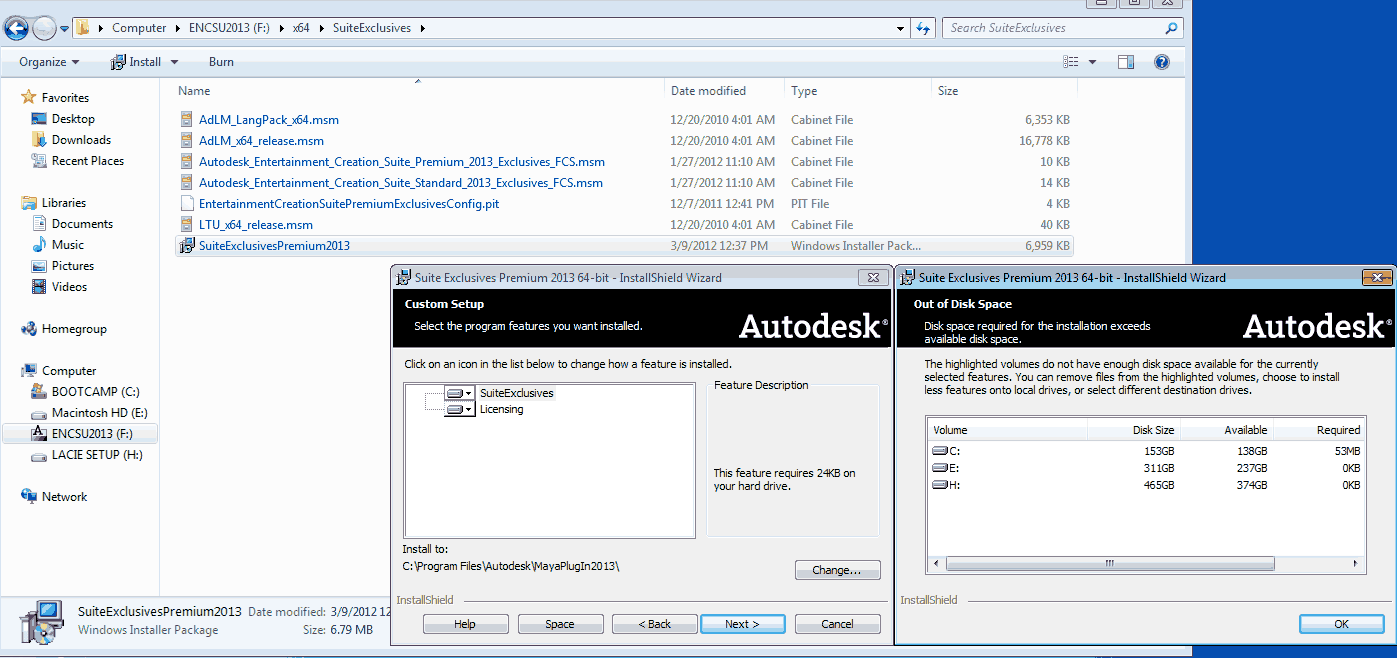
I have a similar error 1606 message while trying to install Autodesk Entertainment Creative suite for The Window side installation via Mac Boot Camp. The Mac side's installation has no problem. A search online seems to suggest problem with the registry. I reinstall Windows 7 just to make sure I start with a clean OS and still got the same error message. Another the solution suggested is to disconnect the internet, which seems to take care of this error message, but I end up with "not enough space" issue. the partition I made for the Window has 138-GB. I then try to test out on a different PC only machine, I got exactly the same thing.
Fred

Reply
Topic Options
- Subscribe to RSS Feed
- Mark Topic as New
- Mark Topic as Read
- Float this Topic for Current User
- Bookmark
- Subscribe
- Printer Friendly Page