Community
- Forums Home
- >
- Subscription, Installation and Licensing Community
- >
- Installation & Licensing forum
- >
- Error 1402 during uninstallation (Could not open key)
Installation & Licensing
Welcome to Autodesk’s Installation and Licensing Forums. Share your knowledge, ask questions, and explore popular Download, Installation, and Licensing topics.
Turn on suggestions
Auto-suggest helps you quickly narrow down your search results by suggesting possible matches as you type.
 This page has been translated for your convenience with an automatic translation service. This is not an official translation and may contain errors and inaccurate translations. Autodesk does not warrant, either expressly or implied, the accuracy, reliability or completeness of the information translated by the machine translation service and will not be liable for damages or losses caused by the trust placed in the translation service.
Translate
This page has been translated for your convenience with an automatic translation service. This is not an official translation and may contain errors and inaccurate translations. Autodesk does not warrant, either expressly or implied, the accuracy, reliability or completeness of the information translated by the machine translation service and will not be liable for damages or losses caused by the trust placed in the translation service.
Translate
Error 1402 during uninstallation (Could not open key)
16 REPLIES 16
Reply
Topic Options
- Subscribe to RSS Feed
- Mark Topic as New
- Mark Topic as Read
- Float this Topic for Current User
- Bookmark
- Subscribe
- Printer Friendly Page
Message 1 of 17


03-02-2011
12:54 PM
- Mark as New
- Bookmark
- Subscribe
- Mute
- Subscribe to RSS Feed
- Permalink
- Report
03-02-2011
12:54 PM
Error 1402 during uninstallation (Could not open key)
We have been getting this error occasionally come into support and when it finally happened on my computer, I decided to go though the solution and confirm that it does work.
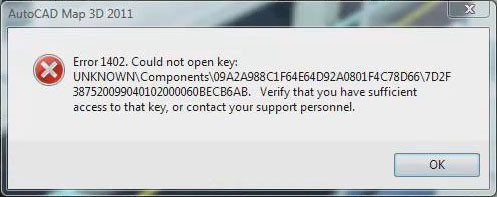
When you try to uninstall an AutoCAD based product, you will get the following error:
Error 1402. Could not open
key:
UNKNOWN\Components\Hex#\Hex#. Verify that you have sufficient access to
that key, or contact your support personnel.
The solution is to change the permissions of the following folder in the Registry:
HKEY_LOCAL_MACHINE\SOFTWARE\Microsoft\Windows\CurrentVersion\Installer\UserData\S-1-5-18\Components
- Right Click on Components select permissions.
- Click Advanced button.
- Select the Owner Tab
- Under Change owner to: Select Administrators (Group) and Click Apply.
- Then Select Check box Replace owner on subcontainers and objects and Click Apply.
- Go to the Permissions tab, select the Check box: Replace all child objects Permissions with inheritable permissions from this object and Click apply. NOTE: The wording maybe a bit different depending on your operating system.
I have included a video on changing the permissions in Windows Vista & Windows 7.

David Lau
16 REPLIES 16
Message 2 of 17


08-11-2011
02:04 AM
- Mark as New
- Bookmark
- Subscribe
- Mute
- Subscribe to RSS Feed
- Permalink
- Report
08-11-2011
02:04 AM
Hi!
Why does this happen in the first place?
We had this happen by deleting the installationfiles from the install folder IMMEDIATLY AFTER the setup.exe returned, but there where still some parts of the install running which were launched by setup.exe.
So the setup itself returned but not all started install tasks were finished. REALLY BAD design!
Trying to just rerun the setup always failed with strange 'unable to install anchor service' errors which were caused by the '1402' errors during the installation because of messed up permissions by the prior (failed) installation.
I would suggest you create a better and more resilient installation routine to prevent stuff like this from happening in the first place. Only tackling the symptoms does not help in the long run.
Overall Autodesk software installation is still a PITA, but has improved over the years - Which does not mean that it is good right now, only shows how utterly horrible it has been in the past. Still a long way to go...
Message 4 of 17
01-06-2012
10:10 AM
- Mark as New
- Bookmark
- Subscribe
- Mute
- Subscribe to RSS Feed
- Permalink
- Report
01-06-2012
10:10 AM
I started having issues with this aftern uninstalling all Autodesk products from a Windows 7 64 bit computer to reinstall clean. I was trying to reinstall a package created on the server. What I did was drilled down to the actual base .msi install package and started the install this way. As a result, when there was an error on a class key, I deleted the class key altogether. Then I hit retry and it recreated it and continued on.
It seems as though the Autocad installer balks when it tries to create a registry key that already exists.
Incidentally, changing the permissions on the keys had no effect.
Message 5 of 17


03-10-2012
05:38 AM
- Mark as New
- Bookmark
- Subscribe
- Mute
- Subscribe to RSS Feed
- Permalink
- Report
03-10-2012
05:38 AM
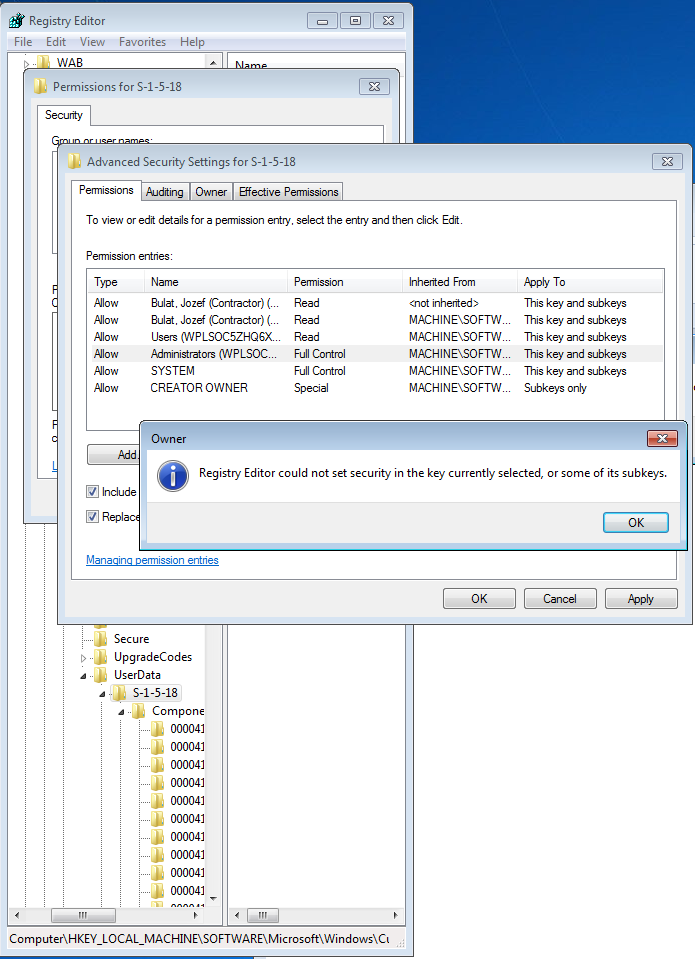
After making the suggested changes this is what happens when I hit APPLY
Registry Editor could not set owner on the key currently selected, or some of its subkeys.
How can I proceed from here?
Message 6 of 17


03-11-2012
08:17 PM
- Mark as New
- Bookmark
- Subscribe
- Mute
- Subscribe to RSS Feed
- Permalink
- Report
03-11-2012
08:17 PM
Try it a few times. If that doesn't work, go down and find each individual key that it cannot change and make the changes there.
http://usa.autodesk.com/adsk/servlet/ps/dl/item?siteID=123112&id=16508079&linkID=9240617
Travis Nave
 Need help in your post? Mention me with @TravisNave
HOT: Named User FAQ | 2025 Download Links | Invalid Serial Number | LiteHTML.DLL error | Reset Autodesk 2020-24 Licensing
My Expert Contributions to the
FLEXnet License Admin | MSI Cleanup Utility | .NET Framework Cleanup Tool | IPv6 NLM Fix | adskflex.opt Options File | Combine .LIC Files
Disk Space | Quickstart Guide for LMTOOLS | Edit setup.ini for 1603 Installation Failure | 1603 Error installing /w Updates | Disable Optimus
Understanding Failures in the Installation .log File | Server Status from Client | Autodesk 2024 System Requirements Fix | Reuse USB Stick
⤽ If my post was helpful, please give Likes and/or mark the Accept as Solution button(s) below. Thank you! ⤵
Message 8 of 17

08-22-2012
05:20 AM
- Mark as New
- Bookmark
- Subscribe
- Mute
- Subscribe to RSS Feed
- Permalink
- Report
08-22-2012
05:20 AM
There is not such key in my registry.
I use Win 7 Ultimate x64
Please help.
Message 9 of 17

06-19-2013
09:32 AM
- Mark as New
- Bookmark
- Subscribe
- Mute
- Subscribe to RSS Feed
- Permalink
- Report
06-19-2013
09:32 AM
Hi,
I did what you suggested. But not all of the subkeys were listening to me. (see attachment)
No matter if I did all permissions on folder "Components" or "S-1-5-18".
Waht is your advice?
Message 10 of 17
06-19-2013
09:45 AM
- Mark as New
- Bookmark
- Subscribe
- Mute
- Subscribe to RSS Feed
- Permalink
- Report
06-19-2013
09:45 AM
eljoseppo wrote:
Hi,
I did what you suggested. But not all of the subkeys were listening to me. (see attachment)
No matter if I did all permissions on folder "Components" or "S-1-5-18".
Waht is your advice?
It takes a couple of tries to get it. Go back thru and make sure you take ownership. Then close it all out and try it again. I typically get it after 2-3 passes.
Travis Nave
Need help in your post? Mention me with @TravisNave HOT: Named User FAQ | 2025 Download Links | Invalid Serial Number | LiteHTML.DLL error | Reset Autodesk 2020-24 Licensing
My Expert Contributions to the
FLEXnet License Admin | MSI Cleanup Utility | .NET Framework Cleanup Tool | IPv6 NLM Fix | adskflex.opt Options File | Combine .LIC Files
Disk Space | Quickstart Guide for LMTOOLS | Edit setup.ini for 1603 Installation Failure | 1603 Error installing /w Updates | Disable Optimus
Understanding Failures in the Installation .log File | Server Status from Client | Autodesk 2024 System Requirements Fix | Reuse USB Stick
⤽ If my post was helpful, please give Likes and/or mark the Accept as Solution button(s) below. Thank you! ⤵
Message 11 of 17


01-08-2015
05:33 AM
- Mark as New
- Bookmark
- Subscribe
- Mute
- Subscribe to RSS Feed
- Permalink
- Report
Message 12 of 17
01-08-2015
07:15 AM
- Mark as New
- Bookmark
- Subscribe
- Mute
- Subscribe to RSS Feed
- Permalink
- Report
01-08-2015
07:15 AM
Same way as Windows 7.
@feswork wrote:
How to solve that problem on win 8.1 ?
Best regards, Evgenii
Travis Nave
Need help in your post? Mention me with @TravisNave HOT: Named User FAQ | 2025 Download Links | Invalid Serial Number | LiteHTML.DLL error | Reset Autodesk 2020-24 Licensing
My Expert Contributions to the
FLEXnet License Admin | MSI Cleanup Utility | .NET Framework Cleanup Tool | IPv6 NLM Fix | adskflex.opt Options File | Combine .LIC Files
Disk Space | Quickstart Guide for LMTOOLS | Edit setup.ini for 1603 Installation Failure | 1603 Error installing /w Updates | Disable Optimus
Understanding Failures in the Installation .log File | Server Status from Client | Autodesk 2024 System Requirements Fix | Reuse USB Stick
⤽ If my post was helpful, please give Likes and/or mark the Accept as Solution button(s) below. Thank you! ⤵
Message 13 of 17
01-08-2015
10:21 AM
- Mark as New
- Bookmark
- Subscribe
- Mute
- Subscribe to RSS Feed
- Permalink
- Report
01-08-2015
10:21 AM
BTW, after several years have passed, many 'new' versions were released, the setup routines still do a really miserable job...
We routinely experience this (and similar) problems for various reasons.
e.g. A setup runs silently in the background and the user does something with the machine or the power fails, etc.
Quite often the Autodesk setups just don't manage to recover from the things they have already 'done to' the machine...
Obviously a setup which can recover from unexpected failures his is not in the focus of Autodesk at all
Maybe a simple 'Cleanup the mess from a failed setup'-Tool is all that is needed.
Bottom line: Still they same manual recovery procedures are required as a few years ago.... Nothing changed...
DId i mention that the full Autodesk design suites installation takes AGES even on really fast machines with ssd drives. So there is plenty of time for something to interfere with the process.
Message 14 of 17
02-17-2016
01:00 PM
- Mark as New
- Bookmark
- Subscribe
- Mute
- Subscribe to RSS Feed
- Permalink
- Report
02-17-2016
01:00 PM
How to slove this problem on windows 10? I can't find the owner tab on the advanced options.
Message 15 of 17

05-10-2016
11:10 AM
- Mark as New
- Bookmark
- Subscribe
- Mute
- Subscribe to RSS Feed
- Permalink
- Report
05-10-2016
11:10 AM
Is Windows 10 the same method? I'm looking in the registry but can't find the Owner tab to be able to follow the correct steps.
Message 16 of 17
03-15-2017
09:55 PM
- Mark as New
- Bookmark
- Subscribe
- Mute
- Subscribe to RSS Feed
- Permalink
- Report
03-15-2017
09:55 PM
In the remediation manual, explicitly forgot one more point - 7. Repeat until the key failure errors appear.
Message 17 of 17

03-12-2018
01:47 AM
- Mark as New
- Bookmark
- Subscribe
- Mute
- Subscribe to RSS Feed
- Permalink
- Report
03-12-2018
01:47 AM
I ran into this problem while trying to uninstall Maya 2017.
The suggested solution of setting the owner for the Components key and all subkeys did, however, not work even after repeating it several times.
I ran into the same error message as other users have posted: That I was unable to set the owner for the current key or some subkeys.
However, I found what was causing the problem, so I thought I post an update here if anyone else should run into the same problem.
I'm doing this on Windows 7, so the exact wording and layout for setting permissions may be different on other versions. The general process should still work, though.
The problem in my case was that the relevant subkeys lacked permissions altogether (thus also lacking the permission to set the owner of the key).
It's an easy fix, though.
Before switching to the Owner tab in the Advanced Security Settings dialogue box, select the Administrators group in the list box and check that it has full control. If not, just click the Edit button and give the Administrators group full control.
Check the box to replace all child object permissions with inheritable permissions from this object. This should give the Administrators group permissions to change the owner on subkeys.
Switch to the Owner tab and select the Administrators group and hit Apply (or OK). That should set the appropriate permissions for the Administrators group as well as take ownership of the entire subtree.
Hope this saves someone an entire OS reinstall.

Reply
Topic Options
- Subscribe to RSS Feed
- Mark Topic as New
- Mark Topic as Read
- Float this Topic for Current User
- Bookmark
- Subscribe
- Printer Friendly Page