Community
- Forums Home
- >
- Subscription, Installation and Licensing Community
- >
- Installation & Licensing forum
- >
- Re: Error 0xc000007b while starting AutoCad 2013
Installation & Licensing
Welcome to Autodesk’s Installation and Licensing Forums. Share your knowledge, ask questions, and explore popular Download, Installation, and Licensing topics.
Turn on suggestions
Auto-suggest helps you quickly narrow down your search results by suggesting possible matches as you type.
 This page has been translated for your convenience with an automatic translation service. This is not an official translation and may contain errors and inaccurate translations. Autodesk does not warrant, either expressly or implied, the accuracy, reliability or completeness of the information translated by the machine translation service and will not be liable for damages or losses caused by the trust placed in the translation service.
Translate
This page has been translated for your convenience with an automatic translation service. This is not an official translation and may contain errors and inaccurate translations. Autodesk does not warrant, either expressly or implied, the accuracy, reliability or completeness of the information translated by the machine translation service and will not be liable for damages or losses caused by the trust placed in the translation service.
Translate
Error 0xc000007b while starting AutoCad 2013
71 REPLIES 71
SOLVED
Reply
Topic Options
- Subscribe to RSS Feed
- Mark Topic as New
- Mark Topic as Read
- Float this Topic for Current User
- Bookmark
- Subscribe
- Printer Friendly Page
Message 1 of 72


09-19-2012
08:16 AM
- Mark as New
- Bookmark
- Subscribe
- Mute
- Subscribe to RSS Feed
- Permalink
- Report
09-19-2012
08:16 AM
Hi, recently i downloaded the trial version of autocad2013 from the offical website.
but after a successful install, i cant even start my autocad2013
It shows an error 0xc000007b.
acad.exe
"The application was unable to start correctly (0xc000007b). Click OK to close the application."
I am using Windows7 Ultimate 64bit verson.
I did a little search on the net, most of the solution is install Microsoft Visual C++ 2010(x86 and x64) redistributable package and reinstall directx 9 but neither works
Please help!!!
Thanks in advance!
Solved! Go to Solution.
Solved by charles1017. Go to Solution.
71 REPLIES 71
Message 21 of 72
10-27-2012
02:58 AM
- Mark as New
- Bookmark
- Subscribe
- Mute
- Subscribe to RSS Feed
- Permalink
- Report
Message 22 of 72


11-01-2012
11:28 AM
- Mark as New
- Bookmark
- Subscribe
- Mute
- Subscribe to RSS Feed
- Permalink
- Report
11-01-2012
11:28 AM
I have been having the same problem as Charles for the past months. My system is windows 7 home 64bit. I also tryed everything you suggested. Isn't anyone at autodesk finding a solution to this problem. Please continue to search for a way to make this work!
Message 23 of 72

11-01-2012
11:03 PM
- Mark as New
- Bookmark
- Subscribe
- Mute
- Subscribe to RSS Feed
- Permalink
- Report
11-01-2012
11:03 PM
I had the same problem with the same OS, running on the latest high end computer parts,
I've search the internet , and someone though my ram size was to low,
with a big smile, I lauch 128GB is a bit to much.
but here on topic, I've fix your problem,
this will defenetly work,
go to your boot directory
for example C:\
go to the folder C:\windows\system32
type in search d3dx
you get an big list,
delete any .ddl file that begins with d3dx
Next
goto C:\windows\Syswow64
Type in search again d3dx
and delete any .dll file
now you go to the internet and download the webinstaller Directx from microsoft website,
this webinstaller detects those files are deleted.
and they will replace it automaticly.
when done,
You can start Autocad 2013 with no problems
Why this soluotion, it appears an autocad installation instals the wrong directx files,
the only way to fix it is by manual delete those files , and replace them with the webinstaller from microsoft.
edit english,
just a Netherlander
Message 24 of 72
11-02-2012
07:54 AM
- Mark as New
- Bookmark
- Subscribe
- Mute
- Subscribe to RSS Feed
- Permalink
- Report
11-02-2012
07:54 AM
i have tried this method before, it doesnt work for me.......
maybe it will work on studiomma's case
Message 25 of 72
11-08-2012
04:34 PM
- Mark as New
- Bookmark
- Subscribe
- Mute
- Subscribe to RSS Feed
- Permalink
- Report
11-08-2012
04:34 PM
Thanks for the suggestion NP but unfortunately, no success! I really don't know what to do. How come no one can fix this situation? I am getting desperate. If anyone as another idea, im all ears. Thanks in advance!
Message 26 of 72
11-10-2012
03:18 AM
- Mark as New
- Bookmark
- Subscribe
- Mute
- Subscribe to RSS Feed
- Permalink
- Report
Message 27 of 72
11-19-2012
05:30 PM
- Mark as New
- Bookmark
- Subscribe
- Mute
- Subscribe to RSS Feed
- Permalink
- Report
Message 28 of 72
12-05-2012
08:05 AM
- Mark as New
- Bookmark
- Subscribe
- Mute
- Subscribe to RSS Feed
- Permalink
- Report
12-05-2012
08:05 AM
I am also experiencing this issue in our office. Any help would be appreciated.
Message 29 of 72

12-12-2012
06:38 AM
- Mark as New
- Bookmark
- Subscribe
- Mute
- Subscribe to RSS Feed
- Permalink
- Report
12-12-2012
06:38 AM
Hi...I got same problem too...
I'm using Windows 7 Ultimate 64 bit, 8 GB RAM, with Kaspersky Internet Security 2013 active.
When first time Install Product Design Suite 2013 Premium, everything is working well no Error found.
But when my System crashed and need to Reformat HDD, and re-install all Autodesk Applications in Product Design Suite 2013, then I got this problem (Error 0xc000007b). Installation is succesful, no ERROR found !!
Not only AutoCAD, but all applications in Product Design Suites Premium 2013 : Inventor, AutoCAD Mechanical, AutoCAD Electrical, 3ds Studio Max Design, Showcase, AdSync, etc... (except : Design Review 2013, Vault Basic 2013 and Uninstall tool PDS 2013) all these applications can not work, with msg : "The application was unable to start correctly (0xc000007b). Click OK to close the application"
I have administrator privilleges for my machine, and have tried to disable Antivirus, Firewall, and update all windows systems, uninstall and reinstall with clean (event clean all Autodesk registries using Registry Cleaner) . Check with DXDiag (DirectX Diagnostic Tools), there is no problem with my system, but Error 0xc000007b still exist everytime I want to run AutoCAD or any application from Product Design Suites 2013.
If I install Product Design Suite Premium 2012 Trial in same machine, all applications are working well.
I think something wrong with runtime execution in AutoCAD.exe in 2013 version, and conflict with one or any windows 64 bit runtime system.
Message 30 of 72
12-12-2012
01:15 PM
- Mark as New
- Bookmark
- Subscribe
- Mute
- Subscribe to RSS Feed
- Permalink
- Report
12-12-2012
01:15 PM
Hi Charles and anyone out there with have same case,
I have good solution for the problem with Error "0xc000007b" it works and the problem solved in my case, hopefully it works for you too.
Since this problem mostly in Windows 7, 64 bit system, and the Error message code is : 0xc000007b ; I have checked to Microsoft support system online, this error code mean incompatibility file that should be run in 64 bit system. Now the question is: which files ? and I am sure if Installation Autodesk 2013 products is automatic choose with our system 32 or 64 bit.
The fact : sometime if you install any applications in Windows, the Visual C++ 2005/2008/2010 Redistributable files will trying to install its new version, like Autodesk Products it will install no matter you have the newest or not in your machine. The bad news is all *.DLL files (in Visual C++ Redistributable file packages) have the same name for 32 or 64 bit system.
For AutoCAD 2013, when you click to start, it will run AutoCAD.exe from your local installation path. We need information any modules in windows system for running AutoCAD.exe. You can't find the answer if read only from Windows event/services viewer. Try to Clean Uninstall and Re-install Autodesk products until make you crazy will not solve the problem !! You need tools like "Dependency Walker" to find any modules working when AutoCAD.exe is running.
In my case, i found the problem is MSVCR100.DLL in C:\Windows\System32, working in 32 bit, not in 64 bit like other modules when running AutoCAD.exe. (Remember, I am using Windows 7 64 bit system). I try to find this file in x64 folders from DVD Source of Product Design Suites 2013 or any source of Autodesk 2013 products (better than download from MIcrosoft for Visual C++ Redistributable packages).
And then,here is my step to solving the problem :
1. Copy file MSVCR100.DLL from x64 folders find in any Autodesk Source DVD,
2. Paste this file to C:\WIndows\System32, you will be prompted if this file is exist, don't worry. Change it with the new one.
3. Restart the system, and then run AutoCAD 2013 or any Autodesk 2013 products which have problem msgs : 0xc000007b.
Voillllaaaa..!!! Problem solved ! All Autodesk products in Product Design Suites Premium 2013 working well. 🙂
Message 31 of 72
12-19-2012
03:12 AM
- Mark as New
- Bookmark
- Subscribe
- Mute
- Subscribe to RSS Feed
- Permalink
- Report
12-19-2012
03:12 AM
Hi Bujans,
I have read through your reply, I believe you are right because when i search the web before, people are all saying that some dll are running incorrectly. and i believe so but i just dont know how to check whats being called when starting up a program. and wow, i learn new things to solve system problem from here.
im gonna give it a try right the way! (though i gave up already and have 2012 installed+using coz its like a dead end before  )
)
something ends up wrong while installing 2013, maybe i need to uninstall the 2012 and install 2013
but uninstall cause a LOT of trouble and im working on a project so im not going to do that now.
anyway i think your method will work!!!
THANKS for all those work!!!
Regards,
Charles
Message 32 of 72
01-16-2013
07:23 AM
- Mark as New
- Bookmark
- Subscribe
- Mute
- Subscribe to RSS Feed
- Permalink
- Report
01-16-2013
07:23 AM
I'm getting the same problem and I tried some of the solutions you offered but none of them worked. Also, it will not allow me to uninstall the program. No idea what to do next...
Message 33 of 72
01-16-2013
02:10 PM
- Mark as New
- Bookmark
- Subscribe
- Mute
- Subscribe to RSS Feed
- Permalink
- Report
Message 34 of 72
01-17-2013
04:52 AM
- Mark as New
- Bookmark
- Subscribe
- Mute
- Subscribe to RSS Feed
- Permalink
- Report
01-17-2013
04:52 AM
You may use ADSUninstallTool.exe inside
http://usa.autodesk.com/adsk/servlet/ps/dl/item?siteID=123112&id=19165706&linkID=16831209
to uninstall AutoCAD2013.
Message 35 of 72
01-27-2013
05:19 AM
- Mark as New
- Bookmark
- Subscribe
- Mute
- Subscribe to RSS Feed
- Permalink
- Report
01-27-2013
05:19 AM
See this:
It's in italian...
Message 36 of 72
01-27-2013
01:25 PM
- Mark as New
- Bookmark
- Subscribe
- Mute
- Subscribe to RSS Feed
- Permalink
- Report
01-27-2013
01:25 PM
Hi,
I've got the same problem on my Windows 7 x64 PC. It's a DELL OEM OS version if that makes a difference.
I've tried all of the suggestions around the net that I can find and have reloaded the OS once as well. I've tried:
Reload OS
Clear TMP, stop AV, Firewall and any other programs from running - still errors
Update directx runtimes
Uninstall all C++ runtimes and only install x64 versions
I'm out of ideas. Is there anything else I can try?
Thanks
Ellie
Message 37 of 72
01-27-2013
08:55 PM
- Mark as New
- Bookmark
- Subscribe
- Mute
- Subscribe to RSS Feed
- Permalink
- Report
01-27-2013
08:55 PM
Hi Ellie and others,...
Since this problem mostly in Windows 7, 64 bit system, and the Error message code is : 0xc000007b ; First, you must know if this problem with the same error message may happened in other aplication too, i.e : Adobe, MS Office, Solidworks, etc. If you check to MIcrosoft support online, this error code mean "incompatibility file that should be run in 64 bit system". This message inform you that you have one or more files (mostly in *.DLL) 32 bit system but worked as 64 bit system in your machine. Some applications may work well, but other will cause error like Error message above.
Maybe some peoples get solving just only re-install or update their DirectX runtime files, but the other still have no solving the problem. In my case, all troubleshoots or suggestions from Internet and Autodesk discussion Groups, no one work !! Until I found this way and it solving my problem very well. 
It is important to knows what exactly files (*.DLL) that caused the problem in your machine. If you aren't an experienced IT with C++ runtime files, you can find to solving the problem with free utility : "Dependency Walker". Dependency Walker is a free utility that scans any 32-bit or 64-bit Windows module (exe, dll, ocx, sys, etc.) and builds a hierarchical tree diagram of all dependent modules. It is also very useful for troubleshooting system errors related to loading and executing modules. Dependency Walker detects many common application problems such as missing modules, invalid modules, mismatched machine types of modules, and module initialization failures like Error message 0xc000007b when you click AutoCAD.exe.
You can download this free utility from : http://www.dependencywalker.com/ . Please download only match with your OS. Install it to your Hard drive system.
If your problem always shows up everytime you open AutoCAD.exe (or other vertical Autodesk products), try to check any dependencies file (mostly in *.DLL) for AutoCAD.exe using this utility (Dependency Walker).
Below is the steps to use Dependency Walker (DW) to solving your problem :
1. Run Dependency Walker utility, and then click File > Open > choose ACAD.exe (from the path you installed AutoCAD 2013). Wait for some seconds, then DW's hierarchical tree diagram will shows up.
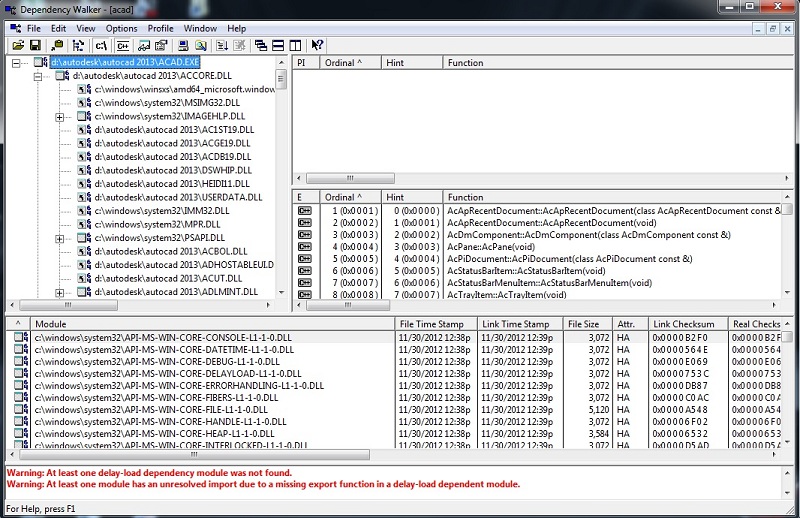
2. Check into hierachy diagram, looking into module column which files (mostly in *.DLL format) with Yellow and RED colour. YELLOW is warning if one or more files failed to load, but your application still can working. RED is very important to do, that you must more attention, this files caused the problem with your AutoCAD (or other vertical Autodesk Products).
a 64 or 32 symbols also appeared in front of your module files. If your system is 64 bit, it should be running module for 64 bit too. If you find it is a 32 bit, that is the problem, then you must change this file with 64 bit system version.
Some messages with RED colour in the bottom of menu, will inform you any warnings regarding the runtime module file. Use this information to help you solving the problem !!
3. After you find the RED colour (maybe with 32 bit symbols) of runtime module, what you must to do next is delete these files (please note the location of these files) and change with 64 bit version from your source of Autodesk products (DVD Source). Make sure you have choosed same file from DVD Source (Autodesk products) but for 64 bit system. (refer to x64 folder in your DVD Source). There are maybe more than 2 files with the same name already in your machine, but don't worry, you need copy paste a fresh one from AutoCAD DVD Source. Paste it into where you instaled AutoCAD folder in your machine. (You can check from hierarchy diagram in Dependency Walker, for location of file)
Hopefuly this step can solving your problem
Message 38 of 72


01-29-2013
01:30 PM
- Mark as New
- Bookmark
- Subscribe
- Mute
- Subscribe to RSS Feed
- Permalink
- Report
01-29-2013
01:30 PM
THANKS !!! I too was having the same problems on a new installation. I could not open any Autodesk programs.
I ran the dependancy walker and found that "msvcr100.dll" was not working. I simply copied this file from another computer with a similar setup, and now everything is working.
Message 39 of 72
02-08-2013
05:46 AM
- Mark as New
- Bookmark
- Subscribe
- Mute
- Subscribe to RSS Feed
- Permalink
- Report
Message 40 of 72

02-28-2013
01:20 PM
- Mark as New
- Bookmark
- Subscribe
- Mute
- Subscribe to RSS Feed
- Permalink
- Report
02-28-2013
01:20 PM
Thank you for figureing this out! This has fixed the error each and every time i've come across it. Thank you for posting!

Reply
Topic Options
- Subscribe to RSS Feed
- Mark Topic as New
- Mark Topic as Read
- Float this Topic for Current User
- Bookmark
- Subscribe
- Printer Friendly Page