Community
- Forums Home
- >
- Subscription, Installation and Licensing Community
- >
- Installation & Licensing forum
- >
- Re: Downloading Autocad Civil 3D Problems Windows
Installation & Licensing
Welcome to Autodesk’s Installation and Licensing Forums. Share your knowledge, ask questions, and explore popular Download, Installation, and Licensing topics.
Turn on suggestions
Auto-suggest helps you quickly narrow down your search results by suggesting possible matches as you type.
 This page has been translated for your convenience with an automatic translation service. This is not an official translation and may contain errors and inaccurate translations. Autodesk does not warrant, either expressly or implied, the accuracy, reliability or completeness of the information translated by the machine translation service and will not be liable for damages or losses caused by the trust placed in the translation service.
Translate
This page has been translated for your convenience with an automatic translation service. This is not an official translation and may contain errors and inaccurate translations. Autodesk does not warrant, either expressly or implied, the accuracy, reliability or completeness of the information translated by the machine translation service and will not be liable for damages or losses caused by the trust placed in the translation service.
Translate
Downloading Autocad Civil 3D Problems Windows
7 REPLIES 7
Reply
Topic Options
- Subscribe to RSS Feed
- Mark Topic as New
- Mark Topic as Read
- Float this Topic for Current User
- Bookmark
- Subscribe
- Printer Friendly Page
Message 1 of 8

Anonymous
877 Views, 7 Replies
12-05-2012
02:57 PM
- Mark as New
- Bookmark
- Subscribe
- Mute
- Subscribe to RSS Feed
- Permalink
- Report
12-05-2012
02:57 PM
Downloading Autocad Civil 3D Problems Windows
Hi,
I have downloaded Autocad Civil 3D 2013 and all the icon have come up on my desk top except for the Autocad Civil 3D Icon.
I have tried downloading Autocad Civil 3D 2013 again but It tells me that it is already downloaded. I have also search through the C Drive but are unable to locate it.
If some can help me out, would be appreciated.
Regards
7 REPLIES 7
Message 2 of 8


12-05-2012
03:05 PM
- Mark as New
- Bookmark
- Subscribe
- Mute
- Subscribe to RSS Feed
- Permalink
- Report
12-05-2012
03:05 PM
Check the folder under C:\Autodesk for it. And also check your Start menu under Programs > Autodesk to see if it made a Civil 3D icon there for you.
Travis Nave
 Need help in your post? Mention me with @TravisNave
HOT: Named User FAQ | 2025 Download Links | Invalid Serial Number | LiteHTML.DLL error | Reset Autodesk 2020-24 Licensing
My Expert Contributions to the
FLEXnet License Admin | MSI Cleanup Utility | .NET Framework Cleanup Tool | IPv6 NLM Fix | adskflex.opt Options File | Combine .LIC Files
Disk Space | Quickstart Guide for LMTOOLS | Edit setup.ini for 1603 Installation Failure | 1603 Error installing /w Updates | Disable Optimus
Understanding Failures in the Installation .log File | Server Status from Client | Autodesk 2024 System Requirements Fix | Reuse USB Stick
⤽ If my post was helpful, please give Likes and/or mark the Accept as Solution button(s) below. Thank you! ⤵
Message 3 of 8
Anonymous
in reply to:
Anonymous
12-05-2012
03:12 PM
- Mark as New
- Bookmark
- Subscribe
- Mute
- Subscribe to RSS Feed
- Permalink
- Report
12-05-2012
03:12 PM
verma88
So I just want to clarify...Did you download this from the subscription center.
Did you select browser download and then extract the downloaded zip fles and install the software?
Or did you use Autodesk download manager and install through that?
Verify through the Start menu--> All programs --> Autodesk --> AutoCAD Civil 3d 2013
That there is a entry for AutoCAD Civil 3d 2013
If there is then right click and send this to the desktop as Shortcut..
Alternatively right click on the icons created and check the properties of the target location...It should read similar to
"C:\Program Files\Autodesk\AutoCAD Civil 3D 2013\acad.exe" /ld "C:\Program Files\Autodesk\AutoCAD Civil 3D 2013\AecBase.dbx" /p "<<C3D_Metric>>"
Message 4 of 8
Anonymous
in reply to:
Anonymous
12-05-2012
03:46 PM
- Mark as New
- Bookmark
- Subscribe
- Mute
- Subscribe to RSS Feed
- Permalink
- Report
12-05-2012
03:46 PM
I downloaded the files as a zip file and them loaded the software.
I have checked to loactions of the icons created and the start menu for Civil 3d but there aren't any files for civil 3d.
Should I uninstall everything and try reinstalling the program again?
Message 5 of 8
Anonymous
in reply to:
Anonymous
12-05-2012
03:58 PM
- Mark as New
- Bookmark
- Subscribe
- Mute
- Subscribe to RSS Feed
- Permalink
- Report
12-05-2012
03:58 PM
Can you clarify what the name of the zip files are you are extracting and downloading?
Is it definitely a AutoCAD Civil 3d install? or a Suite product?
Did you ensure you went into the configuration during the setup to Select the default unit type to install (Metric vs Imperial...or both )and also the option to create a vanilla AutoCAD icon on the desktop from this install?
Are you running the install as a Administrator (Right click on the setup.exe once inflated and seelct the "Run as admistrator" option.
Message 6 of 8
Anonymous
in reply to:
Anonymous
12-05-2012
04:10 PM
- Mark as New
- Bookmark
- Subscribe
- Mute
- Subscribe to RSS Feed
- Permalink
- Report
12-05-2012
04:10 PM
It is definitely an autocad civil 3d program.I have the autocad civil 3d dongle in the my USB port at the moment, I downloaded a zip file of the folders to my computer and ran the Autocad civil 3d 2013 setup as an administrator.
In the zip files the names of the folders are;
-3rdparty
-AutoCad Map 3D citrix
-Cer
-Content
Content_Admin
-en-US
-Eula
-Infrastructure Design Suite Open Source
-Msi
-NLSDL
-setup
-SetupRes
-x64
-x86
Message 7 of 8
Anonymous
in reply to:
Anonymous
12-05-2012
04:58 PM
- Mark as New
- Bookmark
- Subscribe
- Mute
- Subscribe to RSS Feed
- Permalink
- Report
12-05-2012
04:58 PM
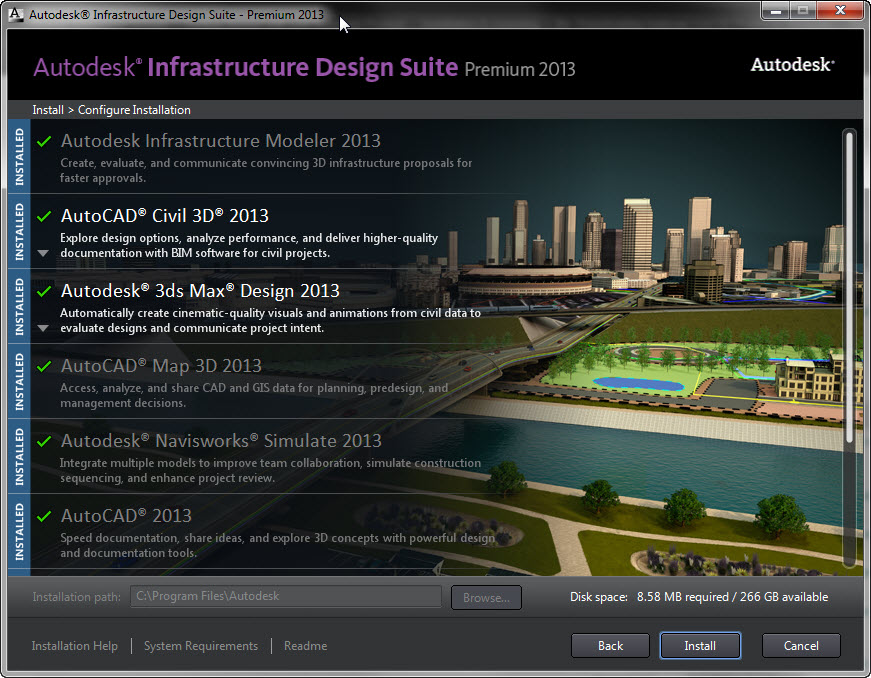
The download you have is actually a Infrastructure Design Suite install...
The UAC (User Account Control) should be disabled if this is a Windows 7 or Windows Vista operating System...procedure located at website below: http://windows.microsoft.com/en-AU/windows-vista/Turn-User-Account-Control-on-or-off
Any Anti-virus software should be disabled at the time of install...
Ensure you are selecting the checkbox to include the AutoCAD Civil 3d 2013..
Once the install is finised ensure it indicates that all products were installed successfully...
Message 8 of 8
Anonymous
in reply to:
Anonymous
12-05-2012
05:19 PM
- Mark as New
- Bookmark
- Subscribe
- Mute
- Subscribe to RSS Feed
- Permalink
- Report
12-05-2012
05:19 PM
If you are having issues uninstalling or reinstalling the Civil 3d 2013 software use the Microsoft fixit website link below...
http://support.microsoft.com/mats/Program_Install_and_Uninstall
Reply
Topic Options
- Subscribe to RSS Feed
- Mark Topic as New
- Mark Topic as Read
- Float this Topic for Current User
- Bookmark
- Subscribe
- Printer Friendly Page

