Community
- Forums Home
- >
- Subscription, Installation and Licensing Community
- >
- Installation & Licensing forum
- >
- Re: Cannot initialze License manager: ADLM: startup failed
Installation & Licensing
Welcome to Autodesk’s Installation and Licensing Forums. Share your knowledge, ask questions, and explore popular Download, Installation, and Licensing topics.
Turn on suggestions
Auto-suggest helps you quickly narrow down your search results by suggesting possible matches as you type.
 This page has been translated for your convenience with an automatic translation service. This is not an official translation and may contain errors and inaccurate translations. Autodesk does not warrant, either expressly or implied, the accuracy, reliability or completeness of the information translated by the machine translation service and will not be liable for damages or losses caused by the trust placed in the translation service.
Translate
This page has been translated for your convenience with an automatic translation service. This is not an official translation and may contain errors and inaccurate translations. Autodesk does not warrant, either expressly or implied, the accuracy, reliability or completeness of the information translated by the machine translation service and will not be liable for damages or losses caused by the trust placed in the translation service.
Translate
Cannot initialze License manager: ADLM: startup failed
22 REPLIES 22
Reply
Topic Options
- Subscribe to RSS Feed
- Mark Topic as New
- Mark Topic as Read
- Float this Topic for Current User
- Bookmark
- Subscribe
- Printer Friendly Page
Message 1 of 23


04-04-2012
12:46 AM
- Mark as New
- Bookmark
- Subscribe
- Mute
- Subscribe to RSS Feed
- Permalink
- Report
04-04-2012
12:46 AM
Cannot initialze License manager: ADLM: startup failed
Running Autodesk Simulation and other Autodesk products on same PC.
Added INCREMENT of new license to my license file but Simulation does not start. Only strange thing is that I get "?\?F?" at the end of Flexlm log file.
22 REPLIES 22
Message 2 of 23


04-04-2012
08:48 AM
- Mark as New
- Bookmark
- Subscribe
- Mute
- Subscribe to RSS Feed
- Permalink
- Report
04-04-2012
08:48 AM
You may have appended the file wrong. Post your status enquiry here and I will check.
Travis Nave
 Need help in your post? Mention me with @TravisNave
HOT: Named User FAQ | 2025 Download Links | Invalid Serial Number | LiteHTML.DLL error | Reset Autodesk 2020-24 Licensing
My Expert Contributions to the
FLEXnet License Admin | MSI Cleanup Utility | .NET Framework Cleanup Tool | IPv6 NLM Fix | adskflex.opt Options File | Combine .LIC Files
Disk Space | Quickstart Guide for LMTOOLS | Edit setup.ini for 1603 Installation Failure | 1603 Error installing /w Updates | Disable Optimus
Understanding Failures in the Installation .log File | Server Status from Client | Autodesk 2024 System Requirements Fix | Reuse USB Stick
⤽ If my post was helpful, please give Likes and/or mark the Accept as Solution button(s) below. Thank you! ⤵
Message 3 of 23
04-04-2012
01:36 PM
- Mark as New
- Bookmark
- Subscribe
- Mute
- Subscribe to RSS Feed
- Permalink
- Report
04-04-2012
01:36 PM
Hi Travis,
Please see attached.
Thanks for your help
BR
MH
Message 4 of 23
04-04-2012
01:40 PM
- Mark as New
- Bookmark
- Subscribe
- Mute
- Subscribe to RSS Feed
- Permalink
- Report
04-04-2012
01:40 PM
That does seem odd about that log file.
Can you copy the contents of your .LIC file in a PM to me so that I can check its consistency? I don't want you to post that sensitive information to the open forum.
Thanks.
Travis Nave
Need help in your post? Mention me with @TravisNave HOT: Named User FAQ | 2025 Download Links | Invalid Serial Number | LiteHTML.DLL error | Reset Autodesk 2020-24 Licensing
My Expert Contributions to the
FLEXnet License Admin | MSI Cleanup Utility | .NET Framework Cleanup Tool | IPv6 NLM Fix | adskflex.opt Options File | Combine .LIC Files
Disk Space | Quickstart Guide for LMTOOLS | Edit setup.ini for 1603 Installation Failure | 1603 Error installing /w Updates | Disable Optimus
Understanding Failures in the Installation .log File | Server Status from Client | Autodesk 2024 System Requirements Fix | Reuse USB Stick
⤽ If my post was helpful, please give Likes and/or mark the Accept as Solution button(s) below. Thank you! ⤵
Message 5 of 23
04-04-2012
02:28 PM
- Mark as New
- Bookmark
- Subscribe
- Mute
- Subscribe to RSS Feed
- Permalink
- Report
04-04-2012
02:28 PM
I received your PM, but you need to post your LIC file in it. Thanks.
Travis Nave
Need help in your post? Mention me with @TravisNave HOT: Named User FAQ | 2025 Download Links | Invalid Serial Number | LiteHTML.DLL error | Reset Autodesk 2020-24 Licensing
My Expert Contributions to the
FLEXnet License Admin | MSI Cleanup Utility | .NET Framework Cleanup Tool | IPv6 NLM Fix | adskflex.opt Options File | Combine .LIC Files
Disk Space | Quickstart Guide for LMTOOLS | Edit setup.ini for 1603 Installation Failure | 1603 Error installing /w Updates | Disable Optimus
Understanding Failures in the Installation .log File | Server Status from Client | Autodesk 2024 System Requirements Fix | Reuse USB Stick
⤽ If my post was helpful, please give Likes and/or mark the Accept as Solution button(s) below. Thank you! ⤵
Message 6 of 23
04-04-2012
02:44 PM
- Mark as New
- Bookmark
- Subscribe
- Mute
- Subscribe to RSS Feed
- Permalink
- Report
04-04-2012
02:44 PM
Hi Travis,
Just got this from Autodesk:
Dear MH:
Thank you for your response.
Kindly note that ASPRO stands for Autodesk Simulation Multiphysics 2013.
We have verified the license file and it's correct.
We kndly ask you to try to activate the product once more with the license file provided by us.
You can update the status of this case, attach files or provide additional information by replying to this email. Please let us know if you have additional feedback regarding the way your case is being handled.
Did you know that Autodesk experts are now monitoring and responding in the Install & Licensing Autodesk Discussion Forum? For fast answers to your questions from Autodesk and community experts, please visit the forum by clicking here.
Thank you for contacting Autodesk.
Do you still want to see the license file?
BR
MH
Message 7 of 23
04-04-2012
02:46 PM
- Mark as New
- Bookmark
- Subscribe
- Mute
- Subscribe to RSS Feed
- Permalink
- Report
04-04-2012
02:46 PM
Nah, if they say it is fine then it is probably fine. What error are you getting when you try to launch your 2013 product?
I noticed your license manager is still 11.9. You need to be running 11.10 for the 2013 product line.
Travis Nave
Need help in your post? Mention me with @TravisNave HOT: Named User FAQ | 2025 Download Links | Invalid Serial Number | LiteHTML.DLL error | Reset Autodesk 2020-24 Licensing
My Expert Contributions to the
FLEXnet License Admin | MSI Cleanup Utility | .NET Framework Cleanup Tool | IPv6 NLM Fix | adskflex.opt Options File | Combine .LIC Files
Disk Space | Quickstart Guide for LMTOOLS | Edit setup.ini for 1603 Installation Failure | 1603 Error installing /w Updates | Disable Optimus
Understanding Failures in the Installation .log File | Server Status from Client | Autodesk 2024 System Requirements Fix | Reuse USB Stick
⤽ If my post was helpful, please give Likes and/or mark the Accept as Solution button(s) below. Thank you! ⤵
Message 8 of 23
04-10-2012
02:04 AM
- Mark as New
- Bookmark
- Subscribe
- Mute
- Subscribe to RSS Feed
- Permalink
- Report
04-10-2012
02:04 AM
Hi Travis,
I have updated the FlexLM tools to:
FLEXnet Licensing (v11.10.0.3 build 96515 x64_n6) started on SELAP367 (IBM PC) (4/10/2012)
But still get this:
Cannot initialize license manager: ADLM: startup Failes
Suggested Solutions:
1. Verify the license manager is running, and ensure connectivity.
2. Verify that license has not expired.
3.Verify that the license is for the current version of Autodesk Simulation CFD.
Status Enquiry:
Users of 85942ASPRO_2013_0F: (Total of 1 licenses issued; Total of 0 licenses in use)
Diagnostics:
"85942ASPRO_2013_0F" v1.000, vendor: adskflex License server: SELAP367 floating license starts: 1-jan-1990, expires: 02-jun-2013 Requests from the same USER/HOST do not consume a new license
This license can be checked out
Any Idea what I should do?
BR
MH
Message 9 of 23
04-11-2012
07:26 AM
- Mark as New
- Bookmark
- Subscribe
- Mute
- Subscribe to RSS Feed
- Permalink
- Report
04-11-2012
07:26 AM
Per your status enquiry, your NLM is running fine. Can you ping the server? Does it get an IPv4 address or IPv6? If it is an IPv6, see my IPv6 fix in my signature link.
Also check for port blocking. Ports 2080 and 27000 need to be open. You can check this with Internet Explorer (not 3rd party browser) by clicking these links for your NLM:
You should get this response for each:
Wê-60Wê-60Wê-60Wê-60Wê-60Wê-60
You might also set system environment variables for ADSKFLEX_LICENSE_FILE @SELAP367 as well as FLEXLM_TIMEOUT 1000000.
http://usa.autodesk.com/adsk/servlet/ps/dl/item?siteID=123112&id=8385605&linkID=9240617
http://usa.autodesk.com/adsk/servlet/ps/dl/item?siteID=123112&id=7574782&linkID=9240617
Travis Nave
Need help in your post? Mention me with @TravisNave HOT: Named User FAQ | 2025 Download Links | Invalid Serial Number | LiteHTML.DLL error | Reset Autodesk 2020-24 Licensing
My Expert Contributions to the
FLEXnet License Admin | MSI Cleanup Utility | .NET Framework Cleanup Tool | IPv6 NLM Fix | adskflex.opt Options File | Combine .LIC Files
Disk Space | Quickstart Guide for LMTOOLS | Edit setup.ini for 1603 Installation Failure | 1603 Error installing /w Updates | Disable Optimus
Understanding Failures in the Installation .log File | Server Status from Client | Autodesk 2024 System Requirements Fix | Reuse USB Stick
⤽ If my post was helpful, please give Likes and/or mark the Accept as Solution button(s) below. Thank you! ⤵
Message 10 of 23


04-28-2012
12:29 PM
- Mark as New
- Bookmark
- Subscribe
- Mute
- Subscribe to RSS Feed
- Permalink
- Report
04-28-2012
12:29 PM
Hi,
I had the same problem (and message) with Simulation CFD 2013, but i got suspicious because it seemed to be a local failure according the message, but I pointed to another machine as a license server.
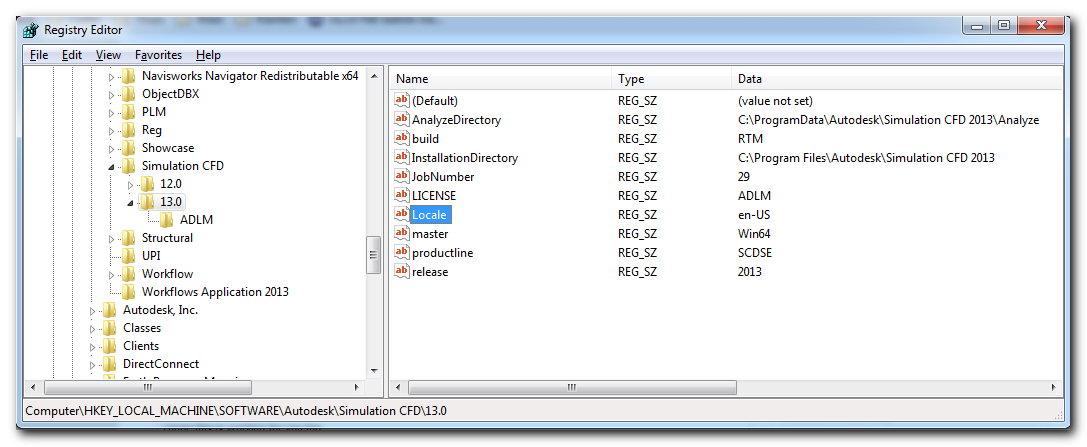
After consulting another user (already running the application) and comparing our registry settings, I changed the following key: \HKLM\software\Autodesk Simulation CFD\13.0\Locale. It's value was du-NL (probably due to the language setting of the license agreement during the installation). I changed it to en-US, and voila, it worked, see the attachement. So in the end my license server was not the problem.
I hope this is working for you too.
Message 11 of 23

05-11-2012
11:03 AM
- Mark as New
- Bookmark
- Subscribe
- Mute
- Subscribe to RSS Feed
- Permalink
- Report
05-11-2012
11:03 AM
Thank you for the registry tip, sir.
I also had the same problem. After I changed the registry entry as you said, Autodesk Simuation CFD worked fine.
I was wondering, that how did you find such an intricate change !.
Anyway, thanks a lot for sharing your experience. It saved a lot of time for me.

Message 13 of 23
05-19-2012
12:23 PM
- Mark as New
- Bookmark
- Subscribe
- Mute
- Subscribe to RSS Feed
- Permalink
- Report
05-19-2012
12:23 PM
Hi guys I have exactly the same problem. Also the same error..
Only there's a difference. When I go to the Simulation CFD file with the Registry editor, I also have the folder 13.0 but only there are no files in it. Except for the default file.
I downloaded the program from the site of Autodesk for students. I have got a serial code and product key.
I installed the program, typed the key and serial code in..
But when I go to the students website of autodesk, it says that I haven't activated it yet. Quite strange if you ask me?
I have totally no clue.. What I know is that I need this program to work asap to do some research for my thesis.
Message 14 of 23

05-23-2012
07:42 AM
- Mark as New
- Bookmark
- Subscribe
- Mute
- Subscribe to RSS Feed
- Permalink
- Report
05-23-2012
07:42 AM
Hi Guys,
I am facing the Same Problem. Attached are the screenshots....
When I try to start CFD 2013 (Student Edition), it pops out this message !

I tried to figure out Network License Manager, but I haven't got any license yet

Tried to activate online but it asks for Product Request Code..... (Which I don't know)

Looking for ua help guys !
Thanks
Aadil
Message 15 of 23
05-23-2012
09:00 AM
- Mark as New
- Bookmark
- Subscribe
- Mute
- Subscribe to RSS Feed
- Permalink
- Report
05-23-2012
09:00 AM
You either use the license manager *OR* you activate your product... not both. If your product is stand-alone (or student version) then you need your serial number to activate. If you have a commercial (or nfr) network seat, then you need to obtain your license file.
Make sure you have local admin rights and then manually start the ADLM service if it is not starting.
Travis Nave
Need help in your post? Mention me with @TravisNave HOT: Named User FAQ | 2025 Download Links | Invalid Serial Number | LiteHTML.DLL error | Reset Autodesk 2020-24 Licensing
My Expert Contributions to the
FLEXnet License Admin | MSI Cleanup Utility | .NET Framework Cleanup Tool | IPv6 NLM Fix | adskflex.opt Options File | Combine .LIC Files
Disk Space | Quickstart Guide for LMTOOLS | Edit setup.ini for 1603 Installation Failure | 1603 Error installing /w Updates | Disable Optimus
Understanding Failures in the Installation .log File | Server Status from Client | Autodesk 2024 System Requirements Fix | Reuse USB Stick
⤽ If my post was helpful, please give Likes and/or mark the Accept as Solution button(s) below. Thank you! ⤵
Message 16 of 23
05-24-2012
01:27 AM
- Mark as New
- Bookmark
- Subscribe
- Mute
- Subscribe to RSS Feed
- Permalink
- Report
05-24-2012
01:27 AM
Travis,
Thanks for your reply.
THe problem is that I cannot do either of them. Simply when I Click CFD Icon, it pops out message....
CANNOT INITIALIZE.......
Can you please let me know how to troubleshoot this. Thanks !
Message 18 of 23

06-21-2012
07:25 AM
- Mark as New
- Bookmark
- Subscribe
- Mute
- Subscribe to RSS Feed
- Permalink
- Report
Message 19 of 23
06-23-2012
04:08 PM
- Mark as New
- Bookmark
- Subscribe
- Mute
- Subscribe to RSS Feed
- Permalink
- Report
06-23-2012
04:08 PM
Hi
i am also trying to install autodesk CFD with a student license
got as far as configuring my Flexera server, but im not sure i even have a license file
who should i turn to?
the licpath i got with the cfd instalation is very small and says:
SERVER MnG-PC2 000000000000
USE_SERVER
(which is the name of my computer)
the error i get from the server status enquiry is:
--------
Status
--------
Flexible License Manager status on Sun 6/24/2012 00:02
[Detecting lmgrd processes...]
License server status: @MnG-PC2
License file(s) on MnG-PC2: C:\Program Files\Autodesk Network License Manager\License\LICPATH.LIC:
lmgrd is not running: Cannot connect to license server system.
The license server manager (lmgrd) has not been started yet,
the wrong port@host or license file is being used, or the
port or hostname in the license file has been changed.
Server name: MnG-PC2
License path: @MnG-PC2;
FLEXnet Licensing error:-15,570
For further information, refer to the FLEXnet Licensing documentation,
available at "www.flexerasoftware.com".
please help!!
thanks
guy
Message 20 of 23
06-25-2012
07:37 AM
- Mark as New
- Bookmark
- Subscribe
- Mute
- Subscribe to RSS Feed
- Permalink
- Report
06-25-2012
07:37 AM
The LICPATH.LIC file is not a license. It is a pointer to the license manager. Since you have a student copy, are you sure that it isn't a stand-alone activation? You may need to reinstall.
Travis Nave
Need help in your post? Mention me with @TravisNave HOT: Named User FAQ | 2025 Download Links | Invalid Serial Number | LiteHTML.DLL error | Reset Autodesk 2020-24 Licensing
My Expert Contributions to the
FLEXnet License Admin | MSI Cleanup Utility | .NET Framework Cleanup Tool | IPv6 NLM Fix | adskflex.opt Options File | Combine .LIC Files
Disk Space | Quickstart Guide for LMTOOLS | Edit setup.ini for 1603 Installation Failure | 1603 Error installing /w Updates | Disable Optimus
Understanding Failures in the Installation .log File | Server Status from Client | Autodesk 2024 System Requirements Fix | Reuse USB Stick
⤽ If my post was helpful, please give Likes and/or mark the Accept as Solution button(s) below. Thank you! ⤵

Reply
Topic Options
- Subscribe to RSS Feed
- Mark Topic as New
- Mark Topic as Read
- Float this Topic for Current User
- Bookmark
- Subscribe
- Printer Friendly Page