Community
- Forums Home
- >
- Subscription, Installation and Licensing Community
- >
- Installation & Licensing forum
- >
- Re: Blank Activation Screen
Installation & Licensing
Welcome to Autodesk’s Installation and Licensing Forums. Share your knowledge, ask questions, and explore popular Download, Installation, and Licensing topics.
Turn on suggestions
Auto-suggest helps you quickly narrow down your search results by suggesting possible matches as you type.
 This page has been translated for your convenience with an automatic translation service. This is not an official translation and may contain errors and inaccurate translations. Autodesk does not warrant, either expressly or implied, the accuracy, reliability or completeness of the information translated by the machine translation service and will not be liable for damages or losses caused by the trust placed in the translation service.
Translate
This page has been translated for your convenience with an automatic translation service. This is not an official translation and may contain errors and inaccurate translations. Autodesk does not warrant, either expressly or implied, the accuracy, reliability or completeness of the information translated by the machine translation service and will not be liable for damages or losses caused by the trust placed in the translation service.
Translate
Blank Activation Screen
231 REPLIES 231
SOLVED
Reply
Topic Options
- Subscribe to RSS Feed
- Mark Topic as New
- Mark Topic as Read
- Float this Topic for Current User
- Bookmark
- Subscribe
- Printer Friendly Page
Message 1 of 232

Anonymous
112029 Views, 231 Replies
12-21-2010
09:27 PM
- Mark as New
- Bookmark
- Subscribe
- Mute
- Subscribe to RSS Feed
- Permalink
- Report
12-21-2010
09:27 PM
In early Dec 2010 I downloaded AutoCAD 2011 (I already had the 2010 version). When I opened it, a screen appeared with the option to 'TRY' or 'ACTIVATE'. When I clicked on Activate the next screen appeared but it was blank except for 2 radio buttons without any text attached. Supposedly, I have to get a request code from that screen to activate but obviously I can't.
Does anyone have any suggestions for this particular problem?
Solved! Go to Solution.
Solved by lh932004. Go to Solution.
Solved by fffsas. Go to Solution.
Solved by Ju.Duncan. Go to Solution.
Solved by par14060. Go to Solution.
Solved by dukduks. Go to Solution.
231 REPLIES 231
Message 2 of 232


12-22-2010
09:45 AM
- Mark as New
- Bookmark
- Subscribe
- Mute
- Subscribe to RSS Feed
- Permalink
- Report
12-22-2010
09:45 AM
I am having the same issue with AutoCad 2011 LT. I havent been able to get any help on this matter. Please someone Help Us!
Message 3 of 232


12-23-2010
11:55 AM
- Mark as New
- Bookmark
- Subscribe
- Mute
- Subscribe to RSS Feed
- Permalink
- Report
12-23-2010
11:55 AM
try this: http://usa.autodesk.com/adsk/servlet/ps/dl/item?linkID=9240617&id=6404339&siteID=123112
DarrenP
Did you find this post helpful? Feel free to Like this post.
Did your question get successfully answered? Then click on the ACCEPT SOLUTION button.

Message 4 of 232

12-23-2010
01:47 PM
- Mark as New
- Bookmark
- Subscribe
- Mute
- Subscribe to RSS Feed
- Permalink
- Report
12-23-2010
01:47 PM
I've had this problem for the last two days, after my student licence expired.
The steps described in http://usa.autodesk.com/adsk/servlet/ps/dl/item?siteID=123112&id=6404339&linkID=9240617 do NOT change anything for me.
Please, this issue needs attention.
Message 5 of 232
01-02-2011
10:33 AM
- Mark as New
- Bookmark
- Subscribe
- Mute
- Subscribe to RSS Feed
- Permalink
- Report
01-02-2011
10:33 AM
I solved it... here's the REAL problem.
Your computer is blocking activex controls.
The first solution is to go into Internet explorer>Tools>internet options or control panel > internet options.
Under the security tab, choose internet zone. Click custom level, and enable the options pertaining to ActiveX ontrols ans java scripting. Then you SHOULD be able to view the controls that were blocked out in the blank activation screen.
This didn't work for me, but it works for others, so I hear.
The second solution for me was to enter the C:\Program Files\Common Files\Autodesk Shared\AdLM\R1\en-US\Webdepot folder, which is where the registry HTMLs are stored. These are the pages that the blank screen shows on.
Open the RTBeginReg.html in a text editor like notepad. Add the following line of code below the <html> line.
<!-- saved from url=(0016)http://localhost -->
This marks the page as SAFE. Save and you should be able to enter your code and stuff.
Message 6 of 232

01-03-2011
09:39 AM
- Mark as New
- Bookmark
- Subscribe
- Mute
- Subscribe to RSS Feed
- Permalink
- Report
01-03-2011
09:39 AM
wow... great! the second one works, but there's still one problems. when i confirm the activation, i've got some script errors 😕 and it appears all the time whenever i click anything. any advice?
thank you 😉
Message 7 of 232

01-03-2011
11:39 AM
- Mark as New
- Bookmark
- Subscribe
- Mute
- Subscribe to RSS Feed
- Permalink
- Report
01-03-2011
11:39 AM
AutoCAD 2011 on Windows XP.. Blank Activation Screen
sorry to trouble you all but neither of those options have worked for me .. going through Regedit or through ActiveX scripting
any idesa ??
not even through the link to the html's in the registry ...
Message 8 of 232
01-05-2011
01:38 PM
- Mark as New
- Bookmark
- Subscribe
- Mute
- Subscribe to RSS Feed
- Permalink
- Report
01-05-2011
01:38 PM
hello friend
if system ms vindows sries;
create new admin accont to system => login to admin accont => start activation license maneger 😉
 god bye
Türkiyeden selamlar
Message 9 of 232
01-07-2011
05:07 AM
- Mark as New
- Bookmark
- Subscribe
- Mute
- Subscribe to RSS Feed
- Permalink
- Report
01-07-2011
05:07 AM
To those still getting the blank screen (and internet opions, registry editing and running as admin doesn't work), I strongly suggest you follow the steps in my last post (regarding the tag added to the HTML document). If the first screen works, but you still get bugged by scripts on other pages, add the tag the other HTMLs in the folder. I didn't have to add it to all of them, only the relevant ones. Be sure to remove Autodesk's tag if there is one.
Message 10 of 232

01-10-2011
12:08 PM
- Mark as New
- Bookmark
- Subscribe
- Mute
- Subscribe to RSS Feed
- Permalink
- Report
01-10-2011
12:08 PM
A quick and easy way to fix this not with just AutoCad but if you have the same problem with other pro grams is, open 'run' command, type in 'regedit' go to 'HKEY_CURRENT_USER, Software, Microsoft, Internet Settings, Zones' you will see under Zones are six files each named 'L' '0' '1' '2' '3' '4', delete the file named 'L', that is the activex problem, you can uninstall it from your PC but these are "parasite" files that stay in the system. Problem solved quick and easy
Message 11 of 232
01-11-2011
12:20 AM
- Mark as New
- Bookmark
- Subscribe
- Mute
- Subscribe to RSS Feed
- Permalink
- Report
01-11-2011
12:20 AM
Blank Activation Screen ...Endows XP
Thanks for the replies .... And the simplest way to solve the blank screen issue is do what I did. Reformat the hard disk, put on the security and then the software and it worked first time...
One thing i noticed though was my default browser was Chrome and for some reason it wouldn't "allow" the activation screen to connect to the net ... and yet with Internet Explorer it sailed through
something worth thinking about
Message 12 of 232
01-13-2011
07:04 AM
- Mark as New
- Bookmark
- Subscribe
- Mute
- Subscribe to RSS Feed
- Permalink
- Report
01-13-2011
07:04 AM
Solution for me:
Adding the htmal strings to multiple files (I just kept adding until it worked) and registering online (through a browser and not the product)
Software works fine!
Thanks for the html tips!
Message 13 of 232
01-13-2011
05:02 PM
- Mark as New
- Bookmark
- Subscribe
- Mute
- Subscribe to RSS Feed
- Permalink
- Report
01-13-2011
05:02 PM
hi!
I've done everything that you said, but i'm still dont guet it. it always show the blank screen. man can u help me? please!
Message 14 of 232
01-13-2011
09:12 PM
- Mark as New
- Bookmark
- Subscribe
- Mute
- Subscribe to RSS Feed
- Permalink
- Report
01-13-2011
09:12 PM
A quick and easy way to fix this not with just AutoCad but if you have the same problem with other programs, like bitdefender and your windows gadgets, press & hold start button on key board and press 'R' , type in 'regedit' go to 'HKEY_CURRENT_USER, Software, Microsoft, Internet Settings, Zones' you will see under Zones are six files each named 'L' '0' '1' '2' '3' '4', delete the file named 'L', that is the activex problem, you can uninstall it from your PC but these are "parasite" files that stay in the system. Problem solved quick and easy.
Message 15 of 232
Anonymous
in reply to:
Anonymous
01-17-2011
04:25 PM
- Mark as New
- Bookmark
- Subscribe
- Mute
- Subscribe to RSS Feed
- Permalink
- Report
01-17-2011
04:25 PM
O.k this might sound stupid but I did all the steps you previously said and I tried to edit the html document and it had an access denied window open when I tried to save it.
Message 17 of 232
01-17-2011
07:01 PM
- Mark as New
- Bookmark
- Subscribe
- Mute
- Subscribe to RSS Feed
- Permalink
- Report
Message 19 of 232
01-18-2011
03:10 PM
- Mark as New
- Bookmark
- Subscribe
- Mute
- Subscribe to RSS Feed
- Permalink
- Report
01-18-2011
03:10 PM
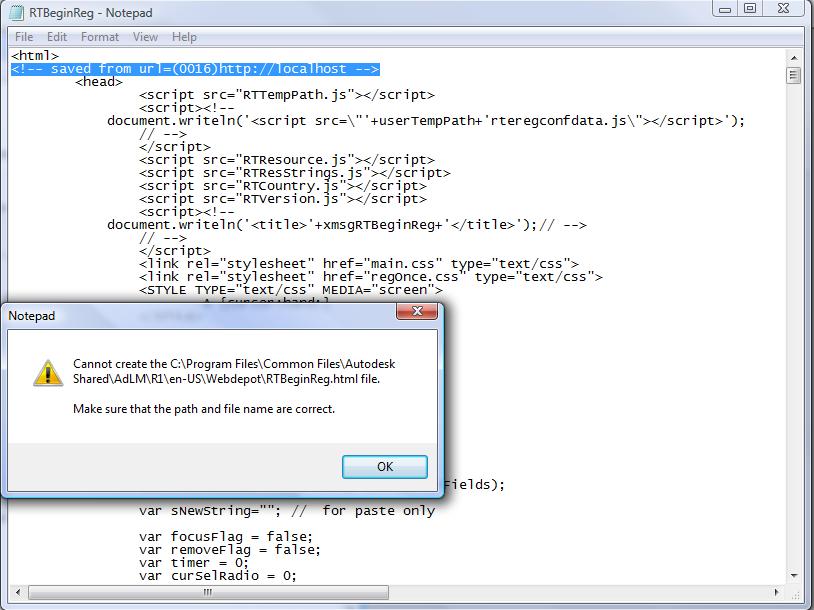
Well i tried editing the RTBeginReg file with notepad (see attachment 1). When i tried to save the file i got an error message (see attachment 2). help please.
Message 20 of 232
01-19-2011
09:07 AM
- Mark as New
- Bookmark
- Subscribe
- Mute
- Subscribe to RSS Feed
- Permalink
- Report
01-19-2011
09:07 AM
Right-click the HTML and make sure you have the permission to edit it. If you are admin, allow the user full control.
And... maybe not have the blank activation screen open when you edit it? That could also help.
Reply
Topic Options
- Subscribe to RSS Feed
- Mark Topic as New
- Mark Topic as Read
- Float this Topic for Current User
- Bookmark
- Subscribe
- Printer Friendly Page