Community
- Forums Home
- >
- Subscription, Installation and Licensing Community
- >
- Installation & Licensing forum
- >
- Autodesk Building Design Suite Standard 2013 install error
Installation & Licensing
Welcome to Autodesk’s Installation and Licensing Forums. Share your knowledge, ask questions, and explore popular Download, Installation, and Licensing topics.
Turn on suggestions
Auto-suggest helps you quickly narrow down your search results by suggesting possible matches as you type.
 This page has been translated for your convenience with an automatic translation service. This is not an official translation and may contain errors and inaccurate translations. Autodesk does not warrant, either expressly or implied, the accuracy, reliability or completeness of the information translated by the machine translation service and will not be liable for damages or losses caused by the trust placed in the translation service.
Translate
This page has been translated for your convenience with an automatic translation service. This is not an official translation and may contain errors and inaccurate translations. Autodesk does not warrant, either expressly or implied, the accuracy, reliability or completeness of the information translated by the machine translation service and will not be liable for damages or losses caused by the trust placed in the translation service.
Translate
Autodesk Building Design Suite Standard 2013 install error
12 REPLIES 12
SOLVED
Reply
Topic Options
- Subscribe to RSS Feed
- Mark Topic as New
- Mark Topic as Read
- Float this Topic for Current User
- Bookmark
- Subscribe
- Printer Friendly Page
Message 1 of 13


01-17-2013
09:27 AM
- Mark as New
- Bookmark
- Subscribe
- Mute
- Subscribe to RSS Feed
- Permalink
- Report
01-17-2013
09:27 AM
I am tring to get Design Suite Standard 2013 to install on my laptop and i keep having errors.
Whats included:
ACAD Architecture, MEP, Structural Design, Sketchbook Designer, Showcase, Design Review, Inventor Fusion, and ACAD (Enhance BIM projects)
Out of the programs listed above, 3 of them have errors when installing.
ACAD (Enhance BIM Projects), ACAD Structural Design, and ACAD Architecture.
I have an HP EliteBook 8770w.
Attached are the error logs.
Please let me know if anyone else is having the same problem and or it there is a fix for this problem.
thanks!
Solved! Go to Solution.
Solved by TravisNave. Go to Solution.
12 REPLIES 12
Message 2 of 13


01-17-2013
09:44 AM
- Mark as New
- Bookmark
- Subscribe
- Mute
- Subscribe to RSS Feed
- Permalink
- Report
01-17-2013
09:44 AM
Typically 1603 errors are hard to diagnose. But generally you can run down a list of things and usually get it.
Here's where I'd start:
1. Make sure you don't already have any other vertical flavor of AutoCAD 2013 already installed before installing BDS2013.
2. Make sure you have local administrator privileges. Sometimes Office updates switch you to Debugger User, etc. So verify you are local administrator. In fact, you might even try logging in as Administrator or running the installer as Administrator.
3. Make sure UAC is disabled completely
4. Make sure anti-virus is off.
5. If you are installing from media (DVD or USB) copy the contents to a folder on your local hard drive and install from there. If you are installing from network deployment, make sure you have full read/write to the share and folder permissions and do not make it a silent deploy.
6. Do not add the service pack during the install. If prompted, decline. Add the service pack afterwards.
These are the typical things to try. Generally one or more of them will get you where you need to be.
Good luck!
Travis Nave
 Need help in your post? Mention me with @TravisNave
HOT: Named User FAQ | 2025 Download Links | Invalid Serial Number | LiteHTML.DLL error | Reset Autodesk 2020-24 Licensing
My Expert Contributions to the
FLEXnet License Admin | MSI Cleanup Utility | .NET Framework Cleanup Tool | IPv6 NLM Fix | adskflex.opt Options File | Combine .LIC Files
Disk Space | Quickstart Guide for LMTOOLS | Edit setup.ini for 1603 Installation Failure | 1603 Error installing /w Updates | Disable Optimus
Understanding Failures in the Installation .log File | Server Status from Client | Autodesk 2024 System Requirements Fix | Reuse USB Stick
⤽ If my post was helpful, please give Likes and/or mark the Accept as Solution button(s) below. Thank you! ⤵
Message 3 of 13
01-17-2013
10:27 AM
- Mark as New
- Bookmark
- Subscribe
- Mute
- Subscribe to RSS Feed
- Permalink
- Report
01-17-2013
10:27 AM
So i went through the list and did everything. I went back to the autodesk install and just tried it with Structural Detailing. I ended up getting a new error code.
Error 1712. One or more of the files required to restore your computer to its previous state could not be found. Restore will not be possible.
Attached also is the error log for this install.
I disabled UAC and turned off Anti-virus. I ran the install as admin and i did not include service packs.
The install came on a USB flash drive and i copied all contents to a folder on my harddrive so i dont need the USB for install.
Let me know if there is anything else i can do.
thanks for the help!
Message 4 of 13
01-17-2013
11:42 AM
- Mark as New
- Bookmark
- Subscribe
- Mute
- Subscribe to RSS Feed
- Permalink
- Report
01-17-2013
11:42 AM
Make sure that you don't have a folder already at C:\Program Files\Autodesk\AutoCAD 2013. If so, you might rename it and try installing again. Just a thought.
Travis Nave
Need help in your post? Mention me with @TravisNave HOT: Named User FAQ | 2025 Download Links | Invalid Serial Number | LiteHTML.DLL error | Reset Autodesk 2020-24 Licensing
My Expert Contributions to the
FLEXnet License Admin | MSI Cleanup Utility | .NET Framework Cleanup Tool | IPv6 NLM Fix | adskflex.opt Options File | Combine .LIC Files
Disk Space | Quickstart Guide for LMTOOLS | Edit setup.ini for 1603 Installation Failure | 1603 Error installing /w Updates | Disable Optimus
Understanding Failures in the Installation .log File | Server Status from Client | Autodesk 2024 System Requirements Fix | Reuse USB Stick
⤽ If my post was helpful, please give Likes and/or mark the Accept as Solution button(s) below. Thank you! ⤵
Message 5 of 13
01-17-2013
12:40 PM
- Mark as New
- Bookmark
- Subscribe
- Mute
- Subscribe to RSS Feed
- Permalink
- Report
01-17-2013
12:40 PM
So i went and renamed the existing 2013 file and finally i got them all to install.
Funny how something so small can cause such a big problem.
Anyways thanks for all the help. I finally got all the programs on building design suite standard 2013 to install on the
laptop.
thanks again!
Message 6 of 13
01-17-2013
12:51 PM
- Mark as New
- Bookmark
- Subscribe
- Mute
- Subscribe to RSS Feed
- Permalink
- Report
01-17-2013
12:51 PM
I've been seeing a lot of this lately. It's my go-to work-around at the moment...
Travis Nave
Need help in your post? Mention me with @TravisNave HOT: Named User FAQ | 2025 Download Links | Invalid Serial Number | LiteHTML.DLL error | Reset Autodesk 2020-24 Licensing
My Expert Contributions to the
FLEXnet License Admin | MSI Cleanup Utility | .NET Framework Cleanup Tool | IPv6 NLM Fix | adskflex.opt Options File | Combine .LIC Files
Disk Space | Quickstart Guide for LMTOOLS | Edit setup.ini for 1603 Installation Failure | 1603 Error installing /w Updates | Disable Optimus
Understanding Failures in the Installation .log File | Server Status from Client | Autodesk 2024 System Requirements Fix | Reuse USB Stick
⤽ If my post was helpful, please give Likes and/or mark the Accept as Solution button(s) below. Thank you! ⤵
Message 7 of 13
01-22-2013
09:17 AM
- Mark as New
- Bookmark
- Subscribe
- Mute
- Subscribe to RSS Feed
- Permalink
- Report
01-22-2013
09:17 AM
Now i have a new issue. I tried opening MEP 2013 today and got a message saying the program could not be found.
I went to control panel/ programs and features and it showed mep 2013 installed. I clicked on it to run a repair when it said the program could not be found and then removed it off the list of installed programs. I opened building design suite standard to reinstall mep 2013 and it says mep 2013 is already installed. I have now gone back through and uninstalled all 2013 programs that came with building design suite standard. I went to do a reinstall and still the same message MEP 2013 is installed. I have gone through the registry and removed everything dealing with 2013. I have also gone into program files/ autodesk and removed all 2013 programs. I still get that autocad mep 2013 is installed and if you do a search for mep 2013 you find nothing.
Attached is a screenshot of what i see.
Need help so i can reinstall building design suite standard for the 3rd time in a week.
thanks!
Message 8 of 13
01-22-2013
11:48 AM
- Mark as New
- Bookmark
- Subscribe
- Mute
- Subscribe to RSS Feed
- Permalink
- Report
01-22-2013
11:48 AM
Yeah, there's a few KB articles on how to get around this as well. There are additional ones that I need to add to my Macros list, but here is what I typically post on this issue:
To Diagnose and Fix installation problems automatically, please see the new Microsoft tool for this here:
http://support.microsoft.com/mats/Program_Install_and_Uninstall
For more information on the Autodesk KB Support article concerning the clean uninstall of Autodesk products, see this link:
http://usa.autodesk.com/adsk/servlet/ps/dl/item?siteID=123112&id=2887771&linkID=9240617
For all other installation problems on Windows XP SP2 or below consider using the Microsoft Installer Clean Up Utility. For more information on this program, please my forum post here:
http://forums.autodesk.com/t5/Installation-Licensing/Microsoft-Installer-Clean-Up-Utility-for-Add-Re...
Travis Nave
Need help in your post? Mention me with @TravisNave HOT: Named User FAQ | 2025 Download Links | Invalid Serial Number | LiteHTML.DLL error | Reset Autodesk 2020-24 Licensing
My Expert Contributions to the
FLEXnet License Admin | MSI Cleanup Utility | .NET Framework Cleanup Tool | IPv6 NLM Fix | adskflex.opt Options File | Combine .LIC Files
Disk Space | Quickstart Guide for LMTOOLS | Edit setup.ini for 1603 Installation Failure | 1603 Error installing /w Updates | Disable Optimus
Understanding Failures in the Installation .log File | Server Status from Client | Autodesk 2024 System Requirements Fix | Reuse USB Stick
⤽ If my post was helpful, please give Likes and/or mark the Accept as Solution button(s) below. Thank you! ⤵
Message 9 of 13
01-22-2013
12:39 PM
- Mark as New
- Bookmark
- Subscribe
- Mute
- Subscribe to RSS Feed
- Permalink
- Report
01-22-2013
12:39 PM
Okay, So i ran the microsoft fix it tool. Come to find out even though i cleaned the registry out there was still a registry patch error that could not be seen but was detected everytime i tried to install. I ran the fix it tool, it fixed the registry error and removed it. Now i can install MEP 2013 again. Hopefully it works better this go round.
Thanks for all the help.
Message 10 of 13
01-22-2013
12:46 PM
- Mark as New
- Bookmark
- Subscribe
- Mute
- Subscribe to RSS Feed
- Permalink
- Report
01-22-2013
12:46 PM
Good luck! The suites have not been playing well together lately. Lots of this kind of problem on this release. Hopefully 2014 will resolve that here in a few months.
Travis Nave
Need help in your post? Mention me with @TravisNave HOT: Named User FAQ | 2025 Download Links | Invalid Serial Number | LiteHTML.DLL error | Reset Autodesk 2020-24 Licensing
My Expert Contributions to the
FLEXnet License Admin | MSI Cleanup Utility | .NET Framework Cleanup Tool | IPv6 NLM Fix | adskflex.opt Options File | Combine .LIC Files
Disk Space | Quickstart Guide for LMTOOLS | Edit setup.ini for 1603 Installation Failure | 1603 Error installing /w Updates | Disable Optimus
Understanding Failures in the Installation .log File | Server Status from Client | Autodesk 2024 System Requirements Fix | Reuse USB Stick
⤽ If my post was helpful, please give Likes and/or mark the Accept as Solution button(s) below. Thank you! ⤵
Message 11 of 13

01-22-2013
01:55 PM
- Mark as New
- Bookmark
- Subscribe
- Mute
- Subscribe to RSS Feed
- Permalink
- Report
01-22-2013
01:55 PM
In the post below, we are instructed to diable UAC. What is UAC?
Re: Autodesk Building Design Suite Standard 2013 install error
01-17-2013 09:44 AM in reply to: dfaircloth927
Typically 1603 errors are hard to diagnose. But generally you can run down a list of things and usually get it.
Here's where I'd start:
1. Make sure you don't already have any other vertical flavor of AutoCAD 2013 already installed before installing BDS2013.
2. Make sure you have local administrator privileges. Sometimes Office updates switch you to Debugger User, etc. So verify you are local administrator. In fact, you might even try logging in as Administrator or running the installer as Administrator.
3. Make sure UAC is disabled completely
4. Make sure anti-virus is off.
5. If you are installing from media (DVD or USB) copy the contents to a folder on your local hard drive and install from there. If you are installing from network deployment, make sure you have full read/write to the share and folder permissions and do not make it a silent deploy.
6. Do not add the service pack during the install. If prompted, decline. Add the service pack afterwards.
These are the typical things to try. Generally one or more of them will get you where you need to be.
Good luck!
Travis Nave
Message 12 of 13
01-22-2013
02:07 PM
- Mark as New
- Bookmark
- Subscribe
- Mute
- Subscribe to RSS Feed
- Permalink
- Report
01-22-2013
02:07 PM
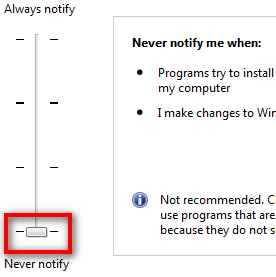
UAC = User Account Control.
It is evil.
Disable it. Here are the steps from Microsoft:
http://windows.microsoft.com/en-US/windows-vista/Turn-User-Account-Control-on-or-off
Travis Nave
Need help in your post? Mention me with @TravisNave HOT: Named User FAQ | 2025 Download Links | Invalid Serial Number | LiteHTML.DLL error | Reset Autodesk 2020-24 Licensing
My Expert Contributions to the
FLEXnet License Admin | MSI Cleanup Utility | .NET Framework Cleanup Tool | IPv6 NLM Fix | adskflex.opt Options File | Combine .LIC Files
Disk Space | Quickstart Guide for LMTOOLS | Edit setup.ini for 1603 Installation Failure | 1603 Error installing /w Updates | Disable Optimus
Understanding Failures in the Installation .log File | Server Status from Client | Autodesk 2024 System Requirements Fix | Reuse USB Stick
⤽ If my post was helpful, please give Likes and/or mark the Accept as Solution button(s) below. Thank you! ⤵
Message 13 of 13


04-28-2013
11:56 AM
- Mark as New
- Bookmark
- Subscribe
- Mute
- Subscribe to RSS Feed
- Permalink
- Report
04-28-2013
11:56 AM
I am getting sick of these suites not working right.
What is @#@$@$ use of rolling back EVERYTHING if one part fails?
First I need to remove all other installed Autodeks software! What the heck? Why? I have licenses for them and have them fully configured!!!!!!
Then you need to run all kind of tools, do registry hackings to get a clean system....
Then you install the suite... get to 50-60 percent in an hour then all roll back because it cant find something, ending with a idiotic message "Installation complete" "Some parts are not installed"
What? Nothing is installed!!! What was installed has been rolled back!!!!!

Reply
Topic Options
- Subscribe to RSS Feed
- Mark Topic as New
- Mark Topic as Read
- Float this Topic for Current User
- Bookmark
- Subscribe
- Printer Friendly Page


