Community
- Forums Home
- >
- Subscription, Installation and Licensing Community
- >
- Installation & Licensing forum
- >
- Re: AutoCad 2012 display problem
Installation & Licensing
Welcome to Autodesk’s Installation and Licensing Forums. Share your knowledge, ask questions, and explore popular Download, Installation, and Licensing topics.
Turn on suggestions
Auto-suggest helps you quickly narrow down your search results by suggesting possible matches as you type.
 This page has been translated for your convenience with an automatic translation service. This is not an official translation and may contain errors and inaccurate translations. Autodesk does not warrant, either expressly or implied, the accuracy, reliability or completeness of the information translated by the machine translation service and will not be liable for damages or losses caused by the trust placed in the translation service.
Translate
This page has been translated for your convenience with an automatic translation service. This is not an official translation and may contain errors and inaccurate translations. Autodesk does not warrant, either expressly or implied, the accuracy, reliability or completeness of the information translated by the machine translation service and will not be liable for damages or losses caused by the trust placed in the translation service.
Translate
AutoCad 2012 display problem
10 REPLIES 10
Reply
Topic Options
- Subscribe to RSS Feed
- Mark Topic as New
- Mark Topic as Read
- Float this Topic for Current User
- Bookmark
- Subscribe
- Printer Friendly Page
Message 1 of 11

Anonymous
993 Views, 10 Replies
10-18-2012
07:28 PM
- Mark as New
- Bookmark
- Subscribe
- Mute
- Subscribe to RSS Feed
- Permalink
- Report
10-18-2012
07:28 PM
AutoCad 2012 display problem
Dear All
We have a problem from AutoCad 2012(64bit version)
We right reference file, open new file and open laybox.
The lay baybox show black serneen.
We have many user have this issue.
We using windows 7 64 bit pro
We try to upgrade display card driver to latest version. But still have problem.
And black scrneen only from AutoCad.
Other software is working.
We confirm this is AutoCad problem
Anyone have idea?
Below is the error for your information
Thank you
Ming
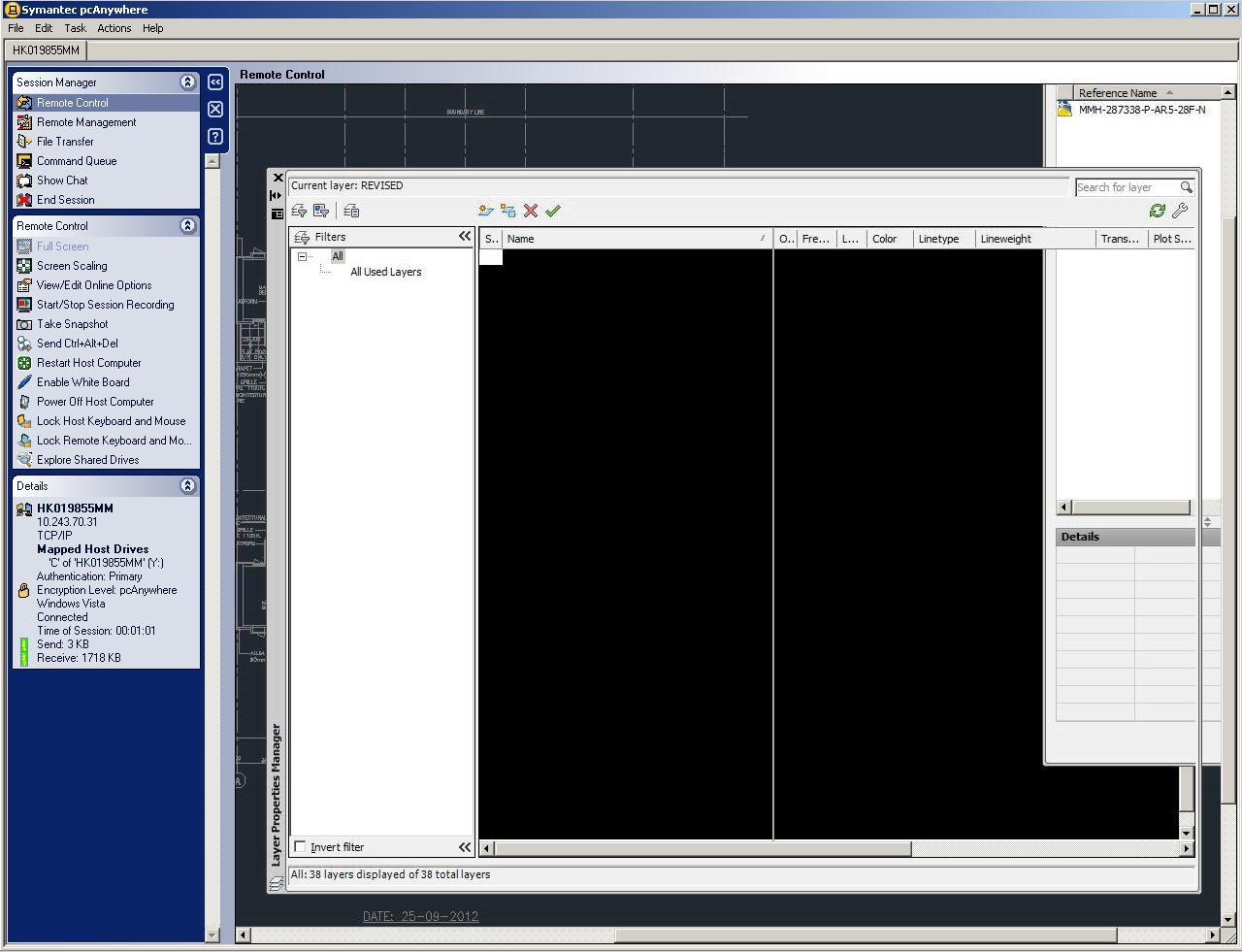
This is AutoCad 2012 version

10 REPLIES 10
Message 2 of 11


10-19-2012
08:02 AM
- Mark as New
- Bookmark
- Subscribe
- Mute
- Subscribe to RSS Feed
- Permalink
- Report
10-19-2012
08:02 AM
What is your video card and driver?
Travis Nave
 Need help in your post? Mention me with @TravisNave
HOT: Named User FAQ | 2025 Download Links | Invalid Serial Number | LiteHTML.DLL error | Reset Autodesk 2020-24 Licensing
My Expert Contributions to the
FLEXnet License Admin | MSI Cleanup Utility | .NET Framework Cleanup Tool | IPv6 NLM Fix | adskflex.opt Options File | Combine .LIC Files
Disk Space | Quickstart Guide for LMTOOLS | Edit setup.ini for 1603 Installation Failure | 1603 Error installing /w Updates | Disable Optimus
Understanding Failures in the Installation .log File | Server Status from Client | Autodesk 2024 System Requirements Fix | Reuse USB Stick
⤽ If my post was helpful, please give Likes and/or mark the Accept as Solution button(s) below. Thank you! ⤵
Message 3 of 11
10-21-2012
09:14 PM
- Mark as New
- Bookmark
- Subscribe
- Mute
- Subscribe to RSS Feed
- Permalink
- Report
10-21-2012
09:14 PM
Hello,
We using NVIDIA Quadro 4000 display card.
And using from nvidia driver.
This is the link for your information
Link: http://www.nvidia.com/object/quadro-tesla-win8-win7-winvista-64bit-306.79-whql-driver.html
Thank you
Ming
Message 4 of 11


10-21-2012
11:37 PM
- Mark as New
- Bookmark
- Subscribe
- Mute
- Subscribe to RSS Feed
- Permalink
- Report
10-21-2012
11:37 PM
Have you tried to turn on Hardware accelerator?
Please check up the Adaptive degralatation and check the graphics card update manually from software.


Yong Jing
Product Support Senior Specialist
Technical Support, CSS, GPS
If my post answers your question, please click the "Accept as Solution" button. This helps everyone find answers more quickly!
如果我的回帖解决了您的问题,请点击 "接受为解决方案" 按钮. 这可以帮助其他人更快的找到解决方案!
Message 6 of 11
10-25-2012
08:32 PM
- Mark as New
- Bookmark
- Subscribe
- Mute
- Subscribe to RSS Feed
- Permalink
- Report
10-25-2012
08:32 PM
Is there possible to provide your system infomation *.nfo file to us?
Yong Jing
Product Support Senior Specialist
Technical Support, CSS, GPS
If my post answers your question, please click the "Accept as Solution" button. This helps everyone find answers more quickly!
如果我的回帖解决了您的问题,请点击 "接受为解决方案" 按钮. 这可以帮助其他人更快的找到解决方案!
Message 8 of 11
10-25-2012
09:22 PM
- Mark as New
- Bookmark
- Subscribe
- Mute
- Subscribe to RSS Feed
- Permalink
- Report
10-25-2012
09:22 PM
In Windows Run, input msinfo32,exe, then click it to open System Infomation.
In System Infomation dialogbox, click File >Save, then save the *.nfo files
Yong Jing
Product Support Senior Specialist
Technical Support, CSS, GPS
If my post answers your question, please click the "Accept as Solution" button. This helps everyone find answers more quickly!
如果我的回帖解决了您的问题,请点击 "接受为解决方案" 按钮. 这可以帮助其他人更快的找到解决方案!
Message 11 of 11
11-23-2012
01:20 AM
- Mark as New
- Bookmark
- Subscribe
- Mute
- Subscribe to RSS Feed
- Permalink
- Report
11-23-2012
01:20 AM
I have not found any special settings from the system infomation. As I could not reproduce your issue at site, I am unable to provide constructive suggestions.
Could you wait others provide you resolution or suggestion?
Yong Jing
Product Support Senior Specialist
Technical Support, CSS, GPS
If my post answers your question, please click the "Accept as Solution" button. This helps everyone find answers more quickly!
如果我的回帖解决了您的问题,请点击 "接受为解决方案" 按钮. 这可以帮助其他人更快的找到解决方案!
Reply
Topic Options
- Subscribe to RSS Feed
- Mark Topic as New
- Mark Topic as Read
- Float this Topic for Current User
- Bookmark
- Subscribe
- Printer Friendly Page

