Community
- Forums Home
- >
- Subscription, Installation and Licensing Community
- >
- Installation & Licensing forum
- >
- Re: AutoCAD MEP 2012 - Service Pack 1 installation errors
Installation & Licensing
Welcome to Autodesk’s Installation and Licensing Forums. Share your knowledge, ask questions, and explore popular Download, Installation, and Licensing topics.
Turn on suggestions
Auto-suggest helps you quickly narrow down your search results by suggesting possible matches as you type.
 This page has been translated for your convenience with an automatic translation service. This is not an official translation and may contain errors and inaccurate translations. Autodesk does not warrant, either expressly or implied, the accuracy, reliability or completeness of the information translated by the machine translation service and will not be liable for damages or losses caused by the trust placed in the translation service.
Translate
This page has been translated for your convenience with an automatic translation service. This is not an official translation and may contain errors and inaccurate translations. Autodesk does not warrant, either expressly or implied, the accuracy, reliability or completeness of the information translated by the machine translation service and will not be liable for damages or losses caused by the trust placed in the translation service.
Translate
AutoCAD MEP 2012 - Service Pack 1 installation errors
17 REPLIES 17
SOLVED
Reply
Topic Options
- Subscribe to RSS Feed
- Mark Topic as New
- Mark Topic as Read
- Float this Topic for Current User
- Bookmark
- Subscribe
- Printer Friendly Page
Message 1 of 18


10-10-2011
07:44 AM
- Mark as New
- Bookmark
- Subscribe
- Mute
- Subscribe to RSS Feed
- Permalink
- Report
10-10-2011
07:44 AM
All,
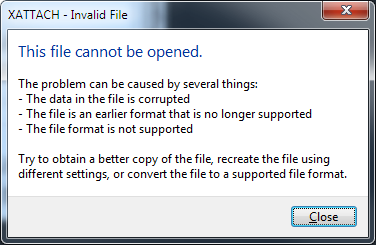
We have been trying to update MEP 2012 with SP1 but have come across some errors in the process. These are 2 of the errors that I have gotten:

I have tried to "retry" with no luck. I can "ignore" the errors and the installation continues and finishes "successfully". As a result of that "successful" installation all of the reference commands no longer seem to work. I.e. attach/detach DWG/Image/PDF/DWF etc. I can attach a DWG if I use the classic xref dialog though.
Any ideas on how I should proceed? I have cleared the folder that is referenced in the error message and tried to install but got the same message with different file names. We are running 64bit on Windows 7.
Thanks for any help
Matthew Corbin
Solved! Go to Solution.
Solved by VinodBalasubramanian. Go to Solution.
Solved by corcad. Go to Solution.
17 REPLIES 17
Message 2 of 18


10-11-2011
06:57 PM
- Mark as New
- Bookmark
- Subscribe
- Mute
- Subscribe to RSS Feed
- Permalink
- Report
10-11-2011
06:57 PM
Hi,
Error 1328 occurs when the service pack installer encounters a file different from what it expected.
Go to Start -> Run -> type %TEMP%. This will help you to access the temp folder. Clear all the contents in the folder. Some of the contents may be in use and will remain undeleted. Don't worry about them and try reinstalling the service pack.
Please also check whether you have downloaded the right service pack for the product and based on whether your machine is 32 bit or a 64 bit one.
You could also try installing the service pack in windows diagnostic mode. Solution below will guide you through,
http://usa.autodesk.com/adsk/servlet/ps/dl/item?siteID=123112&id=2893432&linkID=9240617
If this error only occurs in certain machine but not reproducible in other machines, then the possible cause is that the file is modified by users after it is installed.
In this case, the corresponding resolution is to get the original file back by repairing/reinstalling the product.
Hope it helps. Let me know, if the problem persists.
______________________________________________________________
If my post answers your question, please click the "Accept as Solution" button. This helps everyone find answers more quickly!

Vinod Balasubramanian
AutoCAD Industry Support & Escalation Lead
Message 3 of 18

10-18-2011
03:04 PM
- Mark as New
- Bookmark
- Subscribe
- Mute
- Subscribe to RSS Feed
- Permalink
- Report
10-18-2011
03:04 PM
This also occurs if you've installed the 2012 hot fixes. Restore the files you renamed and install the update. Mark Martinez DC CADD
Mark Martinez
ASTI
ASTI
Message 4 of 18
10-18-2011
04:02 PM
- Mark as New
- Bookmark
- Subscribe
- Mute
- Subscribe to RSS Feed
- Permalink
- Report
10-18-2011
04:02 PM
Thanks for the ideas. Im sorry it has taken me so long to reply. The post was moved by admin and I haven't received any email notifications for some reason.
- I cleared out %TEMP% (19gb, thank you very much) and tried to reinstall. I was once again given the same error messages. After a couple of tries I "ignored" the error and let the installation finish. Now, I actually get an error message when trying to attach a reference.
- I have double-checked the installation file. I am using the 64-bit file.
- I have restored the original files (acbol.dll and acmgd.dll) that were changed from previous hotfixes.
- This issue is identical on all machines running MEP 2012 in my office.
- I have reinstalled the software, I have repaired and uninstalled and reinstalled and thie issue only occurs after the SP1 is installed.
- Uninstalling the Service Pack corrects the issue, but I would love to use service pack.
I will try installing in Diagnostics mode tomorrow morning, but I wanted to give you both an update.
Thanks
Message 5 of 18
10-19-2011
06:12 AM
- Mark as New
- Bookmark
- Subscribe
- Mute
- Subscribe to RSS Feed
- Permalink
- Report
10-19-2011
06:12 AM
If you installed the performance and the block editor hot fixes there would have been 3 files to restore:
AcAuthEnviron.arx
acbol.dll
Acmgd.dll
Mark Martinez
DC CADD
Mark Martinez
ASTI
ASTI
Message 6 of 18
10-19-2011
08:15 AM
- Mark as New
- Bookmark
- Subscribe
- Mute
- Subscribe to RSS Feed
- Permalink
- Report
Message 7 of 18

10-24-2011
01:58 AM
- Mark as New
- Bookmark
- Subscribe
- Mute
- Subscribe to RSS Feed
- Permalink
- Report
10-24-2011
01:58 AM
We have the same problem here. AutoCAD MEP is installed as part of the Building Design Suite Premium on Windows 7 64-bit. I have a log from the failed update if that will help solving the problem.
The same sp1 works without a problem on a AutoCAD MEP which is installed as part of the Revit MEP suite, also on a Windows 7 64-bit.
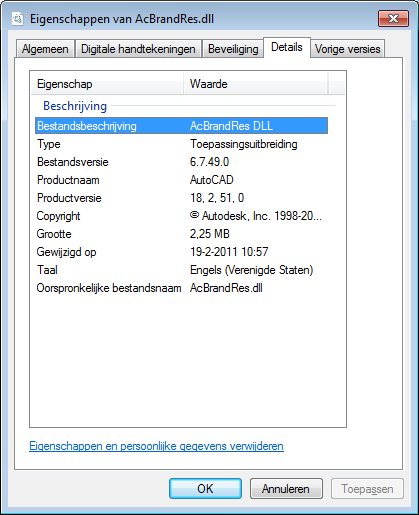
I noticed a date difference in one particular file, acBrandRes.dll. Perhaps there are more differences, I didn't checked them all. I attached screenshots from the files, maybe this helps.
Message 8 of 18


10-26-2011
04:24 PM
- Mark as New
- Bookmark
- Subscribe
- Mute
- Subscribe to RSS Feed
- Permalink
- Report
10-26-2011
04:24 PM
We are reciving the same errors on a brand new deployment based install of BDS Ultimate 2012 for the SP installation to both Autocad Arch 2012 and Autocad MEP 2012. It silently fails during the big BDS installation, leaving the application without the corresponding SP.
However manually running the SP (seperatly downloaded from the web) results in the same Error 1328. I have cleared out the temp folder, uninstalled AV, turned off UAC, stood on my head, and attempted the exact same thing from 5 brand new Win 7 64 workstations all from the same installation source. The installation source was created from freshly downloaded RARs from the subscription site as well.
I have attempted to modify the deployment and told it to redownload the SP as well with no difference.
Message 9 of 18
10-28-2011
10:38 AM
- Mark as New
- Bookmark
- Subscribe
- Mute
- Subscribe to RSS Feed
- Permalink
- Report
10-28-2011
10:38 AM
All,
Just to give you an update on where I am at with this issue. I have tried various things. Most install uninstalling and reinstalling etc. So far the only thing that has worked for me is to reinstall using the DVD's rather than the network deployment we created. It looks like the issue is with the deployment. I am not positive yet but once I am I will mark this solved. I still want to make sure everything is working properly and the rest of my team is up and running before I make the final determination.
Matthew Corbin
Message 10 of 18
11-08-2011
12:31 AM
- Mark as New
- Bookmark
- Subscribe
- Mute
- Subscribe to RSS Feed
- Permalink
- Report
11-08-2011
12:31 AM
Today I've received the following e-mail from Autodesk: Dear AutoCAD® MEP 2012 Customer: Autodesk has analyzed the error report you recently submitted. Errors similar to the one listed below have been resolved and are included in this maintenance update. We recommend that you install this maintenance update to update your product, or contact your system administrator. The error report is 3 months old but that's not an issue here. We can't install the service pack since MEP is installed as part of the Building Design Suite. Any help from Autodesk would be appreciated.
Message 11 of 18
11-08-2011
12:46 AM
- Mark as New
- Bookmark
- Subscribe
- Mute
- Subscribe to RSS Feed
- Permalink
- Report
11-08-2011
12:46 AM
Hi,
After recreating the deployment again, Corcad (Owner of this forum thread) could able to install the software successfully.
If i understand you correctly, you are facing a similar error and you have already received a Maintenance update from Autodesk, can you please share with me on which Update link has been sent to you. I presume its SP1 for 2012. Also provide me the email address you have used while submitting the crash report, this would help me to understand your problem better.
______________________________________________________________
If my post answers your question, please click the "Accept as Solution" button. This helps everyone find answers more quickly!
Vinod Balasubramanian
AutoCAD Industry Support & Escalation Lead
Message 12 of 18
11-09-2011
04:50 AM
- Mark as New
- Bookmark
- Subscribe
- Mute
- Subscribe to RSS Feed
- Permalink
- Report
11-09-2011
04:50 AM
The error with SP1 for AutoCAD MEP occurs on the computers which have AutoCAD MEP installed as part of the Building Design Suite. I have AutoCAD MEP as part of the Revit MEP Suite and SP1 installed without a problem. The mail was more a reminder that my colleagues still can't install SP1. We did not make a deployment for the Building Design Suite so that shouldn't be a problem. The link that's in the mail is not working: http://cerapp.autodesk.com/linker?rep=tFFVVTB^&language=1033<ypeid=4&durl=[http%3A%2F%2Fupdatesdl.autodesk.com%2Fupdates%2Ffiles%2Fmep2012sp1x64.exe]
Message 13 of 18

11-10-2011
07:17 AM
- Mark as New
- Bookmark
- Subscribe
- Mute
- Subscribe to RSS Feed
- Permalink
- Report
11-10-2011
07:17 AM
Solution:
A look in the verbose installer log file shows that AcBrandRes.dll is the ONLY reason why the error happens. Service Pack 1 expects to find the non-suite version of that file. Since that file only contains the SPLASH SCREEN graphic (which is different for the BDS suite) you can safely hit IGNORE for that error.
Otherwise you could steal a copy of that DLL from the NON-SUITE install of AutoCAD MEP and drop it in the program files folder before you apply the service pack. (the free downloadable trial version would work)
Chris
Message 14 of 18
11-15-2011
07:51 AM
- Mark as New
- Bookmark
- Subscribe
- Mute
- Subscribe to RSS Feed
- Permalink
- Report
11-15-2011
07:51 AM
Thanks Chris, your solution worked! I've copied the AcBrandRes.dll from another installation and the service pack installed without any problem. I would appreciate it if Autodesk helped other people with this problem, they don't mention it on the website for example.
Message 15 of 18


11-15-2011
02:26 PM
- Mark as New
- Bookmark
- Subscribe
- Mute
- Subscribe to RSS Feed
- Permalink
- Report
11-15-2011
02:26 PM
So, I have tried everything on the list including uninstalling and re-installing Inventor Pro 2012 to get SP1 to load. I am having crashing issues with the base software. I keep getting the error 1328 during the install. I have replaced the dll file as directed.
Please, for the love of god, tell me what I have to do to fix this. Since the Vault 2012 install has migrated the files over, I am out of options.
I am running a Dell Precision T3500 with Windows 7 pro 64 bit. I have 16 gigs of ram.
Tom D.
Inventor 2012 Pro
Vault 2012
Dell Precision T3500
Nvidia Quadro FX1800
Windows 7/64 bit w/ sp1
Message 16 of 18
11-15-2011
06:57 PM
- Mark as New
- Bookmark
- Subscribe
- Mute
- Subscribe to RSS Feed
- Permalink
- Report
11-15-2011
06:57 PM
Can you please let me know the email address that you have used to submit these crash reports from Inventor. This would help us to investigate further.
Vinod Balasubramanian
AutoCAD Industry Support & Escalation Lead
Message 17 of 18
11-15-2011
07:00 PM
- Mark as New
- Bookmark
- Subscribe
- Mute
- Subscribe to RSS Feed
- Permalink
- Report
11-15-2011
07:00 PM
Can we get an official answer from someone at AutoDesk on this.. and the plan for moving forward. We have 35+ machines with the full BDS suite deployed.. I'd like to have it done correctly the first time instead of having to touch or potentially reinstall a quantity of them again.
Message 18 of 18
11-16-2011
06:21 AM
- Mark as New
- Bookmark
- Subscribe
- Mute
- Subscribe to RSS Feed
- Permalink
- Report

Reply
Topic Options
- Subscribe to RSS Feed
- Mark Topic as New
- Mark Topic as Read
- Float this Topic for Current User
- Bookmark
- Subscribe
- Printer Friendly Page