Community
- Forums Home
- >
- Subscription, Installation and Licensing Community
- >
- Installation & Licensing forum
- >
- Re: 3ds Max 2011 "Software License Checkout Failed Error 20"
Installation & Licensing
Welcome to Autodesk’s Installation and Licensing Forums. Share your knowledge, ask questions, and explore popular Download, Installation, and Licensing topics.
Turn on suggestions
Auto-suggest helps you quickly narrow down your search results by suggesting possible matches as you type.
 This page has been translated for your convenience with an automatic translation service. This is not an official translation and may contain errors and inaccurate translations. Autodesk does not warrant, either expressly or implied, the accuracy, reliability or completeness of the information translated by the machine translation service and will not be liable for damages or losses caused by the trust placed in the translation service.
Translate
This page has been translated for your convenience with an automatic translation service. This is not an official translation and may contain errors and inaccurate translations. Autodesk does not warrant, either expressly or implied, the accuracy, reliability or completeness of the information translated by the machine translation service and will not be liable for damages or losses caused by the trust placed in the translation service.
Translate
3ds Max 2011 "Software License Checkout Failed Error 20"
23 REPLIES 23
Reply
Topic Options
- Subscribe to RSS Feed
- Mark Topic as New
- Mark Topic as Read
- Float this Topic for Current User
- Bookmark
- Subscribe
- Printer Friendly Page
Message 1 of 24

Anonymous
72876 Views, 23 Replies
09-20-2010
01:03 PM
- Mark as New
- Bookmark
- Subscribe
- Mute
- Subscribe to RSS Feed
- Permalink
- Report
09-20-2010
01:03 PM
3ds Max 2011 "Software License Checkout Failed Error 20"
I just upgraded to Windows 7 and I've been trying to re-install Autodesk 3ds Max 2011 (32-bit). Everytime I install the program first of all the icon in the Start menu that is supposed to say "Autodesk 3ds Max 2011" (or something along those lines) says "Change Graphical Settings" instead.
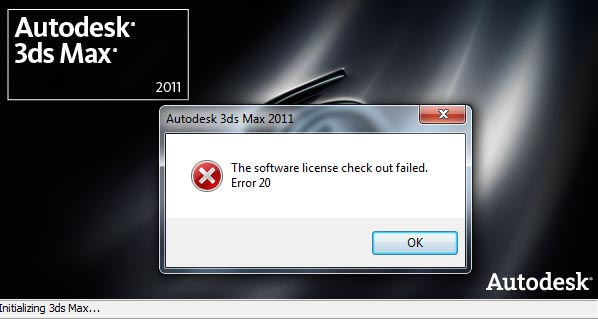
Not only that, but when I try to open the program in any way the loading screen will start going then a few moments into the loading process a window wil pop up saying "Software License Checkout Failed: Error 20", then the program just quits on me.
I've tried uninstalling the program completely and reinstalling it but nothing seems to be working for me.
If anyone can help me get this program working properly I will be eternally grateful because I really need this program in order to do my work.
23 REPLIES 23
Message 2 of 24


09-20-2010
01:24 PM
- Mark as New
- Bookmark
- Subscribe
- Mute
- Subscribe to RSS Feed
- Permalink
- Report
09-20-2010
01:24 PM
Uninstall the software and also delete the ProductInformation.pit and CascadeInfo.cas files located at C:\ProgramData\Autodesk\Adlm. Then reboot and reinstall the software with admin rights or by Run as Administrator. Hopefully that will clear your license error.
Travis Nave
 Need help in your post? Mention me with @TravisNave
HOT: Named User FAQ | 2025 Download Links | Invalid Serial Number | LiteHTML.DLL error | Reset Autodesk 2020-24 Licensing
My Expert Contributions to the
FLEXnet License Admin | MSI Cleanup Utility | .NET Framework Cleanup Tool | IPv6 NLM Fix | adskflex.opt Options File | Combine .LIC Files
Disk Space | Quickstart Guide for LMTOOLS | Edit setup.ini for 1603 Installation Failure | 1603 Error installing /w Updates | Disable Optimus
Understanding Failures in the Installation .log File | Server Status from Client | Autodesk 2024 System Requirements Fix | Reuse USB Stick
⤽ If my post was helpful, please give Likes and/or mark the Accept as Solution button(s) below. Thank you! ⤵
Message 3 of 24
Anonymous
in reply to:
Anonymous
02-22-2011
10:06 AM
- Mark as New
- Bookmark
- Subscribe
- Mute
- Subscribe to RSS Feed
- Permalink
- Report
02-22-2011
10:06 AM
Same problem... don't know what else to do?
can u please exactly tell where the location of this file might be?
I've tried searching everywhere on my computer regarding what you said!
previously I uninstalled n reinstalled it worked for me.. but all of a sudden now it says the same error message??
Message 4 of 24
02-22-2011
11:19 AM
- Mark as New
- Bookmark
- Subscribe
- Mute
- Subscribe to RSS Feed
- Permalink
- Report
02-22-2011
11:19 AM
For more detailed information about the CascadeInfo.cas file, please refer to the Autodesk Support Knowledge Base article found here:
http://usa.autodesk.com/adsk/servlet/ps/dl/item?linkID=9240617&id=13894457&siteID=123112
Travis Nave
Need help in your post? Mention me with @TravisNave HOT: Named User FAQ | 2025 Download Links | Invalid Serial Number | LiteHTML.DLL error | Reset Autodesk 2020-24 Licensing
My Expert Contributions to the
FLEXnet License Admin | MSI Cleanup Utility | .NET Framework Cleanup Tool | IPv6 NLM Fix | adskflex.opt Options File | Combine .LIC Files
Disk Space | Quickstart Guide for LMTOOLS | Edit setup.ini for 1603 Installation Failure | 1603 Error installing /w Updates | Disable Optimus
Understanding Failures in the Installation .log File | Server Status from Client | Autodesk 2024 System Requirements Fix | Reuse USB Stick
⤽ If my post was helpful, please give Likes and/or mark the Accept as Solution button(s) below. Thank you! ⤵
Message 5 of 24


02-25-2011
12:30 AM
- Mark as New
- Bookmark
- Subscribe
- Mute
- Subscribe to RSS Feed
- Permalink
- Report
02-25-2011
12:30 AM
I had the same problem, only my solution was that is disabled the service "FLEXnet Licensing Service".
If you don't know where to find it you did turn if off.
Message 6 of 24
03-02-2011
12:39 PM
- Mark as New
- Bookmark
- Subscribe
- Mute
- Subscribe to RSS Feed
- Permalink
- Report
03-02-2011
12:39 PM
oufffffffffffffffff thnks i have the same prb and i had delete flex net end it's all right think u you save my liveeeeeeee 😉
Message 7 of 24


11-22-2011
02:15 AM
- Mark as New
- Bookmark
- Subscribe
- Mute
- Subscribe to RSS Feed
- Permalink
- Report
11-22-2011
02:15 AM
Hi,
I don't understand, why is it showing the following error message, " The software license check out failed; error 20" (attached image). I tried different ways, by deleting autodesk files, FLEXnet files, uninstall-install 5 times. But not way it does work. It shows repeatedly. Would you please give me any solutions to this problem?
Regards
Aasif Ridwan
Message 8 of 24

12-15-2011
11:17 PM
- Mark as New
- Bookmark
- Subscribe
- Mute
- Subscribe to RSS Feed
- Permalink
- Report
12-15-2011
11:17 PM
Check out the services running in Windows by entering the task manager and start the FLEXnet Licensing Service (64 in case you have 3ds max x64) and it will solve the problem.
I had the same issue and by starting that service 3ds max works again!
Message 9 of 24
Anonymous
in reply to:
Anonymous
12-26-2011
07:39 PM
- Mark as New
- Bookmark
- Subscribe
- Mute
- Subscribe to RSS Feed
- Permalink
- Report
12-26-2011
07:39 PM
Since you are using windows for a long time, why did you upgrade? why don't use a fresh windows copy? upgrades are like system restore. can occure problem any time. fine similler problem here http://www.techyv.com/questions/installation-3ds-max-2012-and-bat4max
Message 10 of 24
01-19-2012
05:14 PM
- Mark as New
- Bookmark
- Subscribe
- Mute
- Subscribe to RSS Feed
- Permalink
- Report
01-19-2012
05:14 PM
Gracias por la ayuda, busque sobre el tema relacionado y encontre que no es solo problema de AUTODESK el problema tambien se puede presentar en ADOBE y es precisamente porque FLEXnet Lincensing Service esta desactivado. Lo que tienen que hacer es:
1. Inicio -> Ejecutar, escribir services.msc y pulsar Enter.
2. Navegar hasta FLEXnet Licensing Service y habilitar el proceso.
3. Reniciar (a mi me funciono sin reiniciar).
Message 11 of 24
Anonymous
in reply to:
Anonymous
02-22-2012
05:28 PM
- Mark as New
- Bookmark
- Subscribe
- Mute
- Subscribe to RSS Feed
- Permalink
- Report
02-22-2012
05:28 PM
I've tried messing around with the FLEXnet garbage and I can't seem to rid of this "error 20" that keeps popping up. I've tried with FLEXnet enabled, and I've tried with it disabled, either way I still get the error. *Also I no longer have my product code to reinstall max since I'm stupid, so is there a way I can fix this without having to purchase a 2nd copy?*
-.-
Message 12 of 24
02-24-2012
07:09 AM
- Mark as New
- Bookmark
- Subscribe
- Mute
- Subscribe to RSS Feed
- Permalink
- Report
02-24-2012
07:09 AM
Make sure you give Everyone full rights to the following folders/files:
C:\ProgramData\FLEXnet\adskflex_*.data
C:\ProgramData\FLEXnet\adskflex_*.data.backup
Travis Nave
Need help in your post? Mention me with @TravisNave HOT: Named User FAQ | 2025 Download Links | Invalid Serial Number | LiteHTML.DLL error | Reset Autodesk 2020-24 Licensing
My Expert Contributions to the
FLEXnet License Admin | MSI Cleanup Utility | .NET Framework Cleanup Tool | IPv6 NLM Fix | adskflex.opt Options File | Combine .LIC Files
Disk Space | Quickstart Guide for LMTOOLS | Edit setup.ini for 1603 Installation Failure | 1603 Error installing /w Updates | Disable Optimus
Understanding Failures in the Installation .log File | Server Status from Client | Autodesk 2024 System Requirements Fix | Reuse USB Stick
⤽ If my post was helpful, please give Likes and/or mark the Accept as Solution button(s) below. Thank you! ⤵

Message 14 of 24
Anonymous
in reply to:
Anonymous
07-29-2012
10:26 AM
- Mark as New
- Bookmark
- Subscribe
- Mute
- Subscribe to RSS Feed
- Permalink
- Report
07-29-2012
10:26 AM
I got this error after I tried to install the Adobe CS4 demo, it puts a file in that flex directory which must confuse
3ds max. Never got the demo running either.
Message 15 of 24
Anonymous
in reply to:
Anonymous
08-29-2012
08:02 PM
- Mark as New
- Bookmark
- Subscribe
- Mute
- Subscribe to RSS Feed
- Permalink
- Report
08-29-2012
08:02 PM
Help me, after all install be ok, when i got to run the program, i receive this message 
Message 17 of 24
09-05-2012
11:12 AM
- Mark as New
- Bookmark
- Subscribe
- Mute
- Subscribe to RSS Feed
- Permalink
- Report
09-05-2012
11:12 AM
Start here:
http://usa.autodesk.com/adsk/servlet/ps/dl/item?siteID=123112&id=15907945&linkID=9242258
For additional information, please consider using Search to assist in your resolution:
Search Autodesk.com
Search Autodesk Discussion Groups
Search Up and Ready Blog
Search Autodesk WikiHelp
Travis Nave
Need help in your post? Mention me with @TravisNave HOT: Named User FAQ | 2025 Download Links | Invalid Serial Number | LiteHTML.DLL error | Reset Autodesk 2020-24 Licensing
My Expert Contributions to the
FLEXnet License Admin | MSI Cleanup Utility | .NET Framework Cleanup Tool | IPv6 NLM Fix | adskflex.opt Options File | Combine .LIC Files
Disk Space | Quickstart Guide for LMTOOLS | Edit setup.ini for 1603 Installation Failure | 1603 Error installing /w Updates | Disable Optimus
Understanding Failures in the Installation .log File | Server Status from Client | Autodesk 2024 System Requirements Fix | Reuse USB Stick
⤽ If my post was helpful, please give Likes and/or mark the Accept as Solution button(s) below. Thank you! ⤵
Message 18 of 24

09-11-2012
12:16 AM
- Mark as New
- Bookmark
- Subscribe
- Mute
- Subscribe to RSS Feed
- Permalink
- Report
09-11-2012
12:16 AM
Hi,
Thanks for the solution.
It worked for me in 3ds Max 2012. The Flexnet license services were stopped permanently. I just restarted & assigned to Start automatically.
Thus its working fine now !
Thanks !!
Message 20 of 24

10-08-2013
01:15 PM
- Mark as New
- Bookmark
- Subscribe
- Mute
- Subscribe to RSS Feed
- Permalink
- Report
10-08-2013
01:15 PM
I did the same as _AKS_ just said, simply deleting both C:\ProgramData\FLEXnet\adskflex_00691b00_tsf.data and C:\ProgramData\FLEXnet\adskflex_00691b00_tsf.data_backup.001 and reloading 3ds Max, then when it loads it recreates the files and the server, this was for 3DS Max 2012 though
Reply
Topic Options
- Subscribe to RSS Feed
- Mark Topic as New
- Mark Topic as Read
- Float this Topic for Current User
- Bookmark
- Subscribe
- Printer Friendly Page