Community
Dynamic Blocks Forum
Turn on suggestions
Auto-suggest helps you quickly narrow down your search results by suggesting possible matches as you type.
 This page has been translated for your convenience with an automatic translation service. This is not an official translation and may contain errors and inaccurate translations. Autodesk does not warrant, either expressly or implied, the accuracy, reliability or completeness of the information translated by the machine translation service and will not be liable for damages or losses caused by the trust placed in the translation service.
Translate
This page has been translated for your convenience with an automatic translation service. This is not an official translation and may contain errors and inaccurate translations. Autodesk does not warrant, either expressly or implied, the accuracy, reliability or completeness of the information translated by the machine translation service and will not be liable for damages or losses caused by the trust placed in the translation service.
Translate
Reply
Topic Options
- Subscribe to RSS Feed
- Mark Topic as New
- Mark Topic as Read
- Float this Topic for Current User
- Bookmark
- Subscribe
- Printer Friendly Page
Message 1 of 213

Anonymous
22181 Views, 212 Replies
07-10-2009
09:33 AM
- Mark as New
- Bookmark
- Subscribe
- Mute
- Subscribe to RSS Feed
- Permalink
- Report
07-10-2009
09:33 AM
Ok, the instructions aren't the clearest, however, when you get the hang of
it you'll love it. Try to make my valve (attached) without using this lisp
routine, you'll spend 10X longer.
Here are the steps I figured out:
------------------------------------------------------------------------------
Elements:
Lines, arcs, splines, attributes, text, etc.
1) Place all the elements. The location doesn't matter at first, so make
them easy to select by not stacking things on top of each other.
2) Add all the parameters/actions you want - DO NOT add any visibility
states or lookups yet. Make sure your actions affect the things you want,
and don't affect the things you don't want them to.
3) Load visibility-add-eng.lsp.
4) Add a visibility parameter using (visibility_add). Rename the parameter
accordingly.
5) Set this new visibility parameter active using (visibility-up). There is
a little problem with the program here. When you have one visibility
parameter active and you set a new one active, it gets hung up. Use the
visibility state pulldown and select a state. Note the command line will
ask you for a visibility state. Type ? to see those available, then type in
any name you want.
6) Add the states to the list of visibilities - DO NOT change the visibility
of anything yet.
7) Using (element-sel-current-del) select all the elements you do not want
to be affected when you change this particular visibility state.
For example: If I'm working on the "actuator" visibility states, I don't
want my valve type to change if a person wants to use a different actuator,
therefore, I will select every element that is not an actuator.
8) Now you can make elements visible or invisible in the states you've
defined. Do not bother changing the visibility of the elements you've
removed.
NOTE: if you draw a new object or copy something, it will not be removed
from any visibility sets.
9) Repeat steps 4 thru 8.
-----------------------------------------------------------------------
I did not list all the functions in this routine. Many I don't even know
how to use yet, or why.
Todd
it you'll love it. Try to make my valve (attached) without using this lisp
routine, you'll spend 10X longer.
Here are the steps I figured out:
------------------------------------------------------------------------------
Elements:
Lines, arcs, splines, attributes, text, etc.
1) Place all the elements. The location doesn't matter at first, so make
them easy to select by not stacking things on top of each other.
2) Add all the parameters/actions you want - DO NOT add any visibility
states or lookups yet. Make sure your actions affect the things you want,
and don't affect the things you don't want them to.
3) Load visibility-add-eng.lsp.
4) Add a visibility parameter using (visibility_add). Rename the parameter
accordingly.
5) Set this new visibility parameter active using (visibility-up). There is
a little problem with the program here. When you have one visibility
parameter active and you set a new one active, it gets hung up. Use the
visibility state pulldown and select a state. Note the command line will
ask you for a visibility state. Type ? to see those available, then type in
any name you want.
6) Add the states to the list of visibilities - DO NOT change the visibility
of anything yet.
7) Using (element-sel-current-del) select all the elements you do not want
to be affected when you change this particular visibility state.
For example: If I'm working on the "actuator" visibility states, I don't
want my valve type to change if a person wants to use a different actuator,
therefore, I will select every element that is not an actuator.
8) Now you can make elements visible or invisible in the states you've
defined. Do not bother changing the visibility of the elements you've
removed.
NOTE: if you draw a new object or copy something, it will not be removed
from any visibility sets.
9) Repeat steps 4 thru 8.
-----------------------------------------------------------------------
I did not list all the functions in this routine. Many I don't even know
how to use yet, or why.
Todd
Solved! Go to Solution.
Solved by rapidcad. Go to Solution.
212 REPLIES 212
Message 181 of 213


04-03-2014
04:53 PM
- Mark as New
- Bookmark
- Subscribe
- Mute
- Subscribe to RSS Feed
- Permalink
- Report
04-03-2014
04:53 PM
Sorry, read it wrong... ~181 posts.
Please mark "Accept as Solution" if your question is answered. Kudos gladly accepted.
Message 183 of 213

04-04-2014
04:54 AM
- Mark as New
- Bookmark
- Subscribe
- Mute
- Subscribe to RSS Feed
- Permalink
- Report
04-04-2014
04:54 AM
Dynamic Blocks were introduced in 2006; Parametric Constriants in 2010
No major enhancments of either have been made in the ensuing years.
Unless the wish list item as rapidcad has mentioned makes it to the top consistantly I would not expect Autodesk to revisit Dynamic Blocks.
Sometimes I wonder if these will be included in future releases...
Regards, Charles Shade
CSHADEDESIGN | AUTOCAD LT | LT-KB | DYNAMIC BLOCKS
Please mark Accept as Solution if your question is answered. Kudos gladly accepted. ⇘
Message 184 of 213


04-04-2014
05:33 AM
- Mark as New
- Bookmark
- Subscribe
- Mute
- Subscribe to RSS Feed
- Permalink
- Report
04-04-2014
05:33 AM
While that's true, Charles, keep in mind that there really was no major enhancement involved in the release of AutoCAD 2015 this week. Perhaps some of these dregs (in their mind) will eventually be addressed? It seems that Autodesk, with AutoCAD being quite a mature program, is struggling to come up with compelling reasons to install an upgrade. Seems that the latest motivating factor they've come up with is pressuring people not on subscription to feel like they have no choice but to join. When the headline is that the latest upgrade's most wonderful new feature is the color of the ribbon interface, you know they're grasping at straws.
I hate to note it because I completely with Libbya on wanting an updated code, but the program is plainly copyrighted by Andrey and I would thik his permission would need to be sought.
ADN CAD Developer/Operator
Message 185 of 213
Anonymous
in reply to:
Anonymous
04-04-2014
06:11 AM
- Mark as New
- Bookmark
- Subscribe
- Mute
- Subscribe to RSS Feed
- Permalink
- Report
04-04-2014
06:11 AM
This Lisp does not work as whole. I have separated commands (portions) and it works fine. Attached are Separated commands + Welding sybmol drawing created with these commands.
Waheed
Mississauga, Canada

Message 187 of 213
04-04-2014
06:51 AM
- Mark as New
- Bookmark
- Subscribe
- Mute
- Subscribe to RSS Feed
- Permalink
- Report
04-04-2014
06:51 AM
"I hate to note it because I completely with Libbya on wanting an updated code, but the program is plainly copyrighted by Andrey and I would thik his permission would need to be sought."
I don't see an issue unless someone starts selling it.
Message 188 of 213
04-04-2014
09:53 AM
- Mark as New
- Bookmark
- Subscribe
- Mute
- Subscribe to RSS Feed
- Permalink
- Report
04-04-2014
09:53 AM
@Libbya wrote:
I don't see an issue unless someone starts selling it.
Like Autodesk?
Regards, Charles Shade
CSHADEDESIGN | AUTOCAD LT | LT-KB | DYNAMIC BLOCKS
Please mark Accept as Solution if your question is answered. Kudos gladly accepted. ⇘
Message 189 of 213


04-05-2014
11:37 AM
- Mark as New
- Bookmark
- Subscribe
- Mute
- Subscribe to RSS Feed
- Permalink
- Report
04-05-2014
11:37 AM
I may have missed this but the thread is pretty long. Has anyone done a full tutorial for this routine?
Thanks
Message 190 of 213
04-07-2014
01:55 PM
- Mark as New
- Bookmark
- Subscribe
- Mute
- Subscribe to RSS Feed
- Permalink
- Report
04-07-2014
01:55 PM
I wouldn't call it a "full" tutorial. But I made a rough stab at it a while back (attached). Mostly for myself, but I sent it to the creator - not to be confused with The Creator.
Please mark "Accept as Solution" if your question is answered. Kudos gladly accepted.
Message 191 of 213
06-10-2014
12:55 AM
- Mark as New
- Bookmark
- Subscribe
- Mute
- Subscribe to RSS Feed
- Permalink
- Report
06-10-2014
12:55 AM
Hi,
It usede to work on AutoCad 2012 now it won't. Ok, I am trying to add visibility parameters in AutoCad 2006 and it also doesn't work. When adding second visibility through (visibility_add) it says:
Changes to parameters may update existing block references in ways that are not always obvious.
Here is when I enter first visibility:
Command: (visibility_add)
Select point for placing Visibility Set: _.BParameter
Enter parameter type
[Alignment/Base/pOint/Linear/Polar/Xy/Rotation/Flip/Visibility/looKup]: _V
Specify parameter location or [Name/Label/Description/Palette]: _L
Enter visibility property label <Visibility>: Visibility-1
Specify parameter location or [Name/Label/Description/Palette]:
Enter number of grips [0/1] <1>:
Command: _.BSAVE
Command: ; error: quit / exit abort
What error?
Then second visibility:
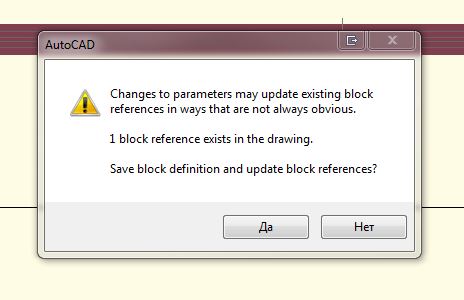
Command: (visibility_add)
Select point for placing Visibility Set: _.BSAVE
Command: _.BParameter
Enter parameter type
[Alignment/Base/pOint/Linear/Polar/Xy/Rotation/Flip/Visibility/looKup]: _V
Specify parameter location or [Name/Label/Description/Palette]: _L
Enter visibility property label <Visibility>: Visibility: 7ed12ec0
Specify parameter location or [Name/Label/Description/Palette]:
Enter number of grips [0/1] <1>:
Command: _.BSAVE
Command: _.-BVSTATE
Current visibility state: VisibilityState0
Enter an option [New/Set/Delete] <New>: _N
Enter name of new visibility state: W5W
Enter object visibility for new state [Hide all/Show all/Current visibility]
<Current visibility>: _H
Command: _.undo Current settings: Auto = Off, Control = All, Combine = Yes
Enter the number of operations to undo or [Auto/Control/BEgin/End/Mark/Back]
<1>: (Lisp Expression)
Command: nil
The strange thing is - after exiting the block edit mode there is second visibility grip, but I can't enter the block edit mode enymore - it says that block contains proxy objects so it cannot edit it.
Any ideas?
Message 194 of 213
06-23-2014
02:35 PM
- Mark as New
- Bookmark
- Subscribe
- Mute
- Subscribe to RSS Feed
- Permalink
- Report
06-23-2014
02:35 PM
Vis-add-eng does not work with any version of Acac later than 2010 but the blocks made with an earlier version will work with later versions of cad. Either install an earlier version of Acad in order to run the lisp or use this workaround:
http://forums.autodesk.com/t5/Dynamic-Blocks/OOTB-Multiple-Visibility-States-SOLUTION/td-p/4961288
Message 195 of 213
06-24-2014
05:27 AM
- Mark as New
- Bookmark
- Subscribe
- Mute
- Subscribe to RSS Feed
- Permalink
- Report
06-24-2014
05:27 AM
Accuracy check!
Libbya wrote:
Vis-add-eng does not work with any version of Acac later than 2010
Just to be clear, several of us use it every day on AutoCAD 2011. However, attempts to get visibility-add-engine v1.5 working correctly in AutoCAD 2012 have not been fully successful. That is why I advise anyone on subscription to download AutoCAD 2011 and use it just for developing MVP dynamic blocks - the blocks will work in future versions through 2015, and most likely, beyond. I am doing this and my testing with 2015 shows no issues.
Ron
ADN CAD Developer/Operator
Message 196 of 213
06-24-2014
04:39 PM
- Mark as New
- Bookmark
- Subscribe
- Mute
- Subscribe to RSS Feed
- Permalink
- Report
06-24-2014
04:39 PM
Thanks for the correction.
IMO, the above linked workaround is easier to use than vis-add-eng until the number of required visibility states gets out of hand.
Message 197 of 213
10-21-2015
06:51 PM
- Mark as New
- Bookmark
- Subscribe
- Mute
- Subscribe to RSS Feed
- Permalink
- Report
10-21-2015
06:51 PM
I just upgraded the lisp to version 1.6 and it works with AutoCAD 2016, explained in the manual I wrote. See one of the two posts I posted, one in the OOTB Visibility States thread. Delivered a working container drawing too with it. I took me about 12 hours to see which commands there where needed, write a manual and create the block twice and test it multiple times.
Message 198 of 213
Anonymous
in reply to:
Anonymous
10-21-2015
11:37 PM
- Mark as New
- Bookmark
- Subscribe
- Mute
- Subscribe to RSS Feed
- Permalink
- Report
10-21-2015
11:37 PM
These are really good news! Thanks a lot!
I used to keep autocad 2011 just to handle MV blocks. Now no need for it. Will give it a try later on.
Message 199 of 213
Anonymous
in reply to:
Anonymous
10-22-2015
02:01 AM
- Mark as New
- Bookmark
- Subscribe
- Mute
- Subscribe to RSS Feed
- Permalink
- Report
10-22-2015
02:01 AM
I noticed the Multiple combo Lookup wasn't needed, so that saves a lot of time.
Here are the lastest files: http://forums.autodesk.com/t5/dynamic-blocks/multiple-visibility-lisp-routine/td-p/3303547/page/2
Message 200 of 213
10-22-2015
01:26 PM
- Mark as New
- Bookmark
- Subscribe
- Mute
- Subscribe to RSS Feed
- Permalink
- Report
10-22-2015
01:26 PM
Thanks whomever reworked this! Looks like DBdj is the one to thank this time. It seems to work somewhat in 2015, I tested on a dynamic block that I built with AutoCAD 2011 using v 1.4, I think. The block I tested with already had a block property table loaded fully with some user parameters, as well as a number of other geometric parameters (like stretches and lookup tables) and it did in fact load the program, and I was able to set various visibility parameters current. That is a big step forward from previous versions.
I could not add entities to existing visibility parameters using VSPAddsel but I have seen this in earlier versions when trying this. Sometimes I had to try multiple times in new AutoCAD windows (copy+paste from the test block window into new AutoCAD window and open block editor and load lisp and try again).
I'll withhold judgement until I test with a non-block table user parameter laden DB. That would be a fairer fight! I mean, we wern't supposed to use block property tables and user parameters with this program in the first place, but I would do all development right up to adding user parameters. But I would have to have everything else done if I wanted to run any more visibility-add functions. Once a user parameter was created, the lisp would no longer work. To edit them later, I would use the parameters manager to delete all the user parameters, then copy+paste the block from the test block window into another open AutoCAD window, load the lisp and it would usually work so I could do my edits and eventually add the user parameters back in once I was done.
In this new version, at least parts of the lisp work once user parameters are present.
However, no matter what this is significant progress!
Thanks again,
Ron
ADN CAD Developer/Operator
Reply
Topic Options
- Subscribe to RSS Feed
- Mark Topic as New
- Mark Topic as Read
- Float this Topic for Current User
- Bookmark
- Subscribe
- Printer Friendly Page


