Community
- Forums Home
- >
- AutoCAD Community
- >
- Dynamic Blocks Forum
- >
- Re: WARNING! Properties Table & Vanishing Attributes! Please Help!
Dynamic Blocks Forum
Turn on suggestions
Auto-suggest helps you quickly narrow down your search results by suggesting possible matches as you type.
 This page has been translated for your convenience with an automatic translation service. This is not an official translation and may contain errors and inaccurate translations. Autodesk does not warrant, either expressly or implied, the accuracy, reliability or completeness of the information translated by the machine translation service and will not be liable for damages or losses caused by the trust placed in the translation service.
Translate
This page has been translated for your convenience with an automatic translation service. This is not an official translation and may contain errors and inaccurate translations. Autodesk does not warrant, either expressly or implied, the accuracy, reliability or completeness of the information translated by the machine translation service and will not be liable for damages or losses caused by the trust placed in the translation service.
Translate
WARNING! Properties Table & Vanishing Attributes! Please Help!
17 REPLIES 17
SOLVED
Reply
Topic Options
- Subscribe to RSS Feed
- Mark Topic as New
- Mark Topic as Read
- Float this Topic for Current User
- Bookmark
- Subscribe
- Printer Friendly Page
Message 1 of 18


10-03-2012
12:33 PM
- Mark as New
- Bookmark
- Subscribe
- Mute
- Subscribe to RSS Feed
- Permalink
- Report
10-03-2012
12:33 PM
Greetings, boardmembers. Have I got a doozy of a problem here, and all kinds of help is appreciated.
I've been creating company-standard blocks lately. My latest skill is getting the Block Properties Table into my blocks, in order to automatically edit Block Attributes (i.e., making a Smoke Detector symbol's attribute to appear as SD). Got things working great so far....
Until I tried to save my blocks as separate files!
After creating my block(s) and placing them in a master DWG file model space, assuring that it works properly, I've gone back into the Block Editor in order to save it separately via the "Save Block Definition to Drawing File" toggle. Maybe not my first mistake, but my biggest mistake was having faith in this, and not checking my saved files sooner. So, when I did click on a block file that had a B.P.T. in it, opening the file opens in Block Editor. But, I am unable to pull up the B.P.T. in spite of the Table Grip being visible. Also, the affected attribute itself has been deleted. It is not even shown in the Parameter Manager. Needless to say, this whole situation is unacceptable.
Has anyone else dealt with this? How else can I save such a Dynamic Block with a B.P.T. as a separate file?
I use AutoCAD 2010, and I pray that I am not the only one plagued by this.
Chris Martin
Solved! Go to Solution.
Solved by Charles_Shade. Go to Solution.
17 REPLIES 17
Message 2 of 18


10-03-2012
12:44 PM
- Mark as New
- Bookmark
- Subscribe
- Mute
- Subscribe to RSS Feed
- Permalink
- Report
10-03-2012
12:44 PM
Post an example of before and after if you can.
Regards, Charles Shade
CSHADEDESIGN | AUTOCAD LT | LT-KB | DYNAMIC BLOCKS
Please mark Accept as Solution if your question is answered. Kudos gladly accepted. ⇘
Message 3 of 18
10-03-2012
12:59 PM
- Mark as New
- Bookmark
- Subscribe
- Mute
- Subscribe to RSS Feed
- Permalink
- Report
Message 4 of 18
10-03-2012
01:29 PM
- Mark as New
- Bookmark
- Subscribe
- Mute
- Subscribe to RSS Feed
- Permalink
- Report
10-03-2012
01:29 PM
So you have three Vis States in this Block?
Likely there is something causing the issue there.
Your after drawing immediately crashed my LT.
What is your current AutoCAD version and visibility-add-eng build?
BTW - I cannot work with that Lisp as I am on the LT platform.
Regards, Charles Shade
CSHADEDESIGN | AUTOCAD LT | LT-KB | DYNAMIC BLOCKS
Please mark Accept as Solution if your question is answered. Kudos gladly accepted. ⇘
Message 5 of 18
10-03-2012
01:48 PM
- Mark as New
- Bookmark
- Subscribe
- Mute
- Subscribe to RSS Feed
- Permalink
- Report
10-03-2012
01:48 PM
Mr. Shade, hearing that your AutoCAD crashed, somehow doesn't surprise me. I apologize.
I use AutoCAD 2010, and in that block I've used Vis_add_eng, version 1.4 (1.5 is more volatile for me, for some reason). I've attached another one of my troubled blocks, in before and after states. This time, however, there are no visibility parameters.
Chris Martin
Message 6 of 18
10-03-2012
02:06 PM
- Mark as New
- Bookmark
- Subscribe
- Mute
- Subscribe to RSS Feed
- Permalink
- Report
10-03-2012
02:06 PM
That worked much better.
Using WBLOCK from Modelspace the DynBlk moved just fine. It does however create the new drawing as a set of entities. The Dynamic Properties are still there but if you want it to be a DynBlk in the Container Drawing you would have to Block it again.
Oherwise it performed just fine.
As I do not seem to have the "Save Block Definition to Drawing File toggle" (or I do not know how to get to it) I may not be able to Save the Block as you are.
No prob on the crash, yours was the only thing open. It was a quick death though.
Gotto go watch Field Hockey. Enjoy the evening.
Regards, Charles Shade
CSHADEDESIGN | AUTOCAD LT | LT-KB | DYNAMIC BLOCKS
Please mark Accept as Solution if your question is answered. Kudos gladly accepted. ⇘
Message 7 of 18
10-04-2012
05:43 AM
- Mark as New
- Bookmark
- Subscribe
- Mute
- Subscribe to RSS Feed
- Permalink
- Report
10-04-2012
05:43 AM
Good morning, Mr. Shade. I hope you enjoyed watching your field hockey.
When I began my symbol library update project, first I had created blocks that were simple geometry & attributes. Not a single dynamic parameter. And I still don't have a clue about constraints. Now, I am updating those same blocks with parameters.
In the Block Editor space, I had found the "Save Block As" button. In the "Save As" screen that appears, the "Save Block Definition to Drawing File" toggle is on the lower-left corner. Choosing this toggle is how I have been saving my blocks as individual files. It is this saving procedure that screws up my tables and deletes my attributes.
Chris Martin
Message 8 of 18
10-04-2012
06:10 AM
- Mark as New
- Bookmark
- Subscribe
- Mute
- Subscribe to RSS Feed
- Permalink
- Report
10-04-2012
06:10 AM
Morning, yep we won so it was a good evening. Thanks.
I do have that option and just used it on a DynBlk that I have that has a BPT. Thanks for the enlightenment.
The Block saved just fine as a separate file and was "exploded" for lack of a better term in the new file.
I opened the new file and then started the BE choosing the Current Drawing since it was the only choice.
The BPT is there and functions normally.
I did a Save Block As and gave it a name, Ok and closed the BE.
Did an INSERT of this saved Block to the same drawing file and the BPT is there and functioning.
Have you tried that on yours or are you seeing the Exploded block in the new file?
Please mark any response as "Accept as Solution" if it answers your question.
_____________________________________________________________
Regards, Charles Shade
CSHADEDESIGN | AUTOCAD LT | LT-KB | DYNAMIC BLOCKS
Please mark Accept as Solution if your question is answered. Kudos gladly accepted. ⇘
Message 9 of 18
10-04-2012
06:36 AM
- Mark as New
- Bookmark
- Subscribe
- Mute
- Subscribe to RSS Feed
- Permalink
- Report
10-04-2012
06:36 AM
Dear Mr. Shade,
I apologize, but I am not following what you did, that made you say the block with the table works.
Here is what happens with me. I "Save As" my table-functioning block with the toggle on, so I create a new file. When I open the new file, I am instantly asked if I want to enter Block Editor (due to authoring elements). If I do not enter Block Editor, all I see is an ellipse (this may be the exploded state of the block, as you mention). If I do enter Block Editor, I see the grip for the BPT along with the ellipse. However, nothing happens when I try to see the BPT itself. And, the attribute that I had created before is totally gone, no matter which way I enter my new file.
Chris Martin
Message 10 of 18
10-04-2012
07:00 AM
- Mark as New
- Bookmark
- Subscribe
- Mute
- Subscribe to RSS Feed
- Permalink
- Report
10-04-2012
07:00 AM
Mr. Shade,
I just put on my Sherlock Holmes hat, and this is what I found. So you know, my BPT had two columns. The first was a User Parameter, just to name the type of tag the ellipse was for. The second was for the value of the attribute that I needed.
First, I deleted the User Parameter column. When I "Save As" the block, the same problem happened.
Then, I deleted the Attribute Value column from my BPT. When I "Save As" the block this time, I have a file with the ellipse, the attribute, and the BPT. Of course, the table is useless because there is nothing to change from one value to the next. But, at least the BPT is there, and it can be opened and edited.
So, my inner detective deduces that there is some issue with my attribute that is causing me hell. Any ideas?
Chris Martin
Message 11 of 18
10-04-2012
07:56 AM
- Mark as New
- Bookmark
- Subscribe
- Mute
- Subscribe to RSS Feed
- Permalink
- Report
10-04-2012
07:56 AM
I think the multi-VIs states and the BPT are not playing nice together.
That's about all I can tell. I tried the same procedure here on the first blocks you posted and it caused my CAD to crash.
Unless the author Nikolay comes along I'm not sure I can help you further.
You may want to try in this thread:
as it gets looked at from time to time and the contributors rapidcad or ojuris have a good handle on the Macro.
Regards, Charles Shade
CSHADEDESIGN | AUTOCAD LT | LT-KB | DYNAMIC BLOCKS
Please mark Accept as Solution if your question is answered. Kudos gladly accepted. ⇘
Message 12 of 18
10-04-2012
08:17 AM
- Mark as New
- Bookmark
- Subscribe
- Mute
- Subscribe to RSS Feed
- Permalink
- Report
10-04-2012
08:17 AM
Thanks for your help, Mr. Shade.
However, the second block that I created for you (the one with the ellipse, Before 2 & After 2) also has the same issue with the Block Properties Table, and there is not a single visibility parameter in the block. There is no need to even have visibility parameters in the ellipse block, either. It is a simple block, with an ellipse, 1 attribute, and the BPT.
I wish that I knew what else to say. Both blocks have the same problem, and I need to create both. Looks like I gotta go back to old-school CAD with this, and type in what I want each block attribute is to read from now on, each time I insert the block in a file.
How prehistoric.
Chris Martin
Message 13 of 18
10-04-2012
09:56 AM
- Mark as New
- Bookmark
- Subscribe
- Mute
- Subscribe to RSS Feed
- Permalink
- Report
10-04-2012
09:56 AM
The second one did not crash but there was no information populating the BPT that was there.
Have you just tried to WBLOCK to a new file and nothing else?
(I hope I have not asked that already.)
Regards, Charles Shade
CSHADEDESIGN | AUTOCAD LT | LT-KB | DYNAMIC BLOCKS
Please mark Accept as Solution if your question is answered. Kudos gladly accepted. ⇘
Message 14 of 18
10-04-2012
10:12 AM
- Mark as New
- Bookmark
- Subscribe
- Mute
- Subscribe to RSS Feed
- Permalink
- Report
10-04-2012
10:12 AM
So far, WBLOCK is a command that is not allowed to be used in Block Editor space. And, I cannot make a block with any of the parameters I need in model space. No Tables, no multiple visibilities, no rotations, none of those can be made in Model Space.
Chris Martin
Message 15 of 18
10-04-2012
11:33 AM
- Mark as New
- Bookmark
- Subscribe
- Mute
- Subscribe to RSS Feed
- Permalink
- Report
10-04-2012
11:33 AM
Make the Block in the BE as you have been.
Save Block As... WITHOUT the Save Block Definition to Drawing File checked.
Close the BE
Run WBLOCK and choose the Block you just named.
Now does it retain the BPT?
Regards, Charles Shade
CSHADEDESIGN | AUTOCAD LT | LT-KB | DYNAMIC BLOCKS
Please mark Accept as Solution if your question is answered. Kudos gladly accepted. ⇘
Message 16 of 18
10-04-2012
12:58 PM
- Mark as New
- Bookmark
- Subscribe
- Mute
- Subscribe to RSS Feed
- Permalink
- Report
10-04-2012
12:58 PM
Salvation!
It worked! It's quite a few kilobytes larger than the way I was saving blocks, but considering my way turned out to be a failure, compared to yours which was successful, I'll deal with it.
Thank you. Thank you so very much.
Chris Martin
Message 17 of 18
10-05-2012
06:17 AM
- Mark as New
- Bookmark
- Subscribe
- Mute
- Subscribe to RSS Feed
- Permalink
- Report
10-05-2012
06:17 AM
That sounds like a bug report should be issued for the failure in the BE.
Glad that it works for you now. Nothing more frustrating than having to recreate the block for no reason other than a software hiccup.
Regards, Charles Shade
CSHADEDESIGN | AUTOCAD LT | LT-KB | DYNAMIC BLOCKS
Please mark Accept as Solution if your question is answered. Kudos gladly accepted. ⇘
Message 18 of 18


10-11-2012
07:29 AM
- Mark as New
- Bookmark
- Subscribe
- Mute
- Subscribe to RSS Feed
- Permalink
- Report
10-11-2012
07:29 AM
I didn't see this thread until today, but I could add two tips to aid with this discussion.
First, MVP blocks (using the Visibility Add Lisp to add multiple visibility parameters) does not officially support use of the Block Property Table (BPT). The author, Andre Lazebny pointed this out in his posts. However, though much trial and error I discovered that the sticking point between MVP and BPT is actually only the user parameter which is generated from within the table.
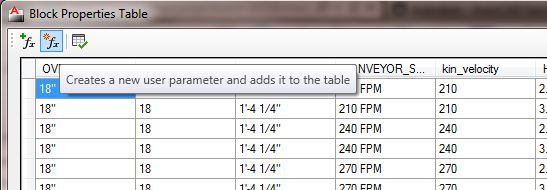
If you place an EMPTY(no columns or rows or properties defined yet) BPT in a dyn block BEFORE you convert it into a MVP dyn block you can sucessfully create a block using both. you would create all your visibility parameters and define your states, and when everything else is defined, the last thing you would do is fill in the table using existing parameters and even defining user parameters. this would then lead us to the second trick which is pertainant to this thread...
I find that for me, I use two or three AutoCAD files when I develop dynamic blocks.
File one - my dnamic block library source file. This contains iterations of each dynamic block until it reaches completion.
File two, an empty drawing to paste blocks into for editing in the block editor - I rarely even save this drawing - I just go with Drawing1.dwg generated from my template.
Fle three isn't actually a drawing by definition - it is the drawing test window.
Here's my procedure: I copy-paste the block I want to modify into Drawing1 from my dynamic block library source file. Then I add all the actions, entities, a block table if needed, and I test. Every time I test I rename the block WITHIN THE TEST WINDOW, then copy-paste it back into my sorce file as an iteration. I immediately save my source file each time so I am safeguarded from a lockup (which the lisp definately increases the frequency of). When I get all done with the functioning block, I fill out the block properties table (if it has one) and test in the test window, rename and copy-paste into my source file. From the source file I wblock out the finished MVP dyn block and it can now be inserted with lisp or a tool palette or both or by using the good old insert comand or drag and drop or whatever.
It's a long post but I hope it helps you get past the root of those two hurdles.
Ron
ADN CAD Developer/Operator

Reply
Topic Options
- Subscribe to RSS Feed
- Mark Topic as New
- Mark Topic as Read
- Float this Topic for Current User
- Bookmark
- Subscribe
- Printer Friendly Page


