Community
Dynamic Blocks Forum
Turn on suggestions
Auto-suggest helps you quickly narrow down your search results by suggesting possible matches as you type.
 This page has been translated for your convenience with an automatic translation service. This is not an official translation and may contain errors and inaccurate translations. Autodesk does not warrant, either expressly or implied, the accuracy, reliability or completeness of the information translated by the machine translation service and will not be liable for damages or losses caused by the trust placed in the translation service.
Translate
This page has been translated for your convenience with an automatic translation service. This is not an official translation and may contain errors and inaccurate translations. Autodesk does not warrant, either expressly or implied, the accuracy, reliability or completeness of the information translated by the machine translation service and will not be liable for damages or losses caused by the trust placed in the translation service.
Translate
Reply
Topic Options
- Subscribe to RSS Feed
- Mark Topic as New
- Mark Topic as Read
- Float this Topic for Current User
- Bookmark
- Subscribe
- Printer Friendly Page
Message 1 of 4


12-12-2012
08:29 AM
- Mark as New
- Bookmark
- Subscribe
- Mute
- Subscribe to RSS Feed
- Permalink
- Report
12-12-2012
08:29 AM
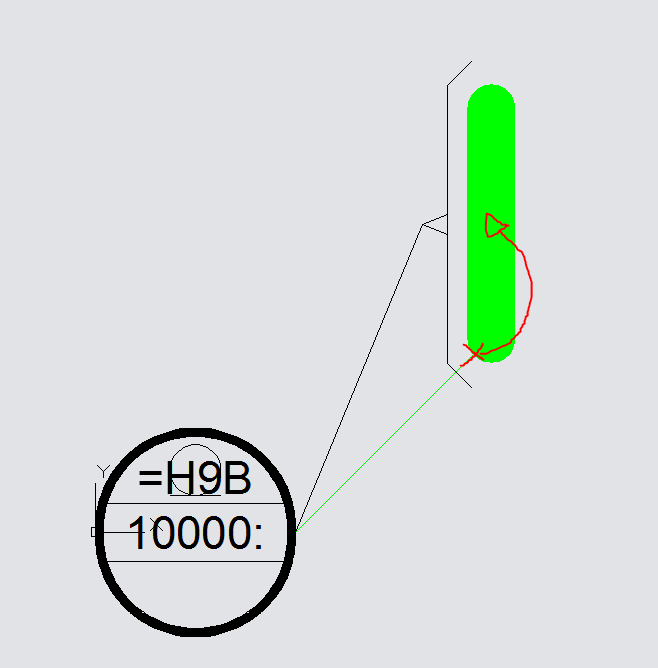
I just opened up a block that I made many months ago, I would like to make a few changes to it, but I just can't figure out how I made it in the first place. What I want to archieve is to make the green line always be centered in the stretched hatch...
I'm beginning to think it isn't possible, throwing it out here in case anybody feels compelled to take a look!
See attached "Capture.png", I want the line to be centered when stretched and rotated.
Signature, sincerely... //Adam
AutoCad LT 2016
Give Kudos where credit is due, Mark "accepted as solution" if the post solved your question.
AutoCad LT 2016
Give Kudos where credit is due, Mark "accepted as solution" if the post solved your question.
Solved! Go to Solution.
Solved by Charles_Shade. Go to Solution.
3 REPLIES 3
Message 2 of 4


12-12-2012
09:18 AM
- Mark as New
- Bookmark
- Subscribe
- Mute
- Subscribe to RSS Feed
- Permalink
- Report
12-12-2012
09:18 AM
Give this a shot.
I deleted the hatch so I could see what was going on.
Regards, Charles Shade
CSHADEDESIGN | AUTOCAD LT | LT-KB | DYNAMIC BLOCKS
Please mark Accept as Solution if your question is answered. Kudos gladly accepted. ⇘
Message 3 of 4
12-14-2012
04:11 AM
- Mark as New
- Bookmark
- Subscribe
- Mute
- Subscribe to RSS Feed
- Permalink
- Report
12-14-2012
04:11 AM
Works like a charm Charles, thanks!
Did you just include it in the stretch action for the rotation?
Signature, sincerely... //Adam
AutoCad LT 2016
Give Kudos where credit is due, Mark "accepted as solution" if the post solved your question.
AutoCad LT 2016
Give Kudos where credit is due, Mark "accepted as solution" if the post solved your question.
Message 4 of 4
12-14-2012
04:57 AM
- Mark as New
- Bookmark
- Subscribe
- Mute
- Subscribe to RSS Feed
- Permalink
- Report
12-14-2012
04:57 AM
Added a new Stretch Action: Stretch4 to the Parameter Distance2
Set the Distance Multiplier to .5
Included Angle3 Parameter in Stretch4's Selection set.
Regards, Charles Shade
CSHADEDESIGN | AUTOCAD LT | LT-KB | DYNAMIC BLOCKS
Please mark Accept as Solution if your question is answered. Kudos gladly accepted. ⇘

Reply
Topic Options
- Subscribe to RSS Feed
- Mark Topic as New
- Mark Topic as Read
- Float this Topic for Current User
- Bookmark
- Subscribe
- Printer Friendly Page