Community
- Forums Home
- >
- DWG Trueview Community
- >
- DWG TrueView Forum
- >
- Re: Layer Filter Applied In Drawing Not Appearing In Trueview Layer Drop Down
DWG TrueView
Welcome to Autodesk’s DWG Trueview Forums. Share your knowledge, ask questions, and explore popular DWG Trueview topics.
Turn on suggestions
Auto-suggest helps you quickly narrow down your search results by suggesting possible matches as you type.
 This page has been translated for your convenience with an automatic translation service. This is not an official translation and may contain errors and inaccurate translations. Autodesk does not warrant, either expressly or implied, the accuracy, reliability or completeness of the information translated by the machine translation service and will not be liable for damages or losses caused by the trust placed in the translation service.
Translate
This page has been translated for your convenience with an automatic translation service. This is not an official translation and may contain errors and inaccurate translations. Autodesk does not warrant, either expressly or implied, the accuracy, reliability or completeness of the information translated by the machine translation service and will not be liable for damages or losses caused by the trust placed in the translation service.
Translate
Layer Filter Applied In Drawing Not Appearing In Trueview Layer Drop Down
5 REPLIES 5
Reply
Topic Options
- Subscribe to RSS Feed
- Mark Topic as New
- Mark Topic as Read
- Float this Topic for Current User
- Bookmark
- Subscribe
- Printer Friendly Page
Message 1 of 6


02-14-2013
05:27 AM
- Mark as New
- Bookmark
- Subscribe
- Mute
- Subscribe to RSS Feed
- Permalink
- Report
02-14-2013
05:27 AM
Layer Filter Applied In Drawing Not Appearing In Trueview Layer Drop Down
Hello,
On a master plan drawing there were far too many layers, so I created a layer filter to show the vital layers on the drawing that I wanted.
I, myself, have no problem with accesing the layer filter showing up in the drop down instead of the original full list of layers on regular AutoCAD. However, my collegues who don't have access to regular AutoCAD on their desktop only have access to Trueview.
When opening this drawing on Trueview, the layer filter I created is clearly viewable in the layer properties, but when I select the filter it does not apply to the layer drop down. This is not practical for my colleagues with regards to viewing the drawing. I want my layer filter showing up for ease of access to turn specific layers on and off.
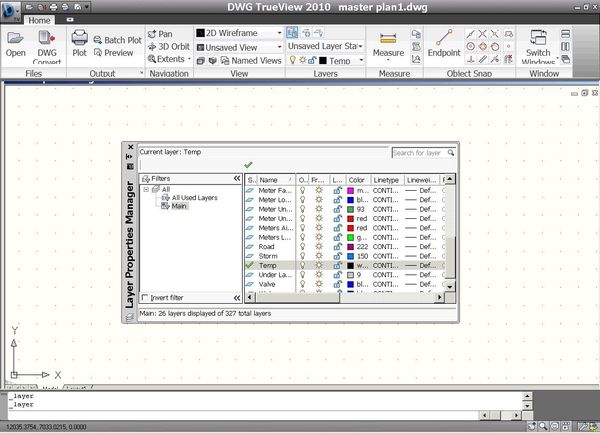

Could anybody please advise me on how to make a layer filter show up on the layer drop down in Trueview, or is this not possible?
Thanks.
5 REPLIES 5
Message 2 of 6


02-14-2013
06:02 AM
- Mark as New
- Bookmark
- Subscribe
- Mute
- Subscribe to RSS Feed
- Permalink
- Report
02-14-2013
06:02 AM
Works fine here in DTV2013: I notice you are using DTV2010. Download and test it to confirm at your end before spreading it around.
Message 3 of 6
02-14-2013
06:22 AM
- Mark as New
- Bookmark
- Subscribe
- Mute
- Subscribe to RSS Feed
- Permalink
- Report
02-14-2013
06:22 AM
Thanks, but that's not possible as it's my work's network and cannot download anything onto the network.
I either need some sort of way to make it work the way I want it to on 2010, or to know if it absolutely is not possible.
Message 4 of 6
02-15-2013
05:33 AM
- Mark as New
- Bookmark
- Subscribe
- Mute
- Subscribe to RSS Feed
- Permalink
- Report
02-15-2013
05:33 AM
You'll have to wait for a DTV2010 user to respond, this is peer support (we are end users like you): based on your testing, it doesn't work (and there are no patches or updates posted for DTV2010) so at least that partially answers your question.
Or did it use to work at one time and now it does not?
Either way, you should be engaging your I.T. /Server personnel and discussing your options moving forward.
Message 5 of 6
02-15-2013
06:05 AM
- Mark as New
- Bookmark
- Subscribe
- Mute
- Subscribe to RSS Feed
- Permalink
- Report
02-15-2013
06:05 AM
Hopefully a DTV2010 user can provide a solution that won't involve a patch/update or download if possible.
Thanks, it helps knowing it may be as i suspect that there may not be any solution with regards to a simple change of settings.
That i know of, it never has worked as it does on DTV2013 (how I want it to). Most of our other drawings don't have so many layers. As this is a master plan the filter had to be created for ease of use. You can manually view the filter in layer properties, but not the drop down, which would be a little more convenient for a less savvy DTV/AutoCAD user.
We have to have a very secure network and our I.T are extremely strict with what we put on to the network, so it may be a dead end unless we can twist their arm.
Thanks again.
Message 6 of 6


02-15-2013
06:58 AM
- Mark as New
- Bookmark
- Subscribe
- Mute
- Subscribe to RSS Feed
- Permalink
- Report
02-15-2013
06:58 AM
Considering how often people post in this forum, you might be waiting awhile for a 2010 user to reply!
Ditto on Dean's suggestion about working with your local IT to go over what possible solution you and any other employee has to obtain software on the Internet that you are not allowed to download and/or install yourself.
That's ridiculous if they don't have a process in place!
As for DWG Trueview 2011, it works as intended...at least it works in the manner I was able to figure out how to do it in Acad 2011.
Highlight the filter in the Layer Properties Manager window, right click on it and choose "Isolate Group" > "All Viewports" to hide all other layers except the ones in this filter. Then to turn them on, right click on the "All Used Layers" filter and choose "Visibility" > "Thawed" to turn all layers back on.
HTH

Reply
Topic Options
- Subscribe to RSS Feed
- Mark Topic as New
- Mark Topic as Read
- Float this Topic for Current User
- Bookmark
- Subscribe
- Printer Friendly Page
