Community
- Forums Home
- >
- Subscription, Installation and Licensing Community
- >
- Autodesk Technology Managers
- >
- Re: CAD Manager Control Utility not running
Autodesk Technology Managers Forum
Share your knowledge, ask questions, and engage with fellow CAD/BIM Managers.
Turn on suggestions
Auto-suggest helps you quickly narrow down your search results by suggesting possible matches as you type.
 This page has been translated for your convenience with an automatic translation service. This is not an official translation and may contain errors and inaccurate translations. Autodesk does not warrant, either expressly or implied, the accuracy, reliability or completeness of the information translated by the machine translation service and will not be liable for damages or losses caused by the trust placed in the translation service.
Translate
This page has been translated for your convenience with an automatic translation service. This is not an official translation and may contain errors and inaccurate translations. Autodesk does not warrant, either expressly or implied, the accuracy, reliability or completeness of the information translated by the machine translation service and will not be liable for damages or losses caused by the trust placed in the translation service.
Translate
CAD Manager Control Utility not running
4 REPLIES 4
Reply
Topic Options
- Subscribe to RSS Feed
- Mark Topic as New
- Mark Topic as Read
- Float this Topic for Current User
- Bookmark
- Subscribe
- Printer Friendly Page
Message 1 of 5

Anonymous
2230 Views, 3 Replies
02-27-2012
09:29 AM
- Mark as New
- Bookmark
- Subscribe
- Mute
- Subscribe to RSS Feed
- Permalink
- Report
02-27-2012
09:29 AM
CAD Manager Control Utility not running
Hi all,
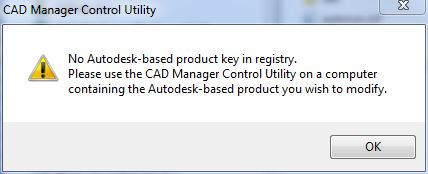
I've searched the forums looking for a solution for my issue without any luck. I have the CAD Manager Control Utility installed from the Building Design Suite Premier (ACAD, 3ds max and Revit installed) and when I launch it the software returns the following;
"No Autodesk-based product key in registry. Please use the CAD Manager Control Utility on a computer containing the Autodesk-based product you wish to modify."
I found this link http://usa.autodesk.com/adsk/servlet/ps/dl/item?siteID=123112&id=13158781&linkID=9240858 but it seems to be specifically to fix a problem with Civil 2010.
Any ideas for a solution or help would be much appreciated.
(OS: Win 7 x64)
4 REPLIES 4
Message 2 of 5


02-28-2012
10:25 AM
- Mark as New
- Bookmark
- Subscribe
- Mute
- Subscribe to RSS Feed
- Permalink
- Report
02-28-2012
10:25 AM
Have you actually tried the instructions in that link? It looks as though it's just xml pointers. Even if it doesn't work, you should be able to modify them to fit your current needs, I would think.
Travis Nave
 Need help in your post? Mention me with @TravisNave
HOT: Named User FAQ | 2025 Download Links | Invalid Serial Number | LiteHTML.DLL error | Reset Autodesk 2020-24 Licensing
My Expert Contributions to the
FLEXnet License Admin | MSI Cleanup Utility | .NET Framework Cleanup Tool | IPv6 NLM Fix | adskflex.opt Options File | Combine .LIC Files
Disk Space | Quickstart Guide for LMTOOLS | Edit setup.ini for 1603 Installation Failure | 1603 Error installing /w Updates | Disable Optimus
Understanding Failures in the Installation .log File | Server Status from Client | Autodesk 2024 System Requirements Fix | Reuse USB Stick
⤽ If my post was helpful, please give Likes and/or mark the Accept as Solution button(s) below. Thank you! ⤵
Message 3 of 5


03-22-2012
07:27 PM
- Mark as New
- Bookmark
- Subscribe
- Mute
- Subscribe to RSS Feed
- Permalink
- Report
03-22-2012
07:27 PM
I just installed the utility and am getting the exact same message. This is despite having the Building Design Suite Ultimate installed with a valid serial.
I followed the link in the original post and checked the registry for the presence of the serial numbers and they are there.
Message 4 of 5
12-20-2016
12:52 PM
- Mark as New
- Bookmark
- Subscribe
- Mute
- Subscribe to RSS Feed
- Permalink
- Report
12-20-2016
12:52 PM
I download the AutoCAD_2-17_English_Win_32_64bit_Trial_en-us_Setup.exe and run the installation but when I open to run it, it said:
"No Autodesk-based product key in registry. Please use the CAD Manager Control Utility on a computer containing the Autodesk-based product you wish to modify."
Any idea how to fix it?
Thanks,
David
Message 5 of 5


12-22-2016
05:48 AM
- Mark as New
- Bookmark
- Subscribe
- Mute
- Subscribe to RSS Feed
- Permalink
- Report
12-22-2016
05:48 AM
Install your 2017 software with this method, your random method where you let Autodesk guess whether you need 32bit or 64bit version is not the way https://knowledge.autodesk.com/customer-service/download-install/download/download-previous-versions...
Reply
Topic Options
- Subscribe to RSS Feed
- Mark Topic as New
- Mark Topic as Read
- Float this Topic for Current User
- Bookmark
- Subscribe
- Printer Friendly Page