deflection limit for panels?

deflection limit for panels?

Anonymous
Not applicable
4,745 Views
15 Replies
Message 1 of 16

deflection limit for panels?

Anonymous
Not applicable

Morning All,


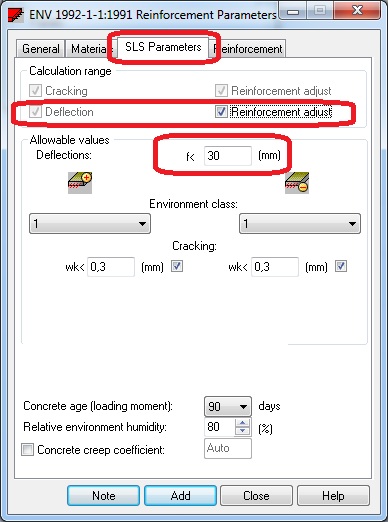
I have a few cantilever zones with high deflections, the worst offender is attached in screenshots below. Is there a setting to enable deflection limits on panels? Screenshot of "required reinforcement" is attached, however the deflection is unacceptably high for this low reinforcement density (refer to screenshots).


If there is no deflection limit setting for panels, is there a way to specify higher reinforcement densities for specific panels to control deflection that way?


Thanks,

Scott


0 Likes
Accepted solutions (1)
4,746 Views
15 Replies
Replies (15)
Message 2 of 16

Rafal.Gaweda
Autodesk Support
Autodesk Support

Are you looking for this?:


defl.jpg


Rafal Gaweda
Message 3 of 16

Anonymous
Not applicable

Morning Rafal 🙂


Ah yes that exactly what I'm looking for, I guess the coffee hasn't woken me up yet! The only problem I can see there though is if I set a specific mm deflection limit this will also apply to slabs with huge spans as the same concrete property is used. If I allocate a specific concrete property for just this panel with the higher deflection restriction that will solve the problem but cause the warning message of "too small distance between reinforcement" cropping up that I was posting about yesterday.


Is there a setting for panels to control deflection as a ratio of span?

Thanks,

Scott

0 Likes
Message 4 of 16

Rafal.Gaweda
Autodesk Support
Autodesk Support

 Is there a setting for panels to control deflection as a ratio of span?


No, absolute value only. It would be hard to detect which span direction to consider in such limit, esspecially is case of irregular panel geometry.


Rafal Gaweda
Message 5 of 16

Anonymous
Not applicable
Accepted solution

Ah ok no problem thanks Rafal, was worth checking.

0 Likes
Message 6 of 16

Anonymous
Not applicable

Hi Rafal,

I've added the deflection limited reinforcement property to 3 panels only. These 3 panels on analysis go beyond the deflection limitation instead of Robot adjusting reinforcement to control the panel within the specified deflection value. Is there somethign I'm doing wrong? It seems to be completely disregarding the deflection limit? See screenshots.

Thanks

0 Likes
Message 7 of 16

Anonymous
Not applicable

pc is apallingly slow and wouldnt keep up with the screenshot copy paste then, refer to this attachment instead please

0 Likes
Message 8 of 16

Anonymous
Not applicable

I have also tried it with "reinforcement correction" switched on (see screenshot attached), it still doesnt control deflection.

0 Likes
Message 9 of 16

Artur.Kosakowski
Autodesk Support
Autodesk Support

Please check what is the value of deflection for static analysis of case 4. As far as I can see you specified the limit as 5 mm and looking at the map the panels they seem to form a cantilever. In such case you have to expect the cracked deflection (from reinforcement calculations) to be much larger that the elastic one (from static analysis). If your elastic deflection is already close to your deflection limit then I'm afraid you will not be able to reduce it by increasing reinforcement in the panels.


Artur Kosakowski
0 Likes
Message 10 of 16

Anonymous
Not applicable
Hi Artur

i have two way slab with small thickness supported on beam with increase Iy and slab ( doesn't resist bending moment in two direction ) and i have reduced stiffness in two direction n1 n2 and to control deflection for slab i have used method of stiffness matrix update is that right ?

and this slab has one layer for reinforcement so i selected design type ( comparison / tension ) at one layer is that right ?
0 Likes
Message 11 of 16

Artur.Kosakowski
Autodesk Support
Autodesk Support

I'm not sure if I understand you correctly. 


"i have two way slab" vs. "slab ( doesn't resist bending moment in two direction )" 


How is this slab intend to work? Is it bi-directional or unidirectional bending? Or is it intended to transfer in-plane forces only with no bending?


Artur Kosakowski
0 Likes
Message 12 of 16

Anonymous
Not applicable

yes i mean it intended to transfer in-plane forces only with no bending


0 Likes
Message 13 of 16

Artur.Kosakowski
Autodesk Support
Autodesk Support

If so, my assumption is that you don't have any load applied in the direction perpendicular to the panel (no bending). If yes, there should be no deflection to control ...


"to control deflection for slab i have used method of stiffness matrix update is that right ?"


... at the stage of reinforcement calculations.


Am I missing something?


Artur Kosakowski
0 Likes
Message 14 of 16

Anonymous
Not applicable

thank for this explanation


if i have topping slab ( 5 cm ) and it has reinforced in one layer do i need to exclude bending moment because as i can see option to reinforce slab in one layer  is only available  for ( comparison / tension )


0 Likes
Message 15 of 16

Artur.Kosakowski
Autodesk Support
Autodesk Support

If your slab is intended to transfer bending then you cannot exclude it in the reinforcement type assigned to it but currently Robot is not capable of calculating single layer reinforcement for such slabs. 


If you find your post answered press the Accept as Solution button please. This will help other users to find solutions much faster. Thank you.


Artur Kosakowski
0 Likes
Message 16 of 16

Anonymous
Not applicable

@Artur.Kosakowski wrote:

 but currently Robot is not capable of calculating single layer reinforcement for such slabs. 


please add it to the next version of robot 2016


0 Likes