Spreadsheet Calculator 2013 Error

Spreadsheet Calculator 2013 Error

Anonymous
Not applicable
3,798 Views
15 Replies
Message 1 of 16

Spreadsheet Calculator 2013 Error

Anonymous
Not applicable
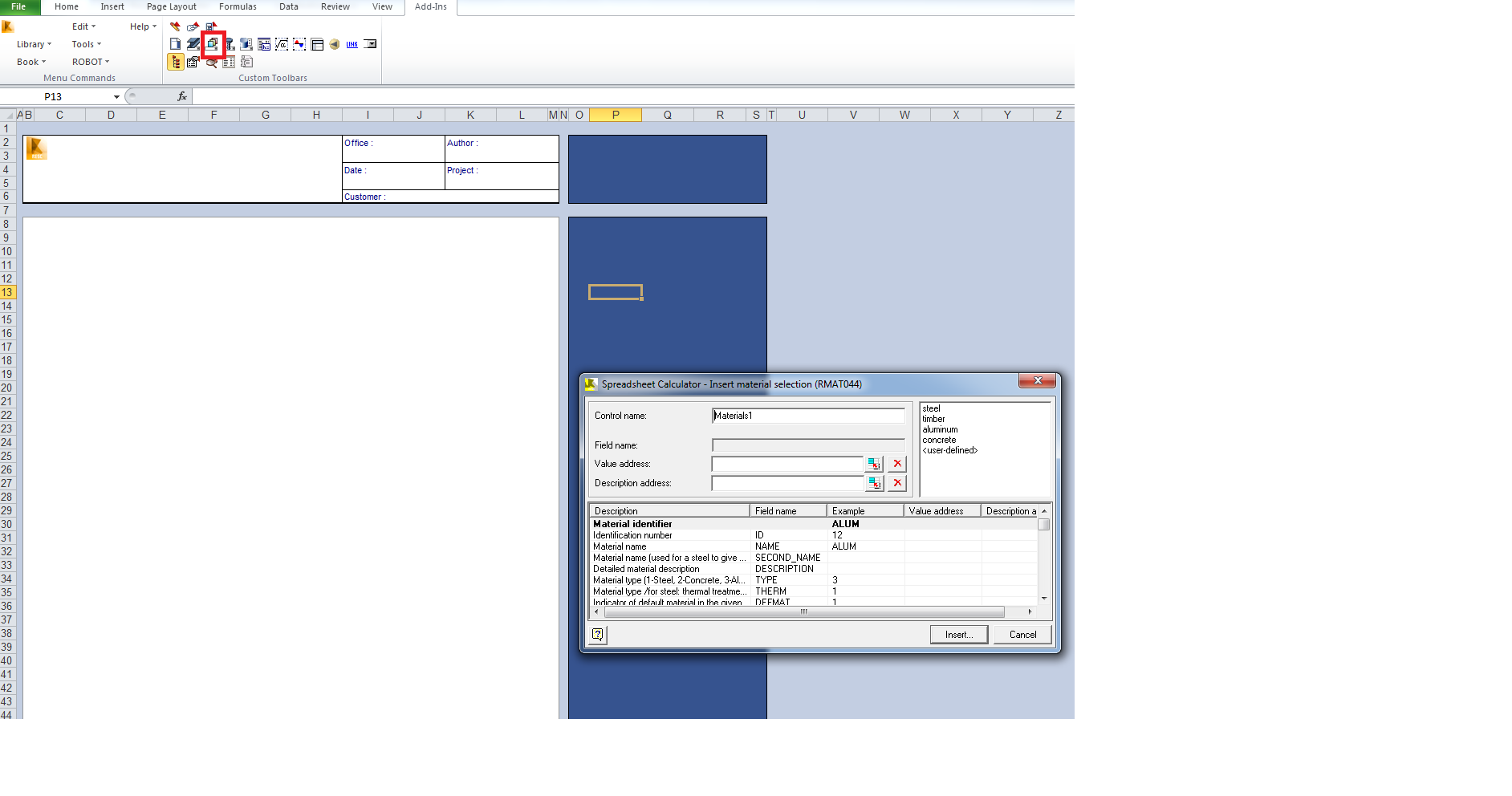
Greetings! I have a problem with Spreadsheet Calculator 2013: I can't create a new document by clicking on corresponding icon (just nothing happens), this concerns all icons except "Insert Formula", "Edit Formula" and "Preferences". However, all library modules are working. Also it keeps showing me errors when i'm trying to insert formula (see attachment). I use Excel 2010 32-bit, in Trust-Center settings all macros are enabled. Thanks in advance.
Accepted solutions (1)
3,799 Views
15 Replies
Replies (15)
Message 2 of 16

Rafal.Gaweda
Autodesk Support
Autodesk Support
Accepted solution

PLease update your SC ("C:\Program Files\Autodesk\Autodesk Robot Structural Analysis Professional 2013\RESC\") by the files from attached zip.


Rafal Gaweda
Message 3 of 16

Anonymous
Not applicable
Rafal, thank you very much!
0 Likes
Message 4 of 16

stosto6666
Enthusiast
Enthusiast

When You start Spreadsheet calculator there is no problem but when You exit Spreadsheet calculator in the Task Manager still working excel.exe and esopstart.exe. See also this at: http://www.rsa4all.com/2012/12/spreadsheet-calculator.html

Thanks to Romanich, Thanks to You.

Message 5 of 16

Rafal.Gaweda
Autodesk Support
Autodesk Support
When You start Spreadsheet calculator there is no problem but when You exit Spreadsheet calculator in the Task Manager still working excel.exe and esopstart.exe.
Developers are investigating this issue. Hope, it will be corrected asap.


Rafal Gaweda
0 Likes
Message 6 of 16

Anonymous
Not applicable
Hi ! I'm currently using Spreadsheet Calculator 2013 on windows 8 + Ms excel 2010 (not sure about the 64 or 32 bits version yet)
Do you know if I must run a 32 bits version so it can work ?
Right now, when I use the spreadsheet calculator menu from Autodesk Robot Structural Analysis 2013, Excel opens, but there is just an excel spreadsheet that opens, usually I used to have a box offering several options. Thks in advance for the help !
0 Likes
Message 7 of 16

Anonymous
Not applicable

Hi! As far as I know Spreadsheet calculator always worked only with 32 bit version of Excel. You can also try "new incarnation" of spreadsheet calculator called "Project Octopus".

0 Likes
Message 8 of 16

Anonymous
Not applicable
Hi, I checked the version and it is a 32 bits version.
have you already encountered this kind of problem ? I just open a new building concept, then directly clic on add ons (I am translating a french menu into English, not sure this is the exact name) and select "spreadsheet calculator". Then excel 2010 32 bits version opens, but there is no popup screen with options allowing me to choose if it is concrete or wood materials. This is what I used to have before uninstalling/reinstalling on a new pc.
Help would be much appreciated on this. Thanks !
0 Likes
Message 9 of 16

Artur.Kosakowski
Autodesk Support
Autodesk Support

You should create it in the way shown below


material list.png

If you find your post answered press the Accept as Solution button please. This will help other users to find solutions much faster. Thank you.


Artur Kosakowski
0 Likes
Message 10 of 16

Anonymous
Not applicable
Thanks for the answer, I'll try this. do you think the behavior is different than before because of the version of Microsoft Office and/or Windows ?
It used to work on windows 7 + office 2007 32 bits before, and the layout of the excel spreadsheet was not like that at all

Another question, do I just need to install Autodesk Robot Structural Analysis 2013 to get the spreadsheet calcultor working, or is there anything else that need to be installed to get it working ? It seems like everything is already installed correctly (I have data in the C:\Program Files\Autodesk\Autodesk Robot Structural Analysis Professional 2013\RESC\ folder) but I am not 100% sure. If something else need to be installed, where can I find it ? In my subscription folder I can only find an install of Autodesk Robot Structural Analysis Professional 2013.
Thanks !
0 Likes
Message 11 of 16

Anonymous
Not applicable

I managed to find on the internet the popup/option box I expect to see when launching spreadsheet calculator. see the msgbox in red ? that's what I am looking for !

this screenshot was taken from http://villagebim.typepad.com/villagebim/2013/04/spreadsheet-calculator-2013-windows-7-creation-d-un...

they are talking a bout a fix

- RESC2013fix.ZIP ‏260 KB

-SCPROT.ZIP ‏22 KB


as it seems there are bugs between office 2010 and 7.

what do you thin a bout this ?

thks in advance foe the help

0 Likes
Message 12 of 16

Anonymous
Not applicable
Hi, I've been searching and searching again, and I think I found out why I have this problem, the libraries are NOT installed on my machine, that's why I don't have the message box with several options.
(http://forums.autodesk.com/t5/Robot-Structural-Analysis/Robot-Extensions-Spreadsheet-Calculator2012/...

The thing is I paid for Robot Structural Analysis 2013 and I should have Spreadsheet Calculator 2013 in the subscription center, as I'm using it since 2010 ! I don't understand why I have so much problems when uninstalling/reinstalling Robot Structural Analysis 2013 + Spreadsheet calculator.

I contacted the customer support, but I can tell I am NOT happy about this.
0 Likes
Message 13 of 16

olivierbayle4523
Autodesk
Autodesk

Hi G2-Info,


What you had read the VillageBim information, he talk about a problem concerning to create a new user sheet. It will don't solve your problem because your problem, it is to try to see the sheets library... it a other subjet !

I think to solve your problem : you need to real this article http://villagebim.typepad.com/villagebim/2012/05/design-spreadsheets-pour-autodesk-robot-structural-... and apply instructions, but to apply these instructions you need to be under active subscription !


Best regards

O.


Olivier Bayle
AEC Technical Sales France
0 Likes
Message 14 of 16

Mirko.Jurcevic
Collaborator
Collaborator

Artur, Rafal,

I need straight answer because our clients asks us about Robot Spreadsheet calculator:

On which versions of MS excel will Spreadsheet calculator work?


I am not sure it will work on all versions, I know there are some problems with x64 x32 I don't know.

Maybe with Excel 2013 version?


Hotfix helps or not? I have 32bit version so I can't test it myself.


I saw a lot of posts about this but straight answer is nowhere to be found. If I am wrong, I'm sorry in advance.


Regards,

If this solved your issue, please Accept it as Solution help other forum users with similar issues to find answers easily.
  
Mirko Jurcevic


My blog: www.engipedia.com
Try my Revit add-ins: Autodesk App Store
0 Likes
Message 15 of 16

Artur.Kosakowski
Autodesk Support
Autodesk Support

2007 32-bit

2010 32-bit


http://knowledge.autodesk.com/support/robot-structural-analysis-products/downloads/caas/sfdcarticles...


If you find your post answered press the Accept as Solution button please. This will help other users to find solutions much faster. Thank you.


Artur Kosakowski
0 Likes
Message 16 of 16

Mirko.Jurcevic
Collaborator
Collaborator

I never thought to look at System requirements  Smiley Embarassed


Anyway, thanks a lot!

If this solved your issue, please Accept it as Solution help other forum users with similar issues to find answers easily.
  
Mirko Jurcevic


My blog: www.engipedia.com
Try my Revit add-ins: Autodesk App Store
0 Likes