
Spreadsheet Calculator 2012 - insert formula

Spreadsheet Calculator 2012 - insert formula

Romanich
Mentor Mentor
2,343 Views
7 Replies
Message 1 of 8

Spreadsheet Calculator 2012 - insert formula

Romanich
Mentor
Mentor

Hello there!

A problem occurred when trying to do one simple thing: insert formula with section info data.
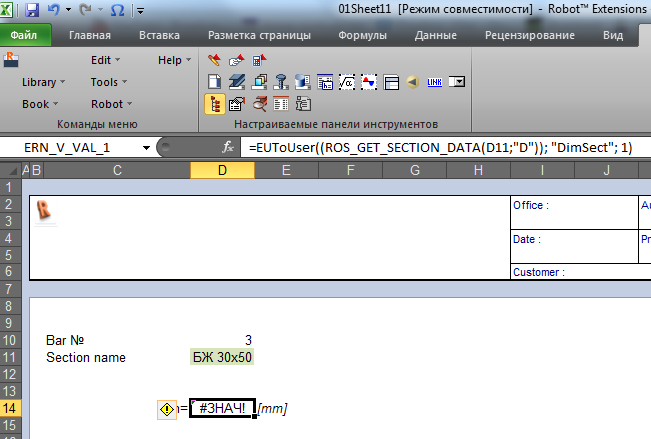
sc_q1.png


sc_q2.png


Also I attached file. Thank you in advance!

Do you find the posts helpful? "LIKE" these posts!
Have your question been answered successfully? Click 'ACCEPT SOLUTION' button.

Roman Zhelezniak

Robot Evangelist & Passionate Civil Structural Engineer

LinkedIn | Robot & Хобот | App Store for Robot
EESignature


0 Likes
Accepted solutions (2)
2,344 Views
7 Replies
Replies (7)
Message 2 of 8

Artur.Kosakowski
Autodesk Support
Autodesk Support

Most likely the section you try to import is not correctly recognized. Could you check if you have the same situation using e.g. HEA100 from one of the standard Robot section databases? Could you attach the Robot file you import bar 3 from please?


Artur Kosakowski
0 Likes
Message 3 of 8

Romanich
Mentor
Mentor

Dear Artur, thank you for your attention.

I found what the problem. This is bug. Just see picture:

SC insert formula bug.png

Do you find the posts helpful? "LIKE" these posts!
Have your question been answered successfully? Click 'ACCEPT SOLUTION' button.

Roman Zhelezniak

Robot Evangelist & Passionate Civil Structural Engineer

LinkedIn | Robot & Хобот | App Store for Robot
EESignature


0 Likes
Message 4 of 8

Artur.Kosakowski
Autodesk Support
Autodesk Support

Please send me the rtd file. I would like to have a look at this issue. What is the section database you used - in case it is the user attach it as well. Thank you.


Artur Kosakowski
0 Likes
Message 5 of 8

Romanich
Mentor
Mentor

I attached rtd file.

Do you find the posts helpful? "LIKE" these posts!
Have your question been answered successfully? Click 'ACCEPT SOLUTION' button.

Roman Zhelezniak

Robot Evangelist & Passionate Civil Structural Engineer

LinkedIn | Robot & Хобот | App Store for Robot
EESignature


0 Likes
Message 6 of 8

Artur.Kosakowski
Autodesk Support
Autodesk Support
Accepted solution

Please use H (height) and B (width) for concrete sections but D and BF for steel ones. This is how these section parameters are defined in Robot API.


If you find your post answered press the Accept as Solution button please. This will help other users to find solutions much faster. Thank you.


Artur Kosakowski
0 Likes
Message 7 of 8

Romanich
Mentor
Mentor

Solution is manual correction of parameter?

Do you find the posts helpful? "LIKE" these posts!
Have your question been answered successfully? Click 'ACCEPT SOLUTION' button.

Roman Zhelezniak

Robot Evangelist & Passionate Civil Structural Engineer

LinkedIn | Robot & Хобот | App Store for Robot
EESignature


0 Likes
Message 8 of 8

Artur.Kosakowski
Autodesk Support
Autodesk Support
Accepted solution

Currently yes, as only one type of the predefined formula is available in SC.


If you find your post answered press the Accept as Solution button please. This will help other users to find solutions much faster. Thank you.


Artur Kosakowski
0 Likes