Section builder

Section builder

mgaafar
Advocate Advocate
3,732 Views
17 Replies
Message 1 of 18

Section builder

mgaafar
Advocate
Advocate

Hi,

    I had complex section so I imported the section from CAD as Dxf and added the section to used database. when I ran the analysis, RSA gave a msg saying that torsional constant IX=0 and a small value will be assumed. so when I opened the saved section I found that I had not selected the Torsion option so I did, but it did not save it back to the user database, So I opened the user database and added the values manually and saved.

now the IX still reads zero when I right click the member and see the properties. how can I refresh or let RSA update the user defined values?

also why RSA does not calculate the wraping constant?

Thanks

0 Likes
Accepted solutions (2)
3,733 Views
17 Replies
Replies (17)
Message 2 of 18

Rafal.Gaweda
Autodesk Support
Autodesk Support

Send us sec file.


Rafal Gaweda
0 Likes
Message 3 of 18

mgaafar
Advocate
Advocate

Please find attached snap shots of the model, the model, the section file and the user database file.

in summary of what I need:

1- i am not sure how to update/refresh section properties of a section if I decide to change the property in the section (.sec) file and re-save it in the user defined database. currently I have to delete the existing section and re-save it to the database.

2-why when I resave the section to the database and re-insert the section in the model it does not update its properties and retain the old property?

Thanks

0 Likes
Message 4 of 18

Anonymous
Not applicable

Hi,

I have also had that issue with other section properties that I entered or changed them manually in the section database.


Try to re-add that section in the section box. You should see a message that says that this section already exists an so on...


0 Likes
Message 5 of 18

Artur.Kosakowski
Autodesk Support
Autodesk Support

2-why when I resave the section to the database and re-insert the section in the model it does not update its properties and retain the old property?


Imagine that I edited the IPE100 section and I saved it in my user section database and I used it in the model. Then I sent you my model and you want to edit the model using the standard IPE100 section tehrefore you load it from the database after opening my file. Would you like to have my IPE100 replaced?


This is still possible but requires user's 'confirmation':

1. Select all bars with 'my' IPE100 section

2. Change their section to any other (e.g. IPE200)

3. Delete 'my' IPE100 section label from the list in the Sections dialog

4. Add standard IPE100 from the database

5. Replace IPE200 with IPE100


Artur Kosakowski
0 Likes
Message 6 of 18

Rafal.Gaweda
Autodesk Support
Autodesk Support


    I had complex section so I imported the section from CAD as Dxf and added the section to used database. when I ran the analysis, RSA gave a msg saying that torsional constant IX=0 


rsec1.jpg


Then save it to database


Rafal Gaweda
0 Likes
Message 7 of 18

mgaafar
Advocate
Advocate

Rafal,

         Thanks, I know that this will solve the torsion constant calculations but my problem that when I save it in the database it does not update the section in the model, but it seems that I will have to rename the section and reinsert it in the model.

by the way does the section builder calculates the wraping constant?

0 Likes
Message 8 of 18

Rafal.Gaweda
Autodesk Support
Autodesk Support
         Thanks, I know that this will solve the torsion constant calculations but my problem that when I save it in the database it does not update the section in the model, 
take a look at message 5 above


Rafal Gaweda
0 Likes
Message 9 of 18

Rafal.Gaweda
Autodesk Support
Autodesk Support
Accepted solution

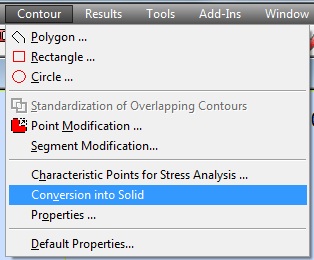
by the way does the section builder calculates the wraping constant?


Yes, for thin walled sections.

So you can create section as thin walled, calculate, then, if you need, you can convert it to thick walled section.


Rafal Gaweda
0 Likes
Message 10 of 18

Anonymous
Not applicable

How would be the way to to this Rafal?

0 Likes
Message 11 of 18

Rafal.Gaweda
Autodesk Support
Autodesk Support
Accepted solution

Look below


convtosolid.jpg


Rafal Gaweda
0 Likes
Message 12 of 18

Anonymous
Not applicable

Hi,


I put from a Cad a Z section. How to read a wraping constant  from "Result" ?


Regards

0 Likes
Message 13 of 18

Rafal.Gaweda
Autodesk Support
Autodesk Support
0 Likes
Message 14 of 18

Anonymous
Not applicable

I have a doubt if in my Principal System is wraping constant.


Could check my ad?

0 Likes
Message 15 of 18

Rafal.Gaweda
Autodesk Support
Autodesk Support

This section is defined as a thick walled, not thin walled section.


eThin walled section results Example below


thinw.jpg


Start Thin walled section, import only centerline of section, then assign \ set correct thickness


Rafal Gaweda
0 Likes
Message 16 of 18

Anonymous
Not applicable

Thank you very much. This works.

0 Likes
Message 17 of 18

Anonymous
Not applicable

HELP !


How to make a new section (in Section Builder) in order to create variable inertia bars ?


(Impossible since the creation of the bar in Geometry tab)

0 Likes
Message 18 of 18

Rafal.Gaweda
Autodesk Support
Autodesk Support
0 Likes