
Problem with Russian language - ??? in tables

Problem with Russian language - ??? in tables

Romanich
Mentor Mentor
1,057 Views
6 Replies
Message 1 of 7

Problem with Russian language - ??? in tables

Romanich
Mentor
Mentor

Hi again,

This problem have common roots with this and this, but in this case problem very serious.

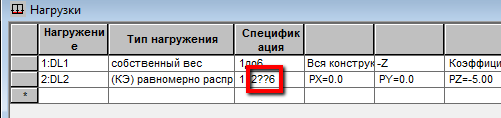
For example, I have several panels, selected them and copied list "2до6" to the clipboard. After then paste this data for Load table (for example) and obtain this:
er2.png


After pressing Enter, only panels 1, 2 and 6 will be loaded. Please, watch the video.

Do you find the posts helpful? "LIKE" these posts!
Have your question been answered successfully? Click 'ACCEPT SOLUTION' button.

Roman Zhelezniak

Robot Evangelist & Passionate Civil Structural Engineer

LinkedIn | Robot & Хобот | App Store for Robot
EESignature


0 Likes
Accepted solutions (1)
1,058 Views
6 Replies
Replies (6)
Message 2 of 7

Pawel.Pulak
Autodesk Support
Autodesk Support
Accepted solution

Hi Roman,

please try to change active keyboard to Russian one:russian_keyb.png


In my case it helped.

Nevetheless this effect is under investigation to be explained and corrected :).


---------------------------------------------
If this post answer your question please click "Accept as Solution". It will help everyone to find answer more quickly!


Regards,


Pawel Pulak
Technical Account Specialist
Message 3 of 7

Romanich
Mentor
Mentor

Hi Pawel,

Your trick is working Smiley Wink


Do you find the posts helpful? "LIKE" these posts!
Have your question been answered successfully? Click 'ACCEPT SOLUTION' button.

Roman Zhelezniak

Robot Evangelist & Passionate Civil Structural Engineer

LinkedIn | Robot & Хобот | App Store for Robot
EESignature


0 Likes
Message 4 of 7

Anonymous
Not applicable

Dear support team,


Could you provide a proper solution for this issue? "tricks" are not working in our case. Thank you.Russian language.jpg

0 Likes
Message 5 of 7

Anonymous
Not applicable

Guys, could you reply if this is solvable or not so we would not waste any more our time. 

Thank you.

0 Likes
Message 6 of 7

Pawel.Pulak
Autodesk Support
Autodesk Support

It is not written in which version you observe these effects and the resolution of screen capture makes it difficult to read but I guess this time it is not related to any "tricks" but to standard behaviour of Robot in all versions up to 2013.

All these versions of Robot are non-Unicode so to correctly display non-Unicode caracters (including Cyrillic ones) it is necessary to select appropriate language in regional settings of Windows:

Russian1.png

Note: after this change Windows is restarted.


BTW:

Starting from 2014 release RSA supports Unicode so none of above settings or "tricks" is necessary!


Pawel Pulak
Technical Account Specialist
Message 7 of 7

Anonymous
Not applicable

Thanks! it is good to know

0 Likes
