Prestress Force

Prestress Force

Anonymous
Not applicable
1,602 Views
10 Replies
Message 1 of 11

Prestress Force

Anonymous
Not applicable

Hi,


If I define prestress force for load case 2 (say, additional self weight case), but I do not include load case 2 in the combination will the prestress be ignored?  


Tony

0 Likes
Accepted solutions (2)
1,603 Views
10 Replies
Replies (10)
Message 2 of 11

Artur.Kosakowski
Autodesk Support
Autodesk Support
Accepted solution

Correct.


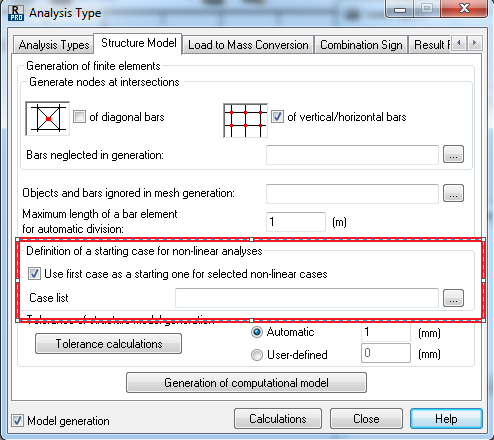
It would be included (providing that defined within the first loads case) automatically  for a cable model (assembly load case) or on demand for other model types  when such functionality is activated as shown below:


starting case.PNG


If you find your post answered press the Accept as Solution button please. This will help other users to find solutions much faster. Thank you.


Artur Kosakowski
Message 3 of 11

Anonymous
Not applicable

OK thanks a lot!  Thanks for quick answer.  

I have another question relating to the picture you posted now (off topic of prestress)


The "include case as starting point" feature;

Is this like saying that for a given non linear case, it will be "built" or superimposed on top of the case typed into the box?


Example for a lateral wind load case that is having trouble converging, if I add a gravity case to this list it often helps me. Does it not automatically add load case 1 as a starting point for all non linear cases?  Or do i need to add self weight case to this "include case as starting point" box?


Tony

0 Likes
Message 4 of 11

Anonymous
Not applicable

Prestress Related Question again.  


When I use the "include case as starting point" feature the so my prestress will be applied to the other non linear cases, will it be "Doubled up" in the combinations?  i.e. added 1000kN in self weight case, then this is starting point for wind and live cases.  WHen it gets tot he combination of dead live and wind will I get the force tripled?


SOrry i have ot just built a test model to figure this out   I DID read the help file but it's a little confusing at 10.45pm

0 Likes
Message 5 of 11

Anonymous
Not applicable

All good answered my own question should have just tried it before asking


0 Likes
Message 6 of 11

Artur.Kosakowski
Autodesk Support
Autodesk Support

@Anonymous wrote:

OK thanks a lot!  Thanks for quick answer.  

I have another question relating to the picture you posted now (off topic of prestress)


The "include case as starting point" feature;

Is this like saying that for a given non linear case, it will be "built" or superimposed on top of the case typed into the box?


Example for a lateral wind load case that is having trouble converging, if I add a gravity case to this list it often helps me. Does it not automatically add load case 1 as a starting point for all non linear cases?  Or do i need to add self weight case to this "include case as starting point" box?


This is similar to the assembly load case for a cable model. The load from the case indicated in  the selection field is applied on already deformed (by the case 1) structure.


Artur Kosakowski
0 Likes
Message 7 of 11

Artur.Kosakowski
Autodesk Support
Autodesk Support

tony.ridley wrote:

Prestress Related Question again.  


When I use the "include case as starting point" feature the so my prestress will be applied to the other non linear cases, will it be "Doubled up" in the combinations?  i.e. added 1000kN in self weight case, then this is starting point for wind and live cases.  WHen it gets tot he combination of dead live and wind will I get the force tripled?


SOrry i have ot just built a test model to figure this out   I DID read the help file but it's a little confusing at 10.45pm


Yes,contrary to a cable model the load load from the first load case will influence each of the load cases (the ones that you entered in the selection field) used in the combination. For the cable model the assembly load case is used only one time. In other words if you use it for e.g. two load cases (2 and 3) and then you create combination 2 + 3 the influence of the case 1 will be 'doubled' (1+ 2 + 1 + 3). For the cable model it would be (1 + 2 + 3).


Artur Kosakowski
Message 8 of 11

Anonymous
Not applicable

. For the cable model the assembly load case is used only one time. In other words if you use it for e.g. two load cases (2 and 3) and then you create combination 2 + 3 the influence of the case 1 will be 'doubled' (1+ 2 + 1 + 3). For the cable model it would be (1 + 2 + 3).


For the cable post tension / regular non linear model with NO cable it would be (1+2+3) ??

0 Likes
Message 9 of 11

Anonymous
Not applicable
Artur,
One more thats it.  If I click on the "use first case" check box - but do not enter any cases in the field below the checkbox - is load case 1 used as starting case for ALL cases?
 

starting case.PNG


0 Likes
Message 10 of 11

Artur.Kosakowski
Autodesk Support
Autodesk Support

@Anonymous wrote:

. For the cable model the assembly load case is used only one time. In other words if you use it for e.g. two load cases (2 and 3) and then you create combination 2 + 3 the influence of the case 1 will be 'doubled' (1+ 2 + 1 + 3). For the cable model it would be (1 + 2 + 3).


For the cable post tension / regular non linear model with NO cable it would be (1+2+3) ??


if you type 2 and 3 in the field then: (1 + 2) + (1 + 3)

if you type 2 then (1 + 2) + 3

if you type 3 then (1 + 3) + 2


Artur Kosakowski
0 Likes
Message 11 of 11

Artur.Kosakowski
Autodesk Support
Autodesk Support
Accepted solution

No, it would not  be used at all. Please mind that for cable models the assembly load case is used for all following load cases automatically and you should not use the starting case functionality at all.


Artur Kosakowski
0 Likes