Modify Table Columns

Modify Table Columns

Anonymous
Not applicable
795 Views
5 Replies
Message 1 of 6

Modify Table Columns

Anonymous
Not applicable

When you open the Bars table, for instance, you might want to reconfigure the columns to add some additional information to the table.  Is there any way to preserve this setting after you have closed the table?  The ability to configure columns in a table is really powerful, it would be great if you could preserve your settings for the next time you open the table.


Thanks,

-Ken


0 Likes
Accepted solutions (1)
796 Views
5 Replies
Replies (5)
Message 2 of 6

Anonymous
Not applicable

I've not come across any way to do this one. 


But agree it would be nice.  Maybe add to the wishlist 🙂

0 Likes
Message 3 of 6

Anonymous
Not applicable

Hey Tony!  Thanks.


I would have figured with all the different ways to save templates etc. there would be some sneaky way to do this.  🙂


-Ken

0 Likes
Message 4 of 6

Rafal.Gaweda
Autodesk Support
Autodesk Support
Accepted solution

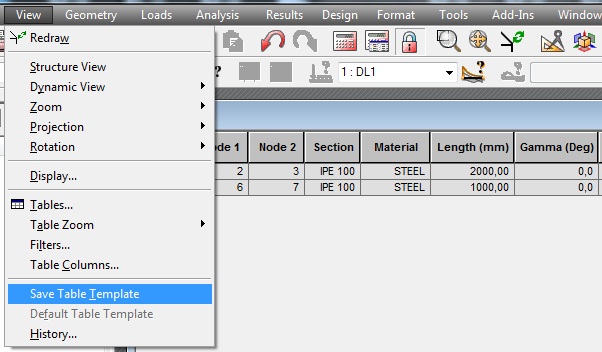
I would have figured with all the different ways to save templates etc.


Sneaky 🙂 ?


savetabletemplate.jpg


Rafal Gaweda
Message 5 of 6

Anonymous
Not applicable

OMG!  Rafal!!! 


see???  sneaky.  menu items which appear and disappear is so sneaky... Smiley Wink


here's something i'm almost embarrassed to admit... I only noticed the entire new menu item "Format" for when a table is in focus...


Love you guys!  so much fun.


Thanks for the information, this is invaluable!


Cheers All!

-Ken


0 Likes
Message 6 of 6

Rafal.Gaweda
Autodesk Support
Autodesk Support

see???  sneaky.  menu items which appear and disappear is so sneaky... Smiley Wink


Menu depends on active window. Different for graphical window comparing to menu for active table.


Rafal Gaweda