Family scales when detail level is coarse only

Family scales when detail level is coarse only

Anonymous
Not applicable
999 Views
6 Replies
Message 1 of 7

Family scales when detail level is coarse only

Anonymous
Not applicable

I have created a family that loads and views in a project fine when the detail level is set to medium and fine. The size of the family remains the same when the view scale is changed within the project. However, when detail level is set to coarse the family scales when the view scale is chnaged and i cannot see why?

I have changed model line settings in the 'family element visibility settings' dialog in the family editor but with no success? any ideas?

0 Likes
Accepted solutions (1)
1,000 Views
6 Replies
Replies (6)
Message 2 of 7

CoreyDaun
Mentor
Mentor

From what it sounds like, there in an embedded Generic Annotation in your family, which does scale according to the View scale.


If this does not help, could you possible attach the .rfa file here so we could get a better understanding of your situation?

Corey D.                                                                                                                  ADSK_Logo_EE_2013.png    AutoCAD 2014 User  Revit 2014 User
──────────────────────────────────────────────────────────────────────
⁞|⁞ Please use Mark Solutions!.Accept as Solution and Give Kudos!Give Kudos as appropriate to further enhance these forums. Thank you!
0 Likes
Message 3 of 7

Anonymous
Not applicable

When this family is inserted into a project it displays at full scale in medium and fine detail level, but scales down when coarse detail level is selected. I have tried resolving this for hours with no success!


Thanks.

0 Likes
Message 4 of 7

CoreyDaun
Mentor
Mentor
Accepted solution

It looks like your family will have to be redrawn. Open a default "Out Of The Box" rectangular elbow and use as a template or a guide.
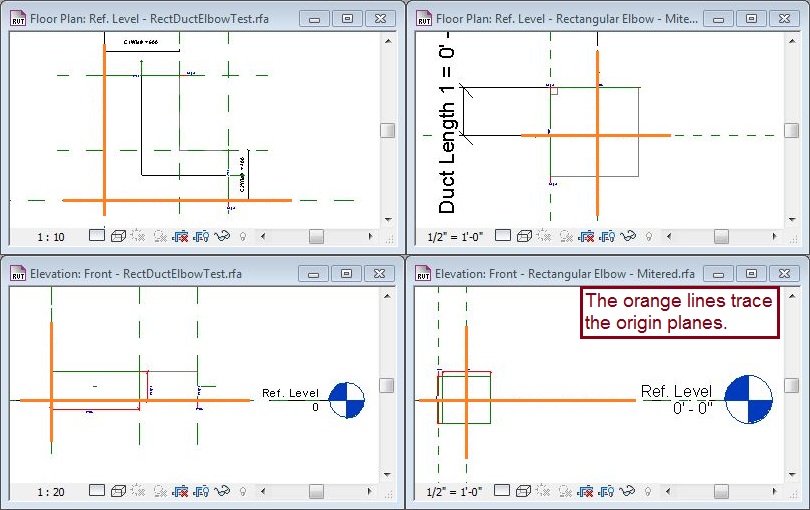
 

Note that the default elbow is centered on the original Reference Planes, both in the Reference View and in Front View. This needs to be corrected because the origin impacts the display of the Annotative Model Lines.


DuctFittingElbow.JPG

Corey D.                                                                                                                  ADSK_Logo_EE_2013.png    AutoCAD 2014 User  Revit 2014 User
──────────────────────────────────────────────────────────────────────
⁞|⁞ Please use Mark Solutions!.Accept as Solution and Give Kudos!Give Kudos as appropriate to further enhance these forums. Thank you!
0 Likes
Message 5 of 7

Anonymous
Not applicable

Thanks

0 Likes
Message 6 of 7

CoreyDaun
Mentor
Mentor

Don't hesitate to post more questions here if you need - there are a lot of knowledgeable users here who are happy to advise, provide tips, and just generally help.

Corey D.                                                                                                                  ADSK_Logo_EE_2013.png    AutoCAD 2014 User  Revit 2014 User
──────────────────────────────────────────────────────────────────────
⁞|⁞ Please use Mark Solutions!.Accept as Solution and Give Kudos!Give Kudos as appropriate to further enhance these forums. Thank you!
0 Likes
Message 7 of 7

Anonymous
Not applicable

Much appreciated, i have no doubt that i will have many more questions, as after many years of AutoCAD, AutoCAD MEP and Cadduct, this software is on a different level.....a huge learning curve. I will persevere with it though, as i believe the 3 Revit packages will become the leader in BIM software/workflows.

Fingers crossed that i will eventually be able to answer questions on here some day!

0 Likes

