Where to download Families?

Where to download Families?

Anonymous
Not applicable
52,241 Views
15 Replies
Message 1 of 16

Where to download Families?

Anonymous
Not applicable

Hi,
In AutoCAD there are many sites where we can download blocks.
In Revit,can anyone guide me to sites to download Families to use in Revit drawings?

Thanks


Jaf

0 Likes
Accepted solutions (4)
52,242 Views
15 Replies
Replies (15)
Message 2 of 16

mkotsamanes
Enthusiast
Enthusiast
Accepted solution

I usually go to;


www.revitcity.com


I don't know if there are any other site. If you click on the resources button at Revitcity you might be able to find more site, not sure.


If anyone can think of other sites post them below I don't mind having an alternative when Revitcity doesn't have what I am looking for.

Message 3 of 16

loboarch
Alumni
Alumni
Accepted solution

seek.autodesk.com


Jeff Hanson
Principal Content Experience Designer
Revit Help |
Message 4 of 16

Anonymous
Not applicable

Thanks for help.

0 Likes
Message 5 of 16

Anonymous
Not applicable

Hi Jeff,

thank you for the link.But I have question: how to download these items? I selected some of them but I could not find a botton to do that. I installed (seekview) but that was only to view the item.

How can I dowenload them?


Thanks


Jaf

0 Likes
Message 6 of 16

Alfredo_Medina
Mentor
Mentor

I think you need to create an account first, log on, and then the download options will be available.


Alfredo Medina _________________________________________________________________ ______
Licensed Architect (Florida) | Freelance Instructor | Profile on Linkedin
0 Likes
Message 7 of 16

loboarch
Alumni
Alumni
Accepted solution

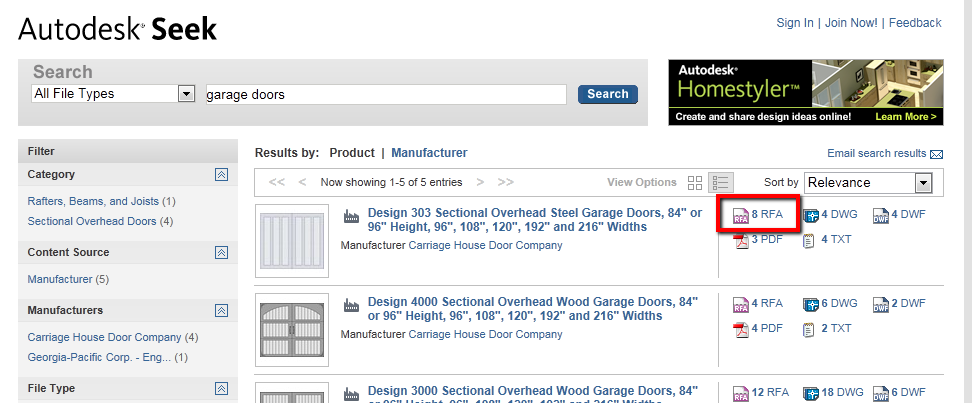
Once you find the item you want to download click the RFA icon for the entry.  RFA files are family files.


rfa_link.png


Once you click the family link then place a check mark next to the specific files you want to download.  in many cases there will be more than one RFA file.  Once you place the check mark then click the download button at the upper portion of the page.


download_seek.png


Jeff Hanson
Principal Content Experience Designer
Revit Help |
Message 8 of 16

loboarch
Alumni
Alumni

Alfredo_Medina wrote:

I think you need to create an account first, log on, and then the download options will be available.


I don't think you need an account to download, it just makes it easier. (Less "nag" screens)


Edit:  And if you have an account to post to this forum you can use the same logon/account at Autodesk Seek.  Smiley Happy


Jeff Hanson
Principal Content Experience Designer
Revit Help |
Message 9 of 16

Alfredo_Medina
Mentor
Mentor

I see. True. I just tried to download a chair without logging on, and it worked. Thanks.


Alfredo Medina _________________________________________________________________ ______
Licensed Architect (Florida) | Freelance Instructor | Profile on Linkedin
0 Likes
Message 10 of 16

GHASEM_ARIYANI
Advisor
Advisor

hi


From the link below you can Download.

http://revit.steelcase.com/Steelcase/


GHASEM ARIYANI
BIM/VDC Manager
Revit Architecture Certified Professional
Revit Structure Certified Professional
Revit Mechanical Certified Professional
Revit Electrical Certified Professional
If my answer solved your problem, please click "ACCEPT SOLUTION" and consider giving a Kudo.
LinkedIn
YouTube
Udemy Course
0 Likes
Message 11 of 16

Anonymous
Not applicable
Accepted solution
You can download some really great BIM content and Revit families from http://www.bimbandit.com
Message 12 of 16

Anonymous
Not applicable

We downloaded a few families from archigrafix. Have a look if you are interested in cars and trees.


0 Likes
Message 13 of 16

Anonymous
Not applicable

I just found some groovy stuff at www.plansort.com if that helps.


0 Likes
Message 14 of 16

Anonymous
Not applicable

Talking about BIM in Healthcare projects there are some great BIM Revit and AutoCAD sites for healthcare projects such as iHFG – The International Health Facility Guidelines with allot of free room layouts, room datasheets, and Revit / AutoCAD content.

Check iHFG out at: http://healthdesign.com.au/ihfg

0 Likes
Message 15 of 16

Anonymous
Not applicable

There are thousands of healthcare related RFA Revit family files available in the HFBS Revit Market:

http://healthdesign.com.au/RevitMarket


These files are compliant with the iHFG (International Health Facility Guidelines) which is a standard implemented across many countries and available online here: http://healthdesign.com.au/ihfg/Guidelines/Index/iHFG

0 Likes
Message 16 of 16

Allan-Wise
Enthusiast
Enthusiast

This site has a decent collection of free Revit Families for download: https://families.draftsperson.net/

A few interesting custom families there too.


Also it's sister site has plenty of free AutoCAD blocks:  https://blocks.draftsperson.net/

0 Likes