Autodesk Revit Architecture
- Subscribe to RSS Feed
- Mark Topic as New
- Mark Topic as Read
- Float this Topic to the Top
- Bookmark
- Subscribe
- Printer Friendly Page
Louvre family not showing up in elevation
- Mark as New
- Bookmark
- Subscribe
- Subscribe to RSS Feed
- Highlight
- Email to a Friend
- Report Inappropriate Content
Hi. My concern is regarding a louvre family i am placing on walls in a multi-storey commercial project. They are viewable in 3d mode and Floor plan view but when i switch to elevation, all i get are holes in the walls where the louvre should be sitting. Any help would be an appreciated. This louvre family is from Breezway and i am getting the same result with all Breezway family members i have downloaded.
Shandor Fahrenfort
sfahrenfort@hotmail.com
Solved! Go to Solution.
Re: Louvre family not showing up in elevation
- Mark as New
- Bookmark
- Subscribe
- Subscribe to RSS Feed
- Highlight
- Email to a Friend
- Report Inappropriate Content
Looks like there is a bad visibility setting in the family. Post the RFA file so someone can take a closer look.

Jeff Hanson
Sr. Subject Matter Expert
Autodesk, Revit User Experience
Re: Louvre family not showing up in elevation
- Mark as New
- Bookmark
- Subscribe
- Subscribe to RSS Feed
- Highlight
- Email to a Friend
- Report Inappropriate Content
These are the louver family files I am using with Revit 2012. If there is a fix please let me know it in case I come across the problem again. Thanks.
Re: Louvre family not showing up in elevation
- Mark as New
- Bookmark
- Subscribe
- Subscribe to RSS Feed
- Highlight
- Email to a Friend
- Report Inappropriate Content
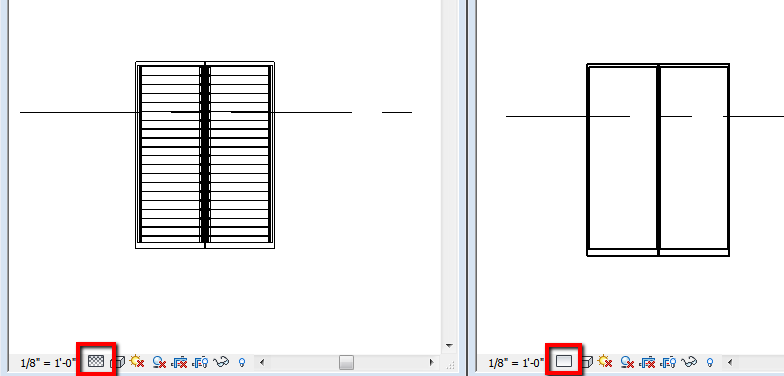
The family has the louvers set to not display at course level of detail. if you change the detail level of the view the louvers will show up.

Jeff Hanson
Sr. Subject Matter Expert
Autodesk, Revit User Experience
Re: Louvre family not showing up in elevation
- Mark as New
- Bookmark
- Subscribe
- Subscribe to RSS Feed
- Highlight
- Email to a Friend
- Report Inappropriate Content
Thanks alot. That fixed it ![]()