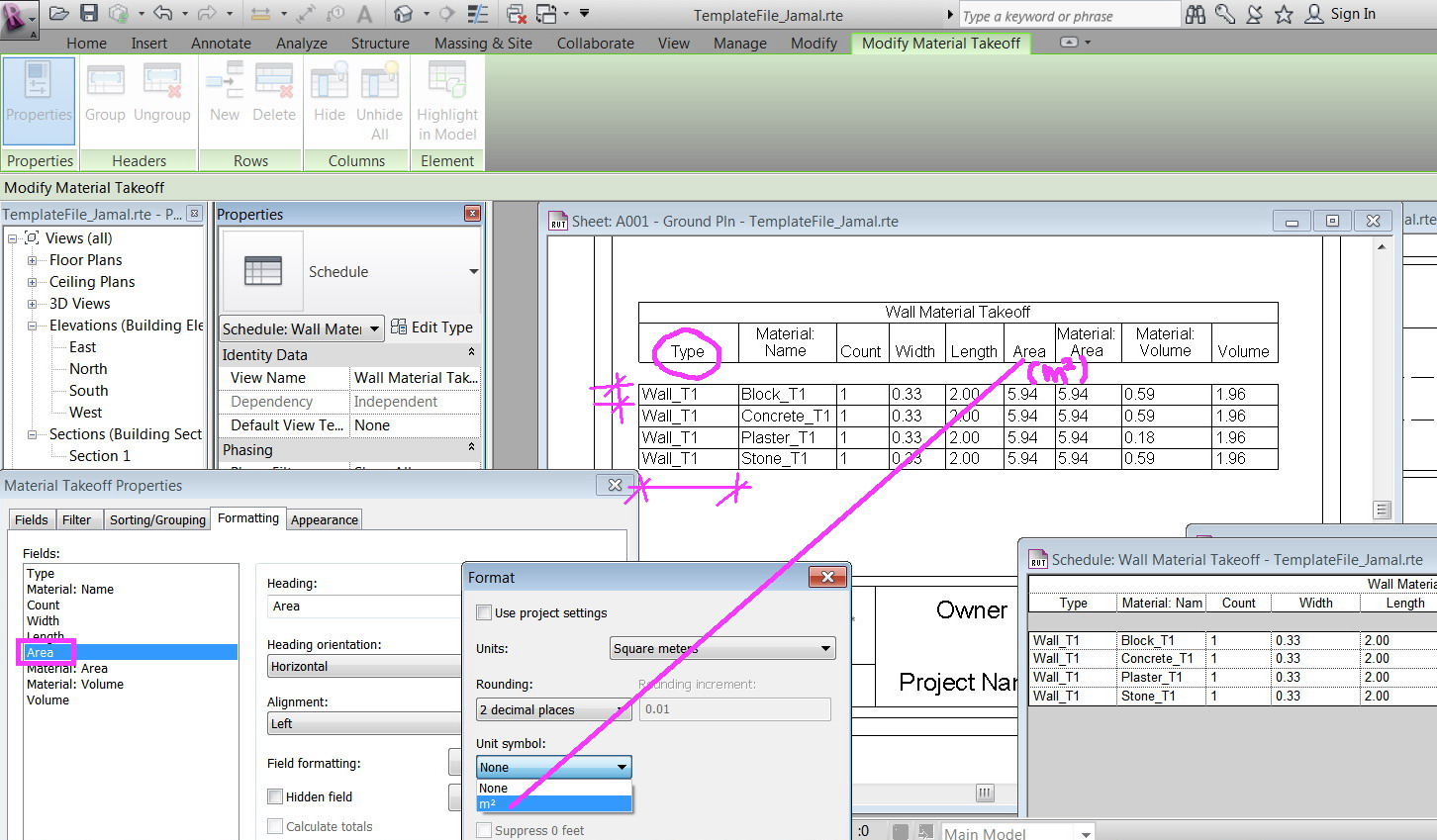
JamaL9722060 wrote:"How to control the width of column and the height of row?"
You can control the width of the columns by selecting the Schedule Graphic and dragging the triangular grips that appear. This is in no way associated to the width of the column in the Schedule View. See image below. The height of the rows, however, cannot be manually controlled. That's based purely on the number of lines of text in the lines of data.

JamaL9722060 wrote:"How to choose the size, color and type of font?"
You can control the size and type of font of the Schedule Graphics under the Appearance tab in Schedule View's Properties. Color is not an option. You cannot control the appearance of the font in the Schedule View. See image.

JamaL9722060 wrote:"How to have the unit of each column in the head row?"
Revit cannot automatically add the unit to the header. You will have to manually add any such text by going to the Format tab under the Schedule View's Properties. See image.

Corey D. 

 ──────────────────────────────────────────────────────────────────────⁞|⁞ Please use
  .Accept as Solution and
  Give Kudos as appropriate to further enhance these forums. Thank you!