Column Display at Different Display Levels

Column Display at Different Display Levels

chris_pitt
Enthusiast Enthusiast
1,299 Views
3 Replies
Message 1 of 4

Column Display at Different Display Levels

chris_pitt
Enthusiast
Enthusiast

Hi


Does anyone have a quick explanation of how to make columns display as columns in the coarse level of detail instead of just as sticks?


I know I'll have to edit the family but I can see anything obvious to change.


Regards


Christopher Alan Pitt

Frank Shaw Associates

0 Likes
Accepted solutions (1)
1,300 Views
3 Replies
Replies (3)
Message 2 of 4

Alfredo_Medina
Mentor
Mentor
Accepted solution

Open the column family, select the extrusion > visibility settings, > activate coarse. Now, do the opposite with the symbolic lines, making them Not visible in coarse level of detail.


Alfredo Medina _________________________________________________________________ ______
Licensed Architect (Florida) | Freelance Instructor | Profile on Linkedin
0 Likes
Message 3 of 4

robert.noriega
Community Visitor
Community Visitor

when i open the column family's where is the extrusion setting

0 Likes
Message 4 of 4

David_W_Koch
Mentor
Mentor

@robert.noriega 

You most likely have figured this out by now, but for any future readers of this thread, you can modify the visibility of extrusions in a column family by:

  1. Edit the family.
  2. Select the extrusion.
  3. On the Modify|Extrusion contextual ribbon tab, on the Mode panel, select the Visibility Settings tool.
  4. In the Family Element Visibility Settings dialog, in the Detail Levels area, check the toggles of the Detail Levels for which you want that extrusion to be visible.
  5. Select OK to accept the change.
  6. Save the family, if appropriate.
  7. Load the family into the project(s) where you want to see the change.
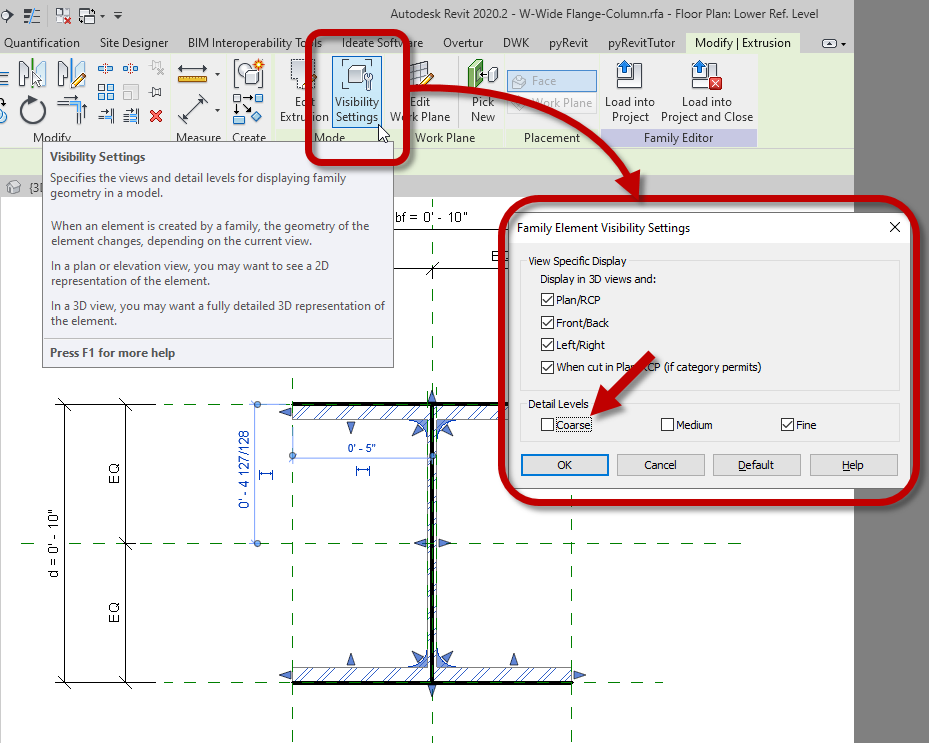
2020-07-13_Revit2020_FamilyEditor_StructuralColumnFamily_ExtrusionVisibility.png


In the out-of-the-box imperial wide flange column family, the extrusion is only set to be visible at the Fine Detail Level.


David Koch
AutoCAD Architecture and Revit User
Blog | LinkedIn

EESignature

0 Likes

