• Industries
  • Products
  • Buy
  • Services & Support
  • Communities
  • Discussion Groups

    Autodesk Revit API

    Reply
    Valued Contributor
    nik.mazreen
    Posts: 59
    Registered: ‎01-10-2011

    Revit API newbie

    546 Views, 11 Replies
    01-15-2012 08:37 PM

    Hi,


    i'm new in this Revit API..dont even have any background in programming...just basic programming. Need help to understand more about revit API. Now i'm trying out Revit API from Revit 2012 API Developer's Guide book. Got an error and not sure how to fix it:


    Here are the codes:


    using System;
    using System.Collections.Generic;
    using System.Linq;
    using System.Text;
    using Autodesk.Revit.UI;
    using Autodesk.Revit.DB;
    using Autodesk.Revit.Attributes;
    using Autodesk.Revit.UI.Selection;


    namespace Filtered_Element
    {
    [Transaction(TransactionMode.ReadOnly)]
    public class Class1 : IExternalCommand
    {
    public Result Execute(ExternalCommandData commandData,
    ref string message, ElementSet elements)
    {
    //Create a Filter to get all the doors in the document
    ElementClassFilter familyInstanceFilter = new ElementClassFilter(typeof(FamilyInstance));
    ElementCategoryFilter doorsCategoryFilter = new ElementCategoryFilter(BuiltInCategory.OST_Doors);
    LogicalAndFilter doorInstanceFilter = new LogicalAndFilter(familyInstanceFilter, doorsCategoryFilter);
    FilteredElementCollector collector = new FilteredElementCollector(document);
    ICollection<ElementId> doors = collector.WherePasses(doorInstanceFilter).ToElementIds();

    string prompt = "The ids of the doors in the current document are:";
    foreach(ElementId id in doors)

    {
    prompt += "\n\t" + id.IntegerValue;
    }

    //Give the user some information
    TaskDialog.Show("Revit", prompt);

    return Result.Succeeded;
    }
    }
    }


    the error:


    The name 'document' does not exist in the current context


    Thx in advanced.


    -Nik-


    Please use plain text.
    Valued Contributor
    ollikat
    Posts: 101
    Registered: ‎04-01-2011

    Re: Revit API newbie

    01-15-2012 10:22 PM in reply to: nik.mazreen

    Basically the reason is that there aren't any object called "document" in your function. So how to get one...?

    Many (most...) of the API methods want to know the project document, which should be used. The reference for this document is provided in the ExternalCommandData argument of the Execute() method. You can assign it to a temporary variable or use it directly intead...pick your choise.


    FilteredElementCollector collector = new FilteredElementCollector(extCommData.Application.ActiveUIDocument.Document);
    
    // OR...
    
    Document doc = extCommData.Application.ActiveUIDocument.Document;
    FilteredElementCollector collector = new FilteredElementCollector(doc);


    Please use plain text.
    Valued Contributor
    nik.mazreen
    Posts: 59
    Registered: ‎01-10-2011

    Re: Revit API newbie

    01-15-2012 10:46 PM in reply to: ollikat

    Thx for the reply...appreciate it..:smileyhappy:


    i did try both of your solution..now another error occur..the error same as before but with different name "The name 'extCommData' does not exist in the current context".


    Here are my coding:


    using System;
    using System.Collections.Generic;
    using System.Linq;
    using System.Text;
    using Autodesk.Revit.UI;
    using Autodesk.Revit.DB;
    using Autodesk.Revit.Attributes;
    using Autodesk.Revit.UI.Selection;
    using Autodesk.Revit.ApplicationServices;

    namespace Filtered_Element
    {
    [Transaction(TransactionMode.ReadOnly)]
    public class Class1 : IExternalCommand
    {
    public Result Execute(ExternalCommandData commandData,
    ref string message, ElementSet elements)
    {
    //Create a Filter to get all the doors in the document
    ElementClassFilter familyInstanceFilter = new ElementClassFilter(typeof(FamilyInstance));
    ElementCategoryFilter doorsCategoryFilter = new ElementCategoryFilter(BuiltInCategory.OST_Doors);
    LogicalAndFilter doorInstanceFilter = new LogicalAndFilter(familyInstanceFilter, doorsCategoryFilter);
    Document doc = extCommData.Application.ActiveUIDocument.Document;
    FilteredElementCollector collector = new FilteredElementCollector(doc);
    ICollection<ElementId> doors = collector.WherePasses(doorInstanceFilter).ToElementIds();

    string prompt = "The ids of the doors in the current document are:";
    foreach(ElementId id in doors)

    {
    prompt += "\n\t" + id.IntegerValue;
    }

    //Give the user some information
    TaskDialog.Show("Revit", prompt);

    return Result.Succeeded;
    }
    }
    }


    i'm not really good in programming..i might missing something...


    thx in advanced..


    -Nik-


    Please use plain text.
    Valued Contributor
    ollikat
    Posts: 101
    Registered: ‎04-01-2011

    Re: Revit API newbie

    01-15-2012 10:54 PM in reply to: nik.mazreen

    Again...there aren't such a variable declared in the scope of the function. Sorry...I just wrote an example, I didn't check out what was the actual name of that argument in yor code. Your function is declared like this:

    public Result Execute(ExternalCommandData commandData, ref string message, ElementSet elements)


    So instead you should use "commandData"

    Please use plain text.
    Valued Contributor
    nik.mazreen
    Posts: 59
    Registered: ‎01-10-2011

    Re: Revit API newbie

    01-15-2012 10:59 PM in reply to: ollikat

    Got it...what a silly question from me..:smileyembarrassed:


    Thank you so much...

    Please use plain text.
    Valued Contributor
    nik.mazreen
    Posts: 59
    Registered: ‎01-10-2011

    Re: Revit API newbie

    01-16-2012 02:05 AM in reply to: nik.mazreen

    Hi again,


    i hv 1 more question..<for now>..:smileytongue:


    how to get area value to be read in task dialog box..


    my codes are as below:

    using System;
    using System.Collections.Generic;
    using System.Linq;
    using System.Text;
    using Autodesk.Revit.Attributes;
    using Autodesk.Revit.DB;
    using Autodesk.Revit.UI;
    using Autodesk.Revit.ApplicationServices;

    namespace Revit_DialogBox
    {
    [Transaction(TransactionMode.Automatic)]
    public class Class1 : IExternalCommand
    {
    public Result Execute(ExternalCommandData commandData,
    ref string message, ElementSet elements)
    {
    //Get the application and document from external data.
    Application app = commandData.Application.Application;
    Document activedoc = commandData.Application.ActiveUIDocument.Document;

    //Create a Revit task dialog to communicate information to the user.
    TaskDialog mainDialog = new TaskDialog("Hello, Revit");
    mainDialog.MainInstruction = "Hello, Revit";
    mainDialog.MainContent = "This sample shows how to use a Revit task dialog to communicate with the user."
    + "The command links below open additional task dialogs with more information.";

    //Add commandLink option to task dialog
    mainDialog.AddCommandLink(TaskDialogCommandLinkId.CommandLink1,
    "View information about the Revit Installation");
    mainDialog.AddCommandLink(TaskDialogCommandLinkId.CommandLink2,
    "View information about the active document");

    //Set common buttons and default button. if no CommandButton or CommandLink is added,
    //task dialog will show a Close button by default.
    mainDialog.CommonButtons = TaskDialogCommonButtons.Close;
    mainDialog.DefaultButton = TaskDialogResult.Close;

    //Set footer text. Footer text is usually used to link to the help document.
    mainDialog.FooterText = "<a href=\"http://usa.autodesk.com/\">"
    + "Click here for the Revit API Developer Center</a>";

    TaskDialogResult tResult = mainDialog.Show();

    //if the user clicks the first command link, a simple Task Dialog
    //with only a close button shows information about the Revit installation.
    if (TaskDialogResult.CommandLink1 == tResult)
    {
    TaskDialog dialog_CommandLink1 = new TaskDialog("Revit Build Information");
    dialog_CommandLink1.MainInstruction = "Revit Version is: " + app.VersionName + "\n"
    + "Revit Version Number is: " + app.VersionNumber + "\n"
    + "Revit Version Build is: " + app.VersionBuild;

    dialog_CommandLink1.Show();
    }

    //if the user clicks the second command link, a simple Task Dialog
    //created by static method shows information about the active document
    else if (TaskDialogResult.CommandLink2 == tResult)
    {
    TaskDialog.Show("Active Document Information",
    "Active document: " + activedoc.Title + "\n"
    + "Active view name: " + activedoc.ActiveView.Name + "\n"
    + "Floor Area: " + ParameterType.Area);
    }
    return Result.Succeeded;
    }
    }
    }


    the highlighted should read the area value..right? or not? the result that i get shown below:

    area.JPG


    help:smileysad:


    thx in advanced..


    -Nik-

    Please use plain text.
    Valued Contributor
    ollikat
    Posts: 101
    Registered: ‎04-01-2011

    Re: Revit API newbie

    01-16-2012 02:22 AM in reply to: nik.mazreen

    Try like this


    ParameterType.Area.ToString("F");


    See explanations from http://msdn.microsoft.com/en-us/library/c3s1ez6e.aspx#Y311

    Please use plain text.
    Valued Contributor
    nik.mazreen
    Posts: 59
    Registered: ‎01-10-2011

    Re: Revit API newbie

    01-18-2012 07:59 PM in reply to: ollikat

    nope..still not working...not sure how to solve this..i did try so many way to get the area value..

    here are my code:


    using System;
    using System.Collections.Generic;
    using System.Linq;
    using System.Text;
    using Autodesk.Revit.Attributes;
    using Autodesk.Revit.DB;
    using Autodesk.Revit.UI;
    using Autodesk.Revit.ApplicationServices;

    namespace Revit_DialogBox
    {
    [Transaction(TransactionMode.Automatic)]
    public class Class1 : IExternalCommand
    {
    public Result Execute(ExternalCommandData commandData,
    ref string message, ElementSet elements)
    {
    //Get the application and document from external data.
    Application app = commandData.Application.Application;
    Document activedoc = commandData.Application.ActiveUIDocument.Document;
    //DimensionTypeSet param = commandData.Data.get_Item(Floor);

    //Create a Revit task dialog to communicate information to the user.
    TaskDialog mainDialog = new TaskDialog("Hello, Revit");
    mainDialog.MainInstruction = "Hello, Revit";
    mainDialog.MainContent = "This sample shows how to use a Revit task dialog to communicate with the user."
    + "The command links below open additional task dialogs with more information.";

    //Add commandLink option to task dialog
    mainDialog.AddCommandLink(TaskDialogCommandLinkId.CommandLink1,
    "View information about the Revit Installation");
    mainDialog.AddCommandLink(TaskDialogCommandLinkId.CommandLink2,
    "View information about the active document");

    //Set common buttons and default button. if no CommandButton or CommandLink is added,
    //task dialog will show a Close button by default.
    mainDialog.CommonButtons = TaskDialogCommonButtons.Close;
    mainDialog.DefaultButton = TaskDialogResult.Close;

    //Set footer text. Footer text is usually used to link to the help document.
    mainDialog.FooterText = "<a href=\"http://usa.autodesk.com/\">"
    + "Click here for the Revit API Developer Center</a>";

    TaskDialogResult tResult = mainDialog.Show();

    //if the user clicks the first command link, a simple Task Dialog
    //with only a close button shows information about the Revit installation.
    if (TaskDialogResult.CommandLink1 == tResult)
    {
    TaskDialog dialog_CommandLink1 = new TaskDialog("Revit Build Information");
    dialog_CommandLink1.MainInstruction = "Revit Version is: " + app.VersionName + "\n"
    + "Revit Version Number is: " + app.VersionNumber + "\n"
    + "Revit Version Build is: " + app.VersionBuild;

    dialog_CommandLink1.Show();
    }

    //if the user clicks the second command link, a simple Task Dialog
    //created by static method shows information about the active document
    else if (TaskDialogResult.CommandLink2 == tResult)
    {
    BuiltInParameter area = BuiltInParameter.MASS_GROSS_AREA;
    BuiltInParameter area3 = BuiltInParameter.ZONE_AREA;
    BuiltInParameter area4 = BuiltInParameter.LEVEL_DATA_FLOOR_PERIMETER;
    BuiltInParameterGroup area5 = BuiltInParameterGroup.PG_AREA;
    BuiltInParameter area6 = BuiltInParameter.LEVEL_DATA_FLOOR_AREA;
    AreaElemType area1 = AreaElemType.BOMAArea;
    ParameterType area2 = ParameterType.Area;
    BuiltInParameter area7 = BuiltInParameter.ROOM_AREA;

    int iarea = (int)area;
    int iarea3 = (int)area3;
    int iarea5 = (int)area5;
    int iarea6 = (int)area6;
    int iarea7 = (int)area7;
    Int64 iarea2 = (Int64)area2;
    Int64 iarea1 = (Int64)area1;

    TaskDialog.Show("Active Document Information",
    "Active document: " + activedoc.Title + "\n"
    + "Active view name: " + activedoc.ActiveView.Name + "\n"
    + "Floor Area: " + activedoc.ActiveView.Level + "\n"
    + "Floor Area: " + activedoc.FloorTypes.Size + "\n"
    + "Floor Area: " + iarea1 + "\n"
    + "Floor Area: " + iarea2 + "\n"
    + "Floor Area: " + iarea3 + "\n"
    + "Floor Area: " + area4 + "\n"
    + "Floor Area: " + iarea5 + "\n"
    + "Floor Area: " + iarea6 + "\n"
    + "Floor Area: " + iarea7 + "\n"
    + "Floor Area: " + iarea);
    }
    return Result.Succeeded;
    }

    }
    }


    this is what i get:
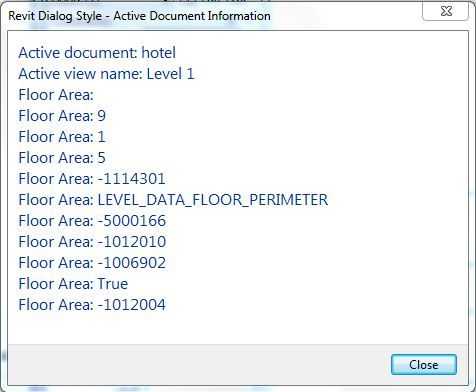
    result1.JPG


    not sure what the numbers mean...


    thx in advanced


    -nik-


    Please use plain text.
    Valued Contributor
    ollikat
    Posts: 101
    Registered: ‎04-01-2011

    Re: Revit API newbie

    01-18-2012 10:04 PM in reply to: nik.mazreen

    Maybe we should first make sure what are you trying to do. Are you trying to get a area (square meters etc) of some floor. Or is it something else that you want?

    Please use plain text.
    Valued Contributor
    nik.mazreen
    Posts: 59
    Registered: ‎01-10-2011

    Re: Revit API newbie

    01-18-2012 10:28 PM in reply to: ollikat

    what im trying to do is that i try to make my taskdialog box to read the area of the floor of my model (hv 3 level).  then i want to transfer this value to either excel/pdf/word..i know in revit there is a tool called Export to export the properties of the model in to csv files..but i want to make it as a new tool that only read the specific value such as area to be export to my report that i've created in excel/pdf/word...is it posibble to do that?

    Please use plain text.
