


Creating AcdbLayOut with Selected entities from modal space

- Mark as New
- Bookmark
- Subscribe
- Mute
- Subscribe to RSS Feed
- Permalink
- Report
My purpse is this: I select some entity in the modal space, then give some params about the width,height of the new AcdbLayout, the rotate angle of the entity (not rotated in the modal space ,but rotate the coordinate system). I found little code about this. please look at the two pictures.
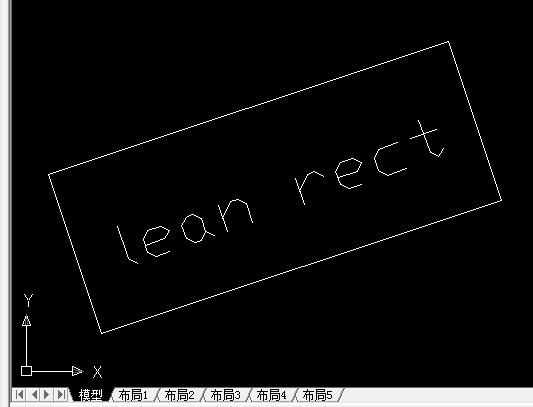

in the first picture, I select the two entites. and I want to create a new layout in the paper space like the picture two.
I write some code , but could not get the right result.
//创建一个新的布局
//layoutId 布局ID(AcdbLayOut)
//btrId 布局所在块表记录ID(AcDbBlockTableRecord)
bool createlayout(AcDbObjectId& layoutId,AcDbObjectId& btrId)
{
AcApLayoutManager *pLayerM =(AcApLayoutManager*)acdbHostApplicationServices()->layoutManager();
TCHAR* nextLayoutName = pLayerM->getNextNewLayoutName(NULL);
bool bRes = false;
if (Acad::eOk == pLayerM->createLayout(nextLayoutName, layoutId,btrId))
{
pLayerM->setDefaultPlotConfig(btrId);
pLayerM->setCurrentLayout(nextLayoutName);
pLayerM->updateLayoutTabs(); // do not know how to set width,height of the layout,
bRes = true;
}
acutDelString(nextLayoutName);
return bRes;
}
AcDbObjectId GetPaperSpaceByName(const TCHAR* szName,AcDbDatabase* pDB = acdbCurDwg())
{
AcDbBlockTable *pTable =NULL;
AcDbObjectId idRec;
if(pDB->getBlockTable(pTable, AcDb::kForRead) ==Acad::eOk)
{
AcDbBlockTableRecord *pRec = NULL;
pTable->getAt(szName,idRec);
pTable->close();
}
return idRec;
}
void AcadTest_PaperSpace::Start()
{
AcDbObjectIdArray idEnts;
if (!CSelectionGet::SSGetFromDWG(idEnts,_T(""),NULL,true))
{
return;
}
//AcDbObjectId idPaperSpace = GetPaperSpaceByName(_T("*PAPER_SPACE"));
AcDbObjectId idLayout,idBtr;
if (!createlayout(idLayout,idBtr))
{
acutPrintf(_T("\n找不到图纸空间"));
return;
}
AcDbBlockTableRecordPointer pRec(idBtr,AcDb::kForWrite);
int i=0;
AcDbObjectPointer<AcDbLayout> pLayout(idLayout,AcDb::kForRead);
double dPaperWidth = 30,dPaperHeight = 30;
AcGePoint3d pt3dPaperCn;//布局中图纸的中心位置
if (pLayout.openStatus() == Acad::eOk)
{
pLayout->getPlotPaperSize(dPaperWidth,dPaperHeight);// where to set? I want to set my custom setting
acutPrintf(_T("\n图纸宽度 %g 高度 %g"),dPaperWidth,dPaperHeight);
double dXMin,dYMin,dXMax,dYMax;
pLayout->getPlotPaperMargins(dXMin,dYMin,dXMax,dYMax);
acutPrintf(_T("\nPlotPaperMargins %g,%g,%g,%g"),dXMin,dYMin,dXMax,dYMax);
AcGePoint2d pt2dMin,pt2dMax;
pLayout->getLimits(pt2dMin,pt2dMax);//得到图纸的大小,位置。
acutPrintf(_T("Limits: %g,%g,%g,%g,(%g,%g)"),pt2dMin.x,pt2dMin.y,pt2dMax.x,pt2dMax.y,pt2dMax.x-pt2dMin.x,pt2dMax.y-pt2dMin.y);
pt2dMin[X]+=dXMin;
pt2dMin[Y]+=dYMin;
pt2dMax[X]-=dXMax;
pt2dMax[Y]-=dYMax;
pt3dPaperCn.set((pt2dMax.x+pt2dMin.x)/2.0,(pt2dMax.y+pt2dMin.y)/2.0,0.0);
dPaperWidth = pt2dMax[X]-pt2dMin[X];
dPaperHeight = pt2dMax[Y]-pt2dMin[Y];
}
for (;i<idEnts.length();++i)
{
ads_point ptMin,ptMax;
if (!Acad_Ent::GetEntExtent(idEnts[i],ptMin,ptMax)) continue;
ads_point ptCn;
Acad_Geometry::MidPoint(ptMin,ptMax,ptCn);
AcDbViewport *pView =0;
pView = new AcDbViewport;
if(pRec->appendAcDbEntity(pView) != Acad::eOk)
{
delete pView;
break;
}
pView->setCenterPoint(pt3dPaperCn);//在图纸空间中设置ViewPort的位置,高宽。
pView->setHeight(dPaperHeight);
pView->setWidth(dPaperWidth);//以上三行代码是根据图纸大小设置。
pView->setOn();//必须是加到DWG之后才能设置。//这个函数要在ViewPort加到数据库之后才能。
pView->setViewTarget(asPnt3d(ptCn));//以这个点旋转
pView->setViewCenter(AcGePoint2d(0,0));//必须被设置成 (0,0)
pView->setViewHeight(ptMax[Y]-ptMin[Y]);//不用直接设置比例, 高度为模型空间中高度。
pView->setTwistAngle(PI/4);// do not work
pView->close();
}
}


