Announcements
IMPORTANT. Forum to be archived in several phases. You can no longer submit new questions - but can only answer existing threads until Oct 17th 2016. Please read this message for details

Unable to install content libraries for Autocad Mech 2010 64-bit on Windows 7

Unable to install content libraries for Autocad Mech 2010 64-bit on Windows 7

Anonymous
Not applicable
3,128 Views
3 Replies
Message 1 of 4

Unable to install content libraries for Autocad Mech 2010 64-bit on Windows 7

Anonymous
Not applicable

Having an issue installing the concent libraries for Autocad Mechanical on a 64-bit Windows 7 machine.  During the install it give me this error (Error 1320. The specified path is too long: c:\documents and settings\all users).  If I go into configure the installation to modify the Content libraries under Autocad Mechanical 2010, it gives me this error (C:\Documents and Settings\All Users\Documents\Autodesk\ACADM 2010\ACADM\Gef\Gdb).  Any ideas?


Thanks,


Tammy

Reply
Reply
0 Likes
Accepted solutions (1)
3,129 Views
3 Replies
Replies (3)
Message 2 of 4

RogerMollon
Autodesk
Autodesk

Tammy,


Since this Mechanical Desktop (MDT) Forum is not for AutoCAD Mechanical, I suggest that you post in the AutoCAD Mechanical Forum:


http://forums.autodesk.com/t5/AutoCAD-Mechanical/bd-p/39


or possibly better the Installation and Licensing Forum where the install experts hang out:


http://forums.autodesk.com/t5/Installation-Licensing/bd-p/24


I hope this helps,


Roger Mollon
Forge - Strategic Tech Consultant - Novi
Autodesk, Inc. - Retired
Reply
Reply
0 Likes
Message 3 of 4

Sridhar-Autodesk
Autodesk
Autodesk
Accepted solution

Hi, Tammy


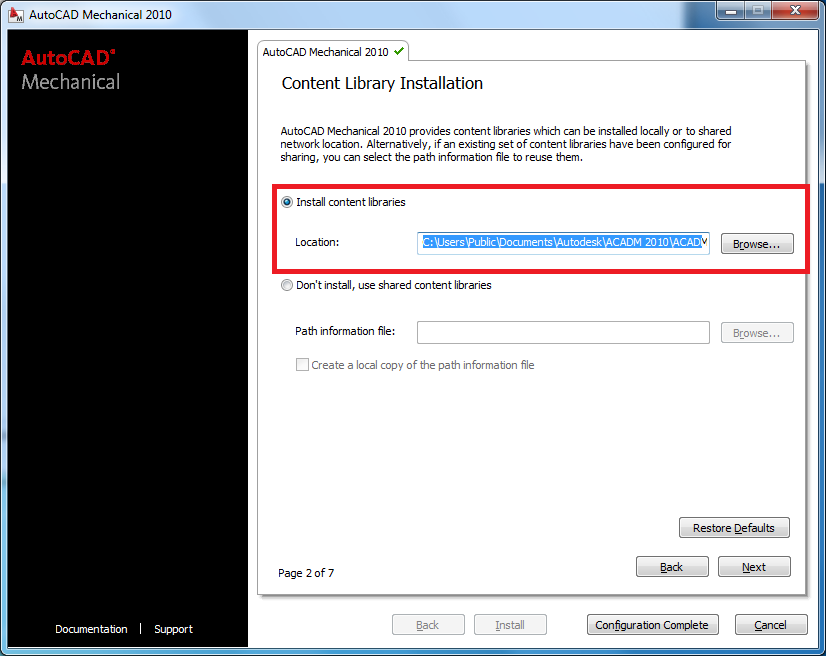
The default install location for content libraries on a Vista or Windows 7 OS machine is as follows


C:\Users\Public\Documents\Autodesk\ACADM 2010\ACADM\Gef\Gdb


Can you try the above path during installation and verify if it works?


Please find attached snapshot.


Thanks


Please select the Accept as Solution button if my post solves your issue or answers your question.


Sridhar Subramani

Senior Product Owner

Reply
Reply
0 Likes
Message 4 of 4

Anonymous
Not applicable
This problem is no longer a considered because it has been solved.There is away to fix this problem and the name of that software is Long Path Tool.I highly recommend it to you since I have already used it.
Reply
Reply
0 Likes