VS 2010 and Inventor 2013

VS 2010 and Inventor 2013

nmunro
Collaborator Collaborator
2,138 Views
10 Replies
Message 1 of 11

VS 2010 and Inventor 2013

nmunro
Collaborator
Collaborator

Is anyone else seeing this.


Win64

Inventor 2013

VS 2010 Pro, SP1


Running an add-in project using Start Debuggin (F5).


Inventor starts without issue and add-in is loaded. If I open a drawing file, the file loads and I can access the add-in commands within a few seconds. However, if I open a part or assembly file, Inventor hangs for approximately 2 minutes before becoming responsive. I can access the add in commands once Inventor responds.


I can work around this by starting Inventor and loading a part or assembly (loads quickly), and then attaching to the Inventor process.


The problem initially resulted in the "Disconnected Context" error that has been discussed in the past so I have turned off capture of that exception. In using Perfmon, it appears that Inventor is spending most of this time loading and reloading the new material libraries and environments (about 90 seconds worth).


Anyone have and suggestions other than what I am already doing (managable, but frustrating)?


Neil



https://c3mcad.com

0 Likes
Accepted solutions (1)
2,139 Views
10 Replies
Replies (10)
Message 2 of 11

PiazzaD
Contributor
Contributor

Same problem in every PC of our company. Very annoying: takes ages to debug. We also noticed it seems is reading material libraries and writing temp files when hunging.

0 Likes
Message 3 of 11

nmunro
Collaborator
Collaborator

I've sent in a support request to ADN, I'll report back anything I hear. Glad to see it is not just me.


https://c3mcad.com

0 Likes
Message 4 of 11

philippe.leefsma
Alumni
Alumni

Hi Neil,


The development team confirmed the issue and will be looking into it.


I unfortunately cannot give you any more precise time frame about when the fix will come.


Sorry for not being more helpful.


Philippe Leefsma
Developer Technical Services
Autodesk Developer Network

0 Likes
Message 5 of 11

Anonymous
Not applicable

Hi,


any new Informations?


is very Important!


thx


Mario

0 Likes
Message 6 of 11

Anonymous
Not applicable

Hi,

I have the same annoying problem, can you confirm a solution in a near future. Because it's really a problem to develop an API.


Thanks to update the information!


Israel Marin

Logiflex

0 Likes
Message 7 of 11

philippe.leefsma
Alumni
Alumni
Accepted solution

Hi All,


Unfortunately a definitive fix for that behavior won't appear until the 2014 release, however the following workaround can be used for 2013:


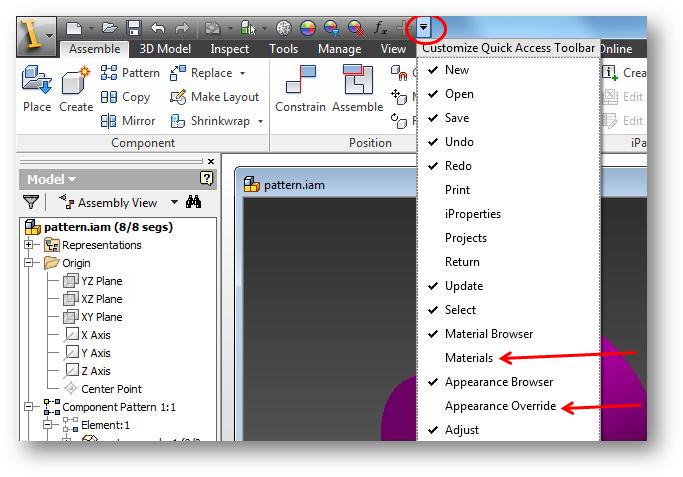
The behavioris a side effect of the consistent material that were added in Inventor 2013. Turning off the material and appearance in the drop-down list in the QAT may eliminate the delay. This is done by using the “Customize Quick Access Toolbar” in the affected environments. Uncheck “Materials” and “Appearance Override”.


material.jpg


Philippe Leefsma
Developer Technical Services
Autodesk Developer Network

Message 8 of 11

nmunro
Collaborator
Collaborator

Thanks Phiippe, it is a bit slower than the attach to process method but is a big improvement.


https://c3mcad.com

0 Likes
Message 9 of 11

marin_israel
Enthusiast
Enthusiast

Thanks, it's a good solution for me, I don't use it anyway...

-------------------------------------
Israël Marin
Programmeur | Programmer
Logiflex
0 Likes
Message 10 of 11

Anonymous
Not applicable

An alternative to this would be to attach to process(as mentioned above) after Inventor is running.  Keyboard shortcuts to speed this up are ctrl-alt-p, then type "Inv" which should bring the dropdown onto Inventor, then enter.


Message 11 of 11

nmunro
Collaborator
Collaborator
I thought the plan was to have this fixed in 2014. It is a bit better but still a complete pig compared to the attach to process method.


https://c3mcad.com

0 Likes