VBA and Inventor

VBA and Inventor

Anonymous
Not applicable
2,538 Views
8 Replies
Message 1 of 9

VBA and Inventor

Anonymous
Not applicable

Hi all, 

On a forum I didn't look for as I know badly language.
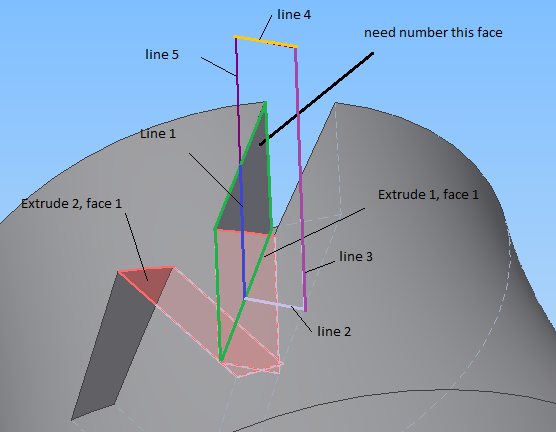
Problem essence: there is a detail and in it cut (rectangular) how to define a side in cut if the line the parent (the outline line) this side is known.
I am sorry for my bad English.


Visual Express Studio 2010 (basic)

Inventor 2013

0 Likes
Accepted solutions (1)
2,539 Views
8 Replies
Replies (8)
Message 2 of 9

Anonymous
Not applicable

Are you asking how to perform a dynamic cut feature with an established sketch?

Message 3 of 9

jdkriek
Advisor
Advisor

Chris, that's what I got as well - hard to tell.


Seferot, what languages do you speak?

Jonathan D. Kriek
MFG Solutions Engineer
KETIV Technologies, Inc.


Message 4 of 9

Anonymous
Not applicable

i speak Russian, 


is the contour, the creation of 5 sketch lines (Figure), which creates a cutout, you need to programmatically determine which forms the face of one line sketch. (the whole model is created programmatically)


есть контур, созданый из 5 эскизных линий (рисунок), который создает вырез, нужно программно определить грань которую образует 1 линия эскиза. (вся модель создаеться программно) 

Снимок.PNG

0 Likes
Message 5 of 9

Anonymous
Not applicable

Я надеюсь, я понимаю вашу проблему правильно. Вы хотите использовать экструзионную эскиз, чтобы сократить часть? Вы сказали, что вся часть создана с помощью кода, правильно? Означает ли это, у вас есть свободный доступ к эскизу, который нужно вырезать с? Вы должны быть в состоянии найти, например, в файле помощи API о том, как экструзия эскиз. В основном один раз у вас есть эскиз, необходимо создать профиль, вы затем создать определение выдавливания, и, наконец, экструзии с использованием определения.


    ' get part document
    Dim oPartDoc As PartDocument

    ' Set a reference to the component definition.
    Dim oCompDef As PartComponentDefinition
    Set oCompDef = oPartDoc.ComponentDefinition

' Get sketch however you need to Dim oSketch As Sketch Set oSketch = oCompDef.Sketches.Item(1) ' Create a profile. Dim oProfile As Profile Set oProfile = oSketch.Profiles.AddForSolid ' Create a pocket .25 cm deep. Set oExtrudeDef = oCompDef.Features.ExtrudeFeatures.CreateExtrudeDefinition(oProfile, kCutOperation) Call oExtrudeDef.SetDistanceExtent(0.25, kNegativeExtentDirection) Set oExtrude = oCompDef.Features.ExtrudeFeatures.Add(oExtrudeDef)


Message 6 of 9

jdkriek
Advisor
Advisor


@Anonymous wrote:

Я надеюсь, я понимаю вашу проблему правильно. Вы хотите использовать экструзионную эскиз, чтобы сократить часть? Вы сказали, что вся часть создана с помощью кода, правильно? Означает ли это, у вас есть свободный доступ к эскизу, который нужно вырезать с? Вы должны быть в состоянии найти, например, в файле помощи API о том, как экструзия эскиз. В основном один раз у вас есть эскиз, необходимо создать профиль, вы затем создать определение выдавливания, и, наконец, экструзии с использованием определения.


Nice, I knew someone spoke Russian 😉


Google Translate for us English speaking types:

I hope I understand your problem correctly. You want to use an extrusion sketch to cut part of it? You said that the entire part is created in the code, right? Does this mean you have free access to the sketch you want to cut with? You should be able to find, for example in a help file API how extrusion sketch. Basically, once you have a sketch, create a profile, you then create a definition of the extrusion, and finally, using the definition of extrusion.


Jonathan D. Kriek
MFG Solutions Engineer
KETIV Technologies, Inc.


0 Likes
Message 7 of 9

Anonymous
Not applicable

как сделать вырез я знаю. так как Инвентор присваивает граням случайную позицию, мне нужно найти номер грани которую образует линия 1.


how to make a Extrude I know. as Inventor assigns faces a random position, I need to find the number that faces forms a line 1.


Безымянный.png


0 Likes
Message 8 of 9

ekinsb
Alumni
Alumni
Accepted solution

Based on the picture I'm making this assumption, you want to find the face that a sketch line lies on.  I don't know if that's an accurate assesment of the problem or not but here's a solution to that.


Public Sub FindFaceFromSketchLine()
    Dim partDoc As PartDocument
    Set partDoc = ThisApplication.ActiveDocument
   
    ' Have the sketch line selected.
    Dim line As SketchLine
    Set line = ThisApplication.CommandManager.Pick( _
               kSketchCurveLinearFilter, "Select the sketch line.")

   
    ' Get the equivalent 3D line.
    Dim modelLine As LineSegment
    Set modelLine = line.Geometry3d
   
    ' Find the face that the midpoint of the line lies on.
    Dim filter(0) As SelectionFilterEnum
    filter(0) = kPartFaceFilter
    Dim foundItems As ObjectsEnumerator
    Set foundItems = partDoc.ComponentDefinition.FindUsingPoint(modelLine.MidPoint, _
                                                                filter, 0.01)

   
    If foundItems.Count > 0 Then
        Dim foundFace As Face
        Set foundFace = foundItems.Item(1)
       
        partDoc.SelectSet.Clear
        Call partDoc.SelectSet.Select(foundFace)
       
        MsgBox "The found face is selected."
    Else
        MsgBox "No face was found for the selected line."
    End If
End Sub


Brian Ekins
Inventor and Fusion 360 API Expert
Mod the Machine blog
Message 9 of 9

Anonymous
Not applicable

Thanks for the help

0 Likes