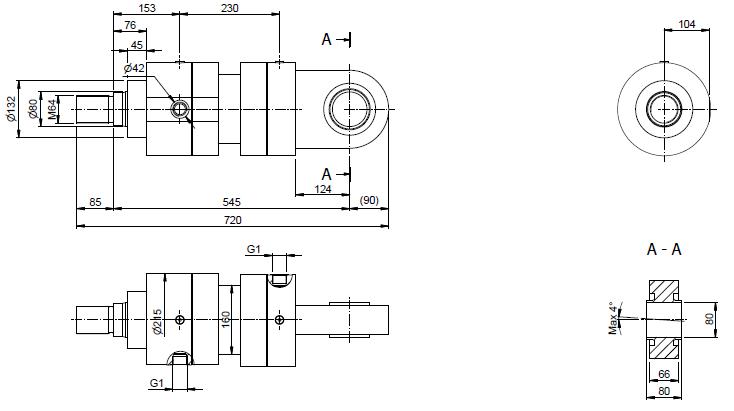
I am trying to dimension my drawing as the aforementioned picture, but there are big problem here.
I don't understand why sometimes it can get the curve and sometime it cannot?
Everything is just like a chaos here, and I cannot control this.
Sub baseview()
Dim oDrawDoc As DrawingDocument
Set oDrawDoc = ThisApplication.ActiveDocument
Dim oSheet As Sheet
Set oSheet = oDrawDoc.ActiveSheet
Dim oBaseView As DrawingView
Set oBaseView = oSheet.DrawingViews.Item(1)
Dim oTG As TransientGeometry
Set oTG = ThisApplication.TransientGeometry
'////////////////oBaseView Dimension//////////////////////
Dim oCurve100 As DrawingCurve
Dim oSelectCurve100, oSelectCurve101, oSelectCurve102, oSelectCurve103, oSelectCurve104 As DrawingCurve
Set oSelectCurve100 = Nothing
Set oSelectCurve101 = Nothing
Set oSelectCurve102 = Nothing
Set oSelectCurve103 = Nothing
Set oSelectCurve104 = Nothing
For Each oCurve100 In oBaseView.DrawingCurves
If oCurve100.CurveType = kLineSegmentCurve Then
If Not oCurve100.StartPoint Is Nothing And Not oCurve100.EndPoint Is Nothing Then
If Round(oCurve100.StartPoint.x - oCurve100.EndPoint.x, 3) = 0 Then
' MsgBox (Round(oCurve100.StartPoint.y - oCurve100.EndPoint.y, 3))
' If (WithinTol(oCurve100.StartPoint.x, oCurve100.EndPoint.x, 0.001) = True) Then
If (Round(Math.Abs(oCurve100.StartPoint.y - oCurve100.EndPoint.y), 3) = 1.28) Then
Set oSelectCurve100 = oCurve100
End If
If (Round(Math.Abs(oCurve100.StartPoint.y - oCurve100.EndPoint.y), 3) = ((80) * 0.2 / 10)) Then
Set oSelectCurve101 = oCurve100
End If
If (Round(Math.Abs(oCurve100.StartPoint.y - oCurve100.EndPoint.y), 3) = ((132) * 0.2 / 10)) Then
Set oSelectCurve102 = oCurve100
End If
If (Round(Math.Abs(oCurve100.StartPoint.y - oCurve100.EndPoint.y), 3) = ((211.5) * 0.2 / 10)) Then
Set oSelectCurve103 = oCurve100
End If
End If
End If
End If
Next
Dim oGI100, oGI101, oGI102, oGI103, oGI104, oGI105, oGI106, oGI107, oGI108, oGI109 As GeometryIntent
Set oGI100 = Nothing
Set oGI101 = Nothing
Set oGI102 = Nothing
Set oGI103 = Nothing
Set oGI104 = Nothing
Set oGI105 = Nothing
Set oGI106 = Nothing
Set oGI107 = Nothing
Set oGI108 = Nothing
Set oGI109 = Nothing
Set oGI100 = oSheet.CreateGeometryIntent(oSelectCurve100, kStartPointIntent)
Set oGI101 = oSheet.CreateGeometryIntent(oSelectCurve100, kEndPointIntent)
Set oGI102 = oSheet.CreateGeometryIntent(oSelectCurve101, kStartPointIntent)
Set oGI103 = oSheet.CreateGeometryIntent(oSelectCurve101, kEndPointIntent)
Set oGI104 = oSheet.CreateGeometryIntent(oSelectCurve102, kStartPointIntent)
Set oGI105 = oSheet.CreateGeometryIntent(oSelectCurve102, kEndPointIntent)
Set oGI106 = oSheet.CreateGeometryIntent(oSelectCurve103, kStartPointIntent)
Dim oGenDims As GeneralDimensions
Set oGenDims = oSheet.DrawingDimensions.GeneralDimensions
Dim oDimPos100, oDimPos101, oDimPos102, oDimPos103, oDimPos104, oDimPos105, oDimPos106, oDimPos107, oDimPos108, oDimPos109 As Point2d
Set oDimPos100 = Nothing
Set oDimPos101 = Nothing
Set oDimPos102 = Nothing
Set oDimPos103 = Nothing
Set oDimPos104 = Nothing
Set oDimPos105 = Nothing
Set oDimPos106 = Nothing
Set oDimPos107 = Nothing
Set oDimPos108 = Nothing
Set oDimPos109 = Nothing
If Not oSelectCurve100 Is Nothing Then
Set oDimPos100 = oTG.CreatePoint2d(oSelectCurve100.MidPoint.x - 1, oSelectCurve100.MidPoint.y)
End If
If Not oSelectCurve101 Is Nothing Then
Set oDimPos101 = oTG.CreatePoint2d(oSelectCurve101.MidPoint.x - 1.8 - 85 * 0.2 / 10, oSelectCurve101.MidPoint.y)
End If
If Not oSelectCurve102 Is Nothing Then
Set oDimPos102 = oTG.CreatePoint2d(oSelectCurve102.MidPoint.x - 2.8 - (85 + (76 - 45)) * 0.2 / 10, oSelectCurve102.MidPoint.y)
End If
If (Not oSelectCurve100 Is Nothing) And (Not oSelectCurve101 Is Nothing) Then
Set oDimPos103 = oTG.CreatePoint2d((oSelectCurve100.MidPoint.x + oSelectCurve101.MidPoint.x) / 2, oSelectCurve100.MidPoint.y - 211.5 * 0.2 / 2 / 10 - 1.8)
End If
If (Not oSelectCurve101 Is Nothing) And (Not oSelectCurve103 Is Nothing) Then
Set oDimPos104 = oTG.CreatePoint2d((oSelectCurve101.MidPoint.x + oSelectCurve103.MidPoint.x) / 2, oSelectCurve103.StartPoint.y + 1.8)
End If
If (Not oSelectCurve102 Is Nothing) And (Not oSelectCurve103 Is Nothing) Then
Set oDimPos105 = oTG.CreatePoint2d((oSelectCurve102.MidPoint.x + oSelectCurve103.MidPoint.x) / 2, oSelectCurve103.StartPoint.y + 1)
End If
Dim oLDim100, oLDim101, oLDim102, oLDim103, oLDim104, oLDim105, oLDim106, oLDim107, oLDim108, oLDim109 As LinearGeneralDimension
'dim KK
If Not oDimPos100 Is Nothing Then
If (Not oGI100 Is Nothing) And (Not oGI101 Is Nothing) Then
Set oLDim100 = oGenDims.AddLinear(oDimPos100, oGI100, oGI101, kAlignedDimensionType)
End If
End If
'dim MM
If Not oDimPos101 Is Nothing Then
If (Not oGI102 Is Nothing) And (Not oGI103 Is Nothing) Then
Set oLDim101 = oGenDims.AddLinear(oDimPos101, oGI102, oGI103, kAlignedDimensionType)
End If
End If
'dim CD
If Not oDimPos102 Is Nothing Then
If (Not oGI104 Is Nothing) And (Not oGI105 Is Nothing) Then
Set oLDim102 = oGenDims.AddLinear(oDimPos102, oGI104, oGI105, kAlignedDimensionType)
End If
End If
'dim A
If Not oDimPos103 Is Nothing Then
If (Not oGI101 Is Nothing) And (Not oGI103 Is Nothing) Then
Set oLDim103 = oGenDims.AddLinear(oDimPos103, oGI101, oGI103, kAlignedDimensionType)
End If
End If
'dim WF
If Not oDimPos104 Is Nothing Then
If (Not oGI102 Is Nothing) And (Not oGI106 Is Nothing) Then
Set oLDim104 = oGenDims.AddLinear(oDimPos104, oGI102, oGI106, kAlignedDimensionType)
End If
End If
'dim VE
If Not oDimPos105 Is Nothing Then
If (Not oGI104 Is Nothing) And (Not oGI106 Is Nothing) Then
Set oLDim105 = oGenDims.AddLinear(oDimPos105, oGI104, oGI106, kAlignedDimensionType)
End If
End If
End Sub
Private Function WithinTol(Value1 As Double, Value2 As Double, Tol As Double) As Boolean
Math.Abs (Value1 - Value2) < Tol
End Function
Why I cannot get the vertical linear curve have length 1.28 cm in my drawing, I go wrong from the first curve???????????
I feel my proficiency improved a lot with the current project, more than 1700 lines of code now.
But when I do dimensions for drawing, it's is just like impossible thing??????
Someone who already make dimension for a difficult drawing, please answer this question: "Normal or Hard or Very Hard or Impossible??????"
I've waited for few days, but it seem no Autodesk guys stop by.................so sad!