Delete User Parameter

Delete User Parameter

Anonymous
Not applicable
6,138 Views
12 Replies
Message 1 of 13

Delete User Parameter

Anonymous
Not applicable

Hi all,


Most of the time, I delete an user parameter without problem. But, in a part, I got an error for two of them and I don't understand why. 


I create a new parameter and redirect all dependencies from the old one to the new. (oldParam.Dependencies.Count = 0).

But when I try to delete it, I've got an error. Also, when I try to delete it by the interface, I don't see the Delete option.


Someone have an idea?


Pascal


0 Likes
Accepted solutions (1)
6,139 Views
12 Replies
Replies (12)
Message 2 of 13

Anonymous
Not applicable

More info:


InUse property of the parameter is set to True.  But I don't find why.


An idea?

0 Likes
Message 3 of 13

ekinsb
Alumni
Alumni

Inventor believes that there's something dependent on that parameter.  The Dependents property of the parameter should return whatever is dependent on it.


Brian Ekins
Inventor and Fusion 360 API Expert
Mod the Machine blog
0 Likes
Message 4 of 13

Anonymous
Not applicable

Hi Brian,


It's look like a bug!?  Because the count of Dependents property equals zero but the InUse property equals True. 


UndeletableParam.jpg


I asked our best drafter to take a look at the part and we have determined that some extrusions are dependent on this parameter by deleting features one by one.  But we didn't find the relation between the parameter and those features.


So, to solve the problem, we need to delete the extrusions and recreate those. 


Do you have an idea?


Thanks,


Pascal Langlais


P.S.: I can send you my part if you want to take a look.

0 Likes
Message 5 of 13

ekinsb
Alumni
Alumni

Hi Pascal,


The behavior you're seeing isn't what I would expect.  I can't say right now if it is a bug or if there is a condition that I'm unaware of that would cause this behavior.  If you can send me the part that would be great.  You can email it directly to me at brian.ekins@autodesk.com. Thanks.


-Brian


Brian Ekins
Inventor and Fusion 360 API Expert
Mod the Machine blog
0 Likes
Message 6 of 13

ekinsb
Alumni
Alumni

Pascal sent me the part demonstrating the problem and after a bit of digging I found the cause.  I thought I would answer it here so everyone can see the answer since this might come up again.


Here are some steps to create a part that demonstrates the issue.


  1. Create a new part document.
  2. Create a block.
  3. Create a hole on the block using a "Distance" termination.
  4. Open the parameters dialog.
  5. Create a user parameter named "Depth" with a value less than the depth of the block.
  6. Notice that you can delete the parameter "Depth" by right clicking on the parameter and "Delete" is available in the context menu.
  7. Edit the parameter that controls the depth of the hole so it's based on the parameter named "Depth".  You can no longer delete "Depth" because something else is dependent on it, which makes sense.
    Params.png
  8. Edit the hole so the termination is "Through All".
  9. Open the parameters dialog.  Notice that the parameter controlling the depth (d9 in the example above) is no longer displayed.
  10. Try deleting "Depth".  The delete option is not available.

What's happening is that the parameter to control the depth of the hole still exists but it's not being shown since it's not currently being used.  But because of this dependency the user parmeter "Depth" can't be deleted.  To delete "Depth", you have to change the extent of the hole to "Distance", edit the parameter value controlling the depth to be a fixed value instead of using the user parameter "Depth" and then set the hole back to a "To" extent hole.  You can now delete "Depth" because it has no dependencies.


You could easily argue that this is strange behavior and Inventor should be better about handling this and you would probably be right, but this is the first time I've ever seen it come up as a problem so I doubt it would be seen as worth spending much development effort on it.


Brian Ekins
Inventor and Fusion 360 API Expert
Mod the Machine blog
Message 7 of 13

Anonymous
Not applicable

Thank you very much for the explanation.


A last question: is it possible to find where the parameter is use by using the API?  In the PartFeatures?


Pascal Langlais

0 Likes
Message 8 of 13

ekinsb
Alumni
Alumni
Accepted solution

Unfortunately, the API doesn't provide much help in determining this relationship.  The API mimics what you see in the user-interface so it doesn't provide access to the hidden, currently unused, parameters.


Brian Ekins
Inventor and Fusion 360 API Expert
Mod the Machine blog
0 Likes
Message 9 of 13

Anonymous
Not applicable

I investigate more on the problem and found something interesting.


Continuing with your example:


11. Delete the hole feature

12. You can now delete the parameter "Depth" (but don't do it)

13. Create a new hole feature (notice that "Depth" parameter is selected by default)

14. Choose "Through All" terminaison (notice that combobox with "Depth" disapeared) and click OK

15. Try deleting "Depth".  The delete option is not available.


Seem that "Depth" is link with the feature even if the combobox was hidden on the screen.  

By the way, if you change "Depth" for something else before switching the terminaison, the problem does not occur.


Pascal Langlais

0 Likes
Message 10 of 13

Martin-Winkler-Consulting
Advisor
Advisor

Hi,

this is an old Post but because i have similiar problems i would like to reactivate it. Perhaps there are now some better news?


I have in some Assemblies User Parameters that could not be deleted.


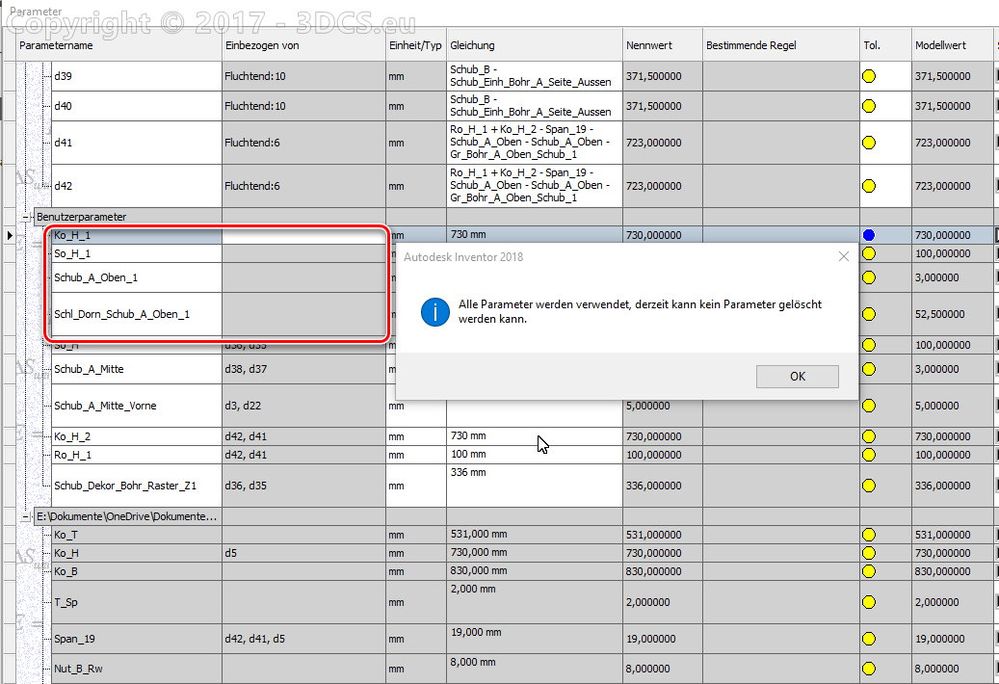
For example in this case the red marked ones:

3DCS_Parameter01.jpg


I looked also with the API to this parameters. They depends on nothing but the property InUse is True !?

So deleting is forbidden!


This parameters were created by deleting the derived table and setting another one into the assembly. In the model parameters the expressions were renamed so that they connect to the derived parameters.


I tried also deleting the derived table and then delete the marked UserParameters. It's not possible.


There must be in the deep grounds of Inventor some flags that indicate the InUse = True Status.


Any new idea?

It would be very nice to delete these garbage parameters.

Martin Winkler
CAD Developer
Did you find this post helpful? Feel free to like this post.
Did your question get successfully answered? Then click on the ACCEPT SOLUTION button.


EESignature

0 Likes
Message 11 of 13

Anonymous
Not applicable

Hi Martin,


Yes, this is an old post.  


If I remember, this issue occurs when you are using a parameter in a feature and you change an option of that feature that don't use parameter. So, the parameter is hidden but it's still there and in use. To fix this issue, you must remove the parameter from the option.


Hope this will help.


Pascal

0 Likes
Message 12 of 13

DonStauffer99
Advocate
Advocate

Still a problem in Inventor 2020.


It would be useful if there were even a way to detect this programmatically other than "If param.InUse AND param.Dependents.Count = 0 Then".


Especially useful would be identifying the feature. Having it in the Parameter.Dependents collection might help. Better still, also providing a way to remove the dependency programmatically.


This really needs to be fixed, though. It's been around WAY too long.

Message 13 of 13

Bert_Bimmel
Advocate
Advocate

"You could easily argue that this is strange behavior and Inventor should be better about handling this and you would probably be right, but this is the first time I've ever seen it come up as a problem so I doubt it would be seen as worth spending much development effort on it"


Ten years later, and your prophecy still remains true.


If anything has happened, Autodesk has made it even worse:

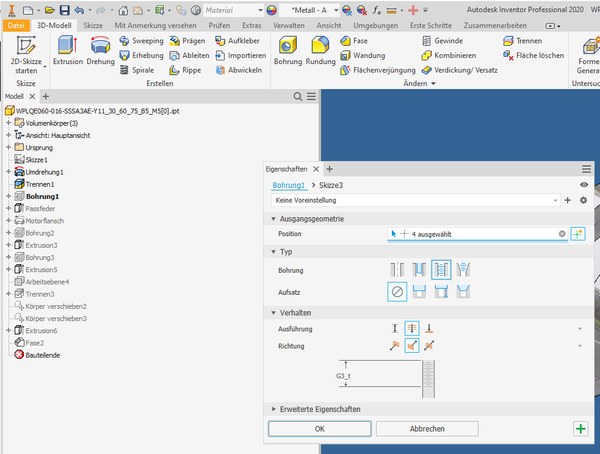
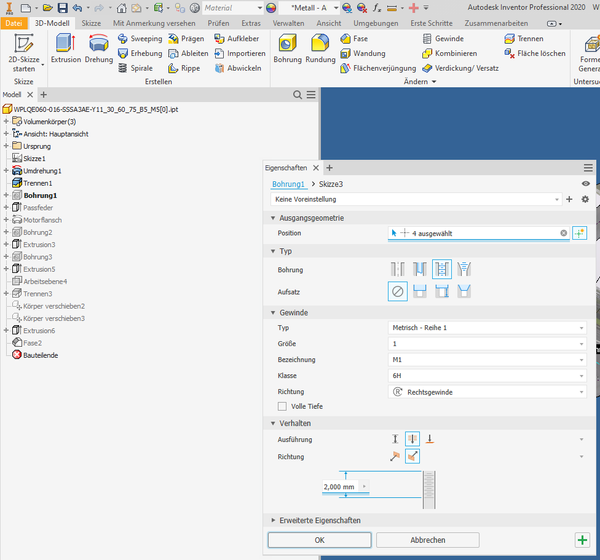
In my particular case, the parameter "G3_t" that was tagged "InUse" and thus undeletable, was latently in use by a hole thread feature, similar to what you have described.

When trying to identify that feature by toggling some of the feature's options, the (horribly) new designed dialog box showed the usage of that parameter only for a fraction of a second, while repainting that window:


Bert_Bimmel_0-1679486639870.png

(it took me several attempts to capture this)


once, Inventor was done with repainting that window, it looked like this:


Bert_Bimmel_1-1679486693608.png


Cool, he?


|-(

0 Likes