Autodesk Inventor Customization
- Start Article
- Subscribe to RSS Feed
- Mark Topic as New
- Mark Topic as Read
- Float this Topic to the Top
- Bookmark
- Subscribe
- Printer Friendly Page
Create a new Inventor DWG drawing using VB.NET
- Mark as New
- Bookmark
- Subscribe
- Subscribe to RSS Feed
- Highlight
- Email to a Friend
- Report Inappropriate Content
Hello.
I'm trying to create a new DWG file in Inventor.
In the Inventor options I changed the default file type of drawing, but when I add a new document using the Add method from the Documents collection, always creates a file of type IDW.
I tried to force the option from code, but I get the same result.
I am using VB.net 2008 and Inventor 2010, this is the code:
InvApp = InventorGet()
InvApp.Visible = True
InvApp.DrawingOptions.DefaultDrawingFileType = DefaultDrawingFileTypeEnum.kDWGDefaultDrawingFileT
InvDoc = InvApp.Documents.Add(DocumentTypeEnum.kDrawingDocu
Any ideas? Thanks in advance
Solved! Go to Solution.
Re: Create a new Inventor DWG drawing using VB.NET
- Mark as New
- Bookmark
- Subscribe
- Subscribe to RSS Feed
- Highlight
- Email to a Friend
- Report Inappropriate Content
Hi jgaston,
you could use it like that and specify the template file:
Dim InvDoc As Document
Set InvDoc = InvApp.Documents.Add(kDrawingDocumentObject, "C:\Templates\Norm.dwg", True)
Hope, this helps.

Dennis Ossadnik
Support Specialist
Product Support
Autodesk, Inc.
Re: Create a new Inventor DWG drawing using VB.NET
- Mark as New
- Bookmark
- Subscribe
- Subscribe to RSS Feed
- Highlight
- Email to a Friend
- Report Inappropriate Content
Thanks Dennis, but hoped to use the default template and not have to deal with code to manage the routes.
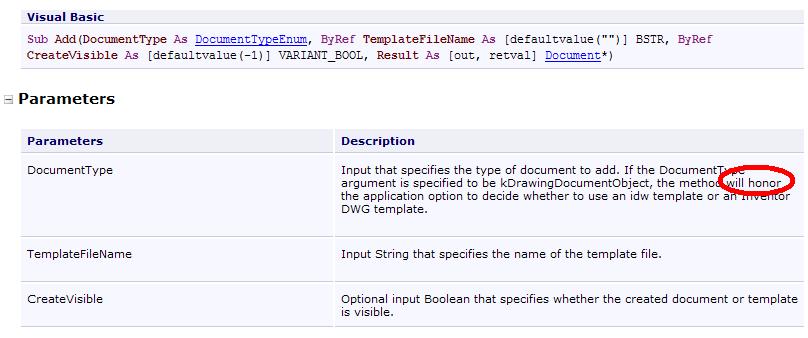
If I understand, the help of the API says the method should work this way.
Regards
Re: Create a new Inventor DWG drawing using VB.NET
- Mark as New
- Bookmark
- Subscribe
- Subscribe to RSS Feed
- Highlight
- Email to a Friend
- Report Inappropriate Content
Hi jgaston
Here is an exaple how you can use the standard templates:
first set the option: DrawingOptions.DefaultDrawingFileType = kDWGDefaultDrawingFileType
then get your template: FileManager.GetTemplateFile(kDrawingDocumentObject
use this template in the way i mentioned:
Documents.Add(kDrawingDocumentObject, TemplateNameDWG, True)
Example:
This code will add two new drawing douments to inventor. One dwg, one idw.
Dim InvApp As Application
Set InvApp = ThisApplication
'Get name of DWG Tamplate
InvApp.DrawingOptions.DefaultDrawingFileType = kDWGDefaultDrawingFileType
Dim TemplateNameDWG As String
TemplateNameDWG = InvApp.FileManager.GetTemplateFile(kDrawingDocumen
'Get name of idw template
InvApp.DrawingOptions.DefaultDrawingFileType = kIDWDefaultDrawingFileType
Dim TemplateNameIDW As String
TemplateNameIDW = InvApp.FileManager.GetTemplateFile(kDrawingDocumen
'New DWG
Dim oDocDWG As Document
Set oDocDWG = InvApp.Documents.Add(kDrawingDocumentObject, TemplateNameDWG, True)
'New IDW
Dim oDocIdw As Document
Set oDocIdw = InvApp.Documents.Add(kDrawingDocumentObject, TemplateNameIDW, True)
I hope this works for you.

Dennis Ossadnik
Support Specialist
Product Support
Autodesk, Inc.
Re: Create a new Inventor DWG drawing using VB.NET
- Mark as New
- Bookmark
- Subscribe
- Subscribe to RSS Feed
- Highlight
- Email to a Friend
- Report Inappropriate Content
Thank you very much Denis
I manage with this.
Just one question, the GUID "{BBF9FDF1-52DC-11D0-8C04-0800090BE8EC}" what type of document referred to? where I can find a list of GUID's valid for this function?
Best regards and thank you very much again.