Component Edit in 2013

Component Edit in 2013

Anonymous
Not applicable
1,448 Views
11 Replies
Message 1 of 12

Component Edit in 2013

Anonymous
Not applicable

I've just upgraded from 2011 to 2013 and come across this problem.


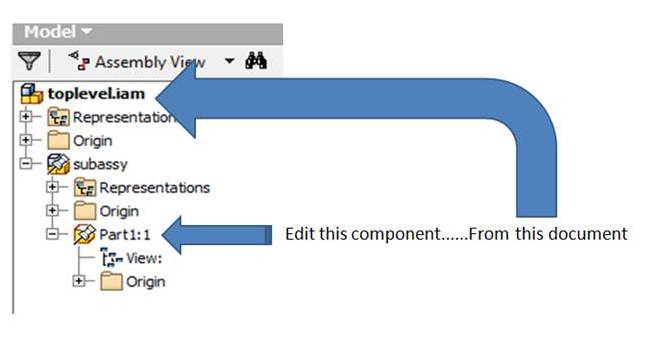
In 2011 I could edit a component from the top level anywhere in the tree - i.e. From an iLogic rule in the top level, I could edit a component in a subassembly.


This doesn't seem to work in 2013 - I can only edit the first child of a component.


In 2011 I could simply use :


compo = Component.InventorComponent("TOP")
compo.Edit


Has anybody else come across this? Is there a workaround?


Thanks for any help,

Tom

0 Likes
Accepted solutions (1)
1,449 Views
11 Replies
Replies (11)
Message 2 of 12

xiaodong_liang
Autodesk Support
Autodesk Support

Hi,


I seemed not to reproduce this issue. Probably I did not get the scenario correctly. Could you elaborate the steps and provide a copy of the assemblies you are using?

0 Likes
Message 3 of 12

Anonymous
Not applicable

Hi,


I have attached a simple example of the issue. The rule in the top level demonstrates it.


compedit.jpg

Thanks

Tom

0 Likes
Message 4 of 12

Anonymous
Not applicable

ps. I'm running SP1.1

0 Likes
Message 5 of 12

xiaodong_liang
Autodesk Support
Autodesk Support

Hi,


I have no Inventror 2012 at this moment, so cannot test how Inventor 2012 works. But firstly, I do not think this line is correct  


    oOcc = Component.InventorComponent("Part1:1")
    oOcc.Edit


becasue Component.InventorComponent returns the occurrence in the current context. In this case, it is top assembly. While part1:1 is in sub assembly. So I thought it should be

   
    oOcc = Component.InventorComponent(MakePath("subassy","Part1:1"))

    oOcc.Edit


this does not work either. But it is not strange to me because the occurrence got by this line is still in the context of sub assembly. While in top assembly, it should be proxy occurrence. So I thought it should be


  ' Try To Get proxy occurrence In top Assembly
   oOcc = Component.InventorComponent("subassy")
   oSubOcc = Component.InventorComponent(MakePath("subassy","Part1:1"))
  Dim oTempObj As Object
   'oOcc.CreateGeometryProxy(oSubOcc,oTempObj) ' failed at this line 
   Dim oProxyOcc as ComponentOccurrenceProxy
   oProxyOcc = oTempObj
   oProxyOcc.Edit


Unfortunetly, it failed at CreateGeometryProxy. Finally, I have to use Inventor API directly. i.e. get the occurrence from assembly, instead of using the wrapped functions of iLogic. It works well.


I cannot say if there is problems with InventorComponent. These are what I can see. Hope the final workaround helps you.


'works :
'oOcc = Component.InventorComponent("subassy")
'oOcc.Edit
' does not work
'oOcc = Component.InventorComponent("Part1:1")
'oOcc.Edit
'doesn't work either because the occurrence is in the context of sub assembly
'oOcc = Component.InventorComponent(MakePath("subassy","Part1:1"))
'oOcc.Edit

'Try To Get proxy occurrence In top Assembly
'oOcc = Component.InventorComponent("subassy")
'oSubOcc = Component.InventorComponent(MakePath("subassy","Part1:1")) 
'Dim oTempObj As Object
''oOcc.CreateGeometryProxy(oSubOcc,oTempObj)  ' failed at this line
' Dim oProxyOcc as ComponentOccurrenceProxy
'oProxyOcc = oTempObj
' oProxyOcc.Edit


' use Inventor API directly ' works!Dim oAssDef As AssemblyComponentDefinition oAssDef = ThisApplication.ActiveDocument.ComponentDefinition Dim oOcc As ComponentOccurrence oOcc = oAssDef.Occurrences.ItemByName("subassy") Dim oSubOcc As ComponentOccurrence 'oSubOcc = oOcc.SubOccurrences(1) 'SubOccurrences does not support ItemByName
oSubOcc = oOcc.Definition.Occurrences.ItemByName("Part1:1") 'oSubOcc is in the context of sub assembly ' to edit it in the context of top assembly, need proxy of occurrenceDim oTempObj As Object oOcc.CreateGeometryProxy(oSubOcc, oTempObj) Dim oSubOccProxy As ComponentOccurrenceProxy oSubOccProxy = oTempObj oSubOccProxy.Edit


0 Likes
Message 6 of 12

Anonymous
Not applicable

Thanks for that, it's interesting.


In iLogic I don't HAVE to explicitly declare my variables, so in theory I should be able to use :


oOcc = Component.InventorComponent("subassy")
oSubOcc = oOcc.Definition.Occurrences.ItemByName("Part1:1")
oOcc.CreateGeometryProxy(oSubOcc, oTempObj)

oTempObj.Edit()

However, I get a Type Mismatch error.

If I declare oOcc as ComponentOccurrence it works fine :


Dim oOcc As ComponentOccurrence
oOcc = Component.InventorComponent("subassy")
oSubOcc = oOcc.Definition.Occurrences.ItemByName("Part1:1")
oOcc.CreateGeometryProxy(oSubOcc, oTempObj)

oTempObj.Edit()


Does that suggest that there is an issue with the object being returned from the Component.InventorComponent() function ?


Thanks

Tom

0 Likes
Message 7 of 12

Anonymous
Not applicable

Ps. The type mismatch error comes from the line :


oOcc.CreateGeometryProxy(oSubOcc, oTempObj)


0 Likes
Message 8 of 12

xiaodong_liang
Autodesk Support
Autodesk Support

this was why I commented it as "failed at this line".  I do not know how the wrapped function Component.InventorComponent is implemented, however it looks problematic in this scenario, at least from what we saw.

0 Likes
Message 9 of 12

MjDeck
Autodesk
Autodesk
Accepted solution

Tom,
 The behavior of Component.InventorComponent changed in 2013. There's a new function:

compo = Component.InventorComponentInThisContext("TOP")
compo.Edit

It will give you a ComponentOccurrenceProxy if the component is in a subassembly.


Mike Deck
Software Developer
Autodesk, Inc.

Message 10 of 12

Anonymous
Not applicable

Mike,


Thanks very much for the reply, that's exaclty what I was looking for.


Are these iLogic / API changes documented anywhere?

I ask because we have another issue with Constraint.IsActive() sometimes returning an error "Cannot complete the function ConstraintIsActive("XX")" which we never had in 2011, and I can't figure out why.


Thanks again,

Tom

0 Likes
Message 11 of 12

MjDeck
Autodesk
Autodesk

InventorComponentInThisContext is not documented yet.
Can you post more details about the Constraint.IsActive failure, maybe with a sample model?


Mike Deck
Software Developer
Autodesk, Inc.

0 Likes
Message 12 of 12

Anonymous
Not applicable

The ConstraintIsActive error is a strange one and has been bugging me for months.

I THINK it happens when the Design Doctor is showing an issue.


Anyway, I posted a topic about it here :


http://forums.autodesk.com/t5/Autodesk-Inventor-Customization/Strange-Constraint-IsActive-Error/m-p/...


In which I've just uploaded an example model.


Thanks,

Tom

0 Likes