Community
Factory Design Utilities Forum
Welcome to Autodesk’s Factory Design Utilities Forums. Share your knowledge, ask questions, and explore popular Factory Design Utilities topics.
Turn on suggestions
Auto-suggest helps you quickly narrow down your search results by suggesting possible matches as you type.
 This page has been translated for your convenience with an automatic translation service. This is not an official translation and may contain errors and inaccurate translations. Autodesk does not warrant, either expressly or implied, the accuracy, reliability or completeness of the information translated by the machine translation service and will not be liable for damages or losses caused by the trust placed in the translation service.
Translate
This page has been translated for your convenience with an automatic translation service. This is not an official translation and may contain errors and inaccurate translations. Autodesk does not warrant, either expressly or implied, the accuracy, reliability or completeness of the information translated by the machine translation service and will not be liable for damages or losses caused by the trust placed in the translation service.
Translate
Reply
Topic Options
- Subscribe to RSS Feed
- Mark Topic as New
- Mark Topic as Read
- Float this Topic for Current User
- Bookmark
- Subscribe
- Printer Friendly Page
Message 1 of 13

Anonymous
787 Views, 12 Replies
08-29-2012
02:35 AM
- Mark as New
- Bookmark
- Subscribe
- Mute
- Subscribe to RSS Feed
- Permalink
- Report
08-29-2012
02:35 AM
level of detail
I have a sheet metal part, no asset, consisting of a face and various flanges.
This place I'm in a fds layout.
Now when I sync with acad I want the flanges are not visible and only the face is visible.
Now I try to list the part a level of detail to make but that is not possible.
I have also tried in the fds assy but that will not be retained.
Is there a possibility to flanges on and off in a level of detail?
I want the acad drawing does not show detailed part.
12 REPLIES 12
Message 2 of 13


08-29-2012
08:39 PM
- Mark as New
- Bookmark
- Subscribe
- Mute
- Subscribe to RSS Feed
- Permalink
- Report
08-29-2012
08:39 PM
Hi Jos,
I think you need to suppress the flange features by like iLogic code. So one key parameter control the flage features suppressed on/off.
Thanks,
-Xuesong
Please mark as a solution if somehow I got it right.
Message 3 of 13
08-30-2012
06:50 PM
- Mark as New
- Bookmark
- Subscribe
- Mute
- Subscribe to RSS Feed
- Permalink
- Report
08-30-2012
06:50 PM
Hi Jos,
I have tried to create a iLogic rule to control the flange features suppressed or not based on the model you sent to me before. In the model, you can set the key parameter "FlangeFeatureSuppressed" True or False, then the flange features will be suppressed or not.
Imports Inventor.ObjectTypeEnum
Sub Main()
Dim oDoc As PartDocument
oDoc = ThisDoc.Document
Dim oDef As PartComponentDefinition
oDef = oDoc.ComponentDefinition
Dim oFea As SheetMetalFeatures
oFea = oDef.Features
For i = 1 To oFea.FlangeFeatures.Count
If (oFea.FlangeFeatures.Item(i).Type = kFlangeFeatureObject) Then
oFea.FlangeFeatures.Item(i).Suppressed = FlangeFeatureSuppressed
End If
Next
End Sub
Thanks,
-Xuesong
Please mark as a solution if somehow I got it right.
Message 4 of 13
08-30-2012
11:10 PM
- Mark as New
- Bookmark
- Subscribe
- Mute
- Subscribe to RSS Feed
- Permalink
- Report
08-30-2012
11:10 PM
Thanks Xuesong
I have made also a ilogic rule and works.
But i tried to make it work in an assy and then only one panel will suppress the flanges.
Now i am trying to make a rule that suppress the features of all the panels that will be insert in the assy so i can suppress al the features at ones in a assy and don't have to do that for each panel separately
Message 5 of 13
08-30-2012
11:47 PM
- Mark as New
- Bookmark
- Subscribe
- Mute
- Subscribe to RSS Feed
- Permalink
- Report
08-30-2012
11:47 PM
Hi Jos,
Sure,that will be more effective.
Thanks,
-Xuesong
Please mark as a solution if somehow I got it right.
Message 6 of 13
11-20-2012
01:12 PM
- Mark as New
- Bookmark
- Subscribe
- Mute
- Subscribe to RSS Feed
- Permalink
- Report
11-20-2012
01:12 PM
I am now ready to succeed to suppress the flanges off the parts in my assy.
The problem now is that if I place a panel with 'Place' it goes well even if I use a different type of panel.
But if I place the panel on "Place iLogic Component" then it does not work.
The panel is the same as when I was with 'Place' insert.
Everything is linked to the same parameters and the same part, the part 'Koppeling'.
Can somebody help me out.
Message 7 of 13
11-20-2012
11:30 PM
- Mark as New
- Bookmark
- Subscribe
- Mute
- Subscribe to RSS Feed
- Permalink
- Report
11-20-2012
11:30 PM
Hello Jos,
I think that is the issue. The parameter which is linked to the inventor part is not updated if you place the asset by "Place iLogic Component".
So I recommend that you link to the parameter in Excel. Afterwards, All the flange features suppressed or not is controned in Excel.Please give a try to the sample attached.
Thanks,
-Xuesong
Please mark as a solution if somehow I got it right.
Message 8 of 13
11-22-2012
10:53 AM
- Mark as New
- Bookmark
- Subscribe
- Mute
- Subscribe to RSS Feed
- Permalink
- Report
11-22-2012
10:53 AM
Hi, Xuesong
This is really GREAT!!!
Why didn't i think of that myself.
Now i going to try to link it to a form so my colleague only have to push the button, i let you know.
Thanks very much.
Message 9 of 13
11-22-2012
05:10 PM
- Mark as New
- Bookmark
- Subscribe
- Mute
- Subscribe to RSS Feed
- Permalink
- Report
11-22-2012
05:10 PM
Hello Jos,
You are welcome. Your idea is really great.
-Xuesong
Please mark as a solution if somehow I got it right.
Message 10 of 13
11-24-2012
11:52 AM
- Mark as New
- Bookmark
- Subscribe
- Mute
- Subscribe to RSS Feed
- Permalink
- Report
11-24-2012
11:52 AM
I linked the excel to an assy and its coming on top of the browser.
In the excel i made a pulldown so they can sellect two options.
Now i have a question, can i change the name 3rd Party into 'Zettingen'?
This name is more recognizable.
Message 11 of 13
11-25-2012
06:55 PM
- Mark as New
- Bookmark
- Subscribe
- Mute
- Subscribe to RSS Feed
- Permalink
- Report
11-25-2012
06:55 PM
Hello Jos,
I don't think it is possible to change the name of 3rd Party. Because there will be other linked/Embed file under 3rd Party node. It is recognizable under 3rd Party node, isn;t it?
BTW: I noticed the you hide the cell A1 to C1, that is really cool. But I don't know how you do that, can you help show me?
Thanks,
-Xuesong

Please mark as a solution if somehow I got it right.
Message 12 of 13
11-26-2012
09:57 AM
- Mark as New
- Bookmark
- Subscribe
- Mute
- Subscribe to RSS Feed
- Permalink
- Report
11-26-2012
09:57 AM
Hi Xuesong
The file is recognizable under 3rd Party but it is always better to see it without having expand the 3rd Party link.
But it can be done this way with good instruction to my colleagues.
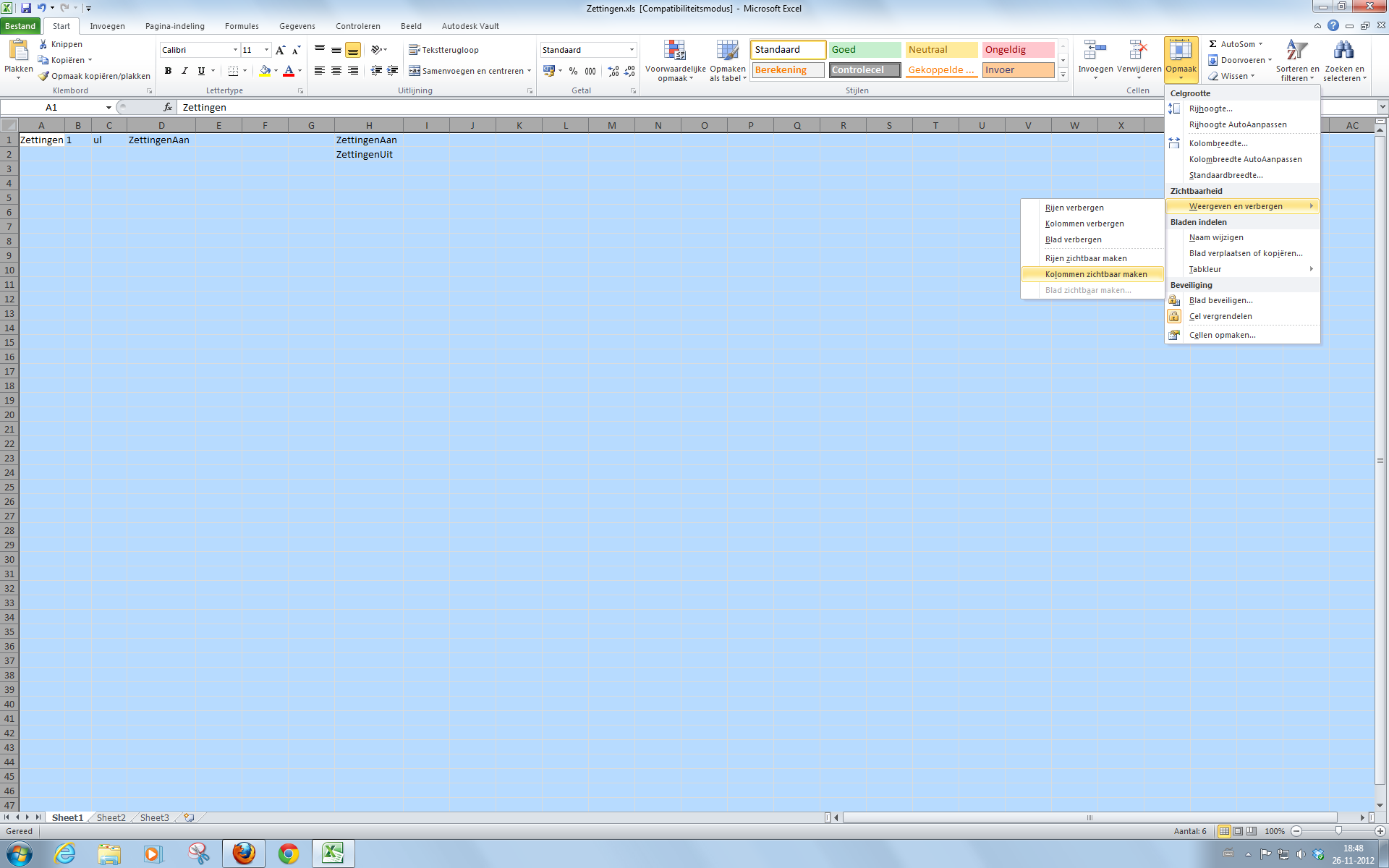
Now to the excel, there are two ways to expand the koloms.
First select all the cells and then go to, look in the attachment.
Its in dutch but you will find on the same place with an englisch version.
Second klik on the link there is a video in english.
Message 13 of 13


01-02-2013
05:41 AM
- Mark as New
- Bookmark
- Subscribe
- Mute
- Subscribe to RSS Feed
- Permalink
- Report
01-02-2013
05:41 AM
I have a youtube movie of a webinar i wanted to follow.
It's about how to make a New Substitute-Derive Assemblie.
You can see how the levels will be linked.
In the Assemble ribbon under Productivity there is a tool 'Link Levels of Details'.
That would be nice for my flanges in my Sheet Metal part.
But there is no way that i can select the flanges in the Derive Assemblie or Shrinkwrap.
It would be a nice solution for my simple panel to sync to acad.
I don't have to use excel.
http://www.youtube.com/watch?v=GmFEbgwzn9w&feature=youtu.be
Mvg Jos
Youre drawings are as good as the symbols that compleet them.....
Youre drawings are as good as the symbols that compleet them.....
Reply
Topic Options
- Subscribe to RSS Feed
- Mark Topic as New
- Mark Topic as Read
- Float this Topic for Current User
- Bookmark
- Subscribe
- Printer Friendly Page
Forums Links
Can't find what you're looking for? Ask the community or share your knowledge.
Post to forums
