Community
- Forums Home
- >
- Factory Design Utilities Community
- >
- Factory Design Utilities Forum
- >
- Re: Use 2D-DWG in IDW
Factory Design Utilities Forum
Welcome to Autodesk’s Factory Design Utilities Forums. Share your knowledge, ask questions, and explore popular Factory Design Utilities topics.
Turn on suggestions
Auto-suggest helps you quickly narrow down your search results by suggesting possible matches as you type.
 This page has been translated for your convenience with an automatic translation service. This is not an official translation and may contain errors and inaccurate translations. Autodesk does not warrant, either expressly or implied, the accuracy, reliability or completeness of the information translated by the machine translation service and will not be liable for damages or losses caused by the trust placed in the translation service.
Translate
This page has been translated for your convenience with an automatic translation service. This is not an official translation and may contain errors and inaccurate translations. Autodesk does not warrant, either expressly or implied, the accuracy, reliability or completeness of the information translated by the machine translation service and will not be liable for damages or losses caused by the trust placed in the translation service.
Translate
Reply
Topic Options
- Subscribe to RSS Feed
- Mark Topic as New
- Mark Topic as Read
- Float this Topic for Current User
- Bookmark
- Subscribe
- Printer Friendly Page
Message 1 of 11

Anonymous
885 Views, 10 Replies
02-29-2012
11:37 PM
- Mark as New
- Bookmark
- Subscribe
- Mute
- Subscribe to RSS Feed
- Permalink
- Report
02-29-2012
11:37 PM
Use 2D-DWG in IDW
My workflow is as follow:
Im using autocad for designing the layouts of factory. This consists of own equipment and subsuppliers/existing equipment.
I then use this drawing as an underlay in Inventor Factory to make the 3D layout.
The equipment that are our own we erect in 3D, but the rest is only in 2d.
The problem is when I try to use the original dwg as underlay in my IDW to get susuppliers/existing equipment in one drawing.
As the dwg is big, the draftview metode is way to slow.
If I create Autocad DWG from IDW the DWG gets to big.
So:
What is the best metode to import a big DWG into an IDW?
10 REPLIES 10
Message 2 of 11


03-01-2012
01:00 AM
- Mark as New
- Bookmark
- Subscribe
- Mute
- Subscribe to RSS Feed
- Permalink
- Report
03-01-2012
01:00 AM
Hi,
Are you using the following workflow in Factort design suites?
1,New 3D layout in Inventor
2,Add your original dwg (AutoCAD dwg) as underlay by Add DWG Overlay command
3,Place your own 3D equipements models in Inventor
4,Save your 3D layout
5,Use Publish/Update DWG command to generate the 2D layout dwg
And why you want to import your dwg to Inventor idw? What is the next workflow in idw?
Thanks,
-Xuesong
Please mark as a solution if somehow I got it right.
Message 3 of 11
03-01-2012
01:56 AM
- Mark as New
- Bookmark
- Subscribe
- Mute
- Subscribe to RSS Feed
- Permalink
- Report
03-01-2012
01:56 AM
The workflow is as you describe appart from pos 5.
The reason for using idw and not dwg as final drawing is the shading of layout in inventor drawing.
I therefore need the original dwg in the IDW.
Message 4 of 11


03-01-2012
06:29 AM
- Mark as New
- Bookmark
- Subscribe
- Mute
- Subscribe to RSS Feed
- Permalink
- Report
03-01-2012
06:29 AM
The way I was described the workflow from Autodask was that Inventor was never really intended to do the 2D portion of the drawings. Sending out to a DWG is the only way you will be able to see all geometry combined. IDW's will only see geometry that came from Inventor.
Please mark this response "Accept as solution" if it answers your question.
-------------------------------------------------------------------------------------
Corey Parks
-------------------------------------------------------------------------------------
Corey Parks
Message 5 of 11

03-01-2012
12:55 PM
- Mark as New
- Bookmark
- Subscribe
- Mute
- Subscribe to RSS Feed
- Permalink
- Report
03-01-2012
12:55 PM
Can you please elaborate a little on what you mean by shading of layout in Inventor? If you can share a screen shot or sample that will be very helpful.
Thanks,
Shibai Bagchi
Product Manager
Autodesk
Message 6 of 11
03-01-2012
07:07 PM
- Mark as New
- Bookmark
- Subscribe
- Mute
- Subscribe to RSS Feed
- Permalink
- Report
03-01-2012
07:07 PM
I guess that is the ISO orientation shaded view in drawing, Right?
Thanks,
-Xuesong
Please mark as a solution if somehow I got it right.
Message 7 of 11
03-01-2012
11:52 PM
- Mark as New
- Bookmark
- Subscribe
- Mute
- Subscribe to RSS Feed
- Permalink
- Report
03-01-2012
11:52 PM
With Shaded layot Im refering to Style when creating view.
On enclosed drawing you can see an example.
However the dwg here i just one component and a plant consist of several like this.
Message 8 of 11
03-02-2012
12:26 AM
- Mark as New
- Bookmark
- Subscribe
- Mute
- Subscribe to RSS Feed
- Permalink
- Report
03-02-2012
12:26 AM
The view of the asset in 3D you own will be shaded view, and other supplier assets in 2D is just on frame view. Correct?
-Xuesong
Please mark as a solution if somehow I got it right.
Message 9 of 11
03-02-2012
12:43 AM
- Mark as New
- Bookmark
- Subscribe
- Mute
- Subscribe to RSS Feed
- Permalink
- Report
Message 10 of 11
Anonymous
in reply to:
Anonymous
03-02-2012
05:42 AM
- Mark as New
- Bookmark
- Subscribe
- Mute
- Subscribe to RSS Feed
- Permalink
- Report
03-02-2012
05:42 AM
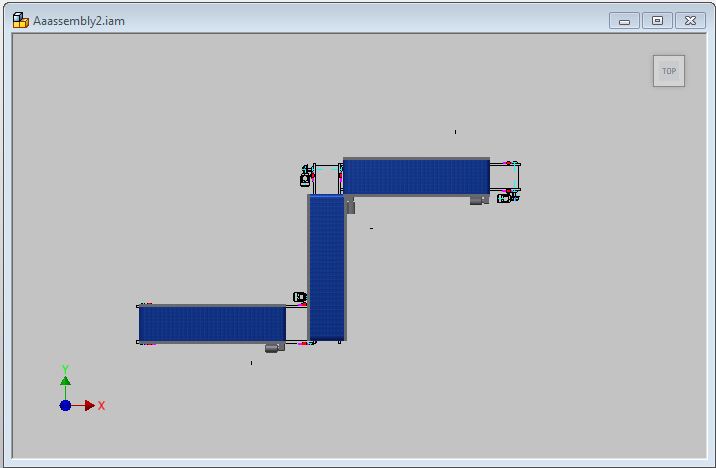
Ive found the button you mentioned "Create/Update DWG"
However the output is not as expected.
The 3D parts are somehow rotated.(see pictures)
Message 11 of 11
03-04-2012
11:38 PM
- Mark as New
- Bookmark
- Subscribe
- Mute
- Subscribe to RSS Feed
- Permalink
- Report
03-04-2012
11:38 PM
Could you please share your datasets? if it is big, you can send it to me by Xuesong.bai@autodesk.com
Thanks,
-Xuesong
Please mark as a solution if somehow I got it right.
Reply
Topic Options
- Subscribe to RSS Feed
- Mark Topic as New
- Mark Topic as Read
- Float this Topic for Current User
- Bookmark
- Subscribe
- Printer Friendly Page