Community
- Forums Home
- >
- Community Archive - Read Only
- >
- Autodesk Architectural Desktop 2007 & Prior forum
- >
- Re: problem with selection sets and dynamic zoom/pan
Announcements
IMPORTANT. Forum in Read Only mode. You can no longer submit new questions or replies. Please read this message for details
Autodesk Architectural Desktop 2007 & Prior
Welcome to Autodesk’s Autodesk Architectural Desktop 2007 & Prior Forums. Share your knowledge, ask questions, and explore popular Autodesk Architectural Desktop 2007 & Prior topics.
Turn on suggestions
Auto-suggest helps you quickly narrow down your search results by suggesting possible matches as you type.
 This page has been translated for your convenience with an automatic translation service. This is not an official translation and may contain errors and inaccurate translations. Autodesk does not warrant, either expressly or implied, the accuracy, reliability or completeness of the information translated by the machine translation service and will not be liable for damages or losses caused by the trust placed in the translation service.
Translate
This page has been translated for your convenience with an automatic translation service. This is not an official translation and may contain errors and inaccurate translations. Autodesk does not warrant, either expressly or implied, the accuracy, reliability or completeness of the information translated by the machine translation service and will not be liable for damages or losses caused by the trust placed in the translation service.
Translate
problem with selection sets and dynamic zoom/pan
3 REPLIES 3
Reply
Topic Options
- Subscribe to RSS Feed
- Mark Topic as New
- Mark Topic as Read
- Float this Topic for Current User
- Bookmark
- Subscribe
- Printer Friendly Page
Message 1 of 4

Anonymous
597 Views, 3 Replies
04-04-2002
01:18 AM
- Mark as New
- Bookmark
- Subscribe
- Mute
- Subscribe to RSS Feed
- Permalink
- Report
04-04-2002
01:18 AM
problem with selection sets and dynamic zoom/pan
when I select some objects
I pan and zoom with the wheel to select some more
and then I issue a move command
some of the selection falls out of the move command and is not moved
serious bug in AutoCAD as I can see. tisk tisk tisk , somebodys not doing a
very good job IMHO, all the problems in these new AutoCAD versions. so
frustrating and a waste of money for such a buggy product. lower prices and
rebates are in order.
I pan and zoom with the wheel to select some more
and then I issue a move command
some of the selection falls out of the move command and is not moved
serious bug in AutoCAD as I can see. tisk tisk tisk , somebodys not doing a
very good job IMHO, all the problems in these new AutoCAD versions. so
frustrating and a waste of money for such a buggy product. lower prices and
rebates are in order.
3 REPLIES 3
Message 2 of 4
Anonymous
in reply to:
Anonymous
04-04-2002
02:03 AM
- Mark as New
- Bookmark
- Subscribe
- Mute
- Subscribe to RSS Feed
- Permalink
- Report
04-04-2002
02:03 AM
I am not experiencing that here for the MOVE command. This effect has been noted for the stretch command and was discussed a few months ago at some length.
--
David Koch
--
David Koch
Message 3 of 4
Anonymous
in reply to:
Anonymous
04-04-2002
03:18 AM
- Mark as New
- Bookmark
- Subscribe
- Mute
- Subscribe to RSS Feed
- Permalink
- Report
04-04-2002
03:18 AM
Not a new issue. If YOU can't see the objects on the screen, neither can
AutoCAD, even if you just selected them before panning. Some view this as a
"feature". What would be nice is, yet another, setvar to allow us to choose
to allow selection sets we can't see.
--
Regards
---------------
Reid M. Addis
Architectural Applications Specialist
Granary Associates
215-665-7056
addis@granaryassoc.com
"Jonas" wrote in message
news:8BE5DC01314E3ADA921932623B90CC96@in.WebX.maYIadrTaRb...
> when I select some objects
> I pan and zoom with the wheel to select some more
> and then I issue a move command
> some of the selection falls out of the move command and is not moved
>
> serious bug in AutoCAD as I can see. tisk tisk tisk , somebodys not doing
a
> very good job IMHO, all the problems in these new AutoCAD versions. so
> frustrating and a waste of money for such a buggy product. lower prices
and
> rebates are in order.
>
>
AutoCAD, even if you just selected them before panning. Some view this as a
"feature". What would be nice is, yet another, setvar to allow us to choose
to allow selection sets we can't see.
--
Regards
---------------
Reid M. Addis
Architectural Applications Specialist
Granary Associates
215-665-7056
addis@granaryassoc.com
"Jonas"
news:8BE5DC01314E3ADA921932623B90CC96@in.WebX.maYIadrTaRb...
> when I select some objects
> I pan and zoom with the wheel to select some more
> and then I issue a move command
> some of the selection falls out of the move command and is not moved
>
> serious bug in AutoCAD as I can see. tisk tisk tisk , somebodys not doing
a
> very good job IMHO, all the problems in these new AutoCAD versions. so
> frustrating and a waste of money for such a buggy product. lower prices
and
> rebates are in order.
>
>
Message 4 of 4


09-24-2012
11:21 PM
- Mark as New
- Bookmark
- Subscribe
- Mute
- Subscribe to RSS Feed
- Permalink
- Report
09-24-2012
11:21 PM
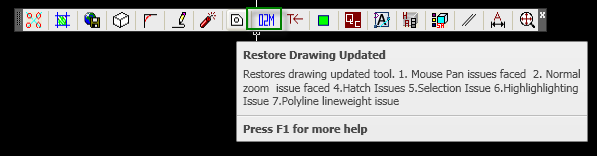
Yes I had seen this issue in our production floors.Being a Software Engineer and a Research person I had recorded all the issues (that you can say a type of bugs) can be summed as follows:-
- Uneven mouse pan issue
- Zoom factor issue in autocad environment
- Hatch issue (regenerating disappeared hatches)
- Selection issue in autocad
- Highlighting issue in autocad
- Polyline line weight not showing
Your issue is also covered in points 1,2 & 4 of the above mentioned listings.
I have devised a tool named RestoreUpdatedTool which can be uploaded using the appload command and donot foget to do the same appload in the contents folder.I have created a toolbar in which I can show the functionalities of the tool.
Note(B): I will share the tool (the lisp file) for your help.
Bireshwar
Reply
Topic Options
- Subscribe to RSS Feed
- Mark Topic as New
- Mark Topic as Read
- Float this Topic for Current User
- Bookmark
- Subscribe
- Printer Friendly Page