AutoCAD LT for Mac - freeze layer in viewport

AutoCAD LT for Mac - freeze layer in viewport

Anonymous
Not applicable
8,224 Views
9 Replies
Message 1 of 10

AutoCAD LT for Mac - freeze layer in viewport

Anonymous
Not applicable

Anyone else having this issue?


When I'm in an active viewport and use the freeze tool to freeze a layer in that viewport, it ends up freezing the layer in model space, which prevents it from showing up in any viewport. I am able to manually freeze the layer in the viewport only using the layers window, but this is obviously not as efficient.


Is there a setting I don't know about that addresses this or is this an issue with the program?

0 Likes
Accepted solutions (1)
8,225 Views
9 Replies
Replies (9)
Message 2 of 10

pendean
Community Legend
Community Legend

In the Windows version (you are in the wrong forum), LAYFRZ command has the option to turn that on/off at the commandline. Tap that HELP button in LT for MAC and find out how to do it there (if available).

0 Likes
Message 3 of 10

maxim_k
Consultant
Consultant
Accepted solution

Hi,


Dean is absolutely right. In AC LT for Mac you can use LAYFRZ command in viewport, just verify settings - should be: Viewports=Vpfreeze


Command: _LAYFRZ
Current settings: Viewports=Vpfreeze, Block nesting level=Block
Select an object on the layer to be frozen or [Settings/Undo]S
Enter setting type for [Viewports/Block selection]V
In paper space viewport use [Freeze/Vpfreeze] <Vpfreeze>: V
Select an object on the layer to be frozen or [Settings/Undo]Layer2
Layer "Layer2" has been frozen in this viewport.


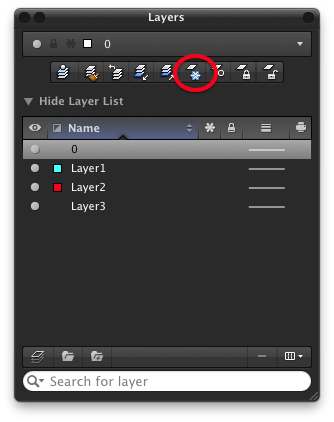
The button is on Layers palette:


Снимок экрана 2013-01-28 в 20.33.00.png


Maxim


Do you find the posts helpful? "LIKE" these posts!
Have your question been answered successfully? Click 'ACCEPT SOLUTION' button.


Maxim Kanaev
Architect
MARSS

MacACAD | Linkedin

Etiquette and Ground Rules of Autodesk Community
0 Likes
Message 4 of 10

Anonymous
Not applicable

I am having the exact same problem as Troy.  I've verified my settings per the answers, but I'm still having the problem.  When I'm in paperspace and try to freeze a layer, it freezes in model space as well.  I've verified that the setting is "vpfreeze" and not just "freeze".  Since I'm probably doing something dumb that is causing this, can someone please step me through the steps to take when in paperspace to freeze a layer?  Can my cursor be anywhere on the screen or do I need to be double clicked in the viewport (ie, in model space)?  I've tried all combinations and am still having the problem.


Thanks.


Peg

0 Likes
Message 5 of 10

maxim_k
Consultant
Consultant

Hi,


Before freezing layer in viewport you have to activate it (or in other words - activate Model space). Then call LAYFRZ command, check VPfreeze option and select object on layer you want to freeze in viewport.

Actually you can freeze layer in viewport from Layers palette too:


Screen Shot 2013-03-05 at 8.33.25.png


Again - activate viewport and click on VPfreeze icon in Layers palette for layer you want to freeze in current viewport.


Maxim


Do you find the posts helpful? "LIKE" these posts!
Have your question been answered successfully? Click 'ACCEPT SOLUTION' button.


Maxim Kanaev
Architect
MARSS

MacACAD | Linkedin

Etiquette and Ground Rules of Autodesk Community
Message 6 of 10

Anonymous
Not applicable

Thank you.  All those other columns weren't showing up in my layer manager.  I found it and I'm good now.  Peg

0 Likes
Message 7 of 10

MILESarch
Enthusiast
Enthusiast

The problem I have started with ACAD14.  I used to be able to click the toobar icon to freeze a layer and then touch each object in an xref through the viewport to VPFreeze it.  Now it just wants to freeze the layer the xref is inserted on.  Any ideas?

0 Likes
Message 8 of 10

maxim_k
Consultant
Consultant
Hi,

Before using LAYFRZ with Xref for the first time, select "Settings" (type S at the Command prompt), then "Block selection", then "Entity" - now LAYFRZ will freeze the layers of selected objects even if they are nested in an xref or a block.

Maxim

Do you find the posts helpful? "LIKE" these posts!
Have your question been answered successfully? Click 'ACCEPT SOLUTION' button.


Maxim Kanaev
Architect
MARSS

MacACAD | Linkedin

Etiquette and Ground Rules of Autodesk Community
Message 9 of 10

MILESarch
Enthusiast
Enthusiast

Perfect!   Your knowledge of ACAD Mac astounds me, Maxim!  Thank you, once again.

Message 10 of 10

JEFFJW9BB
Advocate
Advocate
Great! Thank you
0 Likes