Community
- Forums Home
- >
- Community Archive - Read Only
- >
- AutoCAD Structural Detailing Community
- >
- AutoCAD Structural Detailing Forum
- >
- Re: commitment of RAM
AutoCAD Structural Detailing Forum
Welcome to Autodesk’s AutoCAD Structural Detailing Forums. Share your knowledge, ask questions, and explore popular AutoCAD Structural Detailing topics.
Turn on suggestions
Auto-suggest helps you quickly narrow down your search results by suggesting possible matches as you type.
 This page has been translated for your convenience with an automatic translation service. This is not an official translation and may contain errors and inaccurate translations. Autodesk does not warrant, either expressly or implied, the accuracy, reliability or completeness of the information translated by the machine translation service and will not be liable for damages or losses caused by the trust placed in the translation service.
Translate
This page has been translated for your convenience with an automatic translation service. This is not an official translation and may contain errors and inaccurate translations. Autodesk does not warrant, either expressly or implied, the accuracy, reliability or completeness of the information translated by the machine translation service and will not be liable for damages or losses caused by the trust placed in the translation service.
Translate
Reply
Topic Options
- Subscribe to RSS Feed
- Mark Topic as New
- Mark Topic as Read
- Float this Topic for Current User
- Bookmark
- Subscribe
- Printer Friendly Page
Message 1 of 16


06-07-2012
02:48 AM
- Mark as New
- Bookmark
- Subscribe
- Mute
- Subscribe to RSS Feed
- Permalink
- Report
06-07-2012
02:48 AM
Hello everyone,
anyone of you know why, with a simple 68 Mb file (see below)
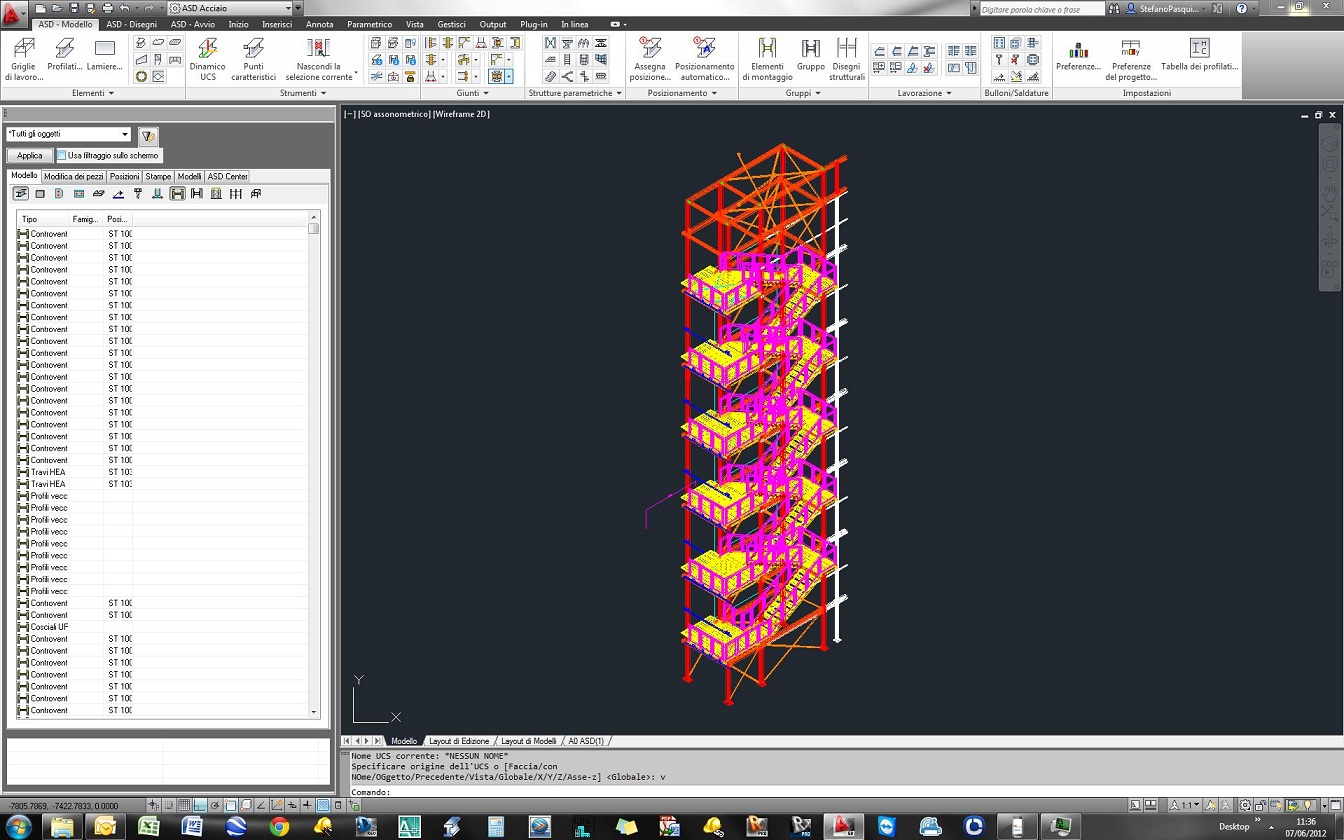
I have a commitment of more than 3 GB of memory ... (see below)

Any suggestions to reduce the amount of memory? thanks so much
SRP

PasProStudio
www.pasquiniprogetti.eu
Structural + Detailing engineers
Solved! Go to Solution.
Solved by dave.wolfe. Go to Solution.
15 REPLIES 15
Message 2 of 16
06-07-2012
04:37 AM
- Mark as New
- Bookmark
- Subscribe
- Mute
- Subscribe to RSS Feed
- Permalink
- Report
06-07-2012
04:37 AM
Because with autoCAD, 64 MB is not a simple model. On top of that because ASD uses custom objects, it stores more data in the file than vanilla AutoCAD would, so you can have more objects in a smaller file than if you were using plain AutoCAD objects. To test this use the export to AutoCAD option.
The video card has to work just as hard to display the shapes regardless of whether you're using AutoCAD solids or custom objects.
Also, you're probably showing a bunch of nuts and bolts which are extremely memory intensive. You'll probably see better performance if you freeze some of the object layers.


Message 3 of 16


06-26-2012
08:42 AM
- Mark as New
- Bookmark
- Subscribe
- Mute
- Subscribe to RSS Feed
- Permalink
- Report
06-26-2012
08:42 AM
I have the same problem with a 150MB large file. -my RAM memory is almost full (see picture 120626_PC RAM) -3D orbit does not work fluently at all! -changing in the top view (front view - side view) takes too much time -there is no workflow -when drawings are generated, it takes up to 10 minutes or longer (for a total overview) it annoys to work in this way. PC System: Windows 7 Professional 64 bit Intel Xenon CPU X3470 @2,93GHZ 8 GB RAM Video card Nvidia Quadro 600 & for a test also a Nvidia GeForce GTX550 Where is the problem? Are there any other possibilities to increase the performance? What can i do?
Message 4 of 16

06-27-2012
04:55 AM
- Mark as New
- Bookmark
- Subscribe
- Mute
- Subscribe to RSS Feed
- Permalink
- Report
06-27-2012
04:55 AM
Autocad becomes lazy when Drawings are generated. I see 2 possible solutions for a "smoother" experience
1) Split the project in multiple projects (there is this option)
2) From model create separate files with each drawing. (the downside is that if you make a modification, it will not be reflected in previously created files.
Message 5 of 16
06-27-2012
05:14 AM
- Mark as New
- Bookmark
- Subscribe
- Mute
- Subscribe to RSS Feed
- Permalink
- Report
06-27-2012
05:14 AM
A lot of people use Xref's to manage large files, it works pretty well. You may have to break up structural model along member type + level.
Message 6 of 16
06-27-2012
05:37 AM
- Mark as New
- Bookmark
- Subscribe
- Mute
- Subscribe to RSS Feed
- Permalink
- Report
06-27-2012
05:37 AM
Thank you guys for the suggestions, but in this case i dont want to split it because its a "not so big room" and i must work simtimes here and sometimes in that corner, and i think it disrupts the work flow. for me its just disappointing that the program or the computer that is designed for big steel structures its not in a position to handle this data volume.... but if i would increase the computer hardware performance, i mean 16 or 32GB RAM and A Nvidia Quadro 6000 with 6GB memory size or something similar... Could that be a possible solution?
Message 7 of 16
06-27-2012
06:11 AM
- Mark as New
- Bookmark
- Subscribe
- Mute
- Subscribe to RSS Feed
- Permalink
- Report
06-27-2012
06:11 AM
See, that's the thing. The program isn't designed for big steel structures. Any program built on top of AutoCAD currently is not designed for BIG. You can always spend more money, there just comes a point where the money spent is less than the gain received. Only you can justify how much to spend.
Your RAM and video card are a bit weak. I got with a Nvidia Quadro 2000 at least (1 GB of RAM on the card), bump up your RAM on your computer to 16 GB and you should see a decent performance boost between the two. I wouldn't spend much more than that.
Here's some reviews by Cadalyst:
Quadro 2000
http://www.cadalyst.com/hardware/graphics-cards/setting-a-cad-speed-record-14292?page_id=1
Quadro 5000
http://www.cadalyst.com/hardware/graphics-cards/nvidia-quadro-5000-13397
Message 8 of 16
06-27-2012
09:02 AM
- Mark as New
- Bookmark
- Subscribe
- Mute
- Subscribe to RSS Feed
- Permalink
- Report
06-27-2012
09:02 AM
OK, thanks for the information. If I get the money I'll try it, I will inform you how it affects. by the way, only of interest: which program is then suitable for large steel structures?
Message 9 of 16
06-27-2012
09:13 AM
- Mark as New
- Bookmark
- Subscribe
- Mute
- Subscribe to RSS Feed
- Permalink
- Report
06-27-2012
09:13 AM
If you're trying to visualize everything at one time, Revit has better performance than AutoCAD. ASD works, but you have to be willing to using xref's...like most people do with 3D inside of AutoCAD. Even Revit will have its limits.
Message 10 of 16

09-20-2012
06:49 PM
- Mark as New
- Bookmark
- Subscribe
- Mute
- Subscribe to RSS Feed
- Permalink
- Report
09-20-2012
06:49 PM
ditto about the Graphics card and ram
the quadro5000 goes very well but the 2000 should do the job, id love a 6000...maybe if I win the lotto.
we split xrefs into :
floors
columns
vert bracing
hor bracing
stairs
etc
CAD Management 101:
You can do it your own way,
If its done just how I say!
[Metallica:And Justice For All:1988]
You can do it your own way,
If its done just how I say!
[Metallica:And Justice For All:1988]
Message 11 of 16

10-28-2012
11:01 AM
- Mark as New
- Bookmark
- Subscribe
- Mute
- Subscribe to RSS Feed
- Permalink
- Report
10-28-2012
11:01 AM
If you use XREF how do you connect the columns with the bracings for example ?
Message 12 of 16
10-28-2012
06:55 PM
- Mark as New
- Bookmark
- Subscribe
- Mute
- Subscribe to RSS Feed
- Permalink
- Report
10-28-2012
06:55 PM
sounds that you should work rendering the biggest galaxy!!! is a disgrace you need to invert/put/waste too much money just using ASD, other programs run full mode using 2gb RAM.
Message 13 of 16
10-29-2012
02:51 PM
- Mark as New
- Bookmark
- Subscribe
- Mute
- Subscribe to RSS Feed
- Permalink
- Report
10-29-2012
02:51 PM
Lanzman you have best computer, no need to change it, man i have just a regular laptop with core 2 duo, 8gb RAM and Nvidia geforce gts 9800m, and 6 months ago i just switch from ASD to Graitec Advance steel who also works on Autocad platform and from my experience Graitec can magae Autocad better then Autodesk itself, When i was working with ASD even for small projects my Ram was always on 100% but now max used RAM with Graitec is just 3 Gb for bigger projects. My opinion is stop investing in your beast machine just invest in new software 😄
Message 14 of 16

10-30-2012
03:08 AM
- Mark as New
- Bookmark
- Subscribe
- Mute
- Subscribe to RSS Feed
- Permalink
- Report
10-30-2012
03:08 AM
I agree with ZHUKOV_ING about the absurldy high system requirements of ASD compared to Advance Steel . Bottom line is that the 3D model appearance is quite the same (except that in Advance Steel the welds are just a cross symbol) but AS is much lighter that ASD , so it's not an impossible task to make the program much lighter , it's its biggest flaw.
PS AS is a great program but it has quite a few things that in my opinion are much better in ASD . If I could combine the two programs into one it would be almost perfect .
Message 15 of 16
10-30-2012
03:53 AM
- Mark as New
- Bookmark
- Subscribe
- Mute
- Subscribe to RSS Feed
- Permalink
- Report
10-30-2012
03:53 AM
My opinion: any other program works very well for large projects: AS, PS, Tekla and (rest in peace) Strucad.
Message 16 of 16
10-30-2012
11:55 PM
- Mark as New
- Bookmark
- Subscribe
- Mute
- Subscribe to RSS Feed
- Permalink
- Report
10-30-2012
11:55 PM
Thats right guys, i agree. In my case i had to finish a project and the only possibility to do that, before i became mad, it was to seperate the 2D drawings in a single file and delete them from the 3D model file. advantage: you could work "normally" disadvantage: the connection to the part does no longer exist, and if something changes you must generate the drawings another time. So...

Reply
Topic Options
- Subscribe to RSS Feed
- Mark Topic as New
- Mark Topic as Read
- Float this Topic for Current User
- Bookmark
- Subscribe
- Printer Friendly Page



