• Industries
  • Products
  • Buy
  • Services & Support
  • Communities
  • Discussion Groups

    AutoCAD Plant 3D

    Reply
    Active Contributor
    Posts: 38
    Registered: ‎06-11-2012
    Accepted Solution

    how to show the "Insulation Line" in the iso

    349 Views, 3 Replies
    09-02-2012 10:31 PM

    In the 'IsoConfig.xml' file, there are some contents like below:

    <Insulation InsulationLineLayerName="Insulation Line" HeatTracingLineLayerName="Heat Tracing Line" InsulationTracingOffsetDistance="0.1531" UseDoubleLineInsulation="true" UseOffsetLineInsulation="false" />

     I don't know what does the "Insulation Line" mean, and how to show that in the iso.

    In addition, the "Heat Tracing Line" is OK.


    Anyone can give me some ideas? Thanks!

    Please use plain text.
    Product Support
    Venkatesan.A
    Posts: 77
    Registered: ‎05-31-2011

    Re: how to show the "Insulation Line" in the iso

    09-02-2012 10:46 PM in reply to: lyowbeen

    Change the "UseOffsetLineInsulation" from false to true (as show below), this will display the inuslation in the ISO.


    UseOffsetLineInsulation="true" />


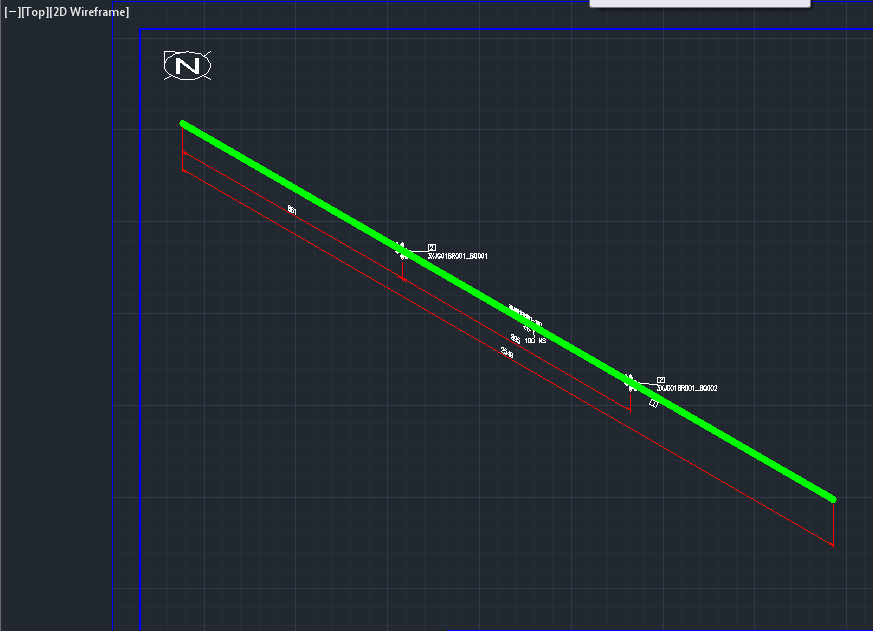
    The ISO will look like the one attached in the Pciture.


    Venkatesan.A
    Support Specialist
    Product Support
    Autodesk, Inc.
    Please use plain text.
    Active Contributor
    Posts: 38
    Registered: ‎06-11-2012

    Re: how to show the "Insulation Line" in the iso

    09-02-2012 11:43 PM in reply to: Venkatesan.A

    Thanks.

    But I think what your pictures shows is the "Heat Tracing Line" but not the "Insulation Line", because the option UseDoubleLineInsulation="true" can't control it. Besides, this line use the "Heat Tracing Line" layer in the "iso.dwt".

    Please use plain text.
    Active Contributor
    Posts: 38
    Registered: ‎06-11-2012

    Re: how to show the "Insulation Line" in the iso

    09-03-2012 12:26 AM in reply to: Venkatesan.A

    Thanks! I have found the point.

    Please use plain text.