Stub-in connection to main branch at known point

Stub-in connection to main branch at known point

PatrickByrne
Advocate Advocate
7,739 Views
9 Replies
Message 1 of 10

Stub-in connection to main branch at known point

PatrickByrne
Advocate
Advocate

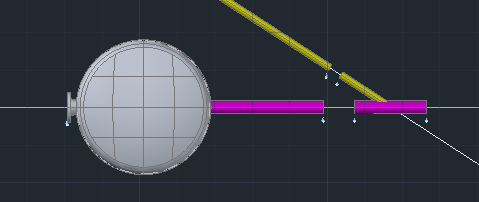
We have a main line say DN 400 and a connecting line coming in at 33 degrees from a known point. Therefore I draw the 400 line and draw a construction line where we want the branch to come in. How do we make a connection at that point?


We have tried this, start the branch line, right click and select Stub-in and then select the end of the construction line, but this does not make a connection to the main line. It only works when I select Nearest or Midpoint of the main pipe.


Is there a way to add a marker or node, or any other suggestions.

0 Likes
Accepted solutions (1)
7,740 Views
9 Replies
Replies (9)
Message 2 of 10

Dan.Scales
Alumni
Alumni

Hi,


You could:


  1. Draw construction lines along the header and stub-in axis lines.
  2. Draw a short section of the header pipe so it's midpoint is at the intersection of the construction lines.
  3. Place the stub-in at the midpoint at the required angle.
  4. Join up the pipes.

stubin.png


I hope this helps.


Thanks,

Dan


Dan Scales
0 Likes
Message 3 of 10

Ahmed1081975
Collaborator
Collaborator

Can you please Add screen shot Or Vidio


Thanks

0 Likes
Message 4 of 10

Dan.Scales
Alumni
Alumni

Hi,


Here is a short video showing the method:


Stub-in


Thanks,

Dan


Dan Scales
Message 5 of 10

Anonymous
Not applicable

learning how to use the 'from' snap is the key to mastering stubins...and any kind of branch connection/support manipulation for that matter.

if you have a segment of pipe coming in at 33 degrees, first start the route continuation, then making sure you chose the stub in option from the command line, start you 'from' snap, then start an 'intersection' snap, pick both lines to generate the snap at the stub in location (or use the set out lines that intersect at this point), this will be your 'from' point, now you pick the 'perpendicular' snap to grab the point on the 400 line.


the stub in needs to snap to a location on the actual pipe centreline its stubing into, not the construction geometry.


0 Likes
Message 6 of 10

jason.drew
Community Manager
Community Manager

Hi Rich,


I tested the FROM snap with a stub-in and wasn't able to get it to work. It resulted in a disconnection marker each time I tried.


Let me make sure I'm following the correct steps:


1. Start route from the branch line

2. Make sure stub-end is on

3. Start FROM snap

4. Snap override with intersection

5. Pick both lines

6. Snap override with perpendicular

7. Pick the header line


I think one improvement here would be the availability of object snap and tracking for pipe centerlines without the need for contruction lines, would you agree?


Jason Drew
Designated Support Specialist
0 Likes
Message 7 of 10

Anonymous
Not applicable

ive just been doing some major upgrades...changed both laptop and pc to win7

added ssd drives for the os and apps, created raid for new hdd's, swapped out graphics cards and a couple of other bits and pieces, oc'ed cpu and gpu's etc

still sorting out network, settings & doing reinstalls of software...


I have had the from method working, but it was a bit finiky ...dependant on a certain pick order ill report back in next couple of days, when ive got everthing installed and up and running.

0 Likes
Message 8 of 10

Anonymous
Not applicable

thats the procedure i use ...just tested, it connects for me

just make sure when you pick for the perp snap that you are picking on the pipe and not the construction lines


most definately would be much better if you could 'build' a snap using just the pipes

as it is, you can only pick one of the pipes to start the intersection snap but then doesnt let you pick the second pipe. untill its fixed a little bit of construction line work will be required


0 Likes
Message 9 of 10

Dan.Scales
Alumni
Alumni
Accepted solution

Hi,


I did some more testing of this using the standard NEA osnap and that also works well and avoids the need for construction lines etc:


http://screencast.com/t/4vJK3mamoD1


Thanks,

Dan


Dan Scales
Message 10 of 10

PatrickByrne
Advocate
Advocate

Thank you for your help, I have been away for the last couple of weeks.


The NEA Osnap works well, I also had a suggestion from Ask the Expert forum to use the line to pipe function on the construction lines. This works well for initial layout and the NEA osnap works well when the main line is already existing.

0 Likes