Hello,
First, do you have access to the Report Designer Manual? Please refer to this forum link and the post by Jason Drew, he provides a link to access the manual.
http://forums.autodesk.com/t5/AutoCAD-Plant-3D/Report-Creator/td-p/.UMpZaG_Ae_w
The field I used in the Pipe properties was Status. There you can assign the pipe as either New, Existing or Demolition.

Then, I opened Report Creator and I created a new report based off of my existing 3D Parts report. You can either generate a new one or base it off another existing report depending what you are wanting to do. Then I selected Edit and Edit Report layout. I added a new column to include the status.
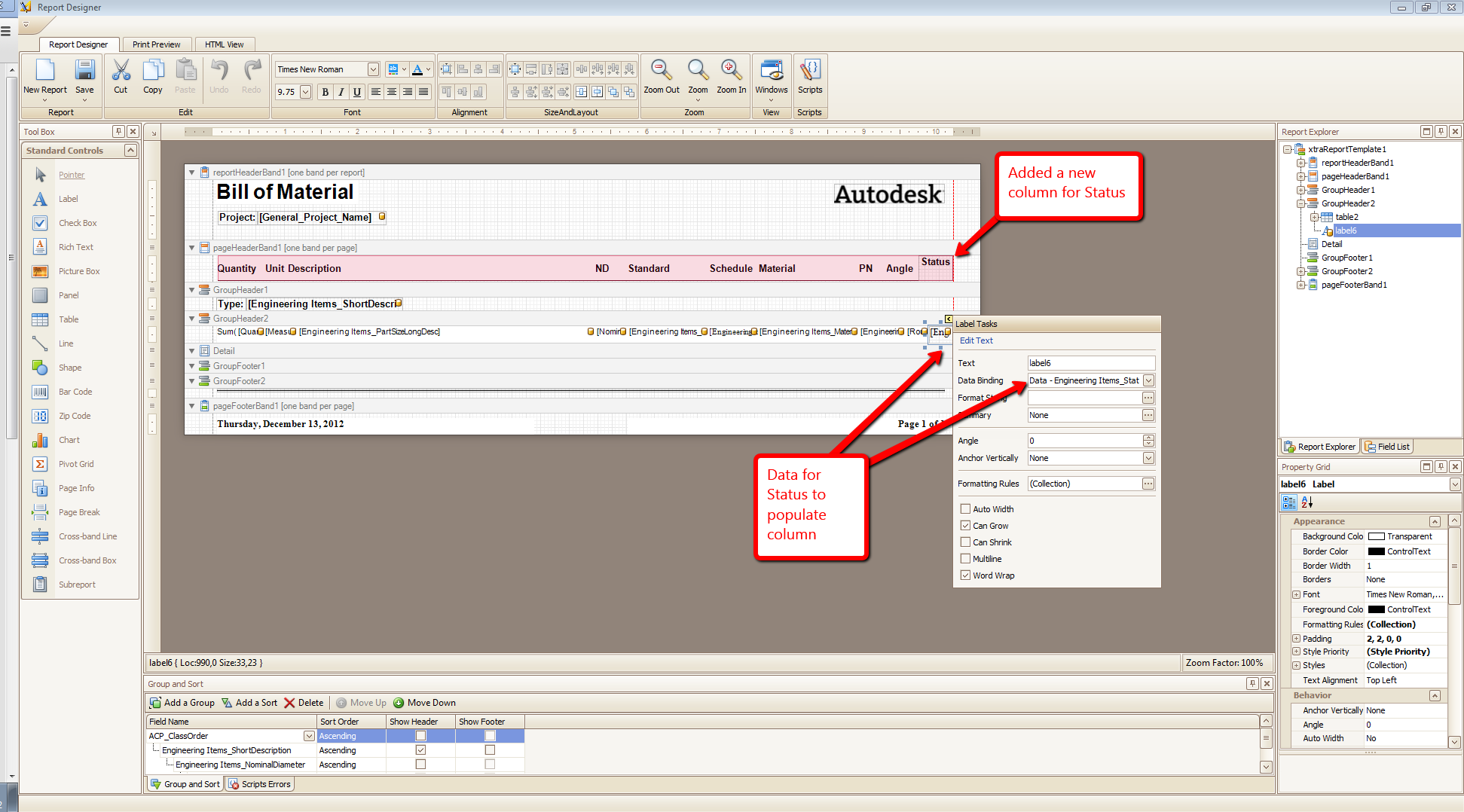
You will then need to setup a filter. This filter will only place the New items you set in the Status.


Now I will run the default 3D Parts report. Pay notice to the total pipe lengths.

Now the new report that filters Status for New items.

Hopefully, this guides you in the direction you needed.
If my post answers your question, please mark it as an Accepted Solution, so that others can find answers quickly!

Quentin Contreras
Technical Support Specialist