Community
- Forums Home
- >
- AutoCAD Map 3D Community
- >
- Developer forum
- >
- Re: 2012 'Could not load file or assembly 'ManagedMapApi.dll'...
AutoCAD Map 3D Developer
Welcome to Autodesk’s AutoCAD Map 3D Developer Forums. Share your knowledge, ask questions, and explore popular AutoCAD Map 3D Developer topics.
Turn on suggestions
Auto-suggest helps you quickly narrow down your search results by suggesting possible matches as you type.
 This page has been translated for your convenience with an automatic translation service. This is not an official translation and may contain errors and inaccurate translations. Autodesk does not warrant, either expressly or implied, the accuracy, reliability or completeness of the information translated by the machine translation service and will not be liable for damages or losses caused by the trust placed in the translation service.
Translate
This page has been translated for your convenience with an automatic translation service. This is not an official translation and may contain errors and inaccurate translations. Autodesk does not warrant, either expressly or implied, the accuracy, reliability or completeness of the information translated by the machine translation service and will not be liable for damages or losses caused by the trust placed in the translation service.
Translate
2012 'Could not load file or assembly 'ManagedMapApi.dll'...
6 REPLIES 6
SOLVED
Reply
Topic Options
- Subscribe to RSS Feed
- Mark Topic as New
- Mark Topic as Read
- Float this Topic for Current User
- Bookmark
- Subscribe
- Printer Friendly Page
Message 1 of 7


06-28-2012
12:45 PM
- Mark as New
- Bookmark
- Subscribe
- Mute
- Subscribe to RSS Feed
- Permalink
- Report
06-28-2012
12:45 PM
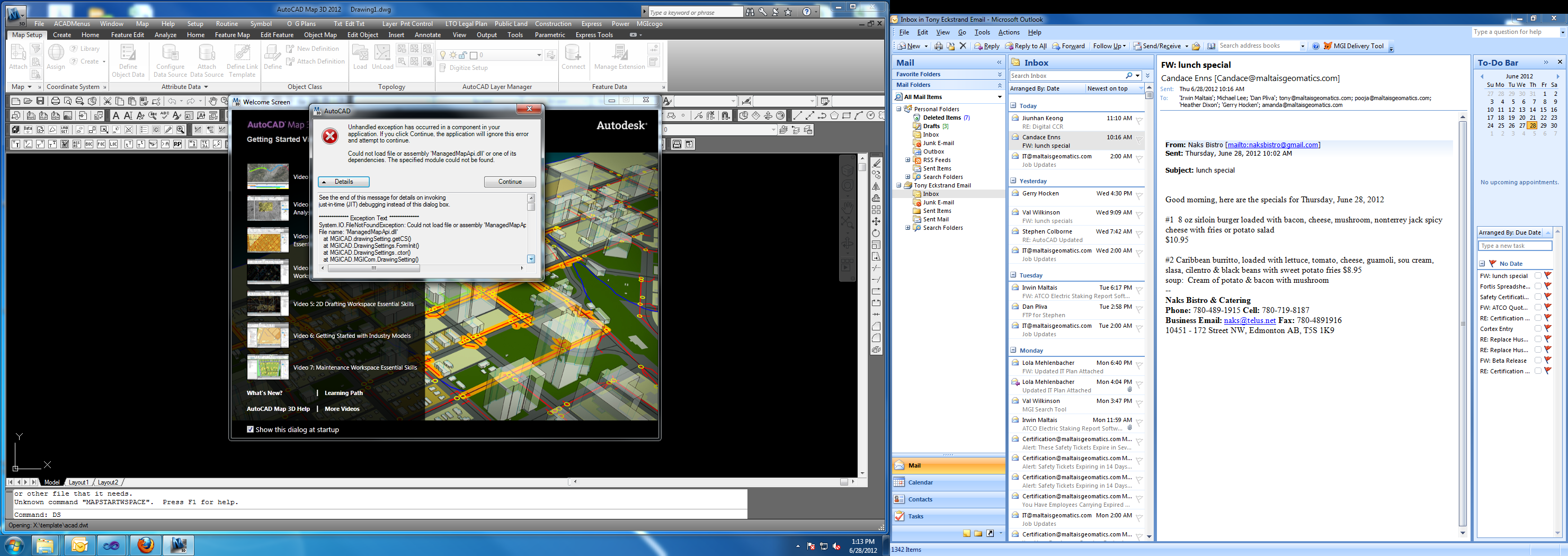
Hi, I keep getting the above error when trying to run a custom form in my .Net custom code that uses the ManagedMapApi.dll. I'm upgrading from AutoCAD Map 3D 2011 to 2012. In 2011 everything works fine but in 2012 it gives this error.
I've looked and there is a C:\Program Files\Autodesk\AutoCAD Map 3D 2012\ManagedMapApi.dll just like in the 2011 version. I've tried referencing the one in the 2011 folder as well as the 2012 folder. I've changed it from Copy Local -> False to Copy Local -> True and back again with no luck. I've also tried running all these changes on a computer with just AutoCAD Map 3D 2012 and no 2011 installed on it. I've tried it with No service pack upgrades, SP1 and SP2 and still no luck.
Any help would be appreciated, thanks.
Solved! Go to Solution.
Solved by Alfred.NESWADBA. Go to Solution.
6 REPLIES 6
Message 2 of 7


07-02-2012
11:48 PM
- Mark as New
- Bookmark
- Subscribe
- Mute
- Subscribe to RSS Feed
- Permalink
- Report
07-02-2012
11:48 PM
Hi,
not checked that now, but I'm quite sure that this was repaired in one of the service-packs for Map3D.
- alfred -
------------------------------------------------------------------------------------
Alfred NESWADBA
Ingenieur Studio HOLLAUS ... www.hollaus.at ... blog.hollaus.at ... CDay 2024
------------------------------------------------------------------------------------
(not an Autodesk consultant)
Alfred NESWADBA
Ingenieur Studio HOLLAUS ... www.hollaus.at ... blog.hollaus.at ... CDay 2024
------------------------------------------------------------------------------------
(not an Autodesk consultant)
Message 3 of 7
07-03-2012
10:07 AM
- Mark as New
- Bookmark
- Subscribe
- Mute
- Subscribe to RSS Feed
- Permalink
- Report
07-03-2012
10:07 AM
Thanks for the reply, I have SP2 installed on both machines and have referenced the ManagedMapApi.dll from the AutoDesk folder after SP2 was installed.
Message 4 of 7
07-03-2012
10:29 AM
- Mark as New
- Bookmark
- Subscribe
- Mute
- Subscribe to RSS Feed
- Permalink
- Report
07-03-2012
10:29 AM
Hi,
can you copy the hole content of the messages (of your error-dialog visible in your screenshot) to a text-file and upload this here?
BTW: why does your app create an exception while Map3D is loading? If you have it set to be loaded while startup then undo this change and try to load your app after Map3D has finished initialization.
- alfred -
------------------------------------------------------------------------------------
Alfred NESWADBA
Ingenieur Studio HOLLAUS ... www.hollaus.at ... blog.hollaus.at ... CDay 2024
------------------------------------------------------------------------------------
(not an Autodesk consultant)
Alfred NESWADBA
Ingenieur Studio HOLLAUS ... www.hollaus.at ... blog.hollaus.at ... CDay 2024
------------------------------------------------------------------------------------
(not an Autodesk consultant)
Message 5 of 7
07-19-2012
02:33 PM
- Mark as New
- Bookmark
- Subscribe
- Mute
- Subscribe to RSS Feed
- Permalink
- Report
07-19-2012
02:33 PM
So even when I try to do a netload and then find the ManagedMapApi.dll in C:\Program Files\Autodesk\AutoCAD Map 3D 2012\ManagedMapApi.dll it gives me the following error, however when I do the same in Map 2011 it properly loads ManagedMapApi.dll with no error. It also gives this error on two different installs of Map 3D 2012 so it's not because of a random install problem.
Cannot load assembly. Error details: System.IO.FileNotFoundException: Could not
load file or assembly 'ManagedMapApi.dll' or one of its dependencies. The
specified module could not be found.
File name: 'ManagedMapApi.dll'
at System.Reflection.RuntimeAssembly._nLoad(AssemblyName fileName, String
codeBase, Evidence assemblySecurity, RuntimeAssembly locationHint,
StackCrawlMark& stackMark, Boolean throwOnFileNotFound, Boolean
forIntrospection, Boolean suppressSecurityChecks)
at System.Reflection.RuntimeAssembly.InternalLoadAssemblyName(AssemblyName
assemblyRef, Evidence assemblySecurity, StackCrawlMark& stackMark, Boolean
forIntrospection, Boolean suppressSecurityChecks)
at System.Reflection.RuntimeAssembly.InternalLoadFrom(String assemblyFile,
Evidence securityEvidence, Byte[] hashValue, AssemblyHashAlgorithm
hashAlgorithm, Boolean forIntrospection, Boolean suppressSecurityChecks,
StackCrawlMark& stackMark)
at System.Reflection.Assembly.LoadFrom(String assemblyFile)
at Autodesk.AutoCAD.Runtime.ExtensionLoader.Load(String fileName)
at loadmgd()
The rest of the message from above is this:
See the end of this message for details on invoking
just-in-time (JIT) debugging instead of this dialog box.

************** Exception Text **************
System.IO.FileNotFoundException: Could not load file or assembly 'ManagedMapApi.dll' or one of its dependencies. The specified module could not be found.
File name: 'ManagedMapApi.dll'
   at MGICAD.drawingSetting.getCS()
   at MGICAD.DrawingSettings.FormInit()
   at MGICAD.DrawingSettings..ctor()
   at MGICAD.MGICom.DrawingSetting()
   at Autodesk.AutoCAD.Runtime.CommandClass.InvokeWorker(MethodInfo mi, Object commandObject, Boolean bLispFunction)
   at Autodesk.AutoCAD.Runtime.CommandClass.InvokeWorkerWithExceptionFilter(MethodInfo mi, Object commandObject, Boolean bLispFunction)
   at Autodesk.AutoCAD.Runtime.PerDocumentCommandClass.Invoke(MethodInfo mi, Boolean bLispFunction)
   at Autodesk.AutoCAD.Runtime.CommandClass.CommandThunk.Invoke()


************** Loaded Assemblies **************
mscorlib
    Assembly Version: 4.0.0.0
    Win32 Version: 4.0.30319.269 (RTMGDR.030319-2600)
    CodeBase: file:///C:/Windows/Microsoft.NET/Framework64/v4.0.30319/mscorlib.dll
----------------------------------------
Acdbmgd
    Assembly Version: 18.2.0.0
    Win32 Version: 18.2.51.0.0
    CodeBase: file:///C:/Program%20Files/Autodesk/AutoCAD%20Map%203D%202012/AcdbMgd.DLL
----------------------------------------
System
    Assembly Version: 4.0.0.0
    Win32 Version: 4.0.30319.269 built by: RTMGDR
    CodeBase: file:///C:/Windows/Microsoft.Net/assembly/GAC_MSIL/System/v4.0_4.0.0.0__b77a5c561934e089/System.dll
----------------------------------------
AdApplicationFrame
    Assembly Version: 0.0.0.0
    Win32 Version: 3.2.23.0
    CodeBase: file:///C:/Program%20Files/Autodesk/AutoCAD%20Map%203D%202012/AdApplicationFrame.DLL
----------------------------------------
msvcm90
    Assembly Version: 9.0.30729.6161
    Win32 Version: 9.00.30729.6161
    CodeBase: file:///C:/Windows/WinSxS/amd64_microsoft.vc90.crt_1fc8b3b9a1e18e3b_9.0.30729.6161_none_08e61857a83bc251/msvcm90.dll
----------------------------------------
AdWindows
    Assembly Version: 3.2.25.0
    Win32 Version: 3.2.25.0
    CodeBase: file:///C:/Program%20Files/Autodesk/AutoCAD%20Map%203D%202012/AdWindows.DLL
----------------------------------------
PresentationFramework
    Assembly Version: 4.0.0.0
    Win32 Version: 4.0.30319.275
    CodeBase: file:///C:/Windows/Microsoft.Net/assembly/GAC_MSIL/PresentationFramework/v4.0_4.0.0.0__31bf3856ad364e35/PresentationFramework.dll
----------------------------------------
WindowsBase
    Assembly Version: 4.0.0.0
    Win32 Version: 4.0.30319.275 built by: RTMGDR
    CodeBase: file:///C:/Windows/Microsoft.Net/assembly/GAC_MSIL/WindowsBase/v4.0_4.0.0.0__31bf3856ad364e35/WindowsBase.dll
----------------------------------------
PresentationCore
    Assembly Version: 4.0.0.0
    Win32 Version: 4.0.30319.275 built by: RTMGDR
    CodeBase: file:///C:/Windows/Microsoft.Net/assembly/GAC_64/PresentationCore/v4.0_4.0.0.0__31bf3856ad364e35/PresentationCore.dll
----------------------------------------
System.Xaml
    Assembly Version: 4.0.0.0
    Win32 Version: 4.0.30319.1 built by: RTMRel
    CodeBase: file:///C:/Windows/Microsoft.Net/assembly/GAC_MSIL/System.Xaml/v4.0_4.0.0.0__b77a5c561934e089/System.Xaml.dll
----------------------------------------
System.Core
    Assembly Version: 4.0.0.0
    Win32 Version: 4.0.30319.233 built by: RTMGDR
    CodeBase: file:///C:/Windows/Microsoft.Net/assembly/GAC_MSIL/System.Core/v4.0_4.0.0.0__b77a5c561934e089/System.Core.dll
----------------------------------------
System.Xml
    Assembly Version: 4.0.0.0
    Win32 Version: 4.0.30319.233 built by: RTMGDR
    CodeBase: file:///C:/Windows/Microsoft.Net/assembly/GAC_MSIL/System.Xml/v4.0_4.0.0.0__b77a5c561934e089/System.Xml.dll
----------------------------------------
PresentationFramework.Aero
    Assembly Version: 4.0.0.0
    Win32 Version: 4.0.30319.1 built by: RTMRel
    CodeBase: file:///C:/Windows/Microsoft.Net/assembly/GAC_MSIL/PresentationFramework.Aero/v4.0_4.0.0.0__31bf3856ad364e35/PresentationFramework.Aero.dll
----------------------------------------
System.Drawing
    Assembly Version: 4.0.0.0
    Win32 Version: 4.0.30319.282 built by: RTMGDR
    CodeBase: file:///C:/Windows/Microsoft.Net/assembly/GAC_MSIL/System.Drawing/v4.0_4.0.0.0__b03f5f7f11d50a3a/System.Drawing.dll
----------------------------------------
Acmgd
    Assembly Version: 18.2.0.0
    Win32 Version: 18.2.205.0.0
    CodeBase: file:///C:/Program%20Files/Autodesk/AutoCAD%20Map%203D%202012/Acmgd.DLL
----------------------------------------
System.Configuration
    Assembly Version: 4.0.0.0
    Win32 Version: 4.0.30319.1 (RTMRel.030319-0100)
    CodeBase: file:///C:/Windows/Microsoft.Net/assembly/GAC_MSIL/System.Configuration/v4.0_4.0.0.0__b03f5f7f11d50a3a/System.Configuration.dll
----------------------------------------
AcWindows
    Assembly Version: 18.2.0.0
    Win32 Version: 18.2.205.0.0
    CodeBase: file:///C:/Program%20Files/Autodesk/AutoCAD%20Map%203D%202012/AcWindows.DLL
----------------------------------------
AcCui
    Assembly Version: 18.2.0.0
    Win32 Version: 18.2.51.0.0
    CodeBase: file:///C:/Program%20Files/Autodesk/AutoCAD%20Map%203D%202012/AcCui.DLL
----------------------------------------
AcWindows.resources
    Assembly Version: 18.2.0.0
    Win32 Version: 18.2.51.0.0
    CodeBase: file:///C:/Program%20Files/Autodesk/AutoCAD%20Map%203D%202012/en-US/AcWindows.resources.DLL
----------------------------------------
AcCustomize
    Assembly Version: 18.2.0.0
    Win32 Version: 18.2.51.0.0
    CodeBase: file:///C:/Program%20Files/Autodesk/AutoCAD%20Map%203D%202012/AcCustomize.DLL
----------------------------------------
AcCustomize.resources
    Assembly Version: 18.2.0.0
    Win32 Version: 18.2.51.0.0
    CodeBase: file:///C:/Program%20Files/Autodesk/AutoCAD%20Map%203D%202012/en-US/AcCustomize.resources.DLL
----------------------------------------
System.Windows.Forms
    Assembly Version: 4.0.0.0
    Win32 Version: 4.0.30319.278 built by: RTMGDR
    CodeBase: file:///C:/Windows/Microsoft.Net/assembly/GAC_MSIL/System.Windows.Forms/v4.0_4.0.0.0__b77a5c561934e089/System.Windows.Forms.dll
----------------------------------------
AcWelcomeScreen
    Assembly Version: 18.2.0.0
    Win32 Version: 18.2.51.0.0
    CodeBase: file:///C:/Program%20Files/Autodesk/AutoCAD%20Map%203D%202012/AcWelcomeScreen.DLL
----------------------------------------
AcWelcomeScreen.resources
    Assembly Version: 18.2.0.0
    Win32 Version: 18.2.51.0.0
    CodeBase: file:///C:/Program%20Files/Autodesk/AutoCAD%20Map%203D%202012/en-US/AcWelcomeScreen.resources.DLL
----------------------------------------
AcMapInfoCenter
    Assembly Version: 15.0.204.1
    Win32 Version: 15.0.204.1
    CodeBase: file:///C:/Program%20Files/Autodesk/AutoCAD%20Map%203D%202012/AcMapInfoCenter.DLL
----------------------------------------
AcWorkspaceSelector
    Assembly Version: 15.0.204.1
    Win32 Version: 15.0.204.1
    CodeBase: file:///C:/Program%20Files/Autodesk/AutoCAD%20Map%203D%202012/bin/AcWorkspaceSelector.DLL
----------------------------------------
ManagedMC3
    Assembly Version: 5.8.0.0
    Win32 Version: 5.8.0.0
    CodeBase: file:///C:/Program%20Files/Autodesk/AutoCAD%20Map%203D%202012/ManagedMC3.DLL
----------------------------------------
Topobase.FeatureSearch
    Assembly Version: 9.0.204.0
    Win32 Version: 9.00.204.00
    CodeBase: file:///C:/Program%20Files/Autodesk/AutoCAD%20Map%203D%202012/bin/Topobase.FeatureSearch.DLL
----------------------------------------
Topobase.Genuine
    Assembly Version: 9.0.204.0
    Win32 Version: 9.00.204.00
    CodeBase: file:///C:/Program%20Files/Autodesk/AutoCAD%20Map%203D%202012/bin/Topobase.Genuine.DLL
----------------------------------------
Topobase.Forms
    Assembly Version: 9.0.204.0
    Win32 Version: 9.00.204.00
    CodeBase: file:///C:/Program%20Files/Autodesk/AutoCAD%20Map%203D%202012/bin/Topobase.Forms.DLL
----------------------------------------
Topobase.Map
    Assembly Version: 9.0.204.0
    Win32 Version: 9.00.204.00
    CodeBase: file:///C:/Program%20Files/Autodesk/AutoCAD%20Map%203D%202012/bin/Topobase.Map.DLL
----------------------------------------
Topobase.PlugInHandler
    Assembly Version: 9.0.204.0
    Win32 Version: 9.00.204.00
    CodeBase: file:///C:/Program%20Files/Autodesk/AutoCAD%20Map%203D%202012/bin/Topobase.PlugInHandler.DLL
----------------------------------------
Topobase.ImageResources
    Assembly Version: 9.0.53.0
    Win32 Version: 9.00.53.00
    CodeBase: file:///C:/Program%20Files/Autodesk/AutoCAD%20Map%203D%202012/bin/Topobase.ImageResources.DLL
----------------------------------------
Topobase.Map.GWS.TBExporter.UI
    Assembly Version: 9.0.204.0
    Win32 Version: 9.00.204.00
    CodeBase: file:///C:/Program%20Files/Autodesk/AutoCAD%20Map%203D%202012/bin/Topobase.Map.GWS.TBExporter.UI.DLL
----------------------------------------
Topobase.Map.Loader
    Assembly Version: 9.0.204.0
    Win32 Version: 9.00.204.00
    CodeBase: file:///C:/Program%20Files/Autodesk/AutoCAD%20Map%203D%202012/bin/Topobase.Map.Loader.DLL
----------------------------------------
log4net
    Assembly Version: 1.2.10.0
    Win32 Version: 1.2.10.0
    CodeBase: file:///C:/Program%20Files/Autodesk/AutoCAD%20Map%203D%202012/bin/log4net.DLL
----------------------------------------
Topobase.Config
    Assembly Version: 9.0.204.0
    Win32 Version: 9.00.204.00
    CodeBase: file:///C:/Program%20Files/Autodesk/AutoCAD%20Map%203D%202012/bin/Topobase.Config.DLL
----------------------------------------
Topobase.Logging
    Assembly Version: 9.0.204.0
    Win32 Version: 9.00.204.00
    CodeBase: file:///C:/Program%20Files/Autodesk/AutoCAD%20Map%203D%202012/bin/Topobase.Logging.DLL
----------------------------------------
Topobase.ExceptionDialog
    Assembly Version: 9.0.204.0
    Win32 Version: 9.00.204.00
    CodeBase: file:///C:/Program%20Files/Autodesk/AutoCAD%20Map%203D%202012/bin/Topobase.ExceptionDialog.DLL
----------------------------------------
Topobase.Exception
    Assembly Version: 9.0.204.0
    Win32 Version: 9.00.204.00
    CodeBase: file:///C:/Program%20Files/Autodesk/AutoCAD%20Map%203D%202012/bin/Topobase.Exception.DLL
----------------------------------------
Topobase.Services
    Assembly Version: 9.0.204.0
    Win32 Version: 9.00.204.00
    CodeBase: file:///C:/Program%20Files/Autodesk/AutoCAD%20Map%203D%202012/bin/Topobase.Services.DLL
----------------------------------------
Topobase.Collections
    Assembly Version: 9.0.204.0
    Win32 Version: 9.00.204.00
    CodeBase: file:///C:/Program%20Files/Autodesk/AutoCAD%20Map%203D%202012/bin/Topobase.Collections.DLL
----------------------------------------
Topobase.FeatureServiceListener
    Assembly Version: 9.0.204.0
    Win32 Version: 9.00.204.00
    CodeBase: file:///C:/Program%20Files/Autodesk/AutoCAD%20Map%203D%202012/bin/Topobase.FeatureServiceListener.DLL
----------------------------------------
Topobase.Tools
    Assembly Version: 9.0.204.0
    Win32 Version: 9.00.204.00
    CodeBase: file:///C:/Program%20Files/Autodesk/AutoCAD%20Map%203D%202012/bin/Topobase.Tools.DLL
----------------------------------------
Autodesk.Map.Platform.Core
    Assembly Version: 15.0.204.1
    Win32 Version: 15.0.204.1
    CodeBase: file:///C:/Program%20Files/Autodesk/AutoCAD%20Map%203D%202012/Autodesk.Map.Platform.Core.DLL
----------------------------------------
OSGeo.MapGuide.PlatformBase
    Assembly Version: 2.3.0.5080
    Win32 Version: 1.0.0.1
    CodeBase: file:///C:/Program%20Files/Autodesk/AutoCAD%20Map%203D%202012/OSGeo.MapGuide.PlatformBase.DLL
----------------------------------------
OSGeo.MapGuide.Foundation
    Assembly Version: 2.3.0.5080
    Win32 Version: 1.0.0.1
    CodeBase: file:///C:/Program%20Files/Autodesk/AutoCAD%20Map%203D%202012/OSGeo.MapGuide.Foundation.DLL
----------------------------------------
Topobase.RibbonItems
    Assembly Version: 9.0.204.0
    Win32 Version: 9.00.204.00
    CodeBase: file:///C:/Program%20Files/Autodesk/AutoCAD%20Map%203D%202012/bin/Topobase.RibbonItems.DLL
----------------------------------------
MGICAD
    Assembly Version: 1.0.0.0
    Win32 Version: 1.0.0.0
    CodeBase: file:///C:/Maltais%20Geomatics%20Inc/MGICAD.dll
----------------------------------------
ContextualTabSelectorRules
    Assembly Version: 0.0.0.0
    Win32 Version: 18.2.205.0.0
    CodeBase: file:///C:/Program%20Files/Autodesk/AutoCAD%20Map%203D%202012/AcWindows.dll
----------------------------------------
AcMapRibbonWrapper
    Assembly Version: 15.0.204.1
    Win32 Version: 15.0.204.1
    CodeBase: file:///C:/Program%20Files/Autodesk/AutoCAD%20Map%203D%202012/AcMapRibbonWrapper.DLL
----------------------------------------
AcMapRibbon
    Assembly Version: 15.0.204.1
    Win32 Version: 15.0.204.1
    CodeBase: file:///C:/Program%20Files/Autodesk/AutoCAD%20Map%203D%202012/AcMapRibbon.DLL
----------------------------------------
Topobase.Map.AutoCAD.ContextualTabHelper
    Assembly Version: 9.0.204.0
    Win32 Version: 9.00.204.00
    CodeBase: file:///C:/Program%20Files/Autodesk/AutoCAD%20Map%203D%202012/bin/Topobase.Map.AutoCAD.ContextualTabHelper.DLL
----------------------------------------
WindowsFormsIntegration
    Assembly Version: 4.0.0.0
    Win32 Version: 4.0.30319.1 built by: RTMRel
    CodeBase: file:///C:/Windows/Microsoft.Net/assembly/GAC_MSIL/WindowsFormsIntegration/v4.0_4.0.0.0__31bf3856ad364e35/WindowsFormsIntegration.dll
----------------------------------------
Autodesk.AutoCAD.Interop
    Assembly Version: 18.2.0.0
    Win32 Version: 18.2.51.0.0
    CodeBase: file:///C:/Windows/assembly/GAC_MSIL/Autodesk.AutoCAD.Interop/18.2.0.0__eed84259d7cbf30b/Autodesk.AutoCAD.Interop.dll
----------------------------------------
Autodesk.AutoCAD.Interop.Common
    Assembly Version: 18.2.0.0
    Win32 Version: 18.2.51.0.0
    CodeBase: file:///C:/Windows/assembly/GAC_MSIL/Autodesk.AutoCAD.Interop.Common/18.2.0.0__eed84259d7cbf30b/Autodesk.AutoCAD.Interop.Common.dll
----------------------------------------
Microsoft.VisualBasic
    Assembly Version: 10.0.0.0
    Win32 Version: 10.0.30319.1 built by: RTMRel
    CodeBase: file:///C:/Windows/Microsoft.Net/assembly/GAC_MSIL/Microsoft.VisualBasic/v4.0_10.0.0.0__b03f5f7f11d50a3a/Microsoft.VisualBasic.dll
----------------------------------------

************** JIT Debugging **************
To enable just-in-time (JIT) debugging, the .config file for this
application or computer (machine.config) must have the
jitDebugging value set in the system.windows.forms section.
The application must also be compiled with debugging
enabled.

For example:

<configuration>
    <system.windows.forms jitDebugging="true" />
</configuration>

When JIT debugging is enabled, any unhandled exception
will be sent to the JIT debugger registered on the computer
rather than be handled by this dialog box.
Thanks for the help, don't know if that extra information will be helpful or not.
Message 6 of 7
07-20-2012
01:39 AM
- Mark as New
- Bookmark
- Subscribe
- Mute
- Subscribe to RSS Feed
- Permalink
- Report
07-20-2012
01:39 AM
Hi,
what happens if you create a small new project just referencing the dll and create a function that uses a small part of this lib.
Do you then also get an error?
I see the second part of the message more important than the first as I don't think that you have a defect ManagedMapApi.dll (as you have done a full installation and you have upgraded all servicepacks for Map3D). So loading of this dll seems to miss some other parts to be able to get initialized. And maybe that you miss some support-paths in Map? E.g. to the directories with the FDO-bin's? Verify that or start with an AutoCAD-profile that is original or that you import from another pc or create a new Windows-user and try it within his environment (to build your sample project).
- alfred -
------------------------------------------------------------------------------------
Alfred NESWADBA
Ingenieur Studio HOLLAUS ... www.hollaus.at ... blog.hollaus.at ... CDay 2024
------------------------------------------------------------------------------------
(not an Autodesk consultant)
Alfred NESWADBA
Ingenieur Studio HOLLAUS ... www.hollaus.at ... blog.hollaus.at ... CDay 2024
------------------------------------------------------------------------------------
(not an Autodesk consultant)
Message 7 of 7
07-20-2012
03:02 PM
- Mark as New
- Bookmark
- Subscribe
- Mute
- Subscribe to RSS Feed
- Permalink
- Report
07-20-2012
03:02 PM
Thank you it did have to do with FDO->Bin directory. My custom profile was set to install location \FDO\Bin for Map 3D 2011, however for some reason this was change for Map 3D 2012 to \bin\fdo... Extremely annoying as I had it based on install location and everything seemed to be changing correctly for 2012.
Thanks again for the help.

Reply
Topic Options
- Subscribe to RSS Feed
- Mark Topic as New
- Mark Topic as Read
- Float this Topic for Current User
- Bookmark
- Subscribe
- Printer Friendly Page