Community
- Forums Home
- >
- Community Archive - Read Only
- >
- AutoCAD Land Desktop (Read Only)
- >
- Re: Autodesk Raster Design 2009 Error
AutoCAD Land Desktop (Read Only)
Turn on suggestions
Auto-suggest helps you quickly narrow down your search results by suggesting possible matches as you type.
 This page has been translated for your convenience with an automatic translation service. This is not an official translation and may contain errors and inaccurate translations. Autodesk does not warrant, either expressly or implied, the accuracy, reliability or completeness of the information translated by the machine translation service and will not be liable for damages or losses caused by the trust placed in the translation service.
Translate
This page has been translated for your convenience with an automatic translation service. This is not an official translation and may contain errors and inaccurate translations. Autodesk does not warrant, either expressly or implied, the accuracy, reliability or completeness of the information translated by the machine translation service and will not be liable for damages or losses caused by the trust placed in the translation service.
Translate
Reply
Topic Options
- Subscribe to RSS Feed
- Mark Topic as New
- Mark Topic as Read
- Float this Topic for Current User
- Bookmark
- Subscribe
- Printer Friendly Page
Message 1 of 2


09-15-2011
11:06 AM
- Mark as New
- Bookmark
- Subscribe
- Mute
- Subscribe to RSS Feed
- Permalink
- Report
09-15-2011
11:06 AM
Autodesk Raster Design 2009 Error
Hi,
Am using autocad land desktop 2009. Downloaded the Raster Design OE in order to insert sid files. When I try to insert sid file I am getting the following errors. "cannot open frame file: \AcMapCoordinateTransform.cpp" Line # "ACMapCorrelation.cpp". If I ignore the errors the image will insert but not at the correct coordinates.
Any help please....Thanks.....Margie
1 REPLY 1
Message 2 of 2


06-16-2012
03:58 PM
- Mark as New
- Bookmark
- Subscribe
- Mute
- Subscribe to RSS Feed
- Permalink
- Report
06-16-2012
03:58 PM
I know this thread is almost a year old, but there's so many people who are still encountering this error message.
To resolve the issue, right-click the application shortcut (located on your desktop) and choose Properties
Navigate to the Compatibility Tab, and check the box "Run this application in compatibility mode for" and choose "Windows NT / Windows ME" from the drop down menu.
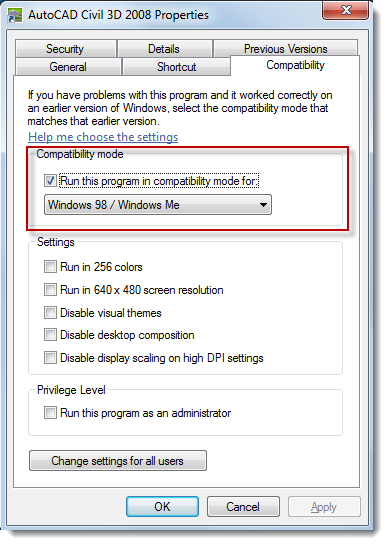
If this information was helpful, please consider using the Accept Solution
Darin Green
Director of Customer Support
Synergis Engineering Design Solutions
Facebook | Twitter | LinkedIn


Reply
Topic Options
- Subscribe to RSS Feed
- Mark Topic as New
- Mark Topic as Read
- Float this Topic for Current User
- Bookmark
- Subscribe
- Printer Friendly Page
