Community
- Forums Home
- >
- Civil 3D Community
- >
- Civil 3D Forum
- >
- force different annotation scale vs viewport scale
Civil 3D Forum
Welcome to Autodesk’s Civil 3D Forums. Share your knowledge, ask questions, and explore popular AutoCAD Civil 3D topics.
Turn on suggestions
Auto-suggest helps you quickly narrow down your search results by suggesting possible matches as you type.
 This page has been translated for your convenience with an automatic translation service. This is not an official translation and may contain errors and inaccurate translations. Autodesk does not warrant, either expressly or implied, the accuracy, reliability or completeness of the information translated by the machine translation service and will not be liable for damages or losses caused by the trust placed in the translation service.
Translate
This page has been translated for your convenience with an automatic translation service. This is not an official translation and may contain errors and inaccurate translations. Autodesk does not warrant, either expressly or implied, the accuracy, reliability or completeness of the information translated by the machine translation service and will not be liable for damages or losses caused by the trust placed in the translation service.
Translate
Reply
Topic Options
- Subscribe to RSS Feed
- Mark Topic as New
- Mark Topic as Read
- Float this Topic for Current User
- Bookmark
- Subscribe
- Printer Friendly Page
Message 1 of 16

Anonymous
8630 Views, 15 Replies
10-14-2009
12:08 PM
- Mark as New
- Bookmark
- Subscribe
- Mute
- Subscribe to RSS Feed
- Permalink
- Report
10-14-2009
12:08 PM
force different annotation scale vs viewport scale
I am trying display my annotation scale that is different than my viewport
scale. Everytime I switch the viewport scale the annotation scale changes.
Can I turn this relationship off?
scale. Everytime I switch the viewport scale the annotation scale changes.
Can I turn this relationship off?
15 REPLIES 15
Message 3 of 16
Anonymous
in reply to:
Anonymous
10-14-2009
12:29 PM
- Mark as New
- Bookmark
- Subscribe
- Mute
- Subscribe to RSS Feed
- Permalink
- Report
10-14-2009
12:29 PM
I am doing some field work and I want the survey points to appear larger on
the print. Normally I can just switch this in the properties dialog box, but
for some reason when I switch the annotation scale the viewport scale jumps
up with it.
"Joe Bouza" wrote in message
news:6271522@discussion.autodesk.com...
Why would you want to do this? Make a style that give you the height you
want at the given scale, no?
the print. Normally I can just switch this in the properties dialog box, but
for some reason when I switch the annotation scale the viewport scale jumps
up with it.
"Joe Bouza"
news:6271522@discussion.autodesk.com...
Why would you want to do this? Make a style that give you the height you
want at the given scale, no?
Message 4 of 16


10-14-2009
12:32 PM
- Mark as New
- Bookmark
- Subscribe
- Mute
- Subscribe to RSS Feed
- Permalink
- Report
10-14-2009
12:32 PM
I'm with Jason on this one. There are odd times that I need a 1"=50' VP but want to keep ALL of the annotation at a 1"=20' size.
This is usually when I need multiple Viewports so I can't do it from model space. I don't want to have to change to different styles to do this. An override of some sort is needed.
Bruce
This is usually when I need multiple Viewports so I can't do it from model space. I don't want to have to change to different styles to do this. An override of some sort is needed.
Bruce
Bruce Klug, P.E.
AutoCAD Expert Elite Alumni
AutoCAD Civil 3D Certified Professional
Civil 3D 2023.2.1
Win 10 Enterprise, 64-bit
AutoCAD Expert Elite Alumni
AutoCAD Civil 3D Certified Professional
Civil 3D 2023.2.1
Win 10 Enterprise, 64-bit
Message 5 of 16
Anonymous
in reply to:
Anonymous
10-14-2009
12:39 PM
- Mark as New
- Bookmark
- Subscribe
- Mute
- Subscribe to RSS Feed
- Permalink
- Report
10-14-2009
12:39 PM
I believe that if you select the viewport and view the viewport properties, there are two settings there. One for annotative scale and one for viewport scale. The order in which you change them is important though. I believe you have to set your viewport scale first, then change the annotative scale second.
Message 6 of 16

10-14-2009
12:53 PM
- Mark as New
- Bookmark
- Subscribe
- Mute
- Subscribe to RSS Feed
- Permalink
- Report
10-14-2009
12:53 PM
You can set the scales independently using ZOOM XP or CANNOSCALE, but we've found no benefit to doing so.
The problem is that C3D labels use the VP scale, and ignore the CANNOSCALE. So you can get the values set differently, but the next time you regen your drawing, all the C3D labels will rescale themselves based on the viewport. To be able to do things like this, we really need C3D labels to scale based on the Annotation Scale, and not on the viewport scale.
-- Sinc
http://www.ejsurveying.com
http://www.quuxsoft.com
The problem is that C3D labels use the VP scale, and ignore the CANNOSCALE. So you can get the values set differently, but the next time you regen your drawing, all the C3D labels will rescale themselves based on the viewport. To be able to do things like this, we really need C3D labels to scale based on the Annotation Scale, and not on the viewport scale.
-- Sinc
http://www.ejsurveying.com
http://www.quuxsoft.com
Sinc
Message 7 of 16
10-14-2009
12:53 PM
- Mark as New
- Bookmark
- Subscribe
- Mute
- Subscribe to RSS Feed
- Permalink
- Report
10-14-2009
12:53 PM
I tried every combination I could think of when I first ran into this problem. I never could get those settings to change the text the way I wanted. After a regen the text ALWAYS matched the vp scale * .12 (for us). If you know the secret method I would like to try again.
I hate telling co-workers "It can't be done"
Thanks,
Bruce
I hate telling co-workers "It can't be done"
Thanks,
Bruce
Bruce Klug, P.E.
AutoCAD Expert Elite Alumni
AutoCAD Civil 3D Certified Professional
Civil 3D 2023.2.1
Win 10 Enterprise, 64-bit
AutoCAD Expert Elite Alumni
AutoCAD Civil 3D Certified Professional
Civil 3D 2023.2.1
Win 10 Enterprise, 64-bit
Message 8 of 16
10-14-2009
12:55 PM
- Mark as New
- Bookmark
- Subscribe
- Mute
- Subscribe to RSS Feed
- Permalink
- Report
10-14-2009
12:55 PM
Dang Sinc,
You type faster than me 🙂
Bruce
You type faster than me 🙂
Bruce
Bruce Klug, P.E.
AutoCAD Expert Elite Alumni
AutoCAD Civil 3D Certified Professional
Civil 3D 2023.2.1
Win 10 Enterprise, 64-bit
AutoCAD Expert Elite Alumni
AutoCAD Civil 3D Certified Professional
Civil 3D 2023.2.1
Win 10 Enterprise, 64-bit
Message 9 of 16


10-14-2009
01:19 PM
- Mark as New
- Bookmark
- Subscribe
- Mute
- Subscribe to RSS Feed
- Permalink
- Report
10-14-2009
01:19 PM
The following method works for me in C3d 2008. I haven't tried it in other versions.
Create the vport and set the scale to the annotative choice I want.
From the Viewports toolbar, select or enter the vport scale I want.
If I try this using the pulldowns at the bottom of the screen it will not work. Only the viewport toolbar process operates as desired.
This results in a vport with two separate scales. If I change the annotative scale again, I have to repeat the process.
The scales remain even after a close or regen/regenall.
Create the vport and set the scale to the annotative choice I want.
From the Viewports toolbar, select or enter the vport scale I want.
If I try this using the pulldowns at the bottom of the screen it will not work. Only the viewport toolbar process operates as desired.
This results in a vport with two separate scales. If I change the annotative scale again, I have to repeat the process.
The scales remain even after a close or regen/regenall.
Message 10 of 16
10-14-2009
01:38 PM
- Mark as New
- Bookmark
- Subscribe
- Mute
- Subscribe to RSS Feed
- Permalink
- Report
10-14-2009
01:38 PM
Yes, the scales remain set that way, but C3D labels still scale according to the VP scale.
The OP is trying to change the VP scale while having the labels on C3D points remain the same size relative to the linework. Unfortunately, this is currently impossible. Basically, the desire is to be able to select "Use Annotative Scale" as an option to resize points, rather than the option we currently have to "Use Drawing Scale" (which actually defaults to "Use Viewport Scale" in paperspace).
-- Sinc
http://www.ejsurveying.com
http://www.quuxsoft.com
The OP is trying to change the VP scale while having the labels on C3D points remain the same size relative to the linework. Unfortunately, this is currently impossible. Basically, the desire is to be able to select "Use Annotative Scale" as an option to resize points, rather than the option we currently have to "Use Drawing Scale" (which actually defaults to "Use Viewport Scale" in paperspace).
-- Sinc
http://www.ejsurveying.com
http://www.quuxsoft.com
Sinc
Message 11 of 16
05-09-2012
03:49 PM
- Mark as New
- Bookmark
- Subscribe
- Mute
- Subscribe to RSS Feed
- Permalink
- Report
05-09-2012
03:49 PM
Any progress on this issue in versions 2010-2013? I came across this situation today trying to create an exhibit (at a different scale) from a plan/profile drawing, where the scale of the C3D lableling looks fine in plan view, but is too large (by a factor of two) for the exhibit. I remember similar display problems in the past, anything new in the latest versions I should be aware of?
Thanks
Message 12 of 16


05-18-2012
03:03 AM
- Mark as New
- Bookmark
- Subscribe
- Mute
- Subscribe to RSS Feed
- Permalink
- Report
05-18-2012
03:03 AM
I would also really like a solution to this. There has been a lot of times where I could be doing with this.
Message 13 of 16


05-18-2012
06:59 AM
- Mark as New
- Bookmark
- Subscribe
- Mute
- Subscribe to RSS Feed
- Permalink
- Report
05-18-2012
06:59 AM
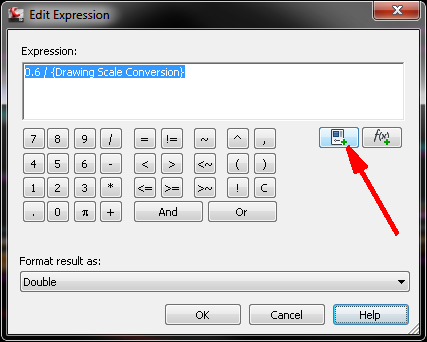
I do this by creating an Expression for fixed heights and using that for the text height in the Style. You have to create one style for each height. These are usually used for stakeout diagrams where we want to show the points quite large but not have other text and notes scaled up.
This is the expression for a height of 0.6 of the drawing scale 0.6 / {Drawing Scale Conversion}. It's from a metric drawing. You can paste that in to the Expression or you can get the Drawing Scale Conversion by clicking on the function icon in the Edit Expression dialog box.
Allen
Allen Jessup
CAD Manager - Designer
Did you find this post helpful? Feel free to Like this post.
Did your question get successfully answered? Then click on the ACCEPT SOLUTION button.

Message 14 of 16
05-20-2012
08:39 PM
- Mark as New
- Bookmark
- Subscribe
- Mute
- Subscribe to RSS Feed
- Permalink
- Report
05-20-2012
08:39 PM
As Allen says, you can always create a Style that forces a specific height. But that gets back into the "Style Breeding" problem, as well as creating tons of Styles that confuse junior users (or anyone new to your company), so I'm not particularly a fan of that process.
There's a weakness in C3D where, especially if you are using the Plan&Production tools, it is NOT easy to create plots at different scales. I was dealing with this issue recently in some of my training, where they wanted to be able to create plots at 24x36 as well as at 11x17, yet they didn't want to simply scale down the bigger drawings to 11x17. My recommendation was to just create everything at 24x36, then use a Page Setup Override (via the Sheet Set Manager) to print an 11x17 version, even though that would result in things like your Scales being wrong. After all, in practice, it's a bad idea to scale things off an 11x17 reduction in any case, so why worry that the scale isn't right...?
But then, we've also been moving toward giving plans to our field guys in the form of a tablet (like an iPad), so they don't even have paper plans at all anymore... That kind of really throws away any desire to scale off a reduced set of plans.
Sinc
Message 15 of 16
05-21-2012
05:30 AM
- Mark as New
- Bookmark
- Subscribe
- Mute
- Subscribe to RSS Feed
- Permalink
- Report
05-21-2012
05:30 AM
It really pains me to say this, but I have been known to enlarge my title block, calculate out alternate viewport scales, then "scale to fit" my drawing. (Say for instance, scaling a title block up by 2.5x to get 20 scale annotation on 50 scale viewports, making a 30x42 drawing into a 75x105 drawing) I really hate doing that because it's prone to error when other people work with your files, but it can get you a 50 scale drawing with 20 scale text. You also have to then set the print scale at the inverse (1/2.5 = 0.4) or scale to fit. The scale to fit is tricky--because you have to have a boundary at the edge of your limits and 0 margins, or else you get something dumb like 0.38 instead of 0.40 scaling.
Message 16 of 16
Anonymous
in reply to:
Anonymous
01-20-2015
02:59 PM
- Mark as New
- Bookmark
- Subscribe
- Mute
- Subscribe to RSS Feed
- Permalink
- Report
01-20-2015
02:59 PM
This is still an issue in 2015. This workaround is recommended when cogo points are needed on exhibits. Treat the cogo points as a stand-alone xref...
First, import the points into the exhibit and drag them around until they look good at the desired scale. Then use quick select to export only the cogo points to a new drawing. Then xref the new drawing into the exhibit. Finally, turn off or delete the actual cogo points in the exhibit and you're left with the xreffed points that look right. Sounds complicated but it only takes a minute or two and there's no need to create "compensator" styles.
Reply
Topic Options
- Subscribe to RSS Feed
- Mark Topic as New
- Mark Topic as Read
- Float this Topic for Current User
- Bookmark
- Subscribe
- Printer Friendly Page

